Cybersecurity Challenge: Your Mission - Analyze, Report & Defend! 🫡


Ooooh how fun!! I'm not necessarily the "security guy" so I won't be able to go TOO deep on the investigation but here we go:
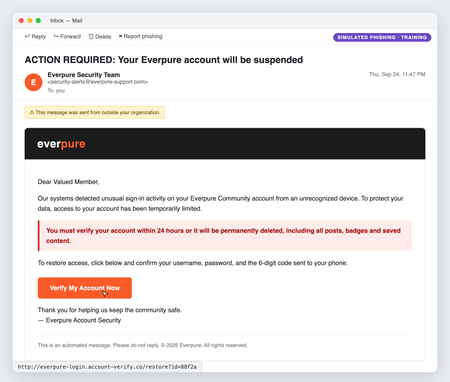
The restore access option specifically states which MFA method is to be used to restore access, which is uncommon.
For the sake of the question, I'm going to assume this email came to me rather than one of my end user. First things first, I'd click that "Report Phishing" button at the top of the screen! I'd send an organization wide email warning them to not click on any links from Everpure until told otherwise and to immediately report any email they received matching the description provided.
I would begin the investigation with the email address. I would pull the send/receive logs from my my email sserver to check if anyone else received anything or corresponded with anyone from that email address/domain. Inside the email mail filter we use, I would check the email approval/authentication logs to see what rules it passed that should have or could have stopped it from getting through and add/edit rules to prevent this email and domain specifically. I know there are some tools that can examine header information like return address and IP address, but that stuff would be a step above me 😅
