Azure Red Hat OpenShift with Everpure Cloud
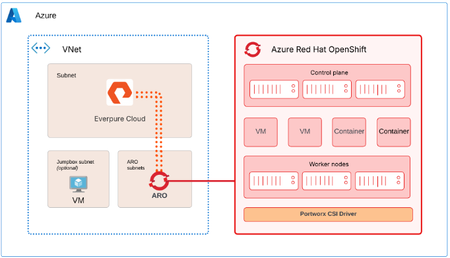
Azure Red Hat OpenShift (ARO) can use Everpure Cloud for persistent block storage, for VMs and containers. Both Everpure Cloud options - Everpure Cloud Azure Native and Everpure Cloud Dedicated are certified with ARO, and the cluster-side setup is nearly identical for both. This post covers the architecture, configuration sequence, and the checks that catch most problems early. Two storage options, one ARO procedure Everpure Cloud Dedicated is an array you deploy into your Azure subscription. Everpure Cloud Azure Native is delivered through the Azure portal, where you deploy a Storage Pool into a delegated subnet in your own Azure Virtual Network. With Azure Native you manage the array through the Platform Console, which gives you the Purity GUI, REST API, and CLI. It's disabled by default and you enable it per Storage Pool. With Dedicated you use the Purity interface directly. Architecture ARO provides the compute platform for VMs and containers. The Storage Pool (or Dedicated array) provides persistent block storage, and PX-CSI connects the ARO worker nodes to it to provision and manage volumes. The solution uses two paths. Management path. PX-CSI talks to the Purity management endpoint to create and manage volumes. With Azure Native, the Platform Console is how you get that endpoint. Data path. iSCSI traffic flows between the ARO worker nodes and the storage over the Azure virtual network. Deploy the ARO cluster and the storage in the same Azure region and virtual network. Put ARO in its dedicated subnets and the Azure Native Storage Pool in a separate subnet delegated to the Everpure Cloud service. A jump host VM is optional, and it's handy for reaching both the cluster and the Platform Console. For the data path, keep it short and boring. Everpure's field guidance is no virtual network peering and no user-defined routes or virtual appliances between the workers and the storage. Walkthrough Enable the Platform Console (Azure Native only) In the Azure portal, open the Storage Pool, go to Settings, then Platform console, and set it to Enabled. Pick the access methods you need (GUI and REST API, and optionally SSH) and select Configure. Copy the management IP address and the cloudadmin user name from Connection details, then generate a one-time password. It's shown once, so copy it before you close the dialog. Browse to https://<management-IP-address>, sign in as cloudadmin, and create a local administrator account right away. cloudadmin is only for first access. Make sure your Network Security Group allows TCP 80 and 443 for the GUI and REST API, and TCP 22 if you enabled SSH, and limit those rules to your management addresses. Prepare the OpenShift cluster Log in to the cluster from your Azure VM, create the Portworx namespace, and turn on user workload monitoring so OpenShift can scrape Portworx metrics. RESOURCE_GROUP="<ARO cluster resource group name>" CLUSTER_NAME="<ARO cluster name>" ADMIN_PW=$(az aro list-credentials --name $CLUSTER_NAME \ --resource-group $RESOURCE_GROUP --query "kubeadminPassword" -o tsv) API_URL=$(az aro show --name $CLUSTER_NAME \ --resource-group $RESOURCE_GROUP --query "apiserverProfile.url" -o tsv) oc login $API_URL -u kubeadmin -p $ADMIN_PW oc create namespace portworx apiVersion: v1 kind: ConfigMap metadata: name: cluster-monitoring-config namespace: openshift-monitoring data: config.yaml: | enableUserWorkload: true Apply that with oc apply -f. Then, in the ARO web console, go to Ecosystem -> Software Catalog, search for Portworx Enterprise, and install it into the portworx namespace. Don't create a StorageCluster yet. It comes after the worker nodes and the credentials are ready. Configure worker nodes PX-CSI attaches volumes over iSCSI, so the workers need multipath and udev settings that match Everpure's Linux recommendations. Create a multipath.conf with "user_friendly_names no" and "find_multipaths no" (each controller has a single path), and a udev.rules file with the recommended queue depth and tuning. The same two files go on every worker. Base64-encode both with base64 -w0, and wrap them in a MachineConfig. apiVersion: machineconfiguration.openshift.io/v1 kind: MachineConfig metadata: name: 98-worker-pure-multipath labels: machineconfiguration.openshift.io/role: worker spec: config: ignition: version: 3.2.0 storage: files: - path: /etc/multipath.conf mode: 0644 contents: source: data:text/plain;charset=utf-8;base64,<base64-multipath-conf> - path: /etc/udev/rules.d/99-pure-storage.rules mode: 0644 contents: source: data:text/plain;charset=utf-8;base64,<base64-udev-rules> systemd: units: - name: iscsid.service enabled: true - name: multipathd.service enabled: true oc apply -f 98-worker-pure-multipath.yaml oc get mcp worker -w The Machine Config Operator merges this into the worker pool and rolls it out one node at a time, cordoning, draining, applying, and rebooting each. Wait until the worker pool shows Updated as True. Give PX-CSI access to the array Create a user with the Storage Admin role (or an equivalent tenant-scoped role if you use secure multi-tenancy) and generate an API token for it. On Dedicated, that looks like this: pureadmin create --access-policy storage_admin px-pure-user ssh px-pure-user@<array-management-IP> pureadmin create --api-token On Azure Native, do the same from the Platform Console. Next, describe the array in a pure.json file and load it into a secret in the portworx namespace. { "FlashArrays": [ { "MgmtEndPoint": "<management-endpoint-IP>", "APIToken": "<api-token>" } ] } oc create secret generic px-pure-secret \ --namespace portworx \ --from-file=pure.json=/path/to/pure.json The secret name has to be px-pure-secret, because PX-CSI looks for that name by default. Generate and apply the PX-CSI StorageCluster Open Portworx Central, go to Spec List, Create New Spec, and choose PX-CSI. Pick a supported release (26.1.x in the documented setup), set the namespace to portworx, choose Azure Red Hat OpenShift (or generic OpenShift, since the YAML is valid for both), set the access type to Block Storage and the SAN type to iSCSI, and leave the rest at defaults. Download the manifest and apply it. oc project portworx oc apply -f px-csi-storagecluster.yaml Watch the StorageCluster in the console until it reads Running. During creation PX-CSI reads px-pure-secret, parses pure.json, and uses those endpoints and the token to manage volumes. Verify and use oc get pods -n portworx | grep -E 'px|pure-csi' oc get storagecluster -n portworx All PX-CSI pods should be Running and the StorageCluster should report Online or Running. oc get sc PX-CSI creates several default px-pure-csi-* StorageClasses, pick your PX-CSI StorageClass with backend: pure_block or create your own. Create a PVC or VM against the class, bind it to a pod, and you'll see the volume appear in the Platform Console or Purity UI. When something doesn't work Start at the bottom of the stack and work up. Connectivity. From a worker, run iscsiadm discovery against the array endpoint, and check that initiator names are unique. Node configuration. Confirm multipath.conf and the udev rules landed on every worker, and that iscsid and multipathd are running. PX-CSI. Check that the pods are Running, the StorageCluster is Online, and px-pure-secret exists in the same namespace as the operator. Connect to workers oc get nodes oc debug node/<worker> -T -- chroot /host Check services (ensure iscsid and multipathd services are enabled and running on workers) and check config files are updated. cat /etc/multipath.conf cat /etc/udev/rules.d/99-pure-storage.rules Resources Everpure Cloud Dedicated with Azure Red Hat OpenShift and PX-CSI Deployment Guide18Views3likes0CommentsSimplify mounting volumes on Azure VM with EC Mount VM Extension
Managing external storage on Azure VMs no longer has to involve repetitive guest OS configuration or custom scripts. The Everpure Cloud Mount VM Extension is now generally available across Azure regions. It automates iSCSI configuration, enables and optimizes MPIO, establishes target connectivity, and mounts storage volumes according to Everpure best practices. With support for both Linux and Windows VMs, the extension can be deployed during provisioning or added to existing VMs. It also integrates with ARM templates, Azure Bicep, and Terraform, making storage connectivity part of your infrastructure-as-code workflows. For Everpure Cloud Azure Native, a one-click mount workflow from the Azure Portal makes attaching storage even simpler. Everpure Cloud Dedicated customers can automate guest-side setup and reduce manual configuration at scale. Less scripting. Less configuration drift. A faster, more consistent path to usable storage on Azure VMs. Learn more: https://blog.everpuredata.com/news-events/announcing-general-availability-of-everpure-cloud-vm-extension/27Views3likes0Comments09172026 - TechTalk Recap - Building an Efficient Storage Platform in Microsoft Azure ☁️
If you missed our latest TechTalks session, Michelle Berry, Nick Scuola, and I talked about a challenge that is top of mind for a lot of IT teams: moving workloads to Azure without creating a new set of cost, performance, and operational headaches. The practical takeaway? Cloud storage should give you more flexibility—not force you to overprovision capacity, rebuild your operational model, or choose between modernizing today and keeping the lights on. What you missed 👇 💸 Cloud costs are not always predictable. Capacity and performance can be tied together in traditional cloud storage, which can leave teams paying for more capacity than they need just to get the performance an application requires. ⚙️ Decouple capacity from performance. Everpure Cloud Azure Native lets teams independently tune capacity and performance, so they can align what they buy with what workloads actually need. 🧰 Keep operations familiar. The service is integrated with Azure tools, including the Azure portal, Marketplace, Azure Resource Manager templates, SDKs, and Azure CLI—helping teams deploy and manage storage without introducing another operational silo. 🔄 Modernize at your own pace. Whether you are running Azure VMs, Azure VMware Solution, or Azure Red Hat OpenShift, Everpure Cloud provides a common storage foundation for VMs and containers. 🛡️Efficiency should not come at the expense of data services. Data reduction, snapshots, cloning, encryption, and other enterprise storage capabilities are built into the platform. One of the most useful parts of the discussion was the practical deployment walkthrough. The core flow is straightforward: create the service, deploy a storage pool, and connect it to the application resource—all from the Azure environment teams already know. For organizations navigating cloud migrations, changing virtualization strategies, or container adoption, this gives you another option: move workloads without being locked into a one-size-fits-all storage model. Catch up on the session 🎥- HERE 💬 What is the biggest storage challenge your team is working through in Azure: cost control, operational complexity, VM migration, or container modernization? Share your perspective in the comments.125Views3likes1CommentAzure VM users — what’s your biggest storage challenge today?
Azure VM users — what’s your biggest storage challenge today? Cody_Hosterman shares some perspectives in the latest Pure Report podcast on Everpure Cloud Azure Native for Azure VMs. 🎙️ https://www.youtube.com/watch?v=TqJwrfWu7Vw What are you seeing in your environment?41Views1like0CommentsAsk Us Everything Recap: Bringing Enterprise Storage Simplicity to Azure
What happens when you take the enterprise storage capabilities IT teams rely on and deliver them as a fully managed, Azure-native experience? That question was at the heart of our latest Ask Us Everything, focused on Everpure Cloud Azure Native for Azure VMs. And judging by the questions from attendees, storage admins and cloud practitioners are thinking beyond simply moving workloads to Azure. They’re asking how to get there without trading familiar enterprise capabilities for higher costs, more operational overhead, or another collection of storage tiers to manage. Everpure experts David Stamen, Nick Scuola, and Joe Houghes dug into those questions—and the conversation surfaced several useful takeaways. “Azure already has storage. What makes Everpure different?” Cloud storage can mean navigating different offerings, tiers, feature sets, and regional availability. Joe contrasted that with the enterprise storage model Everpure customers know: capabilities delivered consistently through the Purity OS, rather than requiring administrators to continually determine which storage option provides which feature. Everpure Cloud for Azure Native brings capabilities including thin provisioning, deduplication, compression, performance, and availability into an experience designed to operate natively as an Azure service. Customers can deploy and consume it through Azure Marketplace, and get benefits they’re used to with their on-prem Everpure, all without managing the underlying storage infrastructure themselves. That distinction matters: IT gets enterprise-grade block storage, without turning cloud storage into another infrastructure management project. “How do I balance performance with cost?” Attendees naturally wanted to know about performance tiers—and the answer illustrated the service’s approach to simplicity. Instead of selecting among traditional on-prem array models or architecting around underlying infrastructure, customers simply choose the performance they need. The experts described a slider-based model for adjusting storage-pool performance, with Everpure handling everything behind the service. That abstraction becomes particularly valuable as Azure evolves. The panel discussed how underlying Azure storage improvements have previously delivered both performance gains and lower infrastructure costs. With a managed service, Everpure can incorporate infrastructure changes behind the scenes, rather than requiring customers to redesign their environments every time the cloud platform changes. As Nick summarized, the objective is the outcome: deliver the service level that customers need, while Everpure handles how it gets delivered. “Can cloud storage actually help reduce our Azure spend?” Cost was a recurring theme. We polled attendees, and half responded that they were “very concerned” about their Azure storage spend. One important lever that can help lower costs is data reduction. Thin provisioning, deduplication, and compression can reduce the physical capacity required, although results depend heavily on workload and data type. The experts noted that the majority of traditional application data benefit greatly from data reduction capabilities built into Everpure Cloud, while already-compressed or encrypted data naturally offer less reduction. The consumption model is simplified, too. Everpure Cloud for Azure Native combines the service and underlying infrastructure into a Marketplace purchase rather than separating software licensing from Azure infrastructure costs. Customers simply choose how much capacity and performance they need, and then receive it as one service and one bill. “Does this simplify my storage management job?” Perhaps the most important answer of the session: Yes! The experts described storage deployments that can be stood up in hours rather than turning implementation into a weeks- or months-long project. For example: once a storage pool is created, volumes can be connected to workloads using Azure VM extensions, simplifying the process of getting storage in front of an application. For experienced storage practitioners, that may be the biggest shift. Everpure Cloud for Azure Native isn’t about recreating every storage-management task in Azure. It’s about abstracting more of those tasks away so teams can concentrate on all their other work: applications, data, migrations, automation, and new initiatives. Or, as Nick put it during the session: the goal is to help free up customers to manage their applications and data—not their storage. That’s a cloud operating model storage admins can get behind. Check out this and all our other Ask Us Everything sessions. And, keep the conversation going by jumping into the Everpure Community.155Views2likes0CommentsJoin Everpure Cloud at Pure Accelerate 2026
If you're coming to Pure Accelerate, make time for the Everpure™ Cloud sessions. This year's lineup brings together breakout sessions, flash talks, and a community meetup focused on modern cloud storage across Azure and AWS, workload design, hybrid cloud strategy, and practical ways to improve cost efficiency and operational simplicity. Whether you're evaluating how to support Azure VMs at scale, looking for better patterns for hybrid workloads, or trying to bring more predictability to cloud storage costs, these sessions are designed to help you move from strategy to execution. Why attend the Everpure Cloud sessions? Cloud teams are under pressure to do more than just migrate. They need to control costs, simplify operations, and build architectures that can adapt as business needs change. At Pure Accelerate, the Everpure Cloud sessions will focus on exactly those conversations, with content spanning architecture, scale, FinOps, storage operations, and real-world workload guidance. This is a strong opportunity to hear how Everpure Cloud supports modern cloud environments across Azure, AWS, and hybrid use cases, while giving infrastructure teams more flexibility in how they scale and manage storage. Featured Everpure Cloud sessions at Pure Accelerate Breakout sessions Modern Azure Storage with Everpure Cloud: Architecture, Scale & FinOps — Thursday, June 18, 1:45–2:30 PM PT. Configuring Workloads for Everpure Cloud: Architectures, Patterns, and Gotchas — Thursday, June 18, 1:45–2:30 PM PT. Maximizing Hybrid SQL Server 2025 on Azure with Everpure Cloud — Wednesday, June 17, 2:45–3:30 PM PT. These breakout sessions are ideal for attendees who want a deeper look at architecture decisions, workload best practices, and ways to align cloud storage performance with cost and scale requirements. Flash talks Everpure Cloud Azure Native for Azure VMs in 15 Minutes — Thursday, June 18, 2:45–3:05 PM PT. Accelerating Storage Operations with Everpure Cloud — Thursday, June 18, 3:15–3:35 PM PT. Evolving Everpure Cloud Value: A Smarter Hybrid Cloud Approach for Healthcare— Thursday, June 18, 12:30–12:50 PM PT. Public Cloud Experience, Private Cloud Economics— Thursday, June 18, 12:00–12:20 PM PT. If you want high-value takeaways in a shorter format, these flash talks are a great way to quickly explore how Everpure Cloud can help streamline operations, support Azure VM environments, and improve the economics of cloud storage. Community session Community Meetup: You're Moving to the Cloud: Now What? — Wednesday, June 17, 5:30–6:30 PM PT. This meetup is a great fit for anyone looking to exchange ideas with peers, hear different perspectives on cloud adoption, and join a broader conversation around the challenges and opportunities that come with moving to the cloud. Meet the Everpure cloud team at booth If you're in Las Vegas for Pure Accelerate, stop by the Everpure Cloud showcase booth to continue the conversation in person and to learn how organizations are reducing storage costs, simplifying operations, and scaling hybrid cloud environments more efficiently. Learn more To explore the Everpure Cloud portfolio in more detail, visit the Everpure Cloud webpage. For deeper technical guidance, check out these Knowledge Portal resources: Everpure Cloud Dedicated for Azure documentation Everpure Cloud Dedicated for AWS documentation Everpure Cloud Azure Native documentation Add Everpure Cloud to Your Pure Accelerate Agenda If cloud cost optimization, operational simplicity, and scalable storage architectures are priorities for your team, be sure to add these sessions to your Pure Accelerate schedule. We look forward to seeing you there. Ready to join us in Las Vegas? Register now for Pure Accelerate 2026 and start building your agenda. We look forward to seeing you there.427Views2likes0CommentsPure Cloud Block Store is now Pure Storage Cloud Dedicated (PSC Dedicated)
Pure Storage Cloud Dedicated: Name Change, Same Enterprise-Grade Experience Pure Storage Cloud is an enterprise-grade block storage delivered as a service in the public cloud. It extends the data services and evergreen architecture of the Purity operating system and can be deployed in: Azure as a fully managed native service or a customer-managed service integrated with Azure VMware Solution (AVS) AWS as a customer-managed service integrated with Elastic VMware Service (EVS) What’s New? Pure Cloud Block Store, the customer-managed service, is being renamed Pure Storage Cloud Dedicated (PSC Dedicated). This change reflects its integration into the Pure Storage Cloud family and alignment with the Enterprise Data Cloud strategy. What’s Not Changing? Everything That Matters Your experience, performance, and features remain the same. Pure Storage Cloud Dedicated continues to provide: Enterprise Data Services: Purity software in Azure and AWS, with data reduction, thin provisioning, and snapshots. Cost Efficiency: Optimized storage usage and reduced footprint through data reduction. Reliability & Resilience: Built-in redundancy, high availability, and cyber resilience. Hybrid & Multi-Cloud Mobility: Consistent APIs and replication across FlashArrays and PSC Dedicated for migration, DR, and data mobility. Disaster Recovery & Backup: Asynchronous and near-synchronous replication, plus snapshots for cost-effective backup and rapid recovery. VMware Workload Support: Enterprise-grade storage for VMware in AVS and EVS environments. Why This Matters The shift from Pure Cloud Block Store to Pure Storage Cloud Dedicated unifies offerings under the Pure Storage Cloud umbrella while advancing the broader Enterprise Data Cloud strategy.615Views3likes0CommentsPure Storage Cloud for Azure VMware Solution | Public Preview Announcement
Pure Storage Cloud for Azure VMware Solution has officially entered a Public Preview phase! Check out the launch blog posts: Pure Storage Cloud for Azure VMware Solution: A Closer Look Announcing the Public Preview of Azure Native Pure Storage Cloud for Azure VMware Solution | Microsoft Community Hub157Views4likes0Comments