Why You Should Make Adopting Current Long-Life Releases a Habit
Hey everyone — At Pure Storage, we see many customers who still think about storage upgrades like old-school firmware: “set it and forget it” until it’s forced to change. But FlashArray isn’t firmware it’s modern, continually improved, and designed for an agile, secure, predictable data platform. That means it’s time to make adopting recent Long-Life Releases (LLRs) a regular habit not just something you reluctantly do, "when you have to". LLRs should be your standard practice: ✅ Fresh Features, Mature Code Each LLR is built on code that’s been running in production for at least 8 months before it branches. That means you get the innovations from recent Feature Releases — tested, stabilized, and production-proven. You avoid missing out on valuable improvements while still benefiting from enterprise-grade predictability. ✅ Consistent Security and Compliance Aging too far behind, even on an LLR, can expose you to security vulnerabilities and unsupported configurations. By habitually adopting recent LLRs, you ensure you’re in the supported window for critical patches and compliance audits and avoiding fire drills later. ✅ Reduce Technical Debt Getting stuck on very old LLRs can build up technical debt. Skipping multiple versions makes your next upgrade harder, riskier, and more time-consuming. Keeping up with recent LLRs means smoother transitions, less operational friction, and easier adoption of the next improvements. ✅ Keep Innovation Flowing The idea that an LLR is “old code” is a myth. Recent LLRs contain carefully chosen, well-hardened feature improvements. If you wait too long, you lock yourself out of meaningful performance, efficiency, and capability gains that your peers are already using. ✅ Break the Firmware Mentality FlashArray is software-driven, and has a rapid but reliable development model. Treating it like outdated firmware, and you miss the true value. The LLR program is designed precisely to let you safely adopt modern features and maintain enterprise-grade stability and maintain a predictable cadence. Bottom line? Adopting recent Long-Life Releases, habitually, is the best way to get modern features, maintain security, reduce upgrade risk, and keep your environment aligned with Pure’s best practices. You deserve innovation and peace of mind. Don’t settle for less by sticking with outdated code. If you want help reviewing which LLR is right for you, or understanding the timelines, just reach out — we’re here to help you stay current, secure, and ahead of the game.1.3KViews8likes2Comments
ActiveCluster for File
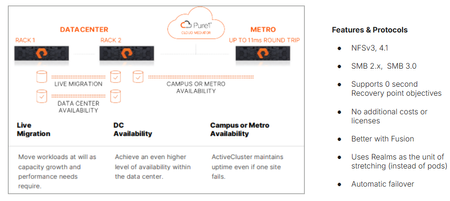
We’re proud to announce the availability of ActiveCluster for file, Everpure’s premier business continuity solution and a fundamental enabler of our Enterprise Data Cloud vision, where Service Level Agreements define what storage, network and compute resources are assigned dynamically to application data sets rather than an hardware-to-app architectures. With ActiveCluster for file, Everpure is extending the benefits of data mobility, continuous access and policy-driven management to file workloads. What is ActiveCluster? Everpure launched ActiveCluster in 2017, and rapidly took the mission critical, enterprise block storage world by storm. ActiveCluster rapidly enabled enterprise customers with the most demanding block workloads to deploy synchronous, always available, always up-to-date, LUNs or volumes to hosts stretched across geographic distances. What set ActiveCluster apart from the existing solutions at the time, and even now, is how simple to set up Everpure RTO-0 and RPO-0 file solutions are, and how flexible and adaptable to the ever changing business needs hosting these data sets become after being deployed on a Everpure Fusion fleets. Today, we’re adding file protocol support like NFSv3, NFSv4.1, SMB 2.0, and SMB 3.0 w/ continuously available shares to our ActiveCluster solution. Realms as a new container ActiveCluster for file utilizes a new, high-level container called a Realm, to synchronously mirror both user data and storage configuration information necessary to provide data access to authorized users on either side of the stretched file system(s). Realms are handy to put applications with similar Recovery Point Objectives and similar Recovery Time Objectives together. Realm Synchronous Replication The act of synchronously mirroring both the user data and storage configuration information across two different FlashArrays is called ‘stretching’. Similar to how a pod is stretched across two FlashArrays, a Realm can be stretched between any FlashArray system that has no more than 11ms Round Trip Time average latencies on their array replication links. Either Fibrechannel or Ethernet array replication links can be used to replicate file data synchronously. Figure 1. ActiveCluster for file can be deployed in different modalities Realms as namespaces for policies Realms contain unique snapshot, audit logging, replication and export policies. These policies are only viewable and attachable to storage objects within the Realm, creating a building block for hosting multiple different end customers or tenants on Fusion fleets. These policies are automatically replicated over to the other array if the Realm is stretched, reducing operator burden in failover scenarios. To prevent split brain scenarios (where a network partition in the array links or replication links stop communication between the pair of FlashArrays) Everpure’s fully managed Cloud Mediator service will determine which remaining FlashArray controller pair can process writes, and which array will not. Unlike other business continuity solutions, ActiveCluster customers don’t have to worry about patching or maintaining the security of separate VMs to act as a mediator service to prevent split brain scenarios. Multiple servers supported per Realm, different IDPs allowed. Each Realm can have one or more servers configured in it, which act as protocol end points for clients and hosts to connect to. Each server in a Realm can have a different IP address, or utilize a different Identity Provider Service. When a failover condition occurs (like a site disaster on one side), automatic failover and the clients in either data center are on the same Ethernet segment or broadcast domain, a failover condition will emit a gratuitous Reverse Address Resolution Protocol request (RARP), mapping the new MAC address of the ethernet interface on one side to a same IP address being used. Applications may see a small pause in reads or writes being serviced, but will not have to re-issue I/O or remount / remap shares or exports. Managed directory quotas can also be used for any filesystem or managed directory attached to the servers in the Realm being stretched. These quota policies automatically get replicated with user data, so the same customer experience in terms of usable space exists both before and after an automatic failover. New Guided Setup available for ActiveCluster for file Deploying new ActiveCluster for file solutions can occur in less than five minutes on already racked and powered arrays. A Guided Setup wizard is available to quickly capture the necessary information to stretch a Realm. This wizard can be started from multiple locations within the Purity GUI. ActiveCluster for file fully takes advantage of Fusion fleets and the ability to manage storage infrastructure as code, programmatically and via policy. Realms are not tied to hardware, and can ‘float’ Realms with ActiveCluster for file support not only provide a 0-RTO and 0-Recovery Point Object at the storage layer for mission critical applications, but they also provide a mechanism to transparently move the data and configuration in the Realm non-disruptively somewhere else within your fleet, whether it’s follow the Sun type round-robin hops, where the Realm’s location changes depending on the time of day, or is moved as a part of a data-center migration. Coupled with Fusion, Everpure’s intelligent control plane, ActiveCluster for file enables workloads and application data and their configuration information to dynamically and seamlessly move to the right location, at the right time, at the right granularity. Seamless movement across greater geographic distances can be accomplished by stretching and unstretching the same Realm between different arrays, as long as the RTT latency between them is <11ms. Service Level Agreements are the lingua franca of the Enterprise Data Cloud Service Level Agreements are the natural language of business owners, and are integral for companies who want to move away from managing storage arrays to managing their business data. They capture answers to questions like “How fast do you need access to this data? Does it need to be backed up or otherwise protected against site-wide failure? SLAs are what forms our vision behind the App-to-data operational model. This App-to-data model takes abstract, high level business requirements as input, and then automatically configures and deploys the required storage services to meet the service level agreement just defined. A Fusion fleet manager’s perspective is one of many different application tiles, and their health, not just a series of HA pairs spread out across different data centers. Data management operations, like instant backups, cloning, movement is applied as “verbs” to the application data set’s name or workload ID, and not to a mismatched storage container whose hardware boundaries impose limits on your app team. An Intelligent, unified control plane manages and enforces SLA’s across the fleet autonomously, like a modern cloud operating model but that can be deployed in any modality, whether on-prem, in the cloud or a hybrid. This scalable model, with Fusion’s intelligent control plane, supports ALL workloads, from modern AI workloads, containers and High Performance Workloads to extremely large image or rich media archives. An Enterprise Data Cloud, made up of discrete nodes tied loosely together, where Service Level Definitions define autonomous system behavior. Stop managing your storage arrays, and start managing your data. Learn more about ActiveCluster for file Read the support documentation for Purity 6.12.0 Test and deploy Fusion fleets and file presets Ask your account executive or system engineer for a demo!1.1KViews4likes0Comments
Backup and Restore FA Configuration
Hi All, Purestorage has how to save or backup and restore configuration when an issue occurs? For example, the software crashed and could not be used anymore. Once the problem was fixed, we restored the existing configuration file from backup.Solved1.4KViews4likes6CommentsFlash Array Certification
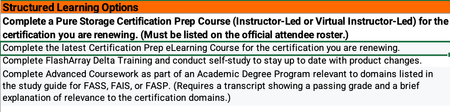
All FlashArray Admins, If any of you currently hold a Flash Array certification there is an alternative to retaking the test to renew your cert. The Continuing Pure Education (CPE) program takes into account learning activities and community engagement and contribution hours to renew your FA certification. I just successfully renewed my Flash Array Storage Professional cert by tracking my activities. Below are the details I received from Pure. Customers can earn 1 CPE credit per hour of session attendance at Accelerate, for a maximum of 10 CPEs total (i.e., up to 10 hours of sessions). Sessions must be attended live. I would go ahead and add all the sessions you attended at Accelerate to the CPE_Submission form. Associate-level certifications will auto-renew as long as there is at least one active higher-level certification (e.g., Data Storage Associate will auto-renew anytime a Professional-level cert is renewed). All certifications other than the Data Storage Associate should be renewed separately. At this time, the CPE program only applies to FlashArray-based exams. Non- FA exams may be renewed by retaking the respective test every three years. You should be able to get the CPE submission form from your account team. Once complete email your recertification Log to [email protected] for formal processing. -Charlie326Views3likes0CommentsChoosing Between Snapshots and Backups? Use Both
Let's settle the old debate: snapshots or backups for data protection? The answer is you need both, working together. The Problem VMware snapshots are great for quick rollbacks, but they create redo logs that strain storage IO and need eventual consolidation. During active snapshots, your storage reads multiple files simultaneously, potentially impacting production. Storage snapshots like Pure's are instantaneous and lightweight, but they capture entire volumes at once, are only crash-consistent, and require full restores or manual workarounds to extract specific data. Neither alone covers every recovery scenario you'll face. The Solution Integrate VMware, Pure Storage, and Veeam into a cohesive platform: Leverage Pure snapshots for fast, efficient data capture without production impact Use Veeam to orchestrate application-consistent backups and enable granular restores Keep snapshots close to the source for quick recovery Maintain backup files for long-term retention Replicate everything to DR sites with the same capabilities The Payoff One integrated solution gives you flexibility for any situation: ransomware recovery from immutable snapshots, granular file restores, site failovers, or long-term archive retrieval. All without impacting production. Modern data protection isn't about picking sides. It's about making your storage, hypervisor, and backup solution work together intelligently. Hear more here on Pure360 Pure Storage and Veeam- Why Architecture Matters435Views3likes1CommentTop 10 Reasons to Love Purity 6.9
(Because 6.7 is so 2024) 10. 🏋️♂️ Long-Life Release means it’s supported until June 2028 — which is about three years longer than that gym membership you swore you’d use. 9. 🌐 Works with all the latest FlashArray platforms, AWS, Azure… pretty much everything except your toaster (for now). 8. 🕵️♂️ Security updates so strong, even your data will feel like it’s in the witness protection program. 7. 🚀 Turn on File Services without downtime or approval from Pure product management — finally, a software update you don’t have to schedule for “that one weekend in Q4 when no one’s looking.” 6. 🙌 Encourages Self-Service Upgrades. Translation: fewer support tickets, more “Look, Mom, I did it myself!” moments. 5. 🔑 Default password warning. Yes, “pureuser” is adorable… until it becomes a resume-generating event. 4. 🍍 VMware improvements so good, your virtual machines just sent a fruit basket. 3. 🎛️ Fusion, Fusion, Fusion! Which is like having a universal remote for your data… without the panic of losing it between the couch cushions. 2. 📜 REST API 2.x release notes so thorough, they make War and Peace look like a sticky note. 🏆 You get to tell your boss you're on a "Long-Life Release," which sounds much more impressive than "I'm not doing an upgrade for a while." Check out the release notes for more! https://support.purestorage.com/bundle/m_flasharray_release/page/FlashArray/FlashArray_Release/01_Purity_FA_Release_Notes/topics/concept/c_purityfa_69x_release_notes.html936Views3likes0Comments🧠 Deep Dive: Configuring File Services Policies & File Systems on FlashArray
Continuing our technical walkthrough series on Pure Storage FlashArray File Services, this new video dives into the nuts and bolts of setting up policies and file systems to create your first SMB file share. If you’ve already followed along with the previous video on setting up networking, DNS, and Active Directory integration, this next step completes the foundation — showing exactly how to configure: Export Policies for SMB access and permissions Quota Policies to manage capacity limits Audit and AutoDir Policies for visibility and governance And finally, how to create and assign a file system for your department or team shares The demo walks through the FlashArray UI and even steps into Windows file share management to validate access-based enumeration and permissions in action — proving just how simple and powerful FlashArray file services can be. 👉 Watch the video on Pure360 to see how easy it is to go from blank configuration to a fully functional SMB file share environment in minutes. -Jason1KViews2likes1CommentA Platform for the Future
So, I’ve been at Pure Storage for a few seasons now. Hint: when I joined, the “//M” generation of FlashArray was still a little wet behind the ears, and was then styled as a lowercase “//m” (bonus points if you can guess the year I joined in your reply!). One of the things that has always impressed me the most about Pure, is how purposeful and thoughtful our development and engineering teams are. Most of us here had realized for years that Pure isn’t a collection of disparate products and features–it’s a real, integrated, intelligent storage platform! One OS (Purity). One flash architecture (DirectFlash). A universal NDU architecture, both software and hardware (Evergreen). Last year, we launched the Pure Storage Platform to make that engineering vision official. Today's announcements mark another huge milestone in the evolution of the Pure Storage Platform. We’ve unified operations across distributed infrastructures, maximized efficiency for AI, and embedded cyber resilience at every layer. Our engineers have outdone themselves once again. It all works together, so your organization can master its data, while you get more done. Pure Storage is helping enterprises turn data into a true business advantage. From edge to core to cloud, the message is clear: data should be unified, efficient, and resilient — so organizations like yours can innovate without compromise. Find out more about what we announced today in our blog. And let us know what you think below!135Views2likes0CommentsAnnouncing the General Availability of Purity//FA 6.5.11 LLR
We are happy to announce the general availability of 6.5.11, the twelfth release in the 6.5 Long-Life Release (LLR) line! This release line is based on the feature set introduced in 6.4, providing long-term consistency in capabilities, user experience, and interoperability, with the latest fixes and security updates. This 6.5 LLR line has demonstrated sufficient accumulated runtime data to be recommended for critical customer workloads and has been declared Enterprise Ready (ER) effective with the 6.5.3 release. For more detailed information about bug fixes and security updates included in each release, see the release notes. UPGRADE RECOMMENDATIONS AND EOL SCHEDULE We recommend customers already running 6.5 who are looking for the latest fixes and updates to upgrade to this long-life release. When possible, customers should make use of Self-Service Upgrades (SSU) to ease the process of planning and executing non-disruptive Purity upgrades for their fleet. The 6.5 LLR line is planned for development through September 2026. HARDWARE SUPPORT This release is supported on the following FlashArray Platforms: FA//M (R2), FA//X, FA//C, and FA//XL. Note, DFS software version 2.2.3 is recommended with this release. ACKNOWLEDGEMENTS We would like to thank everyone within the engineering, support, technical program management, product management, product marketing, finance and technical product specialist teams who contributed to this release. LINKS AND REFERENCES Purity//FA 6.5 Release Notes Self-Service Upgrades Purity//FA Release and End-of-Life Schedule FlashArray Hardware and End-of-Support DirectFlash Shelf Software Compatibility Matrix FlashArray Capacity and Feature Limits1.1KViews2likes0Comments
A list of useful Purity CLI commands to manage Pure Flash Storage arrays.
"pureadmin" commands The pureadmin command displays and manage administrative accounts in Pure Flash Storage Array (22 Commands) Explanation pureadmin create testuser --api-token Generate an API token for the user testuser pureadmin create testuser --api-token --timeout 2h Create API Token for testuser valid for 2 hours pureadmin create testuser --role storage_admin Create user testuser with storage_admin role. Possible roles are readonly, ops_admin, storage_admin, array_admin pureadmin delete --api-token Delete API Token for current user pureadmin delete testuser Delete user testuser from Flash Array pureadmin delete testuser --api-token Delete API Token for user testuser pureadmin global disable --single-sign-on This will disable single sign-on on the current array. Enabling single sign-on gives LDAP users the ability to navigate seamlessly from Pure1 Manage to the current array through a single login. pureadmin global enable --single-sign-on This enables single sign-on on the current array. Enabling single sign-on gives LDAP users the ability to navigate seamlessly from Pure1 Manage to the current array through a single login. pureadmin global list List the global administration attributes like Lockout Duration, Maximum Login Attempts, Minimum Password Length, etc.. pureadmin global setattr --lockout-duration 1m Set the lockout duration to 1 minute after maximum unsuccessful login attempts. pureadmin global setattr --max-login-attempts 3 Set the maximum failed login attempts to 3 before the user get locked out. pureadmin global setattr --min-password-length 8 Set the minimum length of characters required for all the local user account passwords to 8. Minimum length allowed is 1. This will not affect the existing user accounts, but all future password assignment must meet the new value. pureadmin list List all the users configured in the Flash Array pureadmin list --api-token List all the users with api tokens configured pureadmin list --api-token --expose List all the users with api tokens configured and expose the api token for the current user loggedin. pureadmin list --lockout List all the user accounts that are currently lockout pureadmin refresh --clear Clears the permission cache for all the users pureadmin refresh --clear testuser Clears the permission cache for testuser pureadmin refresh testuser Refresh the permission cache for testuser pureadmin reset testuser --lockout Unlock locked user testuser pureadmin setattr testuser --password Change the password for the user testuser pureadmin setattr testuser --role array_admin Change the role of the user testuser to array_admin role. Possible roles are readonly, ops_admin, storage_admin, array_admin "purealert" commands The purealert command manages alert history and the list of designated email addresses for alert notifications (8 Commands) Explanation purealert flag 121212 Flag an alert with ID 121212. This will appear in the flagged alert list. purealert list List all the alerts generated in the Pure Flash Array purealert list --filter "issue='failure'" List all the alerts generated for failures purealert list --filter "severity='critical'" List all the alerts with Critical severity. purealert list --filter "state='closed'" List all the closed alerts purealert list --filter "state='open'" List all the alerts in Open state purealert list --flagged List all the alerts that are flagged. By default all alerts are flagged. We can unflag command once those are resolved. purealert unflag 121212 Unflag alert with ID 121212. This will not appear in the flagged alert list. "purearray" commands The purearray command displays attributes and monitors I/O performance in Pure Flash Storage Array (24 Commands) Explanation purearray connect --management-address 10.0.0.1 --type async-replication --connection-key Connects the local array to remote array 10.0.0.1 for asynchronous replication using the connection key. The Connection key will be prompted to enter. purearray connect --management-address 10.0.0.1 --type sync-replication --connection-key Connects the local array to remote array 10.0.0.1 for synchronous replication using the connection key. The Connection key will be prompted to enter. purearray connect --management-address 10.0.0.1 --type sync-replication --replication-transport ip -- connection-key Connects the local array to remote array 10.0.0.1 for synchronous replication via Ethernet transport using the connection key. The Connection key will be prompted to enter. purearray disable phonehome Disable phonehome or dialhome feature of array. purearray disconnect 10.0.0.1 Disconnects array 10.0.0.1 from the local array connected for remote replication. purearray enable phonehome Enable phonehome or dialhome feature of array. purearray list Display the array name,serial number and firmware version purearray list --connect Display remotely connected arrays for replication purearray list --connect --path Display arrays connected for remote replication along with connection paths purearray list --connect --throttle Display the replication throttle limit purearray list --connection-key Display the connection key that can be used to connect to the array purearray list --controller List all the controllers connected to the Array. This will also display the model and status of each controller purearray list --ntpserver List the NTP servers configured purearray list --phonehome Display the dial home configuration status of the Array purearray list --space Display the capacity and usage statistics information of the Array. purearray list --space --historical 30d Display the capacity and usage statistics information of the Array since last 30 days purearray list --syslogserver List the syslog server names configured to push the logs in pure array purearray monitor --interval 4 --repeat 5 Display the array-wide IO performance of a Flash Array in every 4 seconds for 5 times. purearray remoteassist --status check the Remote Assist is active or inactive purearray rename MYARRAY001 Set the name of the array to MYARRAY001 purearray setattr --ntpserver '' Remove all the NTP servers configured for pure array purearray setattr --ntpserver time.google.com Set the NTP server purearray setattr --syslogserver '' Remove all the syslog server servers configured for pure array purearray setattr --syslogserver log.server.com set the syslog server for pure array "pureaudit" commands The pureaudit command displays and manages the audit logs record details in Pure Flash Storage Array (7 Commands) Explanation pureaudit list Display the list of audit records. Audit trail records are created whenever administrative actions are perfromed by a user (for eg: creating, destroying, eradicating a volume) pureaudit list --filter 'command="purepod" and subcommand="create"' List all the audit records for purepod create command executed in the array pureaudit list --filter 'command="purepod" and user="pureuser"' List all the audit records for purepod commands executed by pureuser in the array pureaudit list --filter 'command="purepod"' List all the audit records for purepod command executed in the array pureaudit list --filter 'user = "root"' Display the list of audit records for the root user pureaudit list --limit 10 Display the first 10 rows of audit records pureaudit list --sort user Display the list of audit records sorted by the user field. By default the records are sorted by the time field "pureconfig" commands The pureconfig command provides commands to reproduce the current Pure Flash Storage Array configuration (4 Commands) Explanation pureconfig list Display list of commands to reproduce the volumes, hosts, host groups, connections, network, alert and array configurations. Copying this and running in another array will create an exact copy. pureconfig list --all Displays all the commands required to reproduce the current FlashAarray configuration of hosts, host groups, pods, protection groups, volumes, volume groups, connections, file systems and directories, alert, network, policies, and support. pureconfig list --object Displays the object configuration of the FlashArray including hosts, host groups, pods, protection groups, volumes, volume groups, and connections, as well as file systems and directories if file services are enabled. pureconfig list --system Displays the system configuration of the flah array including network, policies, alert and support puredns commands The puredns command manages the DNS attributes for an arrays administrative network. (4 Commands) "puredns" list Display the current DNS parameters configured in the array. This includes the domain suffixes and IP addresses of the name servers Explanation puredns setattr --domain "" Removes the domain suffix from Purity//FA DNS queries puredns setattr --domain test.com --nameservers 192.168.0.10,192.168.2.11 Add the IPv4 addresses of two DNS servers for Array to use to resolve hostnames to IP addresses, and the domain suffix test.com for DNS searches. puredns setattr --nameservers"" Unassigns DNS server IP addresses from the DNS entry. This will stop making DNS entries. "puredrive" commands The puredrive command provides information about the Flash Drives and NVRAM modules in Pure Flash Storage Array (6 Commands) Explanation puredrive admit Admit all drive modules that have been added or connected but not yet admitted to the array. Once successfully admitted, the status of the drive modules will change from unadmitted to healthy. puredrive list List all the flash drive modules in an Array. This will also display the capacity of each module. puredrive list --spec List all the flash drive modules in an Array along with Protocol( SAS/NVME) information puredrive list --total List all the flash drive modules in an Array with the total capacity figure puredrive list CH0.BAY10 Display information about flash drive BAY10 in CH0 puredrive list CH0.BAY10 --pack Display information about flash drive BAY10 in CH0 and all other drives in the same pack3.5KViews1like0Comments