Pure Storage Delivers Critical Cyber Outcomes
“We don’t have storage problems. We have outcome problems.” - Pure customer in a recent cyber briefing No matter what we are buying, what we are buying is a desired outcome. If you buy a car, you are buying some sort of outcome or multiple outcomes. Point A to Point B, comfort, dependability, seat heaters, or if you are like me, a real, live Florida Man, seat coolers! The same is true when solving for cyber outcomes, and often overlooked is a storage foundation to drive cyber resilience. A strong storage foundation improves data security, resilience and recovery. With these characteristics, organizations can recover in hours vs. days. Here are some top cyber resilience outcomes Pure Storage is delivering. Native, Layered Resilience Fast Analytics Rapid Restore Enhanced Visibility We will tackle all of these in this blog space (multi-part post alert!), but let’s start with the native, layered resilience Pure provides customers. Layered Resilience refers to a comprehensive approach to ensuring data protection and recovery through multiple layers of security and redundancy. This architecture is designed to provide robust protection against data loss, corruption, and cyber threats, ensuring business continuity and rapid recovery in the event of a disaster. Why is layered resilience important? Different data needs different protection. My photo collection, while important to me, doesn’t require the same level of protection as critical application data needed to keep the company running. Layered resilience indicates that there needs to be different layers of resilience and recovery. Super critical data needs super critical recovery. We are referring to the applications that are the life-blood of organizations, order processing, patient services or trading applications. These may only account for 5% of your data, but drive 95% of the revenue. Many organizations protect these with high availability which provides excellent resilience against disasters and system outages. But for malicious events, such as ransomware, protection is needed to ensure that recoverable data is available if an attack corrupts or destroys the production data. Scheduled snapshots can protect that data from the time the data is born. Little baby data. Protect the baby! Pure Snapshots are a critical feature, providing efficient, zero-footprint copies of data that can be quickly created and restored, ensuring data protection and business continuity. Pure snapshots are optimized for data reduction, ensuring minimal space consumption. This is achieved through global data reduction technologies that compress and deduplicate data, making snapshots space-efficient. They are designed to be simple and flexible, with zero performance overhead and the ability to create tens of thousands of snapshots instantly. They are also integrated with Pure1 (part of our Enhanced Visibility discussion) for enhanced visibility, management and security, reducing the need for complex orchestration and manual intervention. Snapshots can be used to create new volumes with full capabilities, allowing for mounting, reading, writing, and further snapshotting without dependencies on one another. This flexibility supports various use cases, including point-in-time restores and data recovery. In events that require clean recovery, and secure recovery at that, it would be much more desirable to leverage snapshots for recovery, where you could scan and determine cleanliness and safeness, often in parallel efforts and the reset time for going to an earlier period of time is a matter of seconds rather than days. But not even these amazing local snapshots are enough. What if your local site is rendered unavailable for some reason? Do you have control of your data to be able to recover in that scenario? Replicating those local snapshots to a second site could enable more flexibility in recovery. We have had customers leverage our High Availability solution (ActiveCluster) across sites and then engage snapshots and asynchronous replication to a third site as a part of their recovery plan. Data that requires extended retention and granularity is typically handled by a data control plane application that will stream a backup copy to a repository. This is usually a last line of defense in case of an event, as the recovery time objective is longer when considering a streaming recovery of 50%, 75%, or 100% of a data center. Still, this is a layer of resiliency that a comprehensive plan should account for. And if these repositories are on Pure Storage, these also can be protected by SafeMode methodologies and other security measures such as Object Lock API, Freeze Locked Objects, and WORM compliance. And most importantly, this last line of defense can be supercharged for recovery by the predictable, performant platform Pure provides. Some outcomes of this layer of resilience involves Isolated Recovery Environments to incorporate even security and create those Clean Rooms to isolate recovery to ensure you will not re-introduce the event origin back into production. In these solutions, the speed benefits that Pure provides is critical to making these designs a reality. Of course, the final frontier is the archive layer. This is a part of the plan that usually falls into compliance SLA, where data is required to be maintained for longer periods of time. Still, more and more, there are performance and warm data requirements for even these data sets, where AI and other queries can benefit from even the oldest of data. One never knows what layer of resilience is required for any single event. Having the best possible resilience enables any company to recover, and recover quickly, from an attack. But native resilience is just one of the outcomes we deliver. Come back to read how we are delivering fast analytics outcomes in an environment that seeks to discover anomalies as fast as possible. Exit Question: How resilient is your data today? Jason Walker is a technical strategy director for cyber related areas at Pure Storage and a real, live, Florida Man. No animals or humans were injured in the creation of this post.555Views5likes1CommentThe Idea That Was Supposed to Fail
Why DirectFlash and Evergreen//One suddenly look a lot smarter in a world of NAND and DRAM price shocks Dmitry Gorbatov Mar 20, 2026 Important Note for my readers: Writing this piece took me a lot longer than I normally spend on a post. It took a lot of reading and research. Many articles and blogs were written on the subject before NAND and DRAM costs went crazy. The dry-humor version is that the storage industry spent years insisting flash was just disk with better manners, and then acted surprised when the underlying physics eventually asked to speak with management. Now, let’s get to it. I can still picture the room. It wasn’t anything special — just another corporate competitive training session, the kind you’ve sat through many times if you’ve spent enough years in enterprise tech. This was at NetApp, in 2015 or 2016, back when flash was still a question mark. Not if, but how. The industry had not fully committed yet, and everyone was trying to figure out what role it would play. The presenter clicked to the next slide, paused for a second, and said something that stuck with me in a way most of those sessions never do: “Pure Storage is crazy! They’re building their own flash modules. That’s stupid. It’s not sustainable. They won’t survive.” It wasn’t said for effect. There was no dramatic pause afterward, no attempt to persuade. It was delivered as a simple, almost obvious conclusion. And to be fair, it felt obvious. Because the entire storage industry operated on a shared assumption: you didn’t build components, you assembled them. You relied on a mature ecosystem of suppliers who specialized in drives, storage controllers, and memory, and you focused your differentiation on software features and integration. That was the efficient path. That was the scalable path. That was how serious companies behaved. What Pure was proposing at the time — what would later become Everpure — felt like a deviation from that logic. Building your own flash modules didn’t just introduce complexity; it seemed to reject the economic advantages of the broader supply chain. It looked like a risk without a clear payoff. So the conclusion made sense. Until it didn’t. Looking Back, Differently If I think back to that training session now, I do not really see it as a moment where someone was foolish. I see it as a moment where the industry was trapped inside the logic of its own assumptions. If you believe flash should look like disk, then building your own flash modules sounds silly. If you believe storage is just a sequence of refresh cycles, then a model built around non-disruptive evolution sounds unnecessary. If you believe component pricing will keep trending in the right direction forever, then architectural efficiency feels like an academic luxury. But once those assumptions start to crack, the logic changes. And when it changes, the things that once looked eccentric start to look oddly prescient. A Change You Don’t Notice Right Away For years, nothing about that statement felt particularly worth revisiting. The industry moved forward in predictable ways. Flash became mainstream. Performance improved. Density increased. Vendors competed on features, benchmarks, and price points. The conversations most of us had with customers followed familiar patterns. If anything, the abstraction layers built around flash made things easier to consume. SSDs behaved like faster disks — and that was good enough. There is a reason they showed up in familiar HDD form factors. The industry was trying to preserve the old world while sneaking in a new medium. Keep the slots. Keep the enclosures. Keep the assumptions. Change as little as possible. That made adoption easier, but it also buried the problem. Because flash is not a disk. It never was. It does not behave like one, and it does not particularly enjoy being treated like one. The only reason the illusion worked is because the industry built a fairly elaborate translation layer to maintain it. That translation layer is where the story really starts. The Trick That Made Flash Look Simple When commodity SSDs became the standard way to bring flash into enterprise storage, they depended on a piece of internal firmware called the Flash Translation Layer, or FTL. Its job was deceptively simple: make raw NAND look like a disk. That sounds harmless enough until you think about what that actually requires. NAND cannot just overwrite data in place the way the rest of the stack would like it to. It has to handle erase cycles, wear leveling, garbage collection, bad block management, and the constant translation between logical addresses and physical locations on the media. So every SSD became its own little self-contained world, complete with its own controller, its own metadata tables, and its own DRAM to keep track of everything. In other words, every drive became a tiny independent computer, making local decisions in isolation. That design solved the adoption problem. It did not solve the architecture problem. For a while, the tradeoff seemed worth it. The drives were fast enough, the packaging was familiar, and the whole system kept pretending that flash was just a much nicer version of disk. But what looked neat and modular at small scale turned out to be awkward and expensive at enterprise scale. And that is where the “stupid” decision begins to look a lot smarter. What Commodity SSDs Actually Drag Along With Them The more I researched this topic (and believe me I did), the more I realized how much of the industry got comfortable with an abstraction that was doing a lot of quiet damage. Commodity SSDs carry four structural inefficiencies that matter much more today than they did when pricing was stable. Trapped DRAM. Every SSD maintains its own mapping tables, so large-scale systems end up carrying a remarkable amount of DRAM inside the drives themselves. That memory is necessary for the SSD to function, but it does not really help the array think globally. It is duplicated overhead, repeated again and again, drive by drive. In a petabyte-scale system, that is not a rounding error. It is cost, power, and complexity hiding in plain sight. Unpredictable Latency. Garbage collection inside a traditional SSD happens when the drive decides it needs to happen. When that occurs, the drive may become temporarily less responsive, and in an array full of independent drives, those little stalls start to show up as tail-latency spikes. The system is always vulnerable to one drive having a private crisis at exactly the wrong time. Write Amplification. Because the SSD does not really understand the workload or the data structures above it, it moves data more often than necessary. More movement means more writes. More writes mean more wear. More wear means the media gets consumed faster than it should. Over-provisioning. Every SSD holds back some raw capacity for its own housekeeping and spare-cell management, but that reserved space is siloed. The array cannot use it intelligently across the system because each drive is managing its own private affairs. None of this sounded especially dramatic when NAND kept getting cheaper and the economics of flash kept improving. It sounded like engineering trivia. The sort of thing infrastructure people argue about while everyone else waits for the quote. Today it is not trivia. Today it is exposure. Why AI Made This Suddenly Everyone’s Problem For years, one of the quiet assumptions in enterprise IT was that storage capacity would continue to become cheaper and more abundant over time. Not perfectly, not smoothly, but predictably enough that the inefficiencies of the underlying architecture could be tolerated. That assumption is now not only under pressure, it is getting decimated. AI did not just create a new category of interesting workloads. It created a global appetite for silicon that is large enough to bend supply curves. The cute part of AI is easy to mock. The cat kicking the T-Rex. The surreal generated videos. The deepfakes that make you look twice and then sigh a little for civilization. But behind every one of those outputs is a less funny reality: extraordinary consumption of DRAM, NAND, GPUs, and supporting infrastructure. The novelty at the edge is powered by very serious resource demand at the core. And that demand is landing directly on the components enterprise storage depends on. This is the part customers are beginning to feel in ways that are no longer abstract. Expansion quotes do not look as comfortable as they once did. Refresh cycles feel more expensive. Delivery windows stretch. Budgets built on assumptions from even two years ago suddenly need more explaining than anyone wanted. There is a tendency to call this inflation because that is the easiest word available. It is not really inflation. It is supply and demand, with a side of semiconductor reality. And that matters, because a traditional SSD array is exposed to both sides of the problem at once. It is exposed to NAND because that is the medium you are buying, and it is exposed to DRAM because every SSD drags its own DRAM overhead along for the ride. When those two markets tighten at the same time, the cost of the architecture gets hit twice. That is not just a technical nuance. That is economics. Revisiting the “Stupid” Decision This is where the old training-room comment starts to age badly. Because what looked like unnecessary vertical integration was really a decision to stop pretending flash was a disk and start treating it like what it actually is: semiconductor media with very specific physical behaviors that should be managed at the system level, not hidden inside dozens of drives. That is the DirectFlash idea in plain English. Take the Flash Translation Layer out of the individual drive. Pull media management into the operating environment. Let Purity manage flash globally instead of leaving each device to improvise its own local strategy. That changes more than performance charts. It means metadata no longer has to be duplicated and trapped inside every SSD. It means wear leveling can happen across the full system instead of inside the borders of a single device. It means bad block handling, garbage collection, and data placement can be coordinated with global context. It means the platform can see the difference between data that should live together and data that should not, which dramatically reduces unnecessary movement and lowers write amplification. And when write amplification drops, the economics change. The NAND lasts longer. The useful life of the media extends. Lower-endurance flash, like QLC, becomes viable for serious enterprise use because the software is smart enough not to abuse it. The system extracts more useful work from the same raw silicon. That is not just clever engineering. That is insulation from volatility. The reason this matters now is that DirectFlash changes the ratio between the silicon you buy and the value you get from it. If the rest of the market is paying more for NAND and more for DRAM, an architecture that reduces trapped DRAM, minimizes wasted writes, extends media life, and packs far more capacity into far denser modules is not just elegant. It is economically defensive. This is where the old “they build their own flash” criticism misses the point. Building your own flash modules was never the point by itself. The point was controlling the relationship between software and media well enough to eliminate the inefficiencies the commodity model had normalized. Why Purity Is the Real Story DirectFlash makes for a good visual. It is a module. You can point to it. You can talk about density and reliability and the fact that a 150TB module can do work that would have required a small army of traditional devices not all that long ago. But the real story is Purity Operating Environment, i.e. software. Purity is where the architectural bet pays off. It is what turns raw NAND into a coordinated system instead of a pile of politely disagreeing SSDs. Because Purity sees the entire media pool, it can write more intelligently. It can group data with similar expected lifespans together, so that when a snapshot or a temporary workload disappears, whole regions of storage can be retired cleanly instead of forcing background reshuffling of still-live data. That reduces unnecessary churn. Less churn means fewer writes. Fewer writes mean longer media life. Because Purity sees when a NAND die is busy with an erase or program cycle, it can avoid letting that become a host-visible performance problem. RAID-3D and system-level awareness allow the platform to reconstruct data from parity rather than simply waiting for a busy drive to get its act together. The end result is deterministic performance rather than a roulette wheel of occasional latency spikes. Because Purity owns media management globally, the over-provisioning and spare resources are no longer trapped in per-drive silos. The system can use them strategically. I know that all of this sounds a bit scientific, and to be fair, it is. I did spend over 7 years working for Everpure and a few weeks researching for this post. I wanted to sit with that science for a bit. Where the Economics Start to Matter The moment component pricing becomes unpredictable, architecture stops being an engineering preference and starts becoming a financial strategy. That is the part that matters most to customers right now. A traditional buying model assumes that at some point you will hit a refresh cycle, a capacity wall, or a migration event that forces a purchase whether the market timing is good or terrible. You buy when you have to buy. If NAND is expensive, that is unfortunate. If DRAM is expensive too, even better, because apparently the universe enjoys symmetry. That is what makes the combination of DirectFlash and Evergreen so important. DirectFlash reduces the amount of waste, duplication, and premature wear in the system. Evergreen removes the old habit of tying innovation to forklift replacement. Controllers evolve. Capacity can be consolidated into denser modules over time. Data stays in place. The customer is not forced into rebuying the whole environment every few years just to remain current. That already changes the economics. But it still leaves one more question: who is carrying the price risk? And this is where Evergreen//One matters more than ever. The Part I Actually Wanted to Get To Evergreen//One is not just a consumption model. It is not just a nicer way to finance storage. It is a mechanism for moving volatility away from the customer. That is the conclusion I wanted to earn, not just declare. When NAND and DRAM prices start climbing, most traditional models push that turbulence straight into the customer’s planning cycle. The customer eats the increase, absorbs the uncertainty, and tries to explain to the business why the infrastructure line now behaves like it has a gambling problem. Evergreen//One changes that relationship. The customer consumes capacity as a service. Everpure owns the burden of the underlying hardware lifecycle, the media strategy, and the ongoing optimization. DirectFlash makes that model stronger because the platform is structurally more efficient with the silicon it uses. It needs less trapped DRAM, wastes fewer writes, extends media life, and supports denser modules that deliver more usable capacity per unit of power, space, and raw media. Purity compounds that advantage with data reduction, ongoing software improvements, and smarter system-wide media management. Put differently, Everpure is in a much better position to absorb and manage component volatility than a customer buying boxes on a refresh schedule. That is the real price protection story. Not some magical promise that economics no longer apply. They do. NAND still costs what NAND costs. DRAM still costs what DRAM costs. Physics remains annoyingly undefeated. The difference is who is exposed to that volatility, how much inefficiency is built into the system before the customer ever sees it, and whether the operating model gives the customer a stable runway instead of a quarterly surprise. DirectFlash reduces the waste. Evergreen removes the forced disruption. Evergreen//One shifts the risk. That combination is a lot more interesting than it sounded in that room 11 years ago. The Part I Didn’t Appreciate Then What I did not understand sitting in that room 11 years ago was that some decisions are made for futures that have not arrived yet. The market eventually caught up to the architecture. That does not happen often enough in enterprise tech to ignore when it does. DirectFlash was never interesting just because it was different. It was interesting because it removed layers of inherited inefficiency that the rest of the market had accepted as normal. And in a period where NAND and DRAM pricing are under pressure, removing inefficiency is no longer just a performance story. It is a protection story. That is why this matters now. Not because it makes for a clever slide. Because it gives customers a more predictable way forward when the underlying component markets are anything but predictable. And in the current environment, that might be the most practical definition of innovation there is. Appreciate you reading. Dmitry Gorbatov © 2025 Dmitry Gorbatov | #dmitrywashere692Views3likes1Comment
Ask us Everything About Cyber Resilience
Our latest Ask Us Everything session landed right in the middle of Cybersecurity Awareness Month, and the timing couldn’t have been better. The Pure Storage Community came ready with smart, practical questions about one thing every IT team has top of mind: how to build cyber resilience before an attack happens.275Views3likes1CommentPure1 Manage Assessment
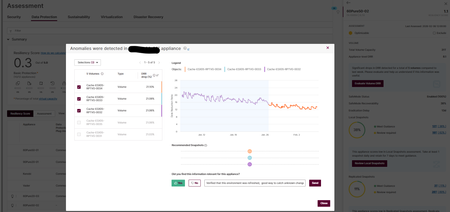
Hey Cincy PUG, I found a cool feature for detecting changes on your Flash Array. Looking at Data Protection under the Assessment menu I saw a lightning bolt on one of my arrays. That lightning bolt led me to an evaluation showing that there had been a significant drop in DRR for a group of volumes. Turns out that change was benign because one of my teammates refreshed an environment causing the change in the Data Reduction Ratio. I see this as just another way Pure 1 Manage can help admins detect threats or problems with data sets. How are you using the tools in Pure1? Share something with the group! -Charles153Views2likes0Comments
Minutes to Meltdown
Join Pure Storage and Commvault for... 💥 Minutes to Meltdown | Manchester This isn't your usual Cyber Security event! You'll take part in a LIVE simulated cyber-attack. Experience firsthand how security, infrastructure, legal, leadership and others must unite when the worst happens. Gain insights in how your business can be better prepared and learn from those that have been through this before. Register here: 👉 https://discover.commvault.com/event-minutes-to-meltdown-manchester-with-pure-storage-registration.html103Views2likes0CommentsThe SafeMode Seance: A Cyber Security Haunting
Topic: How are you protecting your data from cyber threats? Are you both protecting your data, while also preparing to recover in the event that your organization is impacted by a cyber event? Join us for a spooky, cyber-focused meeting; a supportive and open forum where we’ll share scary stories, and explore solutions to ensure your data is protected from even the most ghoulish threats. This customer-driven discussion will focus on your experiences and challenges with protecting your data from a cyber attack. Pure Storage experts will offer insights and guidance to help you protect your data from the zombie apocalypse. Get Involved: We're looking for security-focused individuals who would be willing to attend and share their perspective on how they are helping their organization protect against cyber threats, and prepare in the case that recovery is needed. And all are welcome. You don't have to be a Pure Storage customer to attend. Join the community, talk to your peers, and have some fun. Agenda: Welcome, Introductions, Updates Customer Presentation - How to use Pure1 Assessments to review and improve your security posture Customer Presentation - Something strange is happening, but we don't know what it is. How I used Pure1 AI CoPilot along with Varonis to narrow the scope on the "strange stuff" Pure Presentation (w/ alliance partners) - SafeMode, Cyber Resiliency and Isolated Recovery Environments Panel/Q&A - Open discussion amongst the community; w/ security-focused individuals (hopefully) in attendance. Anonymous Group Feedback: Share your thoughts and experiences in regards to data protection. What’s working? What’s not? Where could you use some feedback from the community? Understanding Your Needs: What does your organization need to fully protect your data, and recover if you were ever attacked? We’ll help you pinpoint what truly matters. Exploration Circle: Hear from Pure’s subject matter experts on what they are seeing regarding the latest cyber security and cyber resiliency topics. Support & Resources: Find out where you can get additional help, training, and resources. Date: Wednesday, October 15th, 2-4pm ET. Location: Aces Pickleball, 2730 Maverick Dr, Norwood, OH 45212 (Factory 52) RSVP: https://info.purestorage.com/2025-Q3AMS-COMREPLCRCincinnatiPUGLP_01---Registration-Page.html Stick around after the Pure User Group meeting and enjoy Pies & Pints with Pure Storage, our partners, and fellow customers.397Views2likes1CommentAccelerate 2026 - Part 1 - Everyone Wants Your Data
Back in February, I wrote that I had never been to Pure//Accelerate. This year, I still am not in Las Vegas. I watched the Everpure Accelerate 2026 opening keynote live from my home office, which turned out to be a different kind of vantage point. Not better than being there. Not worse. Just different. You do not get the hallway energy. You do not get the sponsor booths. You do not get the accidental conversations that happen while looking for coffee (or tea in my case). You do not get to read the room in the same way. You are not surrounded by the noise, the music, the badge lanyards, the customer reactions, or that strange conference feeling where everyone is tired and energized at the same time. A keynote viewed remotely has to work harder because the production does not carry you in the same way. If the speakers are just reading slides, you feel it immediately. If the story is thin, the distance makes it thinner. If the message is only a collection of announcements, you start checking email. But if the story is real, the distance does something interesting. It removes some of the theater. You are left with the words, the pacing, the ideas, and whether the people on stage actually believe what they are saying. This morning, the parts that landed with me were not the parts that felt the most polished. They were the parts where the keynote stopped sounding like a keynote and started sounding like people trying to explain a real shift in the industry. For me, the strongest moments came from Charlie Giancarlo, Chadd Kenney, Shawn Rosemarin, and the NVIDIA conversation. Not because they had the most slides. Not because they had the most numbers. They landed because they are storytellers. That matters more than we sometimes admit in enterprise technology. A slide reader can tell you what a product does. A storyteller can tell you why the product had to exist and why it matters to the customer or partner. There is a difference. And this morning, the difference mattered. Charlie’s most important line came early, and it changed the shape of the keynote. He said he was not going to talk about data storage. He was going to talk about data. For a storage company’s major customer event, that is not a small pivot. It would have been easy for Everpure to spend the morning celebrating the familiar things. Growth. Customer count. Market share. Flash leadership. Subscription run rate. Fusion adoption. Gartner recognition. Net Promoter Score. Performance numbers. Efficiency numbers. All of that was there, and all of that matters. But the real keynote was not about proving that Everpure is good at storage. The real keynote was about arguing that storage is no longer the highest-level conversation. Data is. That is where the rebrand from Pure Storage to Everpure starts to become more than a name change. A company called Pure Storage can be excellent at arrays, controllers, upgrades, density, performance, and simplicity. A company called Everpure has to earn the right to talk about the enterprise data cloud, and that is a much larger promise. It is also a much riskier promise. Because once you move north of storage, you are no longer talking only about where data lives. You are talking about who controls it, who understands it, who governs it, who protects it, and who gets to use it. That is where Charlie’s message became interesting. His argument was that the enterprise has spent decades living in an application-centric architecture. ERP had one version of the business. CRM had another. ServiceNow had another. HR systems had another. Analytics platforms copied data out of all of them. Data lakes were built to make sense of the mess. Now AI agents are being asked to reason across that same fragmented landscape. That is the problem. Not AI in theory. AI on top of fragmented truth. We have all seen some version of this. The definition of a customer changes depending on which system you ask. The data in one application does not quite match the data in another. A report is technically correct, but only according to one source. A copy was made for analytics, another for backup, another for a project, another for a data science team, and one more because someone needed it urgently two years ago and nobody knows if it is still being used. Now imagine asking an AI agent to act on that. That is where the phrase “Data Primacy” becomes more than keynote language. From what I understood this morning, Data Primacy is Everpure’s argument that data should no longer be trapped inside applications as a secondary object. The data itself, along with its context, relationships, governance, and sources of truth, has to become primary. Applications still matter. Workflows still matter. SaaS still matters. But the enterprise cannot keep allowing every application to define its own version of reality and then expect AI to make intelligent decisions across the pile. That is not sustainable. One of the strongest lines from Charlie was the idea that every vendor wants your data. Every SaaS vendor wants your data. Every analytics vendor wants your data. Every AI vendor wants your data. But what they really want is not just the data. They want the context. They want the meaning. They want to know how a customer in one system relates to a contract in another, a support case in another, an invoice in another, a shipment in another, a security policy in another, and a business outcome somewhere else entirely. In the AI era, context is the new land grab. That is the sentence I kept coming back to during the keynote. Everyone wants your data, but the bigger fight is over who owns the context. That is why this morning did not feel like just another AI infrastructure pitch. It felt like Everpure trying to move the conversation from managing arrays to managing truth. That is a big claim. It needs proof. And that is where Chadd Kenney’s part of the keynote mattered. Chadd is one of those speakers who can make infrastructure feel like an actual story instead of a list of capabilities. That is not easy. Storage features can get very technical very quickly, and if you are not careful, everything turns into a blur of replication, snapshots, policies, performance, controllers, and acronyms. But Chadd framed the platform in a way that made sense. First, the unified data plane stores the data. Then the intelligent control plane governs and operates it. Then the universal data intelligence layer helps understand it. Together, those pieces create a different operating model. That phrase, operating model, is important. Because the most interesting part of the demo was not just that Fusion can automate tasks. It was that Everpure is trying to change the relationship between people and infrastructure. The old world asks humans to be perfect by hand. Log into this array. Check that policy. Fix that snapshot setting. Compare it to the spreadsheet. Make sure the production workloads are covered. Exclude dev and test. Check compliance. Update the retention period. Open the change. Wait for the window. Hope nobody missed one. We have normalized that kind of work for years. Then we call it operational discipline. Sometimes it is. But sometimes it is just human beings being forced to compensate for systems that do not understand intent. The Fusion demos showed something better. Define the policy once. Attach intent to the workload. Let the control plane detect drift. Let it show violations. Let it recommend a fix. In some cases, let it act. In other cases, keep the human in the loop, but stop making the human do repetitive work that the platform should be able to understand. The ransomware snapshot example was a perfect illustration. A customer mandate changes retention from fifteen days to thirty days. In many environments, that becomes a manual chase across infrastructure. In the keynote demo, it became a policy problem, a compliance view, a remediation path, and an audit trail. That is what infrastructure teams actually need. Not another dashboard that tells them something is broken. A system that understands what “correct” looks like and helps keep the environment there. The workload mobility demo made the same point from a performance angle. If the platform can see that a workload is trending toward a service level violation, recommend a better placement, validate the move, and relocate that workload without the application owner noticing, that is not just automation. That is infrastructure keeping a promise quietly. And quiet matters. The best infrastructure usually disappears. Nobody sends a thank-you note because latency did not spike. Nobody opens a champagne bottle because a replication policy worked. Nobody celebrates the outage that did not happen. But those invisible wins are the difference between a team that spends its life firefighting and a team that gets to work on the next thing. That is why the Active Cluster for File demo also worked. Synchronous replication for file sounds technical, and it is. But the emotional value is simple. When something fails, the business does not want a heroic recovery story. It wants no story at all. The workload quietly packed its bags and moved. That line stayed with me because disaster recovery should be boring. Boring is the goal. Boring means the policy worked, the automation worked, the architecture worked, and the humans did not have to assemble on a bridge call at 2 a.m. to save the day. Then Shawn Rosemarin took the keynote into the AI conversation, and again, the strength was in the framing. The bottleneck stalling AI is not compute. It is not models. It is not tooling. It is data. That is the part of the AI conversation that I think many customers are starting to feel more clearly. For the last few years, the market has been obsessed with models and GPUs. That made sense. There was a lot to understand, and the infrastructure requirements are real. But most customers are not trying to build the next frontier model. They are trying to unlock the intelligence that already exists inside their own business. Their documents. Their contracts. Their transactions. Their support history. Their clinical records. Their policies. Their engineering files. Their internal knowledge. Their institutional memory. That does not become useful just because someone points a model at it. It becomes useful when the data is prepared, classified, curated, governed, indexed, vectorized, and delivered with the right context at the right time. That is why the Everpure Data Stream announcement with NVIDIA mattered. The message was not simply, “We can feed GPUs fast,” although performance absolutely matters. The more important message was that enterprise AI needs a way to make data AI-ready without creating another silo, another copy, another stale version of the truth. Shawn made the point clearly: other vendors want you to copy your data into their system. But a copy is always behind. That is such a simple sentence, but it carries a lot of weight. A copy has to be protected. A copy has to be governed. A copy has to be reconciled. A copy has to be secured. A copy can drift. If AI is going to answer questions, automate workflows, make recommendations, or support decisions, stale context is not just inefficient. It is dangerous. That is where the NVIDIA conversation added credibility. The point was not just that Everpure has a partner logo on a slide. The point was that AI has become a full-stack infrastructure problem. Data has to move efficiently. GPUs cannot sit idle waiting for bytes. Inference needs low latency and quick access to the right information. Agents need context. Networking matters. Storage matters. Hardware matters again. I liked the line about hardware being cool again. I liked it because it is funny, but also because it is true. For years, parts of the industry talked as if infrastructure had become invisible. Cloud abstracted it. SaaS hid it. Software ate the world, and many people acted as if the physical layer was someone else’s problem. AI ended that illusion. When customers are investing serious money in GPUs and trying to build real AI capability, storage is not a commodity. Networking is not plumbing. Metadata performance is not trivia. Power is not someone else’s concern. Operational excellence is not optional. The physical world is back in the strategy conversation. Maybe it never left. Maybe some people just stopped looking. That is why the keynote worked for me, even from my home office. Not because every demo was relevant to every customer. Not because every phrase was perfect. Not because I think one keynote answers every question. That is what the next two days are for. It worked because the best speakers were not just announcing things. They were connecting the dots. Charlie explained why the application-centric model is running out of room. Chadd showed what it looks like when infrastructure starts operating from intent instead of manual heroics. Shawn connected AI success back to data readiness instead of model worship. The NVIDIA conversation reminded everyone that AI is not magic. It is infrastructure, data movement, context, governance, and execution. That is a story. And in enterprise technology, the story matters because customers are not just buying features. They are buying a way out of the mess they are already in. The mess is fragmentation. AI did not create that mess, but AI is making it impossible to ignore. That may be the real takeaway from day one of Accelerate. The AI era is forcing enterprises to confront the data architecture choices they have been living with for decades. The old model was manageable when humans were the ones reconciling the gaps. It becomes much more dangerous when agents begin acting on top of those gaps at machine speed. That is why Everpure’s move toward Data Primacy is worth paying attention to. It is not just a product direction. It is a point of view. The application should not own the truth. The copy should not become the truth. The dashboard should not pretend to be the truth. The enterprise needs to own its data, understand its context, govern its use, and make it available to applications, analytics, and AI in a way that is coherent and trustworthy. That is easy to say and very hard to do. But this morning, for the first time, I felt the full shape of what Everpure is trying to become after the rebrand. Not just a storage company with a new name. Not just a platform company using AI language because everyone has to. But a company trying to move the enterprise conversation north of storage and into the question that will define the next decade: Who owns the context of your business? Because everyone wants your data. The companies that win will be the ones that know what it means. I appreciate you reading. Dmitry Gorbatov © 2025 Dmitry Gorbatov | #dmitrywashere105Views1like1CommentFinancial Services Sessions at Accelerate 2026
Accelerate is almost here! 🙌 Check out our special track designed to connect with FSI professionals. Hear from Everpure experts about the latest trends and strategies for data management success in Financial Services. If this sounds right up your alley, we’ve curated a list of must-attend breakout sessions focused on all things Financial Services. Check out these don't miss sessions: Why 95% of AI Pilots Fail at Scale, and How a Finance Sector MSP Beat the Odds Sovereign by Design: Delivering a Cloud Operating Model within the Firm’s Own Borders Cyber Defense in a Flash: Spotting the Smoke Before the Fire Will you be joining us in person? Drop a comment below with the session you're most interested in and what you hope to learn!75Views1like0CommentsSpring is Calling, and so is Reds Baseball
I don't know about you, but I am more than ready for Spring; though I could definitely skip the rain. Wiping muddy dog paws after every walk is getting old! On the bright side, who else is ready for some Reds baseball? I have a few exciting updates and resources to share with the community: 🚀 PUG Meeting Update charles_sheppar and I are currently hard at work on the next PUG meeting. Details to come. 🛡️ Strengthening Your Cyber Resilience Given the current geopolitical climate and the rise in cyber threats, now is the perfect time to audit your data protection. Features like SafeMode and Pure1 Security Assessments act as a resilient last line of defense. If you want to see these tools in action, we recently hosted an expert-led demo on building a foundation for cyber resilience. Watch the recording here: https://www.purestorage.com/video/webinars/the-foundations-of-cyber-resilience/6389889927112.html Questions? Reach out to your Everpure SE or partner for a deeper dive. 📅 Upcoming Events March 12: Nutanix Webinar Exploring virtualization alternatives? Nutanix is hosting a session tomorrow focused on simplifying IT operations and highlighting the Everpure partnership. https://event.nutanix.com/simplifyitandonprem March 19: Or perhaps you're interested in running virtual machines alongside containerized workloads within K8s clusters. If that's the case, join Greg McNutt and Sagar Srinivasa for Virtualization Reimagined: Inside the Everpure Journey. https://www.purestorage.com/events/webinars/virtualization-reimagined.html March 19: Ask Us Everything About Storage for Databases. Join experts Anthony Nocentino, Ryan Arsenault, and Don Poorman for a live Q&A session. https://www.purestorage.com/events/webinars/ask-us-everything-about-storage-for-databases.html March 24: Presets & Workloads for Consistent DB Environments. We’re extending the database conversation to discuss how Everpure helps you transition from "managing storage" to "managing data" through automated presets. https://www.purestorage.com/events/webinars/presets-and-workload-setups-for-consistent-database-environments.html125Views1like0Comments