Why You Should Make Adopting Current Long-Life Releases a Habit
Hey everyone — At Pure Storage, we see many customers who still think about storage upgrades like old-school firmware: “set it and forget it” until it’s forced to change. But FlashArray isn’t firmware it’s modern, continually improved, and designed for an agile, secure, predictable data platform. That means it’s time to make adopting recent Long-Life Releases (LLRs) a regular habit not just something you reluctantly do, "when you have to". LLRs should be your standard practice: ✅ Fresh Features, Mature Code Each LLR is built on code that’s been running in production for at least 8 months before it branches. That means you get the innovations from recent Feature Releases — tested, stabilized, and production-proven. You avoid missing out on valuable improvements while still benefiting from enterprise-grade predictability. ✅ Consistent Security and Compliance Aging too far behind, even on an LLR, can expose you to security vulnerabilities and unsupported configurations. By habitually adopting recent LLRs, you ensure you’re in the supported window for critical patches and compliance audits and avoiding fire drills later. ✅ Reduce Technical Debt Getting stuck on very old LLRs can build up technical debt. Skipping multiple versions makes your next upgrade harder, riskier, and more time-consuming. Keeping up with recent LLRs means smoother transitions, less operational friction, and easier adoption of the next improvements. ✅ Keep Innovation Flowing The idea that an LLR is “old code” is a myth. Recent LLRs contain carefully chosen, well-hardened feature improvements. If you wait too long, you lock yourself out of meaningful performance, efficiency, and capability gains that your peers are already using. ✅ Break the Firmware Mentality FlashArray is software-driven, and has a rapid but reliable development model. Treating it like outdated firmware, and you miss the true value. The LLR program is designed precisely to let you safely adopt modern features and maintain enterprise-grade stability and maintain a predictable cadence. Bottom line? Adopting recent Long-Life Releases, habitually, is the best way to get modern features, maintain security, reduce upgrade risk, and keep your environment aligned with Pure’s best practices. You deserve innovation and peace of mind. Don’t settle for less by sticking with outdated code. If you want help reviewing which LLR is right for you, or understanding the timelines, just reach out — we’re here to help you stay current, secure, and ahead of the game.1.3KViews8likes2Comments
ActiveCluster for File
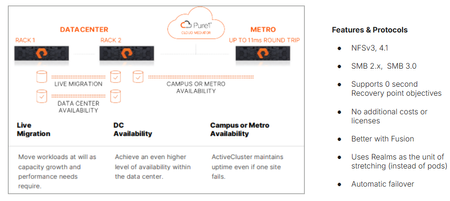
We’re proud to announce the availability of ActiveCluster for file, Everpure’s premier business continuity solution and a fundamental enabler of our Enterprise Data Cloud vision, where Service Level Agreements define what storage, network and compute resources are assigned dynamically to application data sets rather than an hardware-to-app architectures. With ActiveCluster for file, Everpure is extending the benefits of data mobility, continuous access and policy-driven management to file workloads. What is ActiveCluster? Everpure launched ActiveCluster in 2017, and rapidly took the mission critical, enterprise block storage world by storm. ActiveCluster rapidly enabled enterprise customers with the most demanding block workloads to deploy synchronous, always available, always up-to-date, LUNs or volumes to hosts stretched across geographic distances. What set ActiveCluster apart from the existing solutions at the time, and even now, is how simple to set up Everpure RTO-0 and RPO-0 file solutions are, and how flexible and adaptable to the ever changing business needs hosting these data sets become after being deployed on a Everpure Fusion fleets. Today, we’re adding file protocol support like NFSv3, NFSv4.1, SMB 2.0, and SMB 3.0 w/ continuously available shares to our ActiveCluster solution. Realms as a new container ActiveCluster for file utilizes a new, high-level container called a Realm, to synchronously mirror both user data and storage configuration information necessary to provide data access to authorized users on either side of the stretched file system(s). Realms are handy to put applications with similar Recovery Point Objectives and similar Recovery Time Objectives together. Realm Synchronous Replication The act of synchronously mirroring both the user data and storage configuration information across two different FlashArrays is called ‘stretching’. Similar to how a pod is stretched across two FlashArrays, a Realm can be stretched between any FlashArray system that has no more than 11ms Round Trip Time average latencies on their array replication links. Either Fibrechannel or Ethernet array replication links can be used to replicate file data synchronously. Figure 1. ActiveCluster for file can be deployed in different modalities Realms as namespaces for policies Realms contain unique snapshot, audit logging, replication and export policies. These policies are only viewable and attachable to storage objects within the Realm, creating a building block for hosting multiple different end customers or tenants on Fusion fleets. These policies are automatically replicated over to the other array if the Realm is stretched, reducing operator burden in failover scenarios. To prevent split brain scenarios (where a network partition in the array links or replication links stop communication between the pair of FlashArrays) Everpure’s fully managed Cloud Mediator service will determine which remaining FlashArray controller pair can process writes, and which array will not. Unlike other business continuity solutions, ActiveCluster customers don’t have to worry about patching or maintaining the security of separate VMs to act as a mediator service to prevent split brain scenarios. Multiple servers supported per Realm, different IDPs allowed. Each Realm can have one or more servers configured in it, which act as protocol end points for clients and hosts to connect to. Each server in a Realm can have a different IP address, or utilize a different Identity Provider Service. When a failover condition occurs (like a site disaster on one side), automatic failover and the clients in either data center are on the same Ethernet segment or broadcast domain, a failover condition will emit a gratuitous Reverse Address Resolution Protocol request (RARP), mapping the new MAC address of the ethernet interface on one side to a same IP address being used. Applications may see a small pause in reads or writes being serviced, but will not have to re-issue I/O or remount / remap shares or exports. Managed directory quotas can also be used for any filesystem or managed directory attached to the servers in the Realm being stretched. These quota policies automatically get replicated with user data, so the same customer experience in terms of usable space exists both before and after an automatic failover. New Guided Setup available for ActiveCluster for file Deploying new ActiveCluster for file solutions can occur in less than five minutes on already racked and powered arrays. A Guided Setup wizard is available to quickly capture the necessary information to stretch a Realm. This wizard can be started from multiple locations within the Purity GUI. ActiveCluster for file fully takes advantage of Fusion fleets and the ability to manage storage infrastructure as code, programmatically and via policy. Realms are not tied to hardware, and can ‘float’ Realms with ActiveCluster for file support not only provide a 0-RTO and 0-Recovery Point Object at the storage layer for mission critical applications, but they also provide a mechanism to transparently move the data and configuration in the Realm non-disruptively somewhere else within your fleet, whether it’s follow the Sun type round-robin hops, where the Realm’s location changes depending on the time of day, or is moved as a part of a data-center migration. Coupled with Fusion, Everpure’s intelligent control plane, ActiveCluster for file enables workloads and application data and their configuration information to dynamically and seamlessly move to the right location, at the right time, at the right granularity. Seamless movement across greater geographic distances can be accomplished by stretching and unstretching the same Realm between different arrays, as long as the RTT latency between them is <11ms. Service Level Agreements are the lingua franca of the Enterprise Data Cloud Service Level Agreements are the natural language of business owners, and are integral for companies who want to move away from managing storage arrays to managing their business data. They capture answers to questions like “How fast do you need access to this data? Does it need to be backed up or otherwise protected against site-wide failure? SLAs are what forms our vision behind the App-to-data operational model. This App-to-data model takes abstract, high level business requirements as input, and then automatically configures and deploys the required storage services to meet the service level agreement just defined. A Fusion fleet manager’s perspective is one of many different application tiles, and their health, not just a series of HA pairs spread out across different data centers. Data management operations, like instant backups, cloning, movement is applied as “verbs” to the application data set’s name or workload ID, and not to a mismatched storage container whose hardware boundaries impose limits on your app team. An Intelligent, unified control plane manages and enforces SLA’s across the fleet autonomously, like a modern cloud operating model but that can be deployed in any modality, whether on-prem, in the cloud or a hybrid. This scalable model, with Fusion’s intelligent control plane, supports ALL workloads, from modern AI workloads, containers and High Performance Workloads to extremely large image or rich media archives. An Enterprise Data Cloud, made up of discrete nodes tied loosely together, where Service Level Definitions define autonomous system behavior. Stop managing your storage arrays, and start managing your data. Learn more about ActiveCluster for file Read the support documentation for Purity 6.12.0 Test and deploy Fusion fleets and file presets Ask your account executive or system engineer for a demo!1.1KViews4likes0CommentsTop 10 Reasons to Love Purity 6.9
(Because 6.7 is so 2024) 10. 🏋️♂️ Long-Life Release means it’s supported until June 2028 — which is about three years longer than that gym membership you swore you’d use. 9. 🌐 Works with all the latest FlashArray platforms, AWS, Azure… pretty much everything except your toaster (for now). 8. 🕵️♂️ Security updates so strong, even your data will feel like it’s in the witness protection program. 7. 🚀 Turn on File Services without downtime or approval from Pure product management — finally, a software update you don’t have to schedule for “that one weekend in Q4 when no one’s looking.” 6. 🙌 Encourages Self-Service Upgrades. Translation: fewer support tickets, more “Look, Mom, I did it myself!” moments. 5. 🔑 Default password warning. Yes, “pureuser” is adorable… until it becomes a resume-generating event. 4. 🍍 VMware improvements so good, your virtual machines just sent a fruit basket. 3. 🎛️ Fusion, Fusion, Fusion! Which is like having a universal remote for your data… without the panic of losing it between the couch cushions. 2. 📜 REST API 2.x release notes so thorough, they make War and Peace look like a sticky note. 🏆 You get to tell your boss you're on a "Long-Life Release," which sounds much more impressive than "I'm not doing an upgrade for a while." Check out the release notes for more! https://support.purestorage.com/bundle/m_flasharray_release/page/FlashArray/FlashArray_Release/01_Purity_FA_Release_Notes/topics/concept/c_purityfa_69x_release_notes.html940Views3likes0Comments🧠 Deep Dive: Configuring File Services Policies & File Systems on FlashArray
Continuing our technical walkthrough series on Pure Storage FlashArray File Services, this new video dives into the nuts and bolts of setting up policies and file systems to create your first SMB file share. If you’ve already followed along with the previous video on setting up networking, DNS, and Active Directory integration, this next step completes the foundation — showing exactly how to configure: Export Policies for SMB access and permissions Quota Policies to manage capacity limits Audit and AutoDir Policies for visibility and governance And finally, how to create and assign a file system for your department or team shares The demo walks through the FlashArray UI and even steps into Windows file share management to validate access-based enumeration and permissions in action — proving just how simple and powerful FlashArray file services can be. 👉 Watch the video on Pure360 to see how easy it is to go from blank configuration to a fully functional SMB file share environment in minutes. -Jason1KViews2likes1CommentA Platform for the Future
So, I’ve been at Pure Storage for a few seasons now. Hint: when I joined, the “//M” generation of FlashArray was still a little wet behind the ears, and was then styled as a lowercase “//m” (bonus points if you can guess the year I joined in your reply!). One of the things that has always impressed me the most about Pure, is how purposeful and thoughtful our development and engineering teams are. Most of us here had realized for years that Pure isn’t a collection of disparate products and features–it’s a real, integrated, intelligent storage platform! One OS (Purity). One flash architecture (DirectFlash). A universal NDU architecture, both software and hardware (Evergreen). Last year, we launched the Pure Storage Platform to make that engineering vision official. Today's announcements mark another huge milestone in the evolution of the Pure Storage Platform. We’ve unified operations across distributed infrastructures, maximized efficiency for AI, and embedded cyber resilience at every layer. Our engineers have outdone themselves once again. It all works together, so your organization can master its data, while you get more done. Pure Storage is helping enterprises turn data into a true business advantage. From edge to core to cloud, the message is clear: data should be unified, efficient, and resilient — so organizations like yours can innovate without compromise. Find out more about what we announced today in our blog. And let us know what you think below!138Views2likes0CommentsFlashArray File Multi-Server
File support on FlashArray gets another high demanded feature. With version 6.8.7, purity introduces a concept of Server, which connects exports and directory services and all other necessary objects, which are required for this setup, namely DNS configuration and networking. From this version onwards, all directory exports are associated with exactly one server. To recap, server has (associations) to following objects: DNS Active Directory / Directory Service (LDAP) Directory Export Local Directory Service Local Directory Service is another new entity introduced in version 6.8.7 and it represents a container for Local Users and Groups. Each server has it's own Local Directory Service (LDS) assigned to it and LDS also has a domain name, which means "domain" is no longer hardcoded name of a local domain, but it's user-configurable option. All of these statements do imply lots of changes in user experience. Fortunately, commonly this is about adding a reference or possibility to link a server and our GUI contains newly Server management page, including Server details page, which puts everything together and makes a Server configuration easy to understand, validate and modify. One question which you might be asking right now is - can I use File services without Servers? The answer is - no, not really. But don't be alarmed. Significant effort has been made to keep all commands and flows backwards compatible, so unless some script is parsing exact output and needs to be aligned because there is a new "Server" column added, there should be any need for changing those. How did we managed to do that? Special Server called _array_server has been created and if your configuration has anything file related, it will be migrated during upgrade. Let me also offer a taste of how the configuration could look like once the array is updated to the latest version List of Servers # pureserver list Name Dns Directory Services Local Directory Service Created _array_server management - domain 2025-06-09 01:00:26 MDT prod prod - prod 2025-06-09 01:38:14 MDT staging management stage staging 2025-06-09 01:38:12 MDT testing management testing testing 2025-06-09 01:38:11 MDT List of Active Directory accounts Since we can join multiple AD servers, we now can have multiple AD accounts, up to one per server # puread account list Name Domain Computer Name TLS Source ad-array <redacted>.local ad-array required - prod::ad-prod <redacted>.local ad-prod required - ad-array is a configuration for the _array_server and for backwards compatibility reasons, the prefix of the server name hasn't been added. The prefix is there for account connected to server prod (and to any other server). List of Directory Services (LDAP) Directory services got also slightly reworked, since before 6.8.7 there were only two configurations, management and data. Obviously, that's not enough for more than one server (management is reserved for array management access and can't be used for File services). After 6.8.7 release, it's possible to completely manage Directory Service configurations and linking them to individual servers. # pureserver list Name Dns Directory Services Local Directory Service Created _array_server management - domain 2025-06-09 01:00:26 MDT prod prod - prod 2025-06-09 01:38:14 MDT staging management stage staging 2025-06-09 01:38:12 MDT testing management testing testing 2025-06-09 01:38:11 MDT Please note that these objects are intentionally not enabled / not configured. List of Directory exports # puredir export list Name Export Name Server Directory Path Policy Type Enabled prod::smb::accounting accounting prod prodpod::accounting:root / prodpod::smb-simple smb True prod::smb::engineering engineering prod prodpod::engineering:root / prodpod::smb-simple smb True prod::smb::sales sales prod prodpod::sales:root / prodpod::smb-simple smb True prod::smb::shipping shipping prod prodpod::shipping:root / prodpod::smb-simple smb True staging::smb::accounting accounting staging stagingpod::accounting:root / stagingpod::smb-simple smb True staging::smb::engineering engineering staging stagingpod::engineering:root / stagingpod::smb-simple smb True staging::smb::sales sales staging stagingpod::sales:root / stagingpod::smb-simple smb True staging::smb::shipping shipping staging stagingpod::shipping:root / stagingpod::smb-simple smb True testing::smb::accounting accounting testing testpod::accounting:root / testpod::smb-simple smb True testing::smb::engineering engineering testing testpod::engineering:root / testpod::smb-simple smb True testing::smb::sales sales testing testpod::sales:root / testpod::smb-simple smb True testing::smb::shipping shipping testing testpod::shipping:root / testpod::smb-simple smb True The notable change here is that the Export Name and Name has slightly different meaning. Pre-6.8.7 version used the Export Name as a unique identifier, since we had single (implicit, now explicit) server, which naturally created a scope. Now, the Export Name can be the same as long as it's unique in scope of a single server, as seen in this example. The Name is different and provides array-unique export identifier. It is a combination of server name, protocol name and the export name. List of Network file interfaces # purenetwork eth list --service file Name Enabled Type Subnet Address Mask Gateway MTU MAC Speed Services Subinterfaces Servers array False vif - - - - 1500 56:e0:c2:c6:f2:1a 0.00 b/s file - _array_server prod False vif - - - - 1500 de:af:0e:80:bc:76 0.00 b/s file - prod staging False vif - - - - 1500 f2:95:53:3d:0a:0a 0.00 b/s file - staging testing False vif - - - - 1500 7e:c3:89:94:8d:5d 0.00 b/s file - testing As seen above, File network VIFs now are referencing specific server. (this list is particularly artificial, since neither of them is properly configured nor enabled, anyway the main message is that File VIF now "points" to a specific server). Local Directory Services Local Directory Service (LDS) is a newly introduced container for Local Users and Groups. # pureds local ds list Name Domain domain domain testing testing staging staging.mycorp prod prod.mycorp As already mentioned, all local users and groups now has to belong to a LDS, which means management of those also contains that information # pureds local user list Name Local Directory Service Built In Enabled Primary Group Uid Administrator domain True True Administrators 0 Guest domain True False Guests 65534 Administrator prod True True Administrators 0 Guest prod True False Guests 65534 Administrator staging True True Administrators 0 Guest staging True False Guests 65534 Administrator testing True True Administrators 0 Guest testing True False Guests 65534 # pureds local group list Name Local Directory Service Built In Gid Audit Operators domain True 65536 Administrators domain True 0 Guests domain True 65534 Backup Operators domain True 65535 Audit Operators prod True 65536 Administrators prod True 0 Guests prod True 65534 Backup Operators prod True 65535 Audit Operators staging True 65536 Administrators staging True 0 Guests staging True 65534 Backup Operators staging True 65535 Audit Operators testing True 65536 Administrators testing True 0 Guests testing True 65534 Backup Operators testing True 65535 Conclusion I did show how the FA configuration might look like, without providing much details about the actual way how to configure or test these configs, anyway, this article should provide a good overview about what to expect from 6.8.7 version. There is plenty of information about this particular aspect of the release in the updated product documentation. Please let me know if there is any demand to deep-dive into any aspect of this feature.887Views2likes2CommentsCalling all public servants!
Did you know Evepure has a Public Sector community? Come talk shop with fellow federal, state and local govies, education leaders, and partners who get it. We're talking long procurement and CR-driven buying cycles, figuring out where AI actually fits when your data is spread across different systems, all amid election cycles and shifting political priorities. purecommunity.purestorage.com/group/public-sector If you're a customer or partner, would love to see you there! Leave a comment if you're interested and we'll get you set up.91Views1like0CommentsNFS over TLS on FlashArray (Purity//FA 6.10.6)
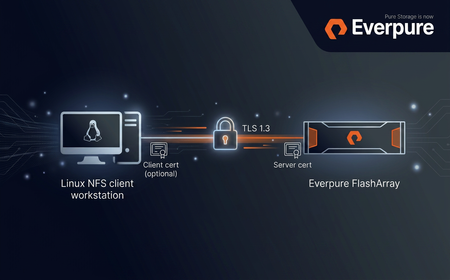
Purity//FA 6.10.6 introduces NFS over TLS for FlashArray File Services: an in-transit encryption layer that wraps NFSv3 and NFSv4.1 RPC traffic in a TLS 1.3 session as defined by RFC 9289 - Towards Remote Procedure Call Encryption By Default. Server authentication is mandatory, and mutual TLS (mTLS) is available as an optional second factor. This post is a technical feature description plus a minimum viable configuration walkthrough. It assumes you are already comfortable with FlashArray File Services (file servers, exports, policies) and Linux NFS clients. What the feature actually is Transport encryption for NFS - NFSv3 and NFSv4.1 RPC traffic is carried inside a TLS 1.3 record layer over TCP/2049. No NFS-level changes; applications and mount paths stay the same. Server authentication - the FlashArray presents an X.509 certificate; the client validates it against its own trust store. Server certificates must include the file-server VIF in the SAN. Optional mTLS - the array can require and verify a client certificate against a configured trusted CA (single certificate or a certificate group). Per-server policy - TLS configuration is a first-class tls policy attached to a specific file server, not a global toggle. End-to-end data path NFS over TLS data path. tlshd on the client performs the TLS handshake against the FlashArray; the resulting session encrypts all consequent NFS traffic on established connection. Building blocks on the FlashArray The feature is exposed as a new tls policy type that ties together three existing concepts: certificates (imported or self-signed), the tls-policy object, and a file server. The policy holds the appliance certificate, the TLS version/cipher constraints, the protocols TLS is enforced for, and (optionally) the trusted CA used to authenticate clients. TLS versions and cipher suites NFS over TLS on FlashArray negotiates TLS 1.3 for the NFS data path. The tls-policy object accepts --minimum-tls-version values of 1.2 or 1.3 , but that minimum is a floor, not a contract - for NFS the negotiated version will always be 1.3. The default TLS 1.3 cipher set is: TLS_AES_256_GCM_SHA384 TLS_CHACHA20_POLY1305_SHA256 TLS_AES_128_GCM_SHA256 (mandatory per RFC 8446) On clients with AES-NI, TLS_AES_256_GCM_SHA384 is the natural choice. TLS_CHACHA20_POLY1305_SHA256 is the cipher to prefer on clients without AES hardware acceleration. NFS protocol versions and mount options Both NFSv3 and NFSv4.1 are supported. The Linux client opts into TLS at mount time via the xprtsec option, mediated by tlshd : Option Meaning xprtsec=tls One-way TLS, server authentication only xprtsec=mtls Mutual TLS - client also presents a certificate vers=4.1 / vers=3 NFS protocol version Prerequisites FlashArray: Purity//FA 6.10.6 or later, with at least one configured file server. Client OS: a recent Linux distribution with NFS-over-TLS support (e.g. Rocky Linux 10), including nfs-utils , tlshd and openssl (for certificate handling). Certificates: a server certificate signed by a CA the client trusts; if there is no proper DNS record set up, the certificate must include the file-server IP Address in its subjectAltName . For mTLS, a client certificate signed by a CA the array trusts. Configuration walkthrough This is the minimum sequence to land an encrypted NFS mount. Replace IPs, names and certificate paths to taste. If you don't yet have a CA to issue the server (and, for mTLS, client) certificate from, see the test-CA appendix at the end of this post. 1. FlashArray - import the appliance certificate # on the FlashArray CLI - interactive paste of key, then certificate purecert imported create nfs-server-cert --key # for mTLS only: import the CA used to sign client certificates purecert imported create nfs-client-ca 2. FlashArray - create a TLS policy Server-auth-only policy: purepolicy tls create nfs-tls-policy \ --appliance-certificate nfs-server-cert \ --tls-enforced-for nfs mTLS variant - require the client to present a certificate and verify it against a trusted CA (the trusted CA argument accepts either a single certificate or a certificate_group ): purepolicy tls create nfs-mtls-policy \ --appliance-certificate nfs-server-cert \ --tls-enforced-for nfs \ --client-certificates-required \ --client-certificate-trust-verify-enabled \ --trusted-client-ca-certificate nfs-client-ca Optional version / cipher tuning: purepolicy tls setattr nfs-tls-policy --minimum-tls-version 1.3 purepolicy tls setattr nfs-tls-policy \ --enabled-tls-ciphers TLS_AES_256_GCM_SHA384,TLS_CHACHA20_POLY1305_SHA256 purepolicy tls list --effective 3. FlashArray - attach the policy to a file server pureserver list purepolicy tls add nfs-tls-policy --server your-file-server purepolicy tls list --member Once the policy is attached, the file server starts requiring TLS for any new NFS connection on that VIF. Existing un-encrypted sessions are not renegotiated or dropped on policy change - clients must remount or restart their NFS service to pick up the new requirements. The same caveat applies when removing or rotating the trusted client CA. 4. FlashArray - create the export (unchanged from regular NFS) purefs create your-filesystem puredir create your-filesystem:your-managed-dir purepolicy nfs create your-nfs-policy purepolicy nfs rule add your-nfs-policy \ --client "*" --no-root-squash --rw --version nfsv3,nfsv4 puredir export create your-export \ --dir your-filesystem:your-managed-dir \ --policy your-nfs-policy \ --server your-file-server The export must live on the same file server that the TLS policy is attached to (note the --server argument). 5. Linux client - install and configure tlshd dnf install -y nfs-utils ktls-utils systemctl enable --now tlshd mkdir -p /etc/pki/nfs cp ca.crt /etc/pki/nfs/ca.crt chmod 644 /etc/pki/nfs/ca.crt Minimal /etc/tlshd.conf for server-only TLS: [debug] loglevel=1 tls=1 nl=0 [authenticate] [authenticate.client] x509.truststore=/etc/pki/nfs/ca.crt [authenticate.server] For mTLS, add the client identity: [authenticate.client] x509.certificate=/etc/pki/nfs/client.crt x509.private_key=/etc/pki/nfs/client.key x509.truststore=/etc/pki/nfs/ca.crt Restart tlshd after any change: systemctl restart tlshd . 6. Mount # server authentication only mount -t nfs -o vers=4.1,xprtsec=tls,rw \ 10.0.0.100:/your-export /mnt/nfs-tls # mutual TLS mount -t nfs -o vers=4.1,xprtsec=mtls,rw \ 10.0.0.100:/your-export /mnt/nfs-mtls # verify mount | grep xprtsec What the wire actually looks like Connection bring-up: AUTH_TLS probe per RFC 9289 → TLS 1.3 handshake brokered by tlshd → encrypted NFS traffic on the same TCP connection. Operational notes Policy changes are not retroactive. Tightening a policy (turning TLS on, switching to mTLS, removing a cipher in use) does not drop or renegotiate existing connections. Affected clients need to remount or restart NFS. Same applies to CA removal/expiry. Server certificate must carry the VIF in SAN. Without a matching subjectAltName entry the client refuses the certificate; common symptom is a mount failure with Protocol not supported and tlshd logging a verification error. NFSv4.1 connection reuse amortises the handshake cost across many operations; NFSv3 mounts re-do the handshake more often, so the relative cost is higher on connection churn. Troubleshooting cheat sheet Symptom Likely cause First thing to check mount.nfs: Connection refused Policy enforces TLS, client mounts plain NFS, or tlshd not running systemctl status tlshd ; add xprtsec=tls access denied by server while mounting mTLS client cert missing/untrusted, or export rule mismatch journalctl -u tlshd -n 100 ; puredir export list Protocol not supported Server certificate SAN does not include the mounted IP, or CA not trusted openssl x509 -in server.crt -text -noout | grep -A1 "Subject Alternative Name" Useful diagnostics on the client: journalctl -u tlshd -f sysctl -w sunrpc.rpc_debug=0x7fff sunrpc.nfs_debug=0x7fff tcpdump -i any -nn -v 'host <file-server-ip> and port 2049' -w /tmp/nfs-tls.pcap # remember to restore: sysctl -w sunrpc.rpc_debug=0 sunrpc.nfs_debug=0 Appendix: a throwaway CA for testing For lab and PoC work it is much more useful to stand up a tiny local CA than to hand out self-signed certs. The workflow mirrors what you would do with a real PKI - the array trusts a CA, that CA signs the appliance certificate, and (for mTLS) the same or a different CA signs each client certificate. Anything below is for non-production use; do not reuse these keys anywhere you care about. Set a couple of variables to keep the commands short: mkdir -p ~/nfs-tls-ca && cd ~/nfs-tls-ca VIP=10.0.0.100 # file-server VIP the client will mount FQDN=nfs.lab.example.com # optional DNS name for the same VIP CLIENT_CN=client01.lab.example.com # only needed for mTLS 1. Root CA # 4096-bit RSA root, valid 10 years openssl genrsa -out ca.key 4096 openssl req -x509 -new -nodes -key ca.key -sha256 -days 3650 \ -subj "/CN=NFS-TLS Lab Root CA/O=Lab" \ -out ca.crt # inspect openssl x509 -in ca.crt -noout -subject -issuer -dates 2. Appliance (server) certificate The server certificate must include the file-server VIP in subjectAltName ; without it the client refuses the certificate during handshake. Add the FQDN as well if you have DNS for it. openssl genrsa -out server.key 2048 openssl req -new -key server.key \ -subj "/CN=${FQDN}/O=Lab" \ -addext "subjectAltName=DNS:${FQDN},IP:${VIP}" \ -out server.csr cat > server.ext <<EOF basicConstraints = CA:FALSE keyUsage = digitalSignature, keyEncipherment extendedKeyUsage = serverAuth subjectAltName = DNS:${FQDN},IP:${VIP} EOF openssl x509 -req -in server.csr -CA ca.crt -CAkey ca.key -CAcreateserial \ -out server.crt -days 825 -sha256 -extfile server.ext # verify the chain and the SAN openssl verify -CAfile ca.crt server.crt openssl x509 -in server.crt -noout -ext subjectAltName Import this pair into the FlashArray as nfs-server-cert and reference it from the TLS policy as --appliance-certificate : # key first, then certificate, when prompted purecert imported create nfs-server-cert --key 3. Client certificate (mTLS only) openssl genrsa -out client.key 2048 openssl req -new -key client.key \ -subj "/CN=${CLIENT_CN}/O=Lab" \ -out client.csr cat > client.ext <<EOF basicConstraints = CA:FALSE keyUsage = digitalSignature extendedKeyUsage = clientAuth EOF openssl x509 -req -in client.csr -CA ca.crt -CAkey ca.key -CAcreateserial \ -out client.crt -days 825 -sha256 -extfile client.ext openssl verify -CAfile ca.crt client.crt 4. What goes where File Goes to Used as server.key + server.crt FlashArray ( purecert imported create nfs-server-cert ) TLS policy --appliance-certificate ca.crt (for mTLS) FlashArray ( purecert imported create nfs-client-ca ) TLS policy --trusted-client-ca-certificate ca.crt NFS client ( /etc/pki/nfs/ca.crt ) tlshd truststore ( x509.truststore ) client.key + client.crt (for mTLS) NFS client ( /etc/pki/nfs/ ) tlshd client identity ( x509.private_key , x509.certificate ) From here, finish with the Configuration walkthrough steps above: create the TLS policy, attach it to the file server, create the export, configure tlshd , mount with xprtsec=tls or xprtsec=mtls . References RFC 9289 - Towards Remote Procedure Call Encryption By Default RFC 8446 - TLS 1.3 tlshd(8) and tlshd.conf(5) manual pages Everpure FlashArray File Services administration guide (Purity//FA 6.10.6)531Views1like0CommentsWhy Object Storage Still Matters
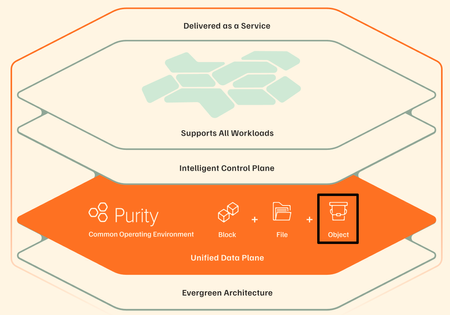
In Part 2, I wrote a line that, at the time, felt almost like a side comment — something I typed without fully appreciating how much it would change the direction of the story: “BREAKING NEWS: The FlashArray now supports Object??? What in the world? I may need to write an article about that!!” That reaction wasn’t planned, and it definitely wasn’t me being clever. It was me looking at the GUI and thinking, “that can’t be right… can it?” It didn’t line up with how I’ve been modeling storage architectures in my head for years, which usually means one of two things: either something fundamentally changed… or I’ve been confidently wrong about part of this for a while. And if I’m being completely honest, there was also a second reaction happening in parallel — one that I didn’t write down at the time because it sounded slightly ridiculous even in my own head: “Wait… do I actually understand why object storage exists in the first place? And more importantly… what exactly was wrong with files?” That’s the part nobody likes to admit out loud. We’ve all spent years confidently explaining block, file, and object as if we were born with that knowledge, when in reality most of us learned it incrementally, retroactively, and with just enough conviction to sound credible in front of a customer. Object storage, in particular, has always carried this aura of inevitability — like of course it’s better, of course it scales, of course it’s what modern applications need — without always forcing us to question why the previous model stopped being enough. Because for as long as most of us have been designing infrastructure, object storage has not simply been another protocol layered onto an existing system. It has represented a fundamentally different way of organizing and accessing data, one that required its own architectural approach, its own scaling model, and, more often than not, its own dedicated platform. The separation between block, file, and object was not arbitrary; it was a reflection of how deeply different those paradigms were in terms of metadata handling, access patterns, and performance expectations. This is precisely why platforms such as Everpure FlashBlade exist in the first place. They were not created as extensions of traditional storage systems but as purpose-built architectures designed to treat unstructured data — and particularly object data — as a first-class citizen. The use of distributed metadata services, sharded across independent nodes, combined with a key-value store storage model, allows such systems to achieve levels of parallelism and throughput that simply cannot be replicated within a controller-based design. In that context, object storage is not something that is “added” to the system; it is the system. Which is why seeing S3 support appear on FlashArray required a pause. Not excitement. Not skepticism alone. Something closer to intellectual friction. Reconciling Two Architectural Worlds The most important step in understanding what FlashArray has introduced is to resist the temptation to treat it as a direct comparison to FlashBlade. These aren’t two different ways of solving the same problem. They’re two different answers to two different problems—and pretending otherwise is where people get themselves into trouble. FlashBlade is built for object, not adapted to it. S3 talks directly to a distributed engine that thinks in objects, not files pretending to be objects. Metadata is spread across blades instead of becoming a centralized choke point, and the whole system scales the way modern workloads actually need it to. There’s no file system layer to fight with, no directory structure to navigate, no POSIX semantics getting in the way. It just does what you’d expect when you remove all of that: it goes fast, it scales cleanly, and it keeps up with workloads like HPC, AI and analytics without breaking a sweat. FlashArray takes a very different path, and in reality, it’s not what most people expect. It doesn’t try to reinvent itself as an object platform, and it doesn’t throw an S3 gateway in front of the array and call it a day. With Purity 6.10.5+, S3 just shows up as another protocol the system understands, right next to block and file. That distinction matters more than it seems. This isn’t something duct-taped on the side — it’s part of the same control plane, the same data path, the same system you’ve already been running. But let’s not pretend it turned into FlashBlade overnight. This is still a controller-driven architecture. The primary controller does the heavy lifting — handling requests, authenticating them, coordinating operations — before anything actually hits the storage engine. Which means it behaves differently, especially as workloads scale. So it ends up in this interesting middle ground. Not a native object system in the pure sense, but not a hack either. Just a different way of exposing what’s already there. The Translation Layer and Its Consequences It would be irresponsible to discuss FlashArray S3 without explicitly addressing the implications of this design. Even with its native integration into Purity, S3 operations are still subject to the realities of a controller-bound architecture. Every request must be processed, authenticated, and coordinated before it is executed, introducing a measurable difference in behavior compared to both native block operations and distributed object systems. The most immediate effect is latency. While FlashArray continues to deliver sub-150 microsecond performance for block workloads, S3 operations typically operate at higher latencies (in 1 millisecond range) due to the additional processing steps involved. This is not a flaw; it is the natural outcome of introducing a protocol that was designed for scale and flexibility into a system optimized for low-latency transactional workloads. Metadata handling further reinforces this distinction. FlashBlade distributes metadata across its architecture, enabling massive parallelism and consistent performance at scale. FlashArray processes metadata through its controller framework, which introduces natural serialization points under high concurrency. As workloads become increasingly metadata-heavy — particularly with small objects — this difference becomes more pronounced. The system also enforces clearly defined operational limits to maintain predictable performance. As of Purity 6.10.5+, FlashArray supports up to 250 S3 buckets per array and a maximum of 1,000,000 objects per bucket. FlashArray Object Store Limits Object storage operates at the array scope and does not integrate with multi-tenancy or “realms”, which has implications for service provider models and strict tenant isolation requirements. These constraints are not arbitrary limitations; they are guardrails that ensure the system behaves consistently within its architectural boundaries. Where the Architecture Becomes Secondary Having established those boundaries, the conversation naturally shifts from “how it works” to “why it matters”. In many enterprise environments, particularly within SLED organizations, the challenge is not achieving exabyte-scale throughput or supporting billions of objects. The challenge is delivering capabilities in a way that is operationally sustainable, economically efficient, and aligned with existing infrastructure. This is where FlashArray’s approach becomes compelling. By exposing object storage within the same platform that already supports block and file workloads, it eliminates the need to introduce a separate system, a separate operational model, and a separate set of dependencies. The same management interface, the same automation framework, and the same data services extend across all protocols. More importantly, object data inherits the full set of Purity capabilities. Global inline deduplication and compression apply to S3 workloads, significantly improving storage efficiency compared to many object-native platforms. SafeMode snapshots extend immutability to object storage, providing a critical layer of protection against ransomware. ActiveCluster, combined with ActiveDR, enables a three-site resilience model that ensures data availability across multiple locations with zero RPO between primary sites. These are not incremental improvements. They represent a shift in how object storage can be consumed within an enterprise. Practical Use Cases in a Unified Model When viewed through this lens, the use cases for FlashArray S3 become both clear and grounded in reality. Development and Staging Environments Some applications rely on S3 APIs but do not require massive scale, FlashArray provides a consistent and integrated object interface without introducing additional infrastructure. Developers can build and test against a familiar model while remaining within the same operational environment. Backup and Recovery Workflows FlashArray S3 enables modern data protection strategies that leverage object storage while benefiting from flash performance, deduplication, and indelible snapshots. This combination improves both recovery times and storage efficiency. Tier-two repositories and application-integrated storage represent another natural fit. Workloads such as document management systems, logs, and archival data often require object semantics but do not justify the higher cost of a dedicated object platform. Consolidating these workloads onto FlashArray simplifies operations while maintaining reliability and performance. Where the Boundaries Still Matter None of this diminishes the importance of selecting the appropriate platform for workloads that demand a different architecture. High-performance AI pipelines, large-scale analytics environments, and use cases requiring massive parallelism remain firmly within the domain of FlashBlade. The ability to scale performance linearly, distribute metadata across many nodes, and support billions of objects is not optional in these scenarios — it is essential. What has changed is not the relevance of those systems, but the necessity of deploying them for every object storage use case. A Subtle but Significant Shift The introduction of S3 on FlashArray does not represent a replacement of one architecture with another. It represents a convergence of capabilities within a unified operational framework. Object storage, in this model, is no longer a destination that requires its own platform. It becomes a capability — one of several ways to access and manage data within the same system. That shift is easy to overlook, but its implications are significant. It allows organizations to design around outcomes rather than protocols, to reduce complexity without sacrificing capability, and to align infrastructure more closely with the needs of modern applications. Closing Reflection Looking back at that line in Part 2, it is clear that the reaction was not just about a new feature appearing in the interface. It was about the recognition — however incomplete at the time — that something foundational was beginning to change. Object storage did not suddenly become simpler, nor did it lose the architectural complexity that defines it. What changed is where it lives. And once that becomes clear, you start asking a slightly uncomfortable but very honest question: If this works… and it works well enough for most of what I actually need… why was I so convinced it had to live somewhere else in the first place? That is usually where the interesting work begins. Appreciate you reading. Dmitry Gorbatov © 2025 Dmitry Gorbatov | #dmitrywashere323Views1like0Comments