Get rid of stressful infrastructure headaches. Everpure Fusion handles your data, autonomously.
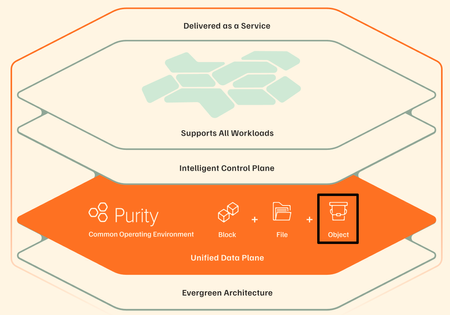
It happens! It's 11:45 PM on a Friday. An alert fires and storage latency has spiked across a production workload. The operator digs in and traces it back to an automated tiering policy that quietly moved a hot dataset to a slower tier because it looked idle based on a 24-hour access window, right before a scheduled batch job that runs every weekend. Nobody changed anything. The policy did exactly what it was configured to do. But nobody remembers configuring it that way, the documentation hasn't been touched in two years, and the monitoring dashboard shows storage as "healthy" because utilization is fine. It's just in the wrong place. The operator overrides the tier, performance recovers, and spends the next hour writing an incident report for a problem that shouldn't exist. A system that was supposed to make life easier made a decision with no context, no warning, and no visibility into why. That's the anger that doesn't go away quickly. It's not just frustration at the incident. It's the feeling that the tools are working against you instead of with you. The core problem in that story was a system making decisions with no context, no warning, and no visibility. Everpure Fusion attacks each of those problems: Unified visibility across the entire fleet: Everpure Fusion provides a global dataset as a single source of truth for discovery, management, and configuration of storage arrays so the operator isn't piecing together what happened across multiple dashboards, multiple arrays, multiple tickets after the fact. They see the full picture in one place, before things go wrong. Intelligent workload placement: Rather than static policies quietly acting on stale access patterns, Everpure Fusion uses AI-guided placement to boost performance and efficiency for every workload. It understands workload behavior, not just utilization snapshots, the kind of context that would have caught a batch job pattern before tiering the dataset down. Policy-driven governance with real control: Automated orchestration cuts manual tasks and speeds service delivery, while unified controls simplify audits, reduce risk, and prove compliance fast. Policies are visible, documented, and governable. Not buried configs nobody remembers setting. Built into the platform, not bolted on: Evepure Fusion is now simply a part of Purity, meaning it is not an add-on you have to install or buy, but rather a core piece of the Purity operating system. The operator doesn't have to manage another tool. The intelligence is already there. The operator in that story didn't need more alerts. They needed a system that understood context, made decisions transparently, and gave them control without requiring them to be online at midnight to maintain it. That's exactly the gap Everpure Fusion is designed to close - with One Fleet, Zero Complexity. Why policy-driven storage operations matter Everpure Fusion is built as the core of Everpure intelligent control plane that manages all arrays including FlashArray, FlashBlade, and cloud as a unified fleet, with one topology, one API, and one operational framework regardless of protocol or local - datacenter, cloud or edge. That uniformity is what makes policy enforcement reliable at scale. Everpure Fusion introduces workload-based provisioning through presets, which are predefined policy-driven templates for specific workload types, encoding protection policies, replication, and SafeMode retention from the moment a workload is provisioned, not patched in after an incident. Admins no longer need to pre-plan and tune deployments manually, which reduces the risk of non-compliance and improves resiliency by ensuring workloads are provisioned correctly from the beginning. The result is infrastructure that enforces your intent, not just your last manual action. Intelligent placement, rebalancing, and fleet-scale capacity control If you manage storage at scale, you've probably seen this scenario play out more than once. One array is buried, running hot, and screaming for relief. Three aisles over, another array is sitting at 40% utilization, doing almost nothing. And somewhere in between, your team is scrambling to provision capacity, kick off an emergency migration, and explain to stakeholders why an SLA was missed on a workload that, in hindsight, never should have been placed there in the first place. This is not a people problem. It is a tooling problem. And it is remarkably common. Everpure Fusion starts solving this problem at the moment of provisioning. When a new workload lands, most storage systems do a simple capacity check and place it wherever space is available. Everpure Fusion does something fundamentally different. The placement engine evaluates every array in the fleet simultaneously, looking at IOPS headroom, throughput capacity, and physical utilization before making a decision. The goal is not just to find somewhere to put the workload. It is to find the right home for it, one where it can live comfortably for the long term without creating a bottleneck down the road. Think of it as placing workloads with intention rather than convenience. Of course, environments do not stay static. Workloads grow, usage patterns shift, and an array that looked healthy six months ago can become a problem today. Everpure Fusion accounts for this with continuous rebalancing built directly into its operation. When an array starts trending toward overload, Everpure Fusion detects it and begins orchestrating data movement across the fleet automatically. No manual intervention required. No application downtime. Data migrates in the background while workloads keep running, and arrays that were sitting underutilized suddenly become productive members of your infrastructure. At fleet scale, now supporting up to 64 arrays, this turns capacity management from a constant firefight into something that largely runs itself. What makes this possible without disruption is how Everpure Fusion executes the move under the hood. It leverages ActiveCluster to stretch the volume across both the source and target arrays simultaneously, creating a synchronous mirror in place. Once the stretch is established, volumes are connected on the target array and hosts auto-discover the new target paths through standard multipathing. The target then validates that path usage is healthy and confirmed before any cutover begins. Only after that validation is complete are the volumes disconnected from the source, ensuring there is zero gap in access at any point in the sequence. Everpure Fusion then unstretches from the source array to complete the rebalance and release its capacity. The result is a seamless, non-disruptive migration that the application never sees. What truly sets Everpure Fusion apart from a standard load balancer is what happens under the hood. Powered by Pure1 AI and up to 30 days of historical workload data, Everpure Fusion does not just look at what is happening right now. It looks at what is about to happen. Say you have a workload that runs a heavy batch job every Saturday night. Everpure Fusion knows that. It has seen the pattern. So when the placement engine is evaluating tier assignments, it will never recommend moving that workload to a lower-performance tier just because it looks quiet on a Tuesday afternoon. It understands what Tuesday quiet actually means in context. And if that workload somehow ends up on the wrong tier, perhaps through a manual change or a migration gone sideways, Everpure Fusion will proactively raise a violation before the weekend arrives. Not after the SLA is missed. Before. The cumulative effect is that customers can operate their fleets closer to full utilization without the anxiety that normally comes with it. Underused hardware gets activated, incremental purchases get deferred, and the reactive, always-behind-the-curve model of capacity management starts to look like a problem from a previous era. And Everpure Fusion does not stop at the infrastructure layer. Through its integration with Pure1 Application Intelligence, Everpure Fusion gains deeper visibility into the nature of the workloads themselves, not just how they behave, but what they actually are. That additional context means smarter decisions at every level, from initial placement to long-term tier management, grounded in a more complete picture of what your environment is really doing. Workload rebalance and mobility will be available towards the end of 2026. Compliance as part of the control plane Most storage compliance workflows follow the same pattern: an audit is announced, someone pulls reports from three different tools, cross-references configuration against a spreadsheet of expected settings, and spends two weeks proving that workloads are protected the way they're supposed to be. Then the audit ends and nothing changes until the next one. That model breaks at fleet scale. When you're managing dozens of arrays across multiple sites and protocols, manual audits don't just slow you down — they leave gaps that only get discovered at the worst possible time. Everpure Fusion Compliance is built into the control plane, not bolted on after provisioning. Because Everpure Fusion presets encode protection policies, replication requirements, SafeMode retention, and QoS settings at deployment time, Everpure Fusion always knows what every workload's intended configuration is. Drift detection is continuous — not periodic. When a workload deviates from its preset, Everpure Fusion instantly surfaces the violation — visible in the UI, queryable via API or CLI, and accessible to AI agents through an MCP server. Remediation can be triggered directly through the same interfaces, without pulling in a separate tool or writing a custom script. Fleet-wide compliance dashboards give storage admins a live view of posture across every array, with exportable audit-ready reports that don't require manual assembly. The shift is meaningful: compliance becomes a property of how the fleet operates, not a project that interrupts how the team works. Everpure Fusion Compliance will be available towards the end of 2026. From dashboards and scripts to natural-language fleet operations You know the drill. A latency spike hits production. You open three dashboards, run a handful of CLI queries, dig through alert logs, and piece together enough context to understand what happened — and by then, you've already spent 45 minutes on a problem that should have taken five. The issue isn't the tools. It's that the context your fleet holds is trapped across systems that don't talk to each other. Everpure Fusion MCP Server changes that. Built on the open Model Context Protocol standard, it connects any MCP-compatible AI assistant — Claude, ChatGPT, Copilot, or internal agents — directly to live Everpure Fusion fleet state. Arrays, workloads, capacity, performance metrics, alert history, configuration, and placement data are normalized into clean, structured JSON and made available to AI in real time, pulled directly from Everpure Fusion and Purity REST APIs. The result: instead of navigating dashboards and stitching together CLI output, you ask a question. "Which arrays are approaching capacity?" "What's driving latency on this workload?" "Which workloads are drifting from their preset?" Everpure Fusion MCP Server answers from live fleet context, not stale snapshots. This is the on-ramp to agentic storage operations. Everpure Fusion already enforces policy and placement across the fleet. Pure1 adds AI-driven analytics and recommendations on top. Together, they give infrastructure operators the foundation to move from reactive troubleshooting to intent-driven, increasingly autonomous fleet management. Using topology groups to encode real infrastructure boundaries If your Everpure Fusion fleet's topology model lives in a color-coded spreadsheet, three wikis, and the institutional memory of one senior admin who never takes vacation — this is for you. Everpure Fusion, built into Purity for FlashArray and FlashBlade, introduces Topology Groups: fleet-scoped objects that let you describe your arrays in the same language your architecture diagrams already use — regions, availability zones, datacenters, rows, racks. No more provisioning a Everpure Fusion workload and hoping it lands in the right building. A Everpure Fusion Topology Group is a hierarchical, tree-structured object. Groups nest up to 10 levels deep (global → us-east → az-us-east-1a → dc01 → row3 → rack12), each array belongs to exactly one parent, and cycles are rejected at write time. Critically, they encode placement semantics — not access control. RBAC stays in Pure1 Resource Groups; topology stays in Everpure Fusion topology. Once modeled, Everpure Fusion presets reference groups using <group>.arrays notation. Everpure Fusion intersects the preset's allowed arrays with the group's membership at placement time. If there's no overlap, Everpure Fusion provisioning fails fast with a clear error — not silently in the wrong zone. The Everpure Fusion CLI shorthand makes automation clean: purevol list --context az-us-east-1a.arrays Everpure Fusion membership changes propagate automatically across the fleet. You stop maintaining a second source of truth outside the control plane. Stop treating topology as tribal knowledge. With Everpure Fusion, make it a first-class part of the intelligent control plane. Extending the model to Kubernetes and virtualization Most infrastructure operators are managing two parallel storage worlds right now: traditional VMs and databases on one side, Kubernetes-based containerized workloads on the other. Separate toolchains. Separate provisioning workflows. Separate everything. Everpure Fusion changes that. Through the Portworx Fusion Controller, Everpure Fusion extends its policy and placement control plane directly into Kubernetes — without forcing developers to change their existing workflows. Everpure Fusion auto-discovers your FlashArray and FlashBlade fleet, then exposes Everpure Fusion presets as native Kubernetes StorageClasses. That means when a developer requests a persistent volume, Everpure Fusion's placement engine resolves it against your existing policy constraints — storage class, protection policy, topology group, replication requirements — the same way it does for any other Everpure Fusion workload. No separate control plane for modern environments. No array-by-array configuration for each cluster. New arrays added to the fleet are automatically discovered and configured, so the operational model stays consistent as infrastructure grows. For VMware environments, Everpure Fusion extends the same operational model through the Everpure Fusion vSphere plugin, connecting storage management directly into virtualization workflows instead of running it as a separate administrative domain. The result: one control plane, one set of policies, one placement engine — spanning VMs, containers, and databases across the fleet. That is fewer parallel stacks to operate, less configuration drift between environments, and a more scalable path to consistent storage operations across the full infrastructure stack. Everpure Fusion as the storage admin foundation for autonomous operations The through-line across everything covered in this blog is simple: Everpure Fusion gives infrastructure operators a unified, policy-driven control plane that enforces intent consistently — across provisioning, placement, compliance, topology, and now Kubernetes and virtualization. That foundation matters because autonomous storage operations do not start with AI. They start with structure. Topology groups encode where workloads belong. Presets encode how they should be configured. Everpure Fusion presets exposed as StorageClasses ensure Kubernetes environments follow the same rules as everything else. When that structure is in place, AI can recommend, optimize, and eventually act — because the context is already clean, trusted, and machine-readable. For storage admins, the shift is real: less time resolving incidents caused by placement decisions nobody remembers making, more time defining the intent that governs the fleet. Everpure Fusion is that foundation — built into Purity, not bolted on. Want to learn more about Everpure Fusion? Check out the following links to dive deeper: Join the Everpure Fusion Mastery Program to build expertise, complete hands-on activities and earn rewards. Sign up for a Fusion test drive to try it out on your own time. Check out more about Fusion product details. Watch our cool new Fusion demo videos. Read Everpure Fusion Datasheet152Views0likes0Comments
Replication Solves Distribution. Auditing Solves Trust.
Ever wonder how to get data exactly where it needs to go without sacrificing security? This post explores how FlashBlade uses replication and auditing to make your data both mobile and trustworthy, helping you tackle everything from complex AI workflows to meeting strict compliance rules.153Views0likes0Comments6 Surprising Truths About Object Storage
This short, easy-to-consume article explains that cloud storage—especially object storage—is not just a bigger version of traditional storage but a fundamentally different system built for massive scale. It highlights key concepts like abstraction (separating how data is accessed from how it’s stored), the illusion of folders in a flat storage structure, and the power of rich, customizable metadata that turns storage into a searchable, automated platform. It also covers how Amazon’s S3 API became the industry standard, why objects are immutable (requiring full replacements instead of edits), and how low storage costs can be offset by expensive data retrieval fees. Overall, these design choices make object storage the backbone of modern cloud applications and data-driven systems.141Views0likes0CommentsWhy Object Storage Still Matters
In Part 2, I wrote a line that, at the time, felt almost like a side comment — something I typed without fully appreciating how much it would change the direction of the story: “BREAKING NEWS: The FlashArray now supports Object??? What in the world? I may need to write an article about that!!” That reaction wasn’t planned, and it definitely wasn’t me being clever. It was me looking at the GUI and thinking, “that can’t be right… can it?” It didn’t line up with how I’ve been modeling storage architectures in my head for years, which usually means one of two things: either something fundamentally changed… or I’ve been confidently wrong about part of this for a while. And if I’m being completely honest, there was also a second reaction happening in parallel — one that I didn’t write down at the time because it sounded slightly ridiculous even in my own head: “Wait… do I actually understand why object storage exists in the first place? And more importantly… what exactly was wrong with files?” That’s the part nobody likes to admit out loud. We’ve all spent years confidently explaining block, file, and object as if we were born with that knowledge, when in reality most of us learned it incrementally, retroactively, and with just enough conviction to sound credible in front of a customer. Object storage, in particular, has always carried this aura of inevitability — like of course it’s better, of course it scales, of course it’s what modern applications need — without always forcing us to question why the previous model stopped being enough. Because for as long as most of us have been designing infrastructure, object storage has not simply been another protocol layered onto an existing system. It has represented a fundamentally different way of organizing and accessing data, one that required its own architectural approach, its own scaling model, and, more often than not, its own dedicated platform. The separation between block, file, and object was not arbitrary; it was a reflection of how deeply different those paradigms were in terms of metadata handling, access patterns, and performance expectations. This is precisely why platforms such as Everpure FlashBlade exist in the first place. They were not created as extensions of traditional storage systems but as purpose-built architectures designed to treat unstructured data — and particularly object data — as a first-class citizen. The use of distributed metadata services, sharded across independent nodes, combined with a key-value store storage model, allows such systems to achieve levels of parallelism and throughput that simply cannot be replicated within a controller-based design. In that context, object storage is not something that is “added” to the system; it is the system. Which is why seeing S3 support appear on FlashArray required a pause. Not excitement. Not skepticism alone. Something closer to intellectual friction. Reconciling Two Architectural Worlds The most important step in understanding what FlashArray has introduced is to resist the temptation to treat it as a direct comparison to FlashBlade. These aren’t two different ways of solving the same problem. They’re two different answers to two different problems—and pretending otherwise is where people get themselves into trouble. FlashBlade is built for object, not adapted to it. S3 talks directly to a distributed engine that thinks in objects, not files pretending to be objects. Metadata is spread across blades instead of becoming a centralized choke point, and the whole system scales the way modern workloads actually need it to. There’s no file system layer to fight with, no directory structure to navigate, no POSIX semantics getting in the way. It just does what you’d expect when you remove all of that: it goes fast, it scales cleanly, and it keeps up with workloads like HPC, AI and analytics without breaking a sweat. FlashArray takes a very different path, and in reality, it’s not what most people expect. It doesn’t try to reinvent itself as an object platform, and it doesn’t throw an S3 gateway in front of the array and call it a day. With Purity 6.10.5+, S3 just shows up as another protocol the system understands, right next to block and file. That distinction matters more than it seems. This isn’t something duct-taped on the side — it’s part of the same control plane, the same data path, the same system you’ve already been running. But let’s not pretend it turned into FlashBlade overnight. This is still a controller-driven architecture. The primary controller does the heavy lifting — handling requests, authenticating them, coordinating operations — before anything actually hits the storage engine. Which means it behaves differently, especially as workloads scale. So it ends up in this interesting middle ground. Not a native object system in the pure sense, but not a hack either. Just a different way of exposing what’s already there. The Translation Layer and Its Consequences It would be irresponsible to discuss FlashArray S3 without explicitly addressing the implications of this design. Even with its native integration into Purity, S3 operations are still subject to the realities of a controller-bound architecture. Every request must be processed, authenticated, and coordinated before it is executed, introducing a measurable difference in behavior compared to both native block operations and distributed object systems. The most immediate effect is latency. While FlashArray continues to deliver sub-150 microsecond performance for block workloads, S3 operations typically operate at higher latencies (in 1 millisecond range) due to the additional processing steps involved. This is not a flaw; it is the natural outcome of introducing a protocol that was designed for scale and flexibility into a system optimized for low-latency transactional workloads. Metadata handling further reinforces this distinction. FlashBlade distributes metadata across its architecture, enabling massive parallelism and consistent performance at scale. FlashArray processes metadata through its controller framework, which introduces natural serialization points under high concurrency. As workloads become increasingly metadata-heavy — particularly with small objects — this difference becomes more pronounced. The system also enforces clearly defined operational limits to maintain predictable performance. As of Purity 6.10.5+, FlashArray supports up to 250 S3 buckets per array and a maximum of 1,000,000 objects per bucket. FlashArray Object Store Limits Object storage operates at the array scope and does not integrate with multi-tenancy or “realms”, which has implications for service provider models and strict tenant isolation requirements. These constraints are not arbitrary limitations; they are guardrails that ensure the system behaves consistently within its architectural boundaries. Where the Architecture Becomes Secondary Having established those boundaries, the conversation naturally shifts from “how it works” to “why it matters”. In many enterprise environments, particularly within SLED organizations, the challenge is not achieving exabyte-scale throughput or supporting billions of objects. The challenge is delivering capabilities in a way that is operationally sustainable, economically efficient, and aligned with existing infrastructure. This is where FlashArray’s approach becomes compelling. By exposing object storage within the same platform that already supports block and file workloads, it eliminates the need to introduce a separate system, a separate operational model, and a separate set of dependencies. The same management interface, the same automation framework, and the same data services extend across all protocols. More importantly, object data inherits the full set of Purity capabilities. Global inline deduplication and compression apply to S3 workloads, significantly improving storage efficiency compared to many object-native platforms. SafeMode snapshots extend immutability to object storage, providing a critical layer of protection against ransomware. ActiveCluster, combined with ActiveDR, enables a three-site resilience model that ensures data availability across multiple locations with zero RPO between primary sites. These are not incremental improvements. They represent a shift in how object storage can be consumed within an enterprise. Practical Use Cases in a Unified Model When viewed through this lens, the use cases for FlashArray S3 become both clear and grounded in reality. Development and Staging Environments Some applications rely on S3 APIs but do not require massive scale, FlashArray provides a consistent and integrated object interface without introducing additional infrastructure. Developers can build and test against a familiar model while remaining within the same operational environment. Backup and Recovery Workflows FlashArray S3 enables modern data protection strategies that leverage object storage while benefiting from flash performance, deduplication, and indelible snapshots. This combination improves both recovery times and storage efficiency. Tier-two repositories and application-integrated storage represent another natural fit. Workloads such as document management systems, logs, and archival data often require object semantics but do not justify the higher cost of a dedicated object platform. Consolidating these workloads onto FlashArray simplifies operations while maintaining reliability and performance. Where the Boundaries Still Matter None of this diminishes the importance of selecting the appropriate platform for workloads that demand a different architecture. High-performance AI pipelines, large-scale analytics environments, and use cases requiring massive parallelism remain firmly within the domain of FlashBlade. The ability to scale performance linearly, distribute metadata across many nodes, and support billions of objects is not optional in these scenarios — it is essential. What has changed is not the relevance of those systems, but the necessity of deploying them for every object storage use case. A Subtle but Significant Shift The introduction of S3 on FlashArray does not represent a replacement of one architecture with another. It represents a convergence of capabilities within a unified operational framework. Object storage, in this model, is no longer a destination that requires its own platform. It becomes a capability — one of several ways to access and manage data within the same system. That shift is easy to overlook, but its implications are significant. It allows organizations to design around outcomes rather than protocols, to reduce complexity without sacrificing capability, and to align infrastructure more closely with the needs of modern applications. Closing Reflection Looking back at that line in Part 2, it is clear that the reaction was not just about a new feature appearing in the interface. It was about the recognition — however incomplete at the time — that something foundational was beginning to change. Object storage did not suddenly become simpler, nor did it lose the architectural complexity that defines it. What changed is where it lives. And once that becomes clear, you start asking a slightly uncomfortable but very honest question: If this works… and it works well enough for most of what I actually need… why was I so convinced it had to live somewhere else in the first place? That is usually where the interesting work begins. Appreciate you reading. Dmitry Gorbatov © 2025 Dmitry Gorbatov | #dmitrywashere453Views1like0CommentsBoosting SQL Server Backup/Restore Performance: Threads and Parallelism
In this post, we’ll discuss day 1 tuning you can do on your database hosts to take full advantage of your new high-performance backup storage. We’ll go over a few tricks around database layout and backup configuration for maximum throughput, discuss some quirks with SMB, and finally discuss using S3 effectively.318Views1like0Comments
A list of useful Purity CLI commands to manage Pure Flash Storage arrays.
"pureadmin" commands The pureadmin command displays and manage administrative accounts in Pure Flash Storage Array (22 Commands) Explanation pureadmin create testuser --api-token Generate an API token for the user testuser pureadmin create testuser --api-token --timeout 2h Create API Token for testuser valid for 2 hours pureadmin create testuser --role storage_admin Create user testuser with storage_admin role. Possible roles are readonly, ops_admin, storage_admin, array_admin pureadmin delete --api-token Delete API Token for current user pureadmin delete testuser Delete user testuser from Flash Array pureadmin delete testuser --api-token Delete API Token for user testuser pureadmin global disable --single-sign-on This will disable single sign-on on the current array. Enabling single sign-on gives LDAP users the ability to navigate seamlessly from Pure1 Manage to the current array through a single login. pureadmin global enable --single-sign-on This enables single sign-on on the current array. Enabling single sign-on gives LDAP users the ability to navigate seamlessly from Pure1 Manage to the current array through a single login. pureadmin global list List the global administration attributes like Lockout Duration, Maximum Login Attempts, Minimum Password Length, etc.. pureadmin global setattr --lockout-duration 1m Set the lockout duration to 1 minute after maximum unsuccessful login attempts. pureadmin global setattr --max-login-attempts 3 Set the maximum failed login attempts to 3 before the user get locked out. pureadmin global setattr --min-password-length 8 Set the minimum length of characters required for all the local user account passwords to 8. Minimum length allowed is 1. This will not affect the existing user accounts, but all future password assignment must meet the new value. pureadmin list List all the users configured in the Flash Array pureadmin list --api-token List all the users with api tokens configured pureadmin list --api-token --expose List all the users with api tokens configured and expose the api token for the current user loggedin. pureadmin list --lockout List all the user accounts that are currently lockout pureadmin refresh --clear Clears the permission cache for all the users pureadmin refresh --clear testuser Clears the permission cache for testuser pureadmin refresh testuser Refresh the permission cache for testuser pureadmin reset testuser --lockout Unlock locked user testuser pureadmin setattr testuser --password Change the password for the user testuser pureadmin setattr testuser --role array_admin Change the role of the user testuser to array_admin role. Possible roles are readonly, ops_admin, storage_admin, array_admin "purealert" commands The purealert command manages alert history and the list of designated email addresses for alert notifications (8 Commands) Explanation purealert flag 121212 Flag an alert with ID 121212. This will appear in the flagged alert list. purealert list List all the alerts generated in the Pure Flash Array purealert list --filter "issue='failure'" List all the alerts generated for failures purealert list --filter "severity='critical'" List all the alerts with Critical severity. purealert list --filter "state='closed'" List all the closed alerts purealert list --filter "state='open'" List all the alerts in Open state purealert list --flagged List all the alerts that are flagged. By default all alerts are flagged. We can unflag command once those are resolved. purealert unflag 121212 Unflag alert with ID 121212. This will not appear in the flagged alert list. "purearray" commands The purearray command displays attributes and monitors I/O performance in Pure Flash Storage Array (24 Commands) Explanation purearray connect --management-address 10.0.0.1 --type async-replication --connection-key Connects the local array to remote array 10.0.0.1 for asynchronous replication using the connection key. The Connection key will be prompted to enter. purearray connect --management-address 10.0.0.1 --type sync-replication --connection-key Connects the local array to remote array 10.0.0.1 for synchronous replication using the connection key. The Connection key will be prompted to enter. purearray connect --management-address 10.0.0.1 --type sync-replication --replication-transport ip -- connection-key Connects the local array to remote array 10.0.0.1 for synchronous replication via Ethernet transport using the connection key. The Connection key will be prompted to enter. purearray disable phonehome Disable phonehome or dialhome feature of array. purearray disconnect 10.0.0.1 Disconnects array 10.0.0.1 from the local array connected for remote replication. purearray enable phonehome Enable phonehome or dialhome feature of array. purearray list Display the array name,serial number and firmware version purearray list --connect Display remotely connected arrays for replication purearray list --connect --path Display arrays connected for remote replication along with connection paths purearray list --connect --throttle Display the replication throttle limit purearray list --connection-key Display the connection key that can be used to connect to the array purearray list --controller List all the controllers connected to the Array. This will also display the model and status of each controller purearray list --ntpserver List the NTP servers configured purearray list --phonehome Display the dial home configuration status of the Array purearray list --space Display the capacity and usage statistics information of the Array. purearray list --space --historical 30d Display the capacity and usage statistics information of the Array since last 30 days purearray list --syslogserver List the syslog server names configured to push the logs in pure array purearray monitor --interval 4 --repeat 5 Display the array-wide IO performance of a Flash Array in every 4 seconds for 5 times. purearray remoteassist --status check the Remote Assist is active or inactive purearray rename MYARRAY001 Set the name of the array to MYARRAY001 purearray setattr --ntpserver '' Remove all the NTP servers configured for pure array purearray setattr --ntpserver time.google.com Set the NTP server purearray setattr --syslogserver '' Remove all the syslog server servers configured for pure array purearray setattr --syslogserver log.server.com set the syslog server for pure array "pureaudit" commands The pureaudit command displays and manages the audit logs record details in Pure Flash Storage Array (7 Commands) Explanation pureaudit list Display the list of audit records. Audit trail records are created whenever administrative actions are perfromed by a user (for eg: creating, destroying, eradicating a volume) pureaudit list --filter 'command="purepod" and subcommand="create"' List all the audit records for purepod create command executed in the array pureaudit list --filter 'command="purepod" and user="pureuser"' List all the audit records for purepod commands executed by pureuser in the array pureaudit list --filter 'command="purepod"' List all the audit records for purepod command executed in the array pureaudit list --filter 'user = "root"' Display the list of audit records for the root user pureaudit list --limit 10 Display the first 10 rows of audit records pureaudit list --sort user Display the list of audit records sorted by the user field. By default the records are sorted by the time field "pureconfig" commands The pureconfig command provides commands to reproduce the current Pure Flash Storage Array configuration (4 Commands) Explanation pureconfig list Display list of commands to reproduce the volumes, hosts, host groups, connections, network, alert and array configurations. Copying this and running in another array will create an exact copy. pureconfig list --all Displays all the commands required to reproduce the current FlashAarray configuration of hosts, host groups, pods, protection groups, volumes, volume groups, connections, file systems and directories, alert, network, policies, and support. pureconfig list --object Displays the object configuration of the FlashArray including hosts, host groups, pods, protection groups, volumes, volume groups, and connections, as well as file systems and directories if file services are enabled. pureconfig list --system Displays the system configuration of the flah array including network, policies, alert and support puredns commands The puredns command manages the DNS attributes for an arrays administrative network. (4 Commands) "puredns" list Display the current DNS parameters configured in the array. This includes the domain suffixes and IP addresses of the name servers Explanation puredns setattr --domain "" Removes the domain suffix from Purity//FA DNS queries puredns setattr --domain test.com --nameservers 192.168.0.10,192.168.2.11 Add the IPv4 addresses of two DNS servers for Array to use to resolve hostnames to IP addresses, and the domain suffix test.com for DNS searches. puredns setattr --nameservers"" Unassigns DNS server IP addresses from the DNS entry. This will stop making DNS entries. "puredrive" commands The puredrive command provides information about the Flash Drives and NVRAM modules in Pure Flash Storage Array (6 Commands) Explanation puredrive admit Admit all drive modules that have been added or connected but not yet admitted to the array. Once successfully admitted, the status of the drive modules will change from unadmitted to healthy. puredrive list List all the flash drive modules in an Array. This will also display the capacity of each module. puredrive list --spec List all the flash drive modules in an Array along with Protocol( SAS/NVME) information puredrive list --total List all the flash drive modules in an Array with the total capacity figure puredrive list CH0.BAY10 Display information about flash drive BAY10 in CH0 puredrive list CH0.BAY10 --pack Display information about flash drive BAY10 in CH0 and all other drives in the same pack4.2KViews1like0CommentsPure FlashArray CLI Quick References (daily feeds)
Questions Commands Explanations How to reduce the size of a Volume in Pure Flash Array purevol truncate --size 1G MY_VOL_001 Reduce the size of MY_VOL_001 to 1GB ( from current size of 8GB for example ) How to list all flash drives and NVRAM modules in a Pure Flash Array with total capacity puredrive list --total List all the flash drive modules in an Array with the total capacity figure How to disconnect volume from host in Pure Flash Array purevol disconnect MY_VOL_001 --host MY-SERVER-001 Disconnect volume MY_VOL_001 from host MY-SERVER-001. This will remove the visibility of the volume to the host. How to create a hostgroup with existing hosts in Pure Flash Array purehgroup create MY-HOSTS --hostlist MY-HOST-001,MY-HOST-002 Create hostgroup MY-HOSTS and add existing hosts MY-HOST-001 and MY-HOST-002 in to it How to stretch a POD purepod add --array PFAX70-REMOTE MYPOD001 Add the remote array PFAX70-REMOTE to the POD MYPOD001. This will stretch the POD and volume data inside the POD synchronously replicated between two arrays. The arrays in a stretched POD are considered as peers, there is no concept of source and target. Volumes within the POD will be visible in each arrays with same serial numbers. How to create multiple Volume in a Pure Flash Array purevol create --size 10G MY_VOLUME_001 MY_VOLUME_002 Create Virtual volumes MY_VOLUME_001 and MY_VOL_SIZE_002 of size 10GB How to remove hosts from hostgroups in Pure Flash Array purehgroup setattr MY-HOSTS --remhostlist MY-HOST-002,MY-HOST-003 Remove MY-HOST-002 and MY-HOST-003 from hostgroup MY-HOSTS How to delete host object in a Pure Flash Array purehost delete MY-SERVER-001 Delete host MY-SERVER-001 How to search for HBA WWN and on which FC port its been logged in to on Flash Array pureport list --initiator --raw --filter "initiator.wwn='1000000000000001'" Search for HBA WWN 1000000000000001 and on which FC port its been logged in to. How to list all the closed alerts in the Pure Flash array purealert list --filter "state='closed'" List all the closed alerts How to disconnect a specific volume from the host in Pure Flash Array purehost disconnect MY-SERVER-001 --vol MY_VOL_001 Disconnect volume MY_VOL_001 from host MY-SERVER-001. This will remove the visibility of the volume to the host. How to display the connection key that can be used to connect to a Pure Flash Array purearray list --connection-key Display the connection key that can be used to connect to the array How to list all the users configured in the Flash Array pureadmin list List all the users configured in the Flash Array How to list all the Volumes in a Pure Flash Array purevol list List all the Virtual Volume How to list all the drive modules in a Pure Flash Array purehw list --type bay List all the Drive modules in an Array How to display all the Flash Array Target Ports pureport list Display all the target ports within the Flash Array. This includes FC, iSCSI and NVME ports. This command also displays WWNs of FC ports iSCSI Qualified Names(IQNs) for iSCSI ports and NVMe Qualified Names(NQNs) for NVMe ports. How to move the volume to the pod in a Pure Flash array purevol move vol001 MYPOD001 Move the volume vol001 to the non-stretched pod. This will throw an error message if trying to add to a stretched pod. How to display the current DNS parameters configured in the Pure Flash array puredns list Display the current DNS parameters configured in the array. This includes the domain suffixes and IP addresses of the name servers How to destroy a POD purepod destroy MYPOD001 Destroy or delete POD MYPOD001. The POD must be empty and unstretched to destroy. POD will not be destructed immediately, but placed under 24hr eradication pending period. How to display the syslog server setting for a Pure Flash Array purearray list --syslogserver List the syslog server names configured to push the logs in pure array How to list all flash drives and NVRAM modules in a Pure Flash Array puredrive list List all the flash drive modules in an Array. This will also display the capacity of each module. How to monitor replica links in a Pure Flash array purepod replica-link monitor --replication Monitor the data transfer speed on the replica links on the array. If the replication link is pause, the speed will show as 0 How to list all the volumes connected to a Host purehost list MY-SERVER-001 --connect List all the volumes connected to Host MY-SERVER-001 How to list all the PODs in the Pure Flash array purepod list List all the PODs in the Pure Flash array. This will shows the arrays in POD and status of each. How to display the arraywide IO performance of a Pure Flash Array purearray monitor --interval 4 --repeat 5 Display the array-wide IO performance of a Flash Array in every 4 seconds for 5 times. How to display all the FC Ports in a controller within the Flash Arrays pureport list --raw --filter "name='CT0.FC*'" Display all the Fibre Channel Ports in Controller 0 with its WWNs in the Flash Arrays How to disconnect volume from hostgroup in Pure Flash Array purehgroup disconnect MY-HOSTS --vol MY_VOL_001 Disconnect volume MY_VOLUME_001 from hostgroup MY-HOSTS How to remove all the hosts from a hostgroup in Pure Flash Array purehgroup setattr MY-HOSTS --hostlist "" Remove all the hosts from hostgroup MY-HOSTS How to disconnect remote array from the local Pure Flash array purearray disconnect 10.0.0.1 Disconnects array 10.0.0.1 from the local array connected for remote replication. How to set the minimum password length of user accounts in a Pure Flash array pureadmin global setattr --min-password-length 8 Set the minimum length of characters required for all the local user account passwords to 8. Minimum length allowed is 1. This will not affect the existing user accounts, but all future password assignment must meet the new value. How to connect volume with hostgroup in Pure Flash Array purehgroup connect MY-HOSTS --vol MY_VOL_001 Connect volume MY_VOLUME_001 to hostgroup MY-HOSTS. This will assign a lun id to the volume. The lun id will start from 254 and go down up to 1If all LUNs in the [1...254] range are taken, Purity//FA starts at LUN 255 and counts up to the maximum LUN 16383, assigning the first available LUN to the connection. How to rename a host object in a Pure Flash Array purehost rename MY-SERVER-001 YOUR-SERVER-001 Rename host MY-SERVER-001 to YOUR-SERVER-001 How to demote a pod in Pure Flash array purepod demote MYPOD001 Demote the pod MYPOD001 How to change the bandwidth a Volume in Pure Flash Array purevol setattr --bw-limit 1M MY_VOL_001 Change the bandwidth limit of MY_VOL_001 to 1MB/s How to connect volume to host in Pure Flash Array purevol connect MY_VOL_001 --host MY-SERVER-001 Connect volume MY_VOL_001 to host MY-SERVER-001. This will Provide the R/W access to the volume.Next available lun address will used by default. How to connect a volume to multiple hosts in Pure Flash Array purehost connect MY-SERVER-001 MY-SERVER-002 --vol MY_VOL_001 Connect volume MY_VOL_001 to hosts MY-SERVER-001 and MY-SERVER-002 How to connects the local Pure Flash array to remote array for asynchronous replication using the connection key purearray connect --management-address 10.0.0.1 --type async-replication --connection-key Connects the local array to remote array 10.0.0.1 for asynchronous replication using the connection key. The Connection key will be prompted to enter. How to display all the iSCSI Ports in aFlash Array pureport list --raw --filter "name='*ETH*'" Display all the iSCSI Ports with its IQNs in the Flash Arrays How to connect multiple volumes to host in a Pure Flash Array purevol connect MY_VOL_001 MY_VOL_002 --host MY-SERVER-001 Connect volumes MY_VOL_001 and MY_VOL_002 to host MY-SERVER-001 How to create a host object in Pure Flash Array purehost create MY-SERVER-001 Create a host object called MY-SERVER-001. HBA wwns can be added later using purehost setattr command. How to create snap shot of a Volume in a Pure Flash Array purevol snap MY_VOL_001 Create snap shot of MY_VOL_001. If it is first snap then MY_VOL_001.2 will be created How to increase the size of multiple Volume in Pure Flash Array purevol setattr --size 2G MY_VOL_001 MY_VOL_002 Increase the size of MY_VOL_001 and MY_VOL_002 to 2GB ( the current size of MY_VOL_001 is 500MB and MY_VOL_002 is 1GB, for example ) How to remove hba wwn from a host object in Pure Flash Array purehost setattr MY-SERVER-001 --remwwnlist 1000000000000003 Remove HBA wwn 1000000000000003 from host MY-SERVER-001 How to create multiple host objects in a Pure Flash Array purehost create MY-SERVER-001 MY-SERVER-002 Create hosts MY-SERVER-001 and MY-HOST-002 How to display the personality of a host purehost list MY-SERVER-001 --personality Display the personality of host MY-SERVER-001 How to list the hosts and personality assigned to each purehost list --personality Display the list hosts along with the personality set against each. The personality is define using the purehost setattr command. How to unlock a locked user in Flash Array pureadmin reset testuser --lockout Unlock locked user testuser How to list all the volumes sorted by serial number in descending order on a Pure Flash Array purevol list --sort "serial-" List all the volumes sorted by serial number descending order How to create a Volume in a Pure Flash Array purevol create --size 10G MY_VOLUME_001 Create a Virtual volume called MY_VOLUME_001 of size 10GB583Views1like0CommentsPure FlashArray CLI Quick References (daily feeds)
Questions Commands Explanations How to display the NTP servers configured in a Pure Flash Array purearray list --ntpserver List the NTP servers configured How to enable phonehome in a Pure Flash Array purearray enable phonehome Enable phonehome or dialhome feature of array. How to list all the FC ports in a Pure Flash Array purehw list --type fc List all the FC ports in an Array with status and speed information How to configure the DNS attributes of a Pure Flash array puredns setattr --domain test.com --nameservers 192.168.0.10,192.168.2.11 Add the IPv4 addresses of two DNS servers for Array to use to resolve hostnames to IP addresses, and the domain suffix test.com for DNS searches. How to list all the connected volumes for a hostgroup in a Pure Flash array purehgroup list --connect MY-HOSTS List all the connected volumes for hostgroup MY-HOSTS How to add hosts to existing hostgroups in Pure Flash Array purehgroup setattr MY-HOSTS --addhostlist MY-HOST-002,MY-HOST-003 Add MY-HOST-002 and MY-HOST-003 to existing hostgroup MY-HOSTS How to list all the Controllers in a Pure Flash Array purehw list --type ct List all the Controller in an Array How to eradicate multiple Virtual Volumes in Pure Flash Array purevol eradicate MY_VOL_001 MY_VOL_002 Eradicate virtual volumes MY_VOL_001 and MY_VOL_002 which are destroyed earlier. This will fully destroy the volumes and not be able to recover further. How to add new HBA wwn to a host object in Pure Flash Array purehost setattr MY-SERVER-001 --addwwnlist 1000000000000003 Add new HBA wwn 1000000000000003 to host MY-HOST-001. 1000000000000003 should not be part of any other host. How to display all the host initiators know to the Flash Array pureport list --initiator Display all the host initiator WWNs, IQNs, NQNs known for the Flash Array. This also shows the target ports on which the initiators are eligible to communicate. How to list all the flagged alerts in a Pure Flash array purealert list --flagged List all the alerts that are flagged. By default all alerts are flagged. We can unflag command once those are resolved. How to display the Dial Home status of a Pure Flash Array purearray list --phonehome Display the dial home configuration status of the Array How to unflag an alert in the Pure Flash array purealert unflag 121212 Unflag alert with ID 121212. This will not appear in the flagged alert list. How to rename a Pure Flash Array purearray rename MYARRAY001 Set the name of the array to MYARRAY001 How to admit the newly connected drive modules in a Pure Flash array puredrive admit Admit all drive modules that have been added or connected but not yet admitted to the array. Once successfully admitted, the status of the drive modules will change from unadmitted to healthy. How to display the replication throttle limit of a Pure Flash Array purearray list --connect --throttle Display the replication throttle limit How to eradicate a Volume in Pure Flash Array purevol eradicate MY_VOL_001 Eradicate virtual volume MY_VOL_001 which is destroyed earlier. This will fully destroy the volume and not be able to recover further. How to unstretch a POD purepod remove --array PFAX70-REMOTE MYPOD001 Remove the remote array PFAX70-REMOTE from the POD MYPOD001. This will unstretch the POD and volume data inside the POD no longer synchronously replicated between two arrays. Volumes within the POD will be only visible in local array. How to list all the Open alerts in a Pure Flash array purealert list --filter "state='open'" List all the alerts in Open state How to list all the Hosts with connected volumes purehost list --connect List all the hosts in a Flash Array which have connected volumes How to create a volume and include in POD purevol create --size 1G MYPOD001::MY_VOL_001 Create a volume of 1GiB size and include it in MYPOD001. If MYPOD001 is stretched, the same volume will be created and visible on the remote arrays too. The volume name and WWN number will appear same from each arrays. How to list all the volumes sorted by size and consumption on a Pure Flash Array purevol list --space --sort size,total List all the volumes sorted by size of each volume and then total space consumed. Both fields are sorted in ascending order. How to pause the replication link in a Pure Flash array purepod replica-link pause PRDPOD001 --remote ARRAY002 --remote-pod DRPOD001 Pause the Active/DR replication by pausing the replica link connection between local and remote array. To continue the replication resume the replica link How to recover a Volume in Pure Flash Array purevol recover MY_VOL_001 Recover virtual volume MY_VOL_001 which is destroyed earlier. How to change the role of a user in Flash Array pureadmin setattr testuser --role array_admin Change the role of the user testuser to array_admin role. Possible roles are readonly, ops_admin, storage_admin, array_admin How to move the volume out of a pod in Pure Flash array purevol move MYPOD001::vol001 "" Move the volume vol001 out of the non-stretched pod MYPOD001. Will throw an error if trying to move from a stretched pod. How to connect volume to hostgroup in Pure Flash Array purevol connect MY_VOL_001 --hgroup MY-HOSTS Connect volume MY_VOL_001 to hostgroup MY-HOSTS. This will assign a lun id to the volume. The lun id will start from 1 and go up to 16383. How to list all the Hosts in a Flash Array purehost list List all the hosts in a Flash Array with its member WWNs or IQNs or NQNs. This will also show the Host Groups if it part of any. How to create a copy of Volume in Pure Flash Array purevol copy MY_VOL_001 MY_VOL_002 Create a copy MY_VOL_001 and name it as MY_VOL_002. If MY_VOL_002 already exists this will throw and error. How to rename a Volume in Pure Flash Array purevol rename MY_VOL_001 MY_VOL_002 Rename virtual volume MY_VOL_001 to MY_VOL_002 How to display the historical capacity and usage statistics information of a Pure Flash Array purearray list --space --historical 30d Display the capacity and usage statistics information of the Array since last 30 days How to connect host to volume with a specific LUN id in Pure Flash Array purehost connect MY-SERVER-001 --vol MY_VOL_001 --lun 10 Connect volume MY_VOL_001 to host MY-SERVER-001 and assign LUN id 10. This will Provide the R/W access to the volume. How to list all the snap shots in a Pure Flash Array purevol list --snap List all the snap shots How to list all the users with api tokens configured in the Flash Array pureadmin list --api-token List all the users with api tokens configured How to reduce the size of a Volume in Pure Flash Array purevol truncate --size 1G MY_VOL_001 Reduce the size of MY_VOL_001 to 1GB ( from current size of 8GB for example ) How to list all flash drives and NVRAM modules in a Pure Flash Array with total capacity puredrive list --total List all the flash drive modules in an Array with the total capacity figure How to disconnect volume from host in Pure Flash Array purevol disconnect MY_VOL_001 --host MY-SERVER-001 Disconnect volume MY_VOL_001 from host MY-SERVER-001. This will remove the visibility of the volume to the host. How to create a hostgroup with existing hosts in Pure Flash Array purehgroup create MY-HOSTS --hostlist MY-HOST-001,MY-HOST-002 Create hostgroup MY-HOSTS and add existing hosts MY-HOST-001 and MY-HOST-002 in to it How to stretch a POD purepod add --array PFAX70-REMOTE MYPOD001 Add the remote array PFAX70-REMOTE to the POD MYPOD001. This will stretch the POD and volume data inside the POD synchronously replicated between two arrays. The arrays in a stretched POD are considered as peers, there is no concept of source and target. Volumes within the POD will be visible in each arrays with same serial numbers. How to create multiple Volume in a Pure Flash Array purevol create --size 10G MY_VOLUME_001 MY_VOLUME_002 Create Virtual volumes MY_VOLUME_001 and MY_VOL_SIZE_002 of size 10GB How to remove hosts from hostgroups in Pure Flash Array purehgroup setattr MY-HOSTS --remhostlist MY-HOST-002,MY-HOST-003 Remove MY-HOST-002 and MY-HOST-003 from hostgroup MY-HOSTS How to delete host object in a Pure Flash Array purehost delete MY-SERVER-001 Delete host MY-SERVER-001 How to search for HBA WWN and on which FC port its been logged in to on Flash Array pureport list --initiator --raw --filter "initiator.wwn='1000000000000001'" Search for HBA WWN 1000000000000001 and on which FC port its been logged in to. How to list all the closed alerts in the Pure Flash array purealert list --filter "state='closed'" List all the closed alerts How to disconnect a specific volume from the host in Pure Flash Array purehost disconnect MY-SERVER-001 --vol MY_VOL_001 Disconnect volume MY_VOL_001 from host MY-SERVER-001. This will remove the visibility of the volume to the host.534Views0likes0CommentsAsk Us Everything about Object Storage
💬 Get ready for our February 2026 edition of Ask Us Everything, this Friday, February 20th at 9 AM Pacific. This month is all about Object Storage. If you have a burning question, feel free to ask it here early and we'll add it to the list to answer tomorrow. Or if we can't get it answered live, our Pure Storage experts can follow up here. Karthik Srinivasan, Flashman & dpoorman are the experts answering your questions during the conversation and here on the community. See you this Friday! (Oh, and if you haven't registered yet, there's still time!) Or, check out this self-serve resource: Object Storage Webinar EDIT: Thanks for joining in! If you have additional burning questions and comments, leave them in the comments below for the team!861Views0likes0CommentsAsk Us Everything about Object Storage
February 20 | Register Now! 9:00AM PT • 12:00PM ET Got questions about object storage? Get answers. This month we’re diving into object storage and how Pure Storage helps customers manage explosive, unstructured data growth with a simpler, more unified approach. Get an overview of how Pure Storage FlashBlade®, FlashArray™, and Pure Fusion™ work together to deliver a seamless object experience across edge, core, and cloud. Learn how Pure Storage enables native data mobility, centralized management, and global visibility—without the silos and operational overhead of traditional architectures. Bring your questions for our experts who are ready to discuss object storage use cases, deployment models, and how Pure Storage empowers you to build a flexible, future-ready foundation for unstructured data—wherever it’s created and consumed. Ask a question for your chance to win: The first 10 eligible Pure Storage customers to submit a question during the live webinar will receive one (1) Pure Storage Customer Appreciation Kit (approximate retail value: $65). Limit one kit per customer. Offer valid only during the live event and while supplies last.129Views0likes0Comments