Ask Us Everything Recap: Rethinking Storage with the Intelligent Control Plane
The latest Ask Us Everything session focused on a topic that’s quickly becoming central to Everpure’s strategy: the intelligent control plane. And based on the questions from the community, it’s clear that many teams are starting to think beyond individual arrays and toward managing storage as a unified platform. Here are the key takeaways—driven by the questions attendees asked and the answers from Everpure experts Don Poorman, Zane Allyn and Mike Nelson. “Do I need to rebuild my automation to use Everpure Fusion?” Most teams already have automation in place, whether it’s Terraform, Ansible, or years of scripts. The good news: you don’t have to start over. Everpure Fusion is API-driven, so existing workflows can stay intact. In practice, you’re simply shifting from targeting individual arrays to targeting the fleet as a whole. That often means adding a parameter, not rewriting everything. Everpure Fusion picks up where any existing automation gets bogged down, so tasks get simpler as you scale, not more complex. The takeaway: Everpure Fusion helps you scale your existing automation—it simplifies, standardizes and extends it across your data estate. “What does API-first really mean here?” At Everpure, API-first isn’t just a label. The APIs are built before the GUI, which means everything you can do in the GUI is already available programmatically. For practitioners, that translates to flexibility. Whether you’re scripting, using infrastructure-as-code, or experimenting with AI-driven workflows, you’re not waiting for features to be exposed—you already have access. It’s a subtle difference from legacy storage, where automation often lags behind the interface. “How do I approach automation without losing control?” Attendees raised a common concern: automation can feel risky. The advice was straightforward—start with outcomes, not everything at once. Automate a single workflow, apply guardrails, and expand gradually. Automation here isn’t about removing control. It’s about: Reducing repetitive work Minimizing human error Freeing up time for higher-value tasks For most admins juggling multiple systems, that shift is practical—not theoretical. “What does this look like in real workflows?” One of the most relatable examples discussed was a ServiceNow-style request flow. Instead of manually provisioning storage across multiple systems, a user submits a request describing what they need—performance, protection, and resiliency. From there, Everpure Fusion and Pure1 handle the process automatically. The result is faster, more consistent delivery with fewer manual steps. More importantly, it abstracts the complexity away from both the admin and the requester. That’s a major difference from legacy environments, where admins must manage each step across each array. “What do I actually need to install?” This answer surprised some people. Everpure Fusion isn’t a separate product. It’s built into Purity. Once you’re on the right version (Purity//FA 6.8.1 or later, Purity//FB 4.5.5 or later), getting started is simple: Create a fleet Add arrays That’s it. No additional infrastructure, no separate control plane to deploy. This lowers the barrier significantly and makes it easy to start small and build as your needs require. “How does this scale?” As expected, scale came up quickly. Instead of managing arrays individually, Everpure Fusion introduces fleet-level management. New capabilities like topology groups allow further organization within that fleet—by region, workload, or compliance requirements. This is where Everpure’s approach really diverges from legacy storage. You’re no longer limited to thinking in terms of hardware. You can organize storage in ways that reflect how your business actually operates. “What happens if something fails?” Everpure Fusion is distributed across the arrays in the fleet. There’s no single point of failure. If one system goes offline, the rest of the fleet continues operating normally. That design keeps management resilient while still enabling centralized control. Final thoughts The biggest shift highlighted in this session is simple: Stop managing arrays. Start managing outcomes. With the intelligent control plane—powered by Everpure Fusion and Pure1—Everpure enables: Policy-driven automation Fleet-scale visibility Simpler, faster operations For storage teams, that means less time on manual tasks and more time focused on how data supports the business. And based on the conversation, that’s exactly where our customers want to go. Find out more about the Everpure Intelligent Control Plane here. Check out this and all our other Ask Us Everything sessions. And, keep the conversation going by jumping into the Everpure Community.319Views1like0Comments
GA: What's new in Purity//FA 6.10.5
We're excited to announce that the latest Purity//FA release is now GA! With the latest Purity//FA 6.10.5 release, customers get a tighter combination of performance, protection, and access control across their FlashArray estate. By combining ActiveCluster™ with near‑synchronous ActiveDR™, the platform now delivers a three‑site resilience capability that can help meet compliance expectations. You get zero‑RPO protection between two primary sites with ActiveCluster, replicating to a third site with ActiveDR. It’s engineered to deliver sub‑30‑second RPO and sub‑minute RTO. At the same time, support for FlashArray//ST™ R5 is here as part of the FlashArray family. It’s optimized to deliver consistent ultra low‑latency performance for OLTP, in‑memory, and real‑time workloads. Take advantage of extreme performance while maintaining consistent enterprise-grade data services. Support for NVMe/TCP with VMware 9.x and ActiveCluster means the most demanding VMware workloads don’t have to choose between performance and resilience. ActiveCluster provides zero-RPO protection, automatic failover, and active-active access for stretched datastores across NVMe/TCP. Rounding it out, Everpure Fusion now supports SAML 2.0 SSO, giving you a faster, simpler, and secure authentication experience across the Everpure Platform. Replace legacy local/LDAP logins with MFA‑backed SSO and IP‑based controls that harden your perimeter without adding operational friction while accessing FlashArray, FlashBlade, and Everpure Fusion fleets. Update to Purity//FlashArray 6.10.5 to leverage these latest innovations. Want to learn what else is new? Check out the Everpure What's New webpage today!947Views1like2Comments
A list of useful Purity CLI commands to manage Pure Flash Storage arrays.
"pureadmin" commands The pureadmin command displays and manage administrative accounts in Pure Flash Storage Array (22 Commands) Explanation pureadmin create testuser --api-token Generate an API token for the user testuser pureadmin create testuser --api-token --timeout 2h Create API Token for testuser valid for 2 hours pureadmin create testuser --role storage_admin Create user testuser with storage_admin role. Possible roles are readonly, ops_admin, storage_admin, array_admin pureadmin delete --api-token Delete API Token for current user pureadmin delete testuser Delete user testuser from Flash Array pureadmin delete testuser --api-token Delete API Token for user testuser pureadmin global disable --single-sign-on This will disable single sign-on on the current array. Enabling single sign-on gives LDAP users the ability to navigate seamlessly from Pure1 Manage to the current array through a single login. pureadmin global enable --single-sign-on This enables single sign-on on the current array. Enabling single sign-on gives LDAP users the ability to navigate seamlessly from Pure1 Manage to the current array through a single login. pureadmin global list List the global administration attributes like Lockout Duration, Maximum Login Attempts, Minimum Password Length, etc.. pureadmin global setattr --lockout-duration 1m Set the lockout duration to 1 minute after maximum unsuccessful login attempts. pureadmin global setattr --max-login-attempts 3 Set the maximum failed login attempts to 3 before the user get locked out. pureadmin global setattr --min-password-length 8 Set the minimum length of characters required for all the local user account passwords to 8. Minimum length allowed is 1. This will not affect the existing user accounts, but all future password assignment must meet the new value. pureadmin list List all the users configured in the Flash Array pureadmin list --api-token List all the users with api tokens configured pureadmin list --api-token --expose List all the users with api tokens configured and expose the api token for the current user loggedin. pureadmin list --lockout List all the user accounts that are currently lockout pureadmin refresh --clear Clears the permission cache for all the users pureadmin refresh --clear testuser Clears the permission cache for testuser pureadmin refresh testuser Refresh the permission cache for testuser pureadmin reset testuser --lockout Unlock locked user testuser pureadmin setattr testuser --password Change the password for the user testuser pureadmin setattr testuser --role array_admin Change the role of the user testuser to array_admin role. Possible roles are readonly, ops_admin, storage_admin, array_admin "purealert" commands The purealert command manages alert history and the list of designated email addresses for alert notifications (8 Commands) Explanation purealert flag 121212 Flag an alert with ID 121212. This will appear in the flagged alert list. purealert list List all the alerts generated in the Pure Flash Array purealert list --filter "issue='failure'" List all the alerts generated for failures purealert list --filter "severity='critical'" List all the alerts with Critical severity. purealert list --filter "state='closed'" List all the closed alerts purealert list --filter "state='open'" List all the alerts in Open state purealert list --flagged List all the alerts that are flagged. By default all alerts are flagged. We can unflag command once those are resolved. purealert unflag 121212 Unflag alert with ID 121212. This will not appear in the flagged alert list. "purearray" commands The purearray command displays attributes and monitors I/O performance in Pure Flash Storage Array (24 Commands) Explanation purearray connect --management-address 10.0.0.1 --type async-replication --connection-key Connects the local array to remote array 10.0.0.1 for asynchronous replication using the connection key. The Connection key will be prompted to enter. purearray connect --management-address 10.0.0.1 --type sync-replication --connection-key Connects the local array to remote array 10.0.0.1 for synchronous replication using the connection key. The Connection key will be prompted to enter. purearray connect --management-address 10.0.0.1 --type sync-replication --replication-transport ip -- connection-key Connects the local array to remote array 10.0.0.1 for synchronous replication via Ethernet transport using the connection key. The Connection key will be prompted to enter. purearray disable phonehome Disable phonehome or dialhome feature of array. purearray disconnect 10.0.0.1 Disconnects array 10.0.0.1 from the local array connected for remote replication. purearray enable phonehome Enable phonehome or dialhome feature of array. purearray list Display the array name,serial number and firmware version purearray list --connect Display remotely connected arrays for replication purearray list --connect --path Display arrays connected for remote replication along with connection paths purearray list --connect --throttle Display the replication throttle limit purearray list --connection-key Display the connection key that can be used to connect to the array purearray list --controller List all the controllers connected to the Array. This will also display the model and status of each controller purearray list --ntpserver List the NTP servers configured purearray list --phonehome Display the dial home configuration status of the Array purearray list --space Display the capacity and usage statistics information of the Array. purearray list --space --historical 30d Display the capacity and usage statistics information of the Array since last 30 days purearray list --syslogserver List the syslog server names configured to push the logs in pure array purearray monitor --interval 4 --repeat 5 Display the array-wide IO performance of a Flash Array in every 4 seconds for 5 times. purearray remoteassist --status check the Remote Assist is active or inactive purearray rename MYARRAY001 Set the name of the array to MYARRAY001 purearray setattr --ntpserver '' Remove all the NTP servers configured for pure array purearray setattr --ntpserver time.google.com Set the NTP server purearray setattr --syslogserver '' Remove all the syslog server servers configured for pure array purearray setattr --syslogserver log.server.com set the syslog server for pure array "pureaudit" commands The pureaudit command displays and manages the audit logs record details in Pure Flash Storage Array (7 Commands) Explanation pureaudit list Display the list of audit records. Audit trail records are created whenever administrative actions are perfromed by a user (for eg: creating, destroying, eradicating a volume) pureaudit list --filter 'command="purepod" and subcommand="create"' List all the audit records for purepod create command executed in the array pureaudit list --filter 'command="purepod" and user="pureuser"' List all the audit records for purepod commands executed by pureuser in the array pureaudit list --filter 'command="purepod"' List all the audit records for purepod command executed in the array pureaudit list --filter 'user = "root"' Display the list of audit records for the root user pureaudit list --limit 10 Display the first 10 rows of audit records pureaudit list --sort user Display the list of audit records sorted by the user field. By default the records are sorted by the time field "pureconfig" commands The pureconfig command provides commands to reproduce the current Pure Flash Storage Array configuration (4 Commands) Explanation pureconfig list Display list of commands to reproduce the volumes, hosts, host groups, connections, network, alert and array configurations. Copying this and running in another array will create an exact copy. pureconfig list --all Displays all the commands required to reproduce the current FlashAarray configuration of hosts, host groups, pods, protection groups, volumes, volume groups, connections, file systems and directories, alert, network, policies, and support. pureconfig list --object Displays the object configuration of the FlashArray including hosts, host groups, pods, protection groups, volumes, volume groups, and connections, as well as file systems and directories if file services are enabled. pureconfig list --system Displays the system configuration of the flah array including network, policies, alert and support puredns commands The puredns command manages the DNS attributes for an arrays administrative network. (4 Commands) "puredns" list Display the current DNS parameters configured in the array. This includes the domain suffixes and IP addresses of the name servers Explanation puredns setattr --domain "" Removes the domain suffix from Purity//FA DNS queries puredns setattr --domain test.com --nameservers 192.168.0.10,192.168.2.11 Add the IPv4 addresses of two DNS servers for Array to use to resolve hostnames to IP addresses, and the domain suffix test.com for DNS searches. puredns setattr --nameservers"" Unassigns DNS server IP addresses from the DNS entry. This will stop making DNS entries. "puredrive" commands The puredrive command provides information about the Flash Drives and NVRAM modules in Pure Flash Storage Array (6 Commands) Explanation puredrive admit Admit all drive modules that have been added or connected but not yet admitted to the array. Once successfully admitted, the status of the drive modules will change from unadmitted to healthy. puredrive list List all the flash drive modules in an Array. This will also display the capacity of each module. puredrive list --spec List all the flash drive modules in an Array along with Protocol( SAS/NVME) information puredrive list --total List all the flash drive modules in an Array with the total capacity figure puredrive list CH0.BAY10 Display information about flash drive BAY10 in CH0 puredrive list CH0.BAY10 --pack Display information about flash drive BAY10 in CH0 and all other drives in the same pack1.5KViews0likes0CommentsPure FlashArray CLI Quick References (daily feeds)
Questions Commands Explanations How to reduce the size of a Volume in Pure Flash Array purevol truncate --size 1G MY_VOL_001 Reduce the size of MY_VOL_001 to 1GB ( from current size of 8GB for example ) How to list all flash drives and NVRAM modules in a Pure Flash Array with total capacity puredrive list --total List all the flash drive modules in an Array with the total capacity figure How to disconnect volume from host in Pure Flash Array purevol disconnect MY_VOL_001 --host MY-SERVER-001 Disconnect volume MY_VOL_001 from host MY-SERVER-001. This will remove the visibility of the volume to the host. How to create a hostgroup with existing hosts in Pure Flash Array purehgroup create MY-HOSTS --hostlist MY-HOST-001,MY-HOST-002 Create hostgroup MY-HOSTS and add existing hosts MY-HOST-001 and MY-HOST-002 in to it How to stretch a POD purepod add --array PFAX70-REMOTE MYPOD001 Add the remote array PFAX70-REMOTE to the POD MYPOD001. This will stretch the POD and volume data inside the POD synchronously replicated between two arrays. The arrays in a stretched POD are considered as peers, there is no concept of source and target. Volumes within the POD will be visible in each arrays with same serial numbers. How to create multiple Volume in a Pure Flash Array purevol create --size 10G MY_VOLUME_001 MY_VOLUME_002 Create Virtual volumes MY_VOLUME_001 and MY_VOL_SIZE_002 of size 10GB How to remove hosts from hostgroups in Pure Flash Array purehgroup setattr MY-HOSTS --remhostlist MY-HOST-002,MY-HOST-003 Remove MY-HOST-002 and MY-HOST-003 from hostgroup MY-HOSTS How to delete host object in a Pure Flash Array purehost delete MY-SERVER-001 Delete host MY-SERVER-001 How to search for HBA WWN and on which FC port its been logged in to on Flash Array pureport list --initiator --raw --filter "initiator.wwn='1000000000000001'" Search for HBA WWN 1000000000000001 and on which FC port its been logged in to. How to list all the closed alerts in the Pure Flash array purealert list --filter "state='closed'" List all the closed alerts How to disconnect a specific volume from the host in Pure Flash Array purehost disconnect MY-SERVER-001 --vol MY_VOL_001 Disconnect volume MY_VOL_001 from host MY-SERVER-001. This will remove the visibility of the volume to the host. How to display the connection key that can be used to connect to a Pure Flash Array purearray list --connection-key Display the connection key that can be used to connect to the array How to list all the users configured in the Flash Array pureadmin list List all the users configured in the Flash Array How to list all the Volumes in a Pure Flash Array purevol list List all the Virtual Volume How to list all the drive modules in a Pure Flash Array purehw list --type bay List all the Drive modules in an Array How to display all the Flash Array Target Ports pureport list Display all the target ports within the Flash Array. This includes FC, iSCSI and NVME ports. This command also displays WWNs of FC ports iSCSI Qualified Names(IQNs) for iSCSI ports and NVMe Qualified Names(NQNs) for NVMe ports. How to move the volume to the pod in a Pure Flash array purevol move vol001 MYPOD001 Move the volume vol001 to the non-stretched pod. This will throw an error message if trying to add to a stretched pod. How to display the current DNS parameters configured in the Pure Flash array puredns list Display the current DNS parameters configured in the array. This includes the domain suffixes and IP addresses of the name servers How to destroy a POD purepod destroy MYPOD001 Destroy or delete POD MYPOD001. The POD must be empty and unstretched to destroy. POD will not be destructed immediately, but placed under 24hr eradication pending period. How to display the syslog server setting for a Pure Flash Array purearray list --syslogserver List the syslog server names configured to push the logs in pure array How to list all flash drives and NVRAM modules in a Pure Flash Array puredrive list List all the flash drive modules in an Array. This will also display the capacity of each module. How to monitor replica links in a Pure Flash array purepod replica-link monitor --replication Monitor the data transfer speed on the replica links on the array. If the replication link is pause, the speed will show as 0 How to list all the volumes connected to a Host purehost list MY-SERVER-001 --connect List all the volumes connected to Host MY-SERVER-001 How to list all the PODs in the Pure Flash array purepod list List all the PODs in the Pure Flash array. This will shows the arrays in POD and status of each. How to display the arraywide IO performance of a Pure Flash Array purearray monitor --interval 4 --repeat 5 Display the array-wide IO performance of a Flash Array in every 4 seconds for 5 times. How to display all the FC Ports in a controller within the Flash Arrays pureport list --raw --filter "name='CT0.FC*'" Display all the Fibre Channel Ports in Controller 0 with its WWNs in the Flash Arrays How to disconnect volume from hostgroup in Pure Flash Array purehgroup disconnect MY-HOSTS --vol MY_VOL_001 Disconnect volume MY_VOLUME_001 from hostgroup MY-HOSTS How to remove all the hosts from a hostgroup in Pure Flash Array purehgroup setattr MY-HOSTS --hostlist "" Remove all the hosts from hostgroup MY-HOSTS How to disconnect remote array from the local Pure Flash array purearray disconnect 10.0.0.1 Disconnects array 10.0.0.1 from the local array connected for remote replication. How to set the minimum password length of user accounts in a Pure Flash array pureadmin global setattr --min-password-length 8 Set the minimum length of characters required for all the local user account passwords to 8. Minimum length allowed is 1. This will not affect the existing user accounts, but all future password assignment must meet the new value. How to connect volume with hostgroup in Pure Flash Array purehgroup connect MY-HOSTS --vol MY_VOL_001 Connect volume MY_VOLUME_001 to hostgroup MY-HOSTS. This will assign a lun id to the volume. The lun id will start from 254 and go down up to 1If all LUNs in the [1...254] range are taken, Purity//FA starts at LUN 255 and counts up to the maximum LUN 16383, assigning the first available LUN to the connection. How to rename a host object in a Pure Flash Array purehost rename MY-SERVER-001 YOUR-SERVER-001 Rename host MY-SERVER-001 to YOUR-SERVER-001 How to demote a pod in Pure Flash array purepod demote MYPOD001 Demote the pod MYPOD001 How to change the bandwidth a Volume in Pure Flash Array purevol setattr --bw-limit 1M MY_VOL_001 Change the bandwidth limit of MY_VOL_001 to 1MB/s How to connect volume to host in Pure Flash Array purevol connect MY_VOL_001 --host MY-SERVER-001 Connect volume MY_VOL_001 to host MY-SERVER-001. This will Provide the R/W access to the volume.Next available lun address will used by default. How to connect a volume to multiple hosts in Pure Flash Array purehost connect MY-SERVER-001 MY-SERVER-002 --vol MY_VOL_001 Connect volume MY_VOL_001 to hosts MY-SERVER-001 and MY-SERVER-002 How to connects the local Pure Flash array to remote array for asynchronous replication using the connection key purearray connect --management-address 10.0.0.1 --type async-replication --connection-key Connects the local array to remote array 10.0.0.1 for asynchronous replication using the connection key. The Connection key will be prompted to enter. How to display all the iSCSI Ports in aFlash Array pureport list --raw --filter "name='*ETH*'" Display all the iSCSI Ports with its IQNs in the Flash Arrays How to connect multiple volumes to host in a Pure Flash Array purevol connect MY_VOL_001 MY_VOL_002 --host MY-SERVER-001 Connect volumes MY_VOL_001 and MY_VOL_002 to host MY-SERVER-001 How to create a host object in Pure Flash Array purehost create MY-SERVER-001 Create a host object called MY-SERVER-001. HBA wwns can be added later using purehost setattr command. How to create snap shot of a Volume in a Pure Flash Array purevol snap MY_VOL_001 Create snap shot of MY_VOL_001. If it is first snap then MY_VOL_001.2 will be created How to increase the size of multiple Volume in Pure Flash Array purevol setattr --size 2G MY_VOL_001 MY_VOL_002 Increase the size of MY_VOL_001 and MY_VOL_002 to 2GB ( the current size of MY_VOL_001 is 500MB and MY_VOL_002 is 1GB, for example ) How to remove hba wwn from a host object in Pure Flash Array purehost setattr MY-SERVER-001 --remwwnlist 1000000000000003 Remove HBA wwn 1000000000000003 from host MY-SERVER-001 How to create multiple host objects in a Pure Flash Array purehost create MY-SERVER-001 MY-SERVER-002 Create hosts MY-SERVER-001 and MY-HOST-002 How to display the personality of a host purehost list MY-SERVER-001 --personality Display the personality of host MY-SERVER-001 How to list the hosts and personality assigned to each purehost list --personality Display the list hosts along with the personality set against each. The personality is define using the purehost setattr command. How to unlock a locked user in Flash Array pureadmin reset testuser --lockout Unlock locked user testuser How to list all the volumes sorted by serial number in descending order on a Pure Flash Array purevol list --sort "serial-" List all the volumes sorted by serial number descending order How to create a Volume in a Pure Flash Array purevol create --size 10G MY_VOLUME_001 Create a Virtual volume called MY_VOLUME_001 of size 10GB178Views0likes0CommentsPure FlashArray CLI Quick References (daily feeds)
Questions Commands Explanations How to display the NTP servers configured in a Pure Flash Array purearray list --ntpserver List the NTP servers configured How to enable phonehome in a Pure Flash Array purearray enable phonehome Enable phonehome or dialhome feature of array. How to list all the FC ports in a Pure Flash Array purehw list --type fc List all the FC ports in an Array with status and speed information How to configure the DNS attributes of a Pure Flash array puredns setattr --domain test.com --nameservers 192.168.0.10,192.168.2.11 Add the IPv4 addresses of two DNS servers for Array to use to resolve hostnames to IP addresses, and the domain suffix test.com for DNS searches. How to list all the connected volumes for a hostgroup in a Pure Flash array purehgroup list --connect MY-HOSTS List all the connected volumes for hostgroup MY-HOSTS How to add hosts to existing hostgroups in Pure Flash Array purehgroup setattr MY-HOSTS --addhostlist MY-HOST-002,MY-HOST-003 Add MY-HOST-002 and MY-HOST-003 to existing hostgroup MY-HOSTS How to list all the Controllers in a Pure Flash Array purehw list --type ct List all the Controller in an Array How to eradicate multiple Virtual Volumes in Pure Flash Array purevol eradicate MY_VOL_001 MY_VOL_002 Eradicate virtual volumes MY_VOL_001 and MY_VOL_002 which are destroyed earlier. This will fully destroy the volumes and not be able to recover further. How to add new HBA wwn to a host object in Pure Flash Array purehost setattr MY-SERVER-001 --addwwnlist 1000000000000003 Add new HBA wwn 1000000000000003 to host MY-HOST-001. 1000000000000003 should not be part of any other host. How to display all the host initiators know to the Flash Array pureport list --initiator Display all the host initiator WWNs, IQNs, NQNs known for the Flash Array. This also shows the target ports on which the initiators are eligible to communicate. How to list all the flagged alerts in a Pure Flash array purealert list --flagged List all the alerts that are flagged. By default all alerts are flagged. We can unflag command once those are resolved. How to display the Dial Home status of a Pure Flash Array purearray list --phonehome Display the dial home configuration status of the Array How to unflag an alert in the Pure Flash array purealert unflag 121212 Unflag alert with ID 121212. This will not appear in the flagged alert list. How to rename a Pure Flash Array purearray rename MYARRAY001 Set the name of the array to MYARRAY001 How to admit the newly connected drive modules in a Pure Flash array puredrive admit Admit all drive modules that have been added or connected but not yet admitted to the array. Once successfully admitted, the status of the drive modules will change from unadmitted to healthy. How to display the replication throttle limit of a Pure Flash Array purearray list --connect --throttle Display the replication throttle limit How to eradicate a Volume in Pure Flash Array purevol eradicate MY_VOL_001 Eradicate virtual volume MY_VOL_001 which is destroyed earlier. This will fully destroy the volume and not be able to recover further. How to unstretch a POD purepod remove --array PFAX70-REMOTE MYPOD001 Remove the remote array PFAX70-REMOTE from the POD MYPOD001. This will unstretch the POD and volume data inside the POD no longer synchronously replicated between two arrays. Volumes within the POD will be only visible in local array. How to list all the Open alerts in a Pure Flash array purealert list --filter "state='open'" List all the alerts in Open state How to list all the Hosts with connected volumes purehost list --connect List all the hosts in a Flash Array which have connected volumes How to create a volume and include in POD purevol create --size 1G MYPOD001::MY_VOL_001 Create a volume of 1GiB size and include it in MYPOD001. If MYPOD001 is stretched, the same volume will be created and visible on the remote arrays too. The volume name and WWN number will appear same from each arrays. How to list all the volumes sorted by size and consumption on a Pure Flash Array purevol list --space --sort size,total List all the volumes sorted by size of each volume and then total space consumed. Both fields are sorted in ascending order. How to pause the replication link in a Pure Flash array purepod replica-link pause PRDPOD001 --remote ARRAY002 --remote-pod DRPOD001 Pause the Active/DR replication by pausing the replica link connection between local and remote array. To continue the replication resume the replica link How to recover a Volume in Pure Flash Array purevol recover MY_VOL_001 Recover virtual volume MY_VOL_001 which is destroyed earlier. How to change the role of a user in Flash Array pureadmin setattr testuser --role array_admin Change the role of the user testuser to array_admin role. Possible roles are readonly, ops_admin, storage_admin, array_admin How to move the volume out of a pod in Pure Flash array purevol move MYPOD001::vol001 "" Move the volume vol001 out of the non-stretched pod MYPOD001. Will throw an error if trying to move from a stretched pod. How to connect volume to hostgroup in Pure Flash Array purevol connect MY_VOL_001 --hgroup MY-HOSTS Connect volume MY_VOL_001 to hostgroup MY-HOSTS. This will assign a lun id to the volume. The lun id will start from 1 and go up to 16383. How to list all the Hosts in a Flash Array purehost list List all the hosts in a Flash Array with its member WWNs or IQNs or NQNs. This will also show the Host Groups if it part of any. How to create a copy of Volume in Pure Flash Array purevol copy MY_VOL_001 MY_VOL_002 Create a copy MY_VOL_001 and name it as MY_VOL_002. If MY_VOL_002 already exists this will throw and error. How to rename a Volume in Pure Flash Array purevol rename MY_VOL_001 MY_VOL_002 Rename virtual volume MY_VOL_001 to MY_VOL_002 How to display the historical capacity and usage statistics information of a Pure Flash Array purearray list --space --historical 30d Display the capacity and usage statistics information of the Array since last 30 days How to connect host to volume with a specific LUN id in Pure Flash Array purehost connect MY-SERVER-001 --vol MY_VOL_001 --lun 10 Connect volume MY_VOL_001 to host MY-SERVER-001 and assign LUN id 10. This will Provide the R/W access to the volume. How to list all the snap shots in a Pure Flash Array purevol list --snap List all the snap shots How to list all the users with api tokens configured in the Flash Array pureadmin list --api-token List all the users with api tokens configured How to reduce the size of a Volume in Pure Flash Array purevol truncate --size 1G MY_VOL_001 Reduce the size of MY_VOL_001 to 1GB ( from current size of 8GB for example ) How to list all flash drives and NVRAM modules in a Pure Flash Array with total capacity puredrive list --total List all the flash drive modules in an Array with the total capacity figure How to disconnect volume from host in Pure Flash Array purevol disconnect MY_VOL_001 --host MY-SERVER-001 Disconnect volume MY_VOL_001 from host MY-SERVER-001. This will remove the visibility of the volume to the host. How to create a hostgroup with existing hosts in Pure Flash Array purehgroup create MY-HOSTS --hostlist MY-HOST-001,MY-HOST-002 Create hostgroup MY-HOSTS and add existing hosts MY-HOST-001 and MY-HOST-002 in to it How to stretch a POD purepod add --array PFAX70-REMOTE MYPOD001 Add the remote array PFAX70-REMOTE to the POD MYPOD001. This will stretch the POD and volume data inside the POD synchronously replicated between two arrays. The arrays in a stretched POD are considered as peers, there is no concept of source and target. Volumes within the POD will be visible in each arrays with same serial numbers. How to create multiple Volume in a Pure Flash Array purevol create --size 10G MY_VOLUME_001 MY_VOLUME_002 Create Virtual volumes MY_VOLUME_001 and MY_VOL_SIZE_002 of size 10GB How to remove hosts from hostgroups in Pure Flash Array purehgroup setattr MY-HOSTS --remhostlist MY-HOST-002,MY-HOST-003 Remove MY-HOST-002 and MY-HOST-003 from hostgroup MY-HOSTS How to delete host object in a Pure Flash Array purehost delete MY-SERVER-001 Delete host MY-SERVER-001 How to search for HBA WWN and on which FC port its been logged in to on Flash Array pureport list --initiator --raw --filter "initiator.wwn='1000000000000001'" Search for HBA WWN 1000000000000001 and on which FC port its been logged in to. How to list all the closed alerts in the Pure Flash array purealert list --filter "state='closed'" List all the closed alerts How to disconnect a specific volume from the host in Pure Flash Array purehost disconnect MY-SERVER-001 --vol MY_VOL_001 Disconnect volume MY_VOL_001 from host MY-SERVER-001. This will remove the visibility of the volume to the host.193Views0likes0CommentsPure FlashArray CLI Quick References (daily feeds)
Questions Commands Explanations How to display serial number of a specific hardware component of a Pure Flash Array purehw list CT0 --spec Display model, part number, and serial number of Controller 0 How to check the Remote Assist is active or inactive in a Pure Flash Array purearray remoteassist --status check the Remote Assist is active or inactive How to change the password for a user in Flash Array pureadmin setattr testuser --password Change the password for the user testuser How to display the name serial number and firmware version of Pure Flash Array purearray list Display the array name,serial number and firmware version How to generate API token for a user in Flash Array pureadmin create testuser --api-token Generate an API token for the user testuser How to increase the size of a Volume in Pure Flash Array purevol setattr --size 2G MY_VOL_001 Increase the size of MY_VOL_001 to 2GB ( from current size of 1GB for example ) How to list all the Ethernet ports in a Pure Flash Array purehw list --type eth List all the Ethernet ports in an Array How to set the NTP server for Pure Flash Array purearray setattr --ntpserver time.google.com Set the NTP server How to list all the Host initiators and connected volumes purehost list --all List all the hosts in a Flash Array along with its member initiators connected to volumes through target ports How to list all the destroyed Virtual Volumes pending for eradication in a Pure Flash Array purevol list --pending-only List all the destroyed Virtual Volumes pending for eradication How to list all the hardware components of a Pure Flash Array along with part and serial number purehw list --spec List all the hardware components along with information like Model name, Part number and serial number How to list the pods with the mediator connectivity status in a Pure Flash array purepod list --mediator List all the pods along with connectivity status from each array to the mediator. How to create a user in Flash Array pureadmin create testuser --role storage_admin Create user testuser with storage_admin role. Possible roles are readonly, ops_admin, storage_admin, array_admin How to destroy Volume in Pure Flash Array purevol destroy MY_VOL_001 Destroy virtual volume MY_VOL_001. This volume can be recovered within 24hrs. After that, physical storage occupied this volume will be reclaimed. How to display audit log records in Pure Flash Storage pureaudit list Display the list of audit records. Audit trail records are created whenever administrative actions are perfromed by a user (for eg: creating, destroying, eradicating a volume) How to list all the controllers connected to a Pure Flash Array purearray list --controller List all the controllers connected to the Array. This will also display the model and status of each controller How to list all the hardware components of a Pure Flash Array purehw list List all the hardware components along with information like status, temperature, voltage etc. How to list all the HBA WWNs logged in to a Flash Array target FC port pureport list --initiator --raw --filter "name='CT0.FC0'" Display all HBA WWNs logged to the FC port CT0.FC0 How to expose the api token for the current user pureadmin list --api-token --expose List all the users with api tokens configured and expose the api token for the current user loggedin. How to set the personality for a host purehost setattr MY-SERVER-001 --personality esxi Set the personality of host MY-SERVER-001 to esxi. Some other values are aix, solaris etc.. How to display all the FC Ports in the Flash Arrays pureport list --raw --filter "name='*FC*'" Display all the Fibre Channel Ports with its WWNs in the Flash Arrays How to display the host with a specified WWN purehost list --filter "wwn='1000000000000003'" Display the host with WWN 1000000000000003 as a member How to connect volume to host with specific LUN id in Pure Flash Array purevol connect MY_VOL_001 --host MY-SERVER-001 --lun 10 Connect volume MY_VOL_001 to host MY-SERVER-001 and assign LUN id 10. This will Provide the R/W access to the volume. How to copy data from one Volume to another in a Pure Flash Array purevol copy MY_VOL_001 MY_VOL_002 --overwrite Copy data from MY_VOL_001 to an existing volume MY_VOL_002. Contents of MY_VOL_002 will be overwritten.237Views0likes0CommentsPure FlashArray CLI Quick References (daily feeds)
1. How to display serial number of a specific hardware component of a Pure Flash Array? purehw list CT0 --spec Explanation: Display model, part number, and serial number of Controller 0 2. How to check the Remote Assist is active or inactive in a Pure Flash Array? purearray remoteassist --status Explanation: check the Remote Assist is active or inactive 3. How to change the password for a user in Flash Array? pureadmin setattr testuser --password Explanation: Change the password for the user testuser 4. How to display the name serial number and firmware version of Pure Flash Array? purearray list Explanation: Display the array name,serial number and firmware version 5. How to generate API token for a user in Flash Array? pureadmin create testuser --api-token Explanation: Generate an API token for the user testuser84Views0likes0Comments
ActiveCluster for File
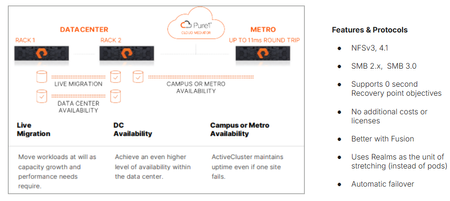
We’re proud to announce the availability of ActiveCluster for file, Everpure’s premier business continuity solution and a fundamental enabler of our Enterprise Data Cloud vision, where Service Level Agreements define what storage, network and compute resources are assigned dynamically to application data sets rather than an hardware-to-app architectures. With ActiveCluster for file, Everpure is extending the benefits of data mobility, continuous access and policy-driven management to file workloads. What is ActiveCluster? Everpure launched ActiveCluster in 2017, and rapidly took the mission critical, enterprise block storage world by storm. ActiveCluster rapidly enabled enterprise customers with the most demanding block workloads to deploy synchronous, always available, always up-to-date, LUNs or volumes to hosts stretched across geographic distances. What set ActiveCluster apart from the existing solutions at the time, and even now, is how simple to set up Everpure RTO-0 and RPO-0 file solutions are, and how flexible and adaptable to the ever changing business needs hosting these data sets become after being deployed on a Everpure Fusion fleets. Today, we’re adding file protocol support like NFSv3, NFSv4.1, SMB 2.0, and SMB 3.0 w/ continuously available shares to our ActiveCluster solution. Realms as a new container ActiveCluster for file utilizes a new, high-level container called a Realm, to synchronously mirror both user data and storage configuration information necessary to provide data access to authorized users on either side of the stretched file system(s). Realms are handy to put applications with similar Recovery Point Objectives and similar Recovery Time Objectives together. Realm Synchronous Replication The act of synchronously mirroring both the user data and storage configuration information across two different FlashArrays is called ‘stretching’. Similar to how a pod is stretched across two FlashArrays, a Realm can be stretched between any FlashArray system that has no more than 11ms Round Trip Time average latencies on their array replication links. Either Fibrechannel or Ethernet array replication links can be used to replicate file data synchronously. Figure 1. ActiveCluster for file can be deployed in different modalities Realms as namespaces for policies Realms contain unique snapshot, audit logging, replication and export policies. These policies are only viewable and attachable to storage objects within the Realm, creating a building block for hosting multiple different end customers or tenants on Fusion fleets. These policies are automatically replicated over to the other array if the Realm is stretched, reducing operator burden in failover scenarios. To prevent split brain scenarios (where a network partition in the array links or replication links stop communication between the pair of FlashArrays) Everpure’s fully managed Cloud Mediator service will determine which remaining FlashArray controller pair can process writes, and which array will not. Unlike other business continuity solutions, ActiveCluster customers don’t have to worry about patching or maintaining the security of separate VMs to act as a mediator service to prevent split brain scenarios. Multiple servers supported per Realm, different IDPs allowed. Each Realm can have one or more servers configured in it, which act as protocol end points for clients and hosts to connect to. Each server in a Realm can have a different IP address, or utilize a different Identity Provider Service. When a failover condition occurs (like a site disaster on one side), automatic failover and the clients in either data center are on the same Ethernet segment or broadcast domain, a failover condition will emit a gratuitous Reverse Address Resolution Protocol request (RARP), mapping the new MAC address of the ethernet interface on one side to a same IP address being used. Applications may see a small pause in reads or writes being serviced, but will not have to re-issue I/O or remount / remap shares or exports. Managed directory quotas can also be used for any filesystem or managed directory attached to the servers in the Realm being stretched. These quota policies automatically get replicated with user data, so the same customer experience in terms of usable space exists both before and after an automatic failover. New Guided Setup available for ActiveCluster for file Deploying new ActiveCluster for file solutions can occur in less than five minutes on already racked and powered arrays. A Guided Setup wizard is available to quickly capture the necessary information to stretch a Realm. This wizard can be started from multiple locations within the Purity GUI. ActiveCluster for file fully takes advantage of Fusion fleets and the ability to manage storage infrastructure as code, programmatically and via policy. Realms are not tied to hardware, and can ‘float’ Realms with ActiveCluster for file support not only provide a 0-RTO and 0-Recovery Point Object at the storage layer for mission critical applications, but they also provide a mechanism to transparently move the data and configuration in the Realm non-disruptively somewhere else within your fleet, whether it’s follow the Sun type round-robin hops, where the Realm’s location changes depending on the time of day, or is moved as a part of a data-center migration. Coupled with Fusion, Everpure’s intelligent control plane, ActiveCluster for file enables workloads and application data and their configuration information to dynamically and seamlessly move to the right location, at the right time, at the right granularity. Seamless movement across greater geographic distances can be accomplished by stretching and unstretching the same Realm between different arrays, as long as the RTT latency between them is <11ms. Service Level Agreements are the lingua franca of the Enterprise Data Cloud Service Level Agreements are the natural language of business owners, and are integral for companies who want to move away from managing storage arrays to managing their business data. They capture answers to questions like “How fast do you need access to this data? Does it need to be backed up or otherwise protected against site-wide failure? SLAs are what forms our vision behind the App-to-data operational model. This App-to-data model takes abstract, high level business requirements as input, and then automatically configures and deploys the required storage services to meet the service level agreement just defined. A Fusion fleet manager’s perspective is one of many different application tiles, and their health, not just a series of HA pairs spread out across different data centers. Data management operations, like instant backups, cloning, movement is applied as “verbs” to the application data set’s name or workload ID, and not to a mismatched storage container whose hardware boundaries impose limits on your app team. An Intelligent, unified control plane manages and enforces SLA’s across the fleet autonomously, like a modern cloud operating model but that can be deployed in any modality, whether on-prem, in the cloud or a hybrid. This scalable model, with Fusion’s intelligent control plane, supports ALL workloads, from modern AI workloads, containers and High Performance Workloads to extremely large image or rich media archives. An Enterprise Data Cloud, made up of discrete nodes tied loosely together, where Service Level Definitions define autonomous system behavior. Stop managing your storage arrays, and start managing your data. Learn more about ActiveCluster for file Read the support documentation for Purity 6.12.0 Test and deploy Fusion fleets and file presets Ask your account executive or system engineer for a demo!405Views3likes0CommentsFlash Array Certification
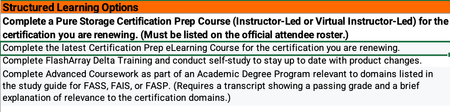
All FlashArray Admins, If any of you currently hold a Flash Array certification there is an alternative to retaking the test to renew your cert. The Continuing Pure Education (CPE) program takes into account learning activities and community engagement and contribution hours to renew your FA certification. I just successfully renewed my Flash Array Storage Professional cert by tracking my activities. Below are the details I received from Pure. Customers can earn 1 CPE credit per hour of session attendance at Accelerate, for a maximum of 10 CPEs total (i.e., up to 10 hours of sessions). Sessions must be attended live. I would go ahead and add all the sessions you attended at Accelerate to the CPE_Submission form. Associate-level certifications will auto-renew as long as there is at least one active higher-level certification (e.g., Data Storage Associate will auto-renew anytime a Professional-level cert is renewed). All certifications other than the Data Storage Associate should be renewed separately. At this time, the CPE program only applies to FlashArray-based exams. Non- FA exams may be renewed by retaking the respective test every three years. You should be able to get the CPE submission form from your account team. Once complete email your recertification Log to peak-education@purestorage.com for formal processing. -Charlie239Views3likes0Comments