It’s Here! Everpure Fusion MCP Server v2.0!
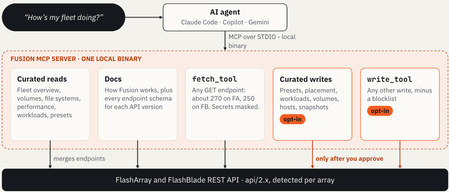
If your current process for "just snapshot that volume before the change window" involves a browser tab, an SSH session, maybe a semi-remembered purevol flag, and a Slack message that starts with "hey, does anyone remember how we…", then Everpure Fusion MCP Server 2.0 is for you! V1 of the MCP taught your AI agent to look at your fleet and do a little action to it. V2.0 teaches it to actually touch your fleet, with a seatbelt, an airbag, and a very suspicious bouncer standing at the door checking IDs. All in, it’s full read coverage of the FlashArray and FlashBlade REST APIs, three new curated write tools for volumes, hosts and snapshots, a fully reworked approval model, and a CLI that finally looks like it grew up with a purpose. Reading is great. Doing is awesome.. If you tried Fusion MCP Server 1.x, you probably had the same reaction I did: "Show me the fleet overview" is kinda magical. And then about five minutes later you thought: "ok cool, now can it just… do the next thing?" Here's where v1 left you hanging: Reads were curated, not complete. Great for the common questions. Less great when you wanted that one setting from that one endpoint nobody wrapped in a tool. Writes stopped at workloads. Placement recommendations, preset create/update and workload deploy were in. Volumes, hosts, snapshots, the things you actually touch every day? Not so much. The approval story had a soft spot. If your agent couldn't show an MCP elicitation dialog, the server fell back to politely instructing the agent to go ask you. In practice that worked reliably, but it was a request, not a lock. Mixed Purity versions were awkward. Real fleets are never all on the same release (you know it, I know it, your Change Control definitely knows it). Fusion MCP Server 2.0 closes those gaps without turning your AI agent into an unsupervised intern with array_admin. What’s new in 2.0? Here's the whole release: Full API read coverage — fetch_tool can read every GET endpoint in the FlashArray and FlashBlade REST APIs (except the few that return credentials), and masks credentials in what it sends back. Version-aware across mixed fleets — Endpoint docs are built into the binary for FlashArray REST 2.38 to 2.57 and FlashBlade REST 2.17 to 2.28, and the tools accept an optional api_version, so arrays on older Purity releases stay in the conversation. Three new curated write tools — volumes_write, hosts_write and snapshots_write, joining the placement, preset and workload tools you already know. A generic write_tool — Calls almost any write endpoint in the FA and FB REST APIs, minus a blocklist of things no agent should ever touch. Off by default. A rebuilt approval model — Every write needs your explicit OK via an MCP elicitation prompt from the server. Destructive writes need you to type the resource name. A tidier CLI — One config command group, new config validate and config array add / list / remove, plus export-logs. Logs and traceability — Log files with credentials redacted, a configurable level, and a session ID on every request the server sends to an array. So, let's go ahead and unpack the good stuff. Reads - if there's a GET for it, your agent can read it In v1, the agent worked from a set of curated tools plus a read-only fetch path. In 2.0, fetch_tool covers every GET endpoint, and the endpoint documentation for every supported API version ships inside the binary. The flow is nicely boring, which is exactly what I want in infrastructure: I ask a question. If a curated tool fits (fleet overview, volumes, file systems, performance, workloads, presets), the agent uses it. If not, it reads the embedded endpoint docs, finds the right GET, and calls fetch_tool. Credential-ish fields (tokens, passwords, secret keys, connection keys) come back as ***REDACTED***. The server also rejects the expose_api_token query parameter, and the factory-reset token endpoint isn't in the list at all. Because the array still checks the role of the configured API token, your agent only sees what that token is allowed to see. Nice trick, but it's really the right trick. Some read-only prompts to try (no flags to flip, no write tools needed): Show me the fleet overview with alerts. Which configured arrays are closest to full? Show volumes with names containing "prod". List file systems on FlashBlade and include performance if available. Audit configuration settings across my fleet. List the endpoints that are embedded in the server. That last one is a handy trick. It asks the agent to enumerate what the server knows how to read for you, which is a great way to discover endpoints you didn't know you could ask about. Got an older array? The tools accept an optional api_version, and each member in the fleet overview now reports the newest REST API version it supports, so you can spot the stragglers without opening a spreadsheet. Writes - 4 new tools & zero surprises Here's the mental model. There are two switches in auth-config.json, both off by default, and each one only unlocks its own tools: enable_write_tools unlocks the curated tools: create_placement_recommendation, presets_create, presets_update, workloads_deploy, and the new volumes_write, hosts_write and snapshots_write. enable_generic_write_tool unlocks write_tool, and only write_tool. Flip one, flip the other, flip neither. They're independent by design. volumes_write (FlashArray) Creates, grows, clones, overwrites and restores volumes. Two design decisions I really like: Grow never shrinks. There's no "oops, I typed 1G instead of 1T" path to data loss. No action eradicates a volume. Not even if you ask nicely :-) Prompts to try: Create a 500G volume named app-data on fa1. Grow volume app-data on fa1 to 1T. Clone snapshot app-data.nightly into a new volume named app-data-test. Overwrite volume app-data-test with snapshot app-data.nightly. Restore volume app-data to its own snapshot app-data.nightly. Overwrite replaces data, so expect the typed-name confirmation there. (Yes, I'm going to keep bringing that up.) Restore rewrites a volume from its own snapshot too, so read that approval dialog very carefully before you click anything. hosts_write (FlashArray) Creates hosts and host groups, adds hosts to groups, and connects volumes. It changes one object per call and asks for approval every time. Create host esx-01 with WWNs 21:00:00:24:ff:4c:c5:4a and 21:00:00:24:ff:4c:c5:4b. Create host group esx-cluster and add esx-01 to it. Connect volume datastore-01 to host group esx-cluster. Some fine print worth knowing: Creating a host needs at least one WWN, IQN or NQN, because hosts_write can't add them to the host afterward. It never sets host personality, CHAP credentials or preferred arrays. Those stay with you. Connecting a volume that's already connected to a different host or host group makes you type the volume name. Two clusters writing to the same volume is how you end up explaining things to your DBA, so the server makes you slow down. snapshots_write (FlashArray and FlashBlade) Snapshots volumes, protection groups and file systems, and can replicate a snapshot right away to targets you pick. It also manages protection group members and FlashBlade file system snapshot policies. Take a snapshot of protection group pg-hourly on fa1 and send it to its replication targets. Attach the hourly snapshot policy to the workloads file system on fb1. Notice that second one. Snapshot policies on FlashBlade file systems used to be a "go click through the GUI" task. Now it's a sentence. How cool is that! write_tool (FlashArray and FlashBlade, off by default) This is the escape hatch for the other few hundred write operations. It calls almost any write endpoint in the FA and FB REST APIs, masks credentials in its responses, and refuses to touch the following: Administrators, users, groups, roles and management authentication SSO, directory services and Active Directory Certificates, KMIP, encryption keys, password policies, TLS policies, API clients Network settings (interfaces, DNS, subnets, LAGs) Connections to other arrays, realms and fleets, plus replication and offload targets Software installs, patches and upgrades Array erasure and factory reset (The full list lives in the User Guide. If you want to see every write write_tool accepts, ask your agent to call get_endpoint_documentation with an empty path.) Once it's on, you can say things like: Cap the backup volume at 10K IOPS. It is starving the database. And it'll find the right endpoint, build the request, and show you exactly what it's about to send before anything happens. Turning the writes on The old way (v1) was generate-config and update-config. The new way: # Enable the curated write tools while generating your config fusion-mcp-server config generate --FA fa1.example.com,<token> --enable-write-tools # Or flip them on later fusion-mcp-server config set --enable-write-tools # Only if you actually need it. This prints a warning, on purpose fusion-mcp-server config set --enable-generic-write-tool # And off again fusion-mcp-server config set --enable-write-tools=false fusion-mcp-server config set --enable-generic-write-tool=false Restart your agent after changing either switch so the server picks up the new config. Safety first. The agent proposes, you approve (and sometimes you gotta type) This was the part we at Everpure sweated over the most, because "AI agent that can change storage" is a sentence that makes security teams twitch and Audit folks drool. Here's how v2.0 handles it. Off by default. Two separate switches, covered above. The server asks you, not the model. Every write triggers an MCP elicitation dialog from the server, showing the array, the action and the formatted request body. Decline it and nothing is sent to the array. The model can't "approve" its own request, because the approval doesn't go through the model. No elicitation, no write. If your agent can't display that dialog, the server refuses the write and tells the agent why. In v1, this case fell back to polite instructions. In v2.0 the agent can't get around the refusal. Type the name for the scary stuff. You'll need to type the resource name (or the endpoint path, when there's no resource) for every DELETE, for any request carrying an eradicate, destroy, truncate, erase, overwrite or discard parameter, and for skip_quiesce or abort_quiesce. Wrong name? Refused, nothing changes. A blocklist on write_tool. Covered above. One object, one array, per call. The write tools take a single target and at most one remote context, so the result tells you exactly what changed and where. No "well, it touched some arrays" conversations. The token is the hard limit. The agent can never do more than the API token's role allows. Everything else here is defense in depth. The honest caveats (‘cause you deserve them) Which agents can show the dialog? In our testing of Gemini, Augment, Claude Code and Claude Desktop, only Claude Code supported MCP elicitation. Claude Desktop happily did reads, then refused a write, which is exactly the behavior we want. Client support changes fast, so check your agent's docs. But, sadly, Agents change their behaviour like we change our socks. Test it before production! The gate only guards the front door. It governs requests that go through this server. If your assistant also has a shell with SSH access and your keys, it can run purevol directly, and no dialog will appear because the server was never involved. (In my testing, an assistant did exactly that, because it was the shorter path.) In a normal setup the assistant holds no array credentials and the MCP server is its only road. If your agent can reach arrays some other way, treat that as the wider permission it is. You might see two prompts. Many agents have their own tool-permission prompt and the server's dialog. They're separate layers. You can silence one: either allow the tool in your agent (the server still asks), or turn elicitation off (your agent's prompt becomes the only check). Do not do both. That's the "agent changes your arrays without asking" combo. You can turn elicitation off. fusion-mcp-server config set --disable-elicitation. It prints a big warning, and the server logs every write that runs this way at WARN. I'm going to politely suggest you don't, unless you really, really know why, and you understand what an RGE is (Resume Generating Event). Everything else on the CLI (for nerds) Yes, I'm going to geek out on the CLI for a minute, because that's where the automation lives. Version 1 had a handful of top-level commands. Version 2.0 organizes them into a proper config group: Old (still works, deprecated) New generate-config config generate update-config config set validate-config config validate (nothing) config array add / list / remove (nothing) export-logs The deprecated names still work as aliases, but they're going away in the next major release, so now's a good time to update your scripts. Run fusion-mcp-server --version to see what you're on, and fusion-mcp-server config --help for the new menu. config validate — "is my config actually OK?" # Validate the default config: static checks plus a login probe against every array fusion-mcp-server config validate # Validate a specific file fusion-mcp-server config validate --config ./my-config.json # Static checks only. No array credentials needed fusion-mcp-server config validate --skip-connection It checks that the JSON parses, the required fields are there and every baseUrl is well-formed, then (unless you skip it) tries the login flow against each array. It exits non-zero if any array fails, which makes it a handy CI or pre-commit gate. config array — add, list, remove without regenerating everything # Add arrays to an existing config. Same --FA / --FB syntax as config generate fusion-mcp-server config array add --FA fa2.example.com,<token> fusion-mcp-server config array add --FA "fa2.example.com,tok1;fa3.example.com,tok2" --FB fb1.example.com,tok3 # See what's configured (name, platform, URL). No network calls fusion-mcp-server config array list # Retire one. By name or by URL, and it works even if the array is already gone fusion-mcp-server config array remove --name my-array fusion-mcp-server config array remove --url arr1.example.com A couple of safety nets: add probes every new array first and aborts before touching your config file if any probe fails, and it rejects an array whose name already exists. remove does no network I/O, so decommissioned arrays don't get stuck in your config forever. Every one of these also takes --config for a non-default file. Logging: on by default, quiet by default, you control Logs go to a rotating JSON-per-line file. Nothing is printed to the terminal while the server runs (stdout is the MCP channel). Default level is WARN. Set DEBUG, INFO, WARN, ERROR or NONE with fusion-mcp-server config set --log-level <level>, and restart your agent. NONE really means none. No log directory, no log file. export-logs will tell you there's nothing to bundle and exit cleanly. Tokens are wrapped in a redacting type before they hit the logging pipeline. If you ever see a raw token in a log, that's a bug, please file an issue. Nothing leaves your machine on its own. No telemetry, no auto-upload. Logs only go anywhere if you run export-logs (which zips them for a support case) and send the archive. Default locations: ~/Library/Logs/fusion-mcp/ on macOS, ${XDG_STATE_HOME:-~/.local/state}/fusion-mcp/log/ on Linux and %LOCALAPPDATA%\fusion-mcp\Logs\ on Windows. Override with FUSION_MCP_LOG_DIR. Fun little tidbit - the approval decisions are logged too. Typed confirmations, mismatched confirmations, writes refused for lack of elicitation, and any write that ran with elicitation off are all logged at WARN. For the full paper trail (ordinary approvals and declines included), run config set --log-level INFO. Traceability: a session ID on every request Every request to an array now carries a User-Agent like this: pure/fusion-mcp/<version> (session=<uuid>; source=<tool or command>) The session UUID is generated when the process starts and is the same for every request from that server instance, so array-side logs can be matched to one MCP server session. source tells you which MCP tool (say, list_arrays) or CLI command (say, config_array_add) triggered the call. No personal information in there. Your admins will love you for this one. One more security-ish change If you run the server in HTTP mode for local debugging (start --auth-config ./auth-config.json --http), it now binds to 127.0.0.1 only, and no flag changes that. It's still for local debugging, though: the /mcp endpoint has no authentication, so don't put it behind a proxy, tunnel or port forward and call it production. Scenario test - a Friday afternoon test refresh Let's walk through something very real. It's Friday, 4:30 PM, and the app team wants a fresh copy of last night's data for a test environment before Monday. In the old world, this is a ticket, a GUI session, and someone's weekend plans. Here's the conversation, with writes enabled (enable_write_tools) and an agent that supports elicitation: Look first. "Show volumes with names containing app-data on fa1." Read-only, no prompts. Clone. "Clone snapshot app-data.nightly into a new volume named app-data-test." The server pops a dialog showing the array, the action and the request body. You read it, you approve. Connect. "Connect volume app-data-test to host group esx-cluster." Another dialog. Because app-data-test isn't connected anywhere else, a plain approval is enough. (If it were connected to another host or group, you'd have to type the volume name.) Next week, refresh it. "Overwrite volume app-data-test with snapshot app-data.nightly." This one replaces data, so on top of the dialog you must type app-data-test. Typo? Refused, and nothing changes. Four sentences, three approvals and one typed confirmation, and every step has a log line. And since each write targets exactly one object on one array, if anything fails you know precisely what did and didn't happen. It's also a pretty cool CLI automation story Because I can't help myself, here are two small helpers for the scripting crowd. These are examples of what you could build around the new commands, not something that ships with the product. PowerShell- onboard a batch of arrays from a CSV (tokens come from environment variables, so they never live in the CSV, ever, right?): # arrays.csv columns: Platform (FA or FB), Host, TokenEnvVar Import-Csv .\arrays.csv | ForEach-Object { $token = [Environment]::GetEnvironmentVariable($_.TokenEnvVar) if (-not $token) { Write-Warning "No token found in `$env:$($_.TokenEnvVar) for $($_.Host), skipping" return } $flag = if ($_.Platform -eq 'FB') { '--FB' } else { '--FA' } & fusion-mcp-server config array add $flag "$($_.Host),$token" if ($LASTEXITCODE -ne 0) { Write-Warning "Could not add $($_.Host)" } } # Finish with a health check of the whole config & fusion-mcp-server config validate Python- a tiny "what did the gate do?" log watcher (the log is JSON-per-line, so this is easy): import json, os, sys from pathlib import Path # Default macOS path; set FUSION_MCP_LOG_DIR (or edit this) for Linux/Windows log_dir = Path(os.environ.get("FUSION_MCP_LOG_DIR", Path.home() / "Library/Logs/fusion-mcp")) log_file = log_dir / "server.log" if not log_file.exists(): sys.exit(f"No log at {log_file}. Is logging set to NONE, or has the server not run yet?") for line in log_file.read_text().splitlines(): try: entry = json.loads(line) except json.JSONDecodeError: continue if str(entry.get("level", "")).upper() in {"WARN", "ERROR"}: print(f'{entry.get("ts")} [{entry.get("level")}] {entry.get("component")} - {entry.get("msg")}') Run it after a week of agent-assisted work and you've got a nice little "here's everywhere the server said no, or yes-with-a-typed-name" report for your next security or the dreaded Audit review. How it connects to the rest of Fusion A few integration details that kinda matter: One token can cover a lot of fleet. You configure one array per platform, and Fusion remote execution reaches the rest of that platform's fleet. One FlashArray token covers the FlashArrays, one FlashBlade token covers the FlashBlades. Cross-platform calls (FlashArray reaching FlashBlade) are refused. Some things still want a direct token. Performance data in particular needs a token for each array you want to see, and older Purity releases need a token on every array. Want complete performance coverage? config array add is now a one-liner. Writes take exactly one context per call. That's the "no guessing which array changed" rule from earlier. Mix and match MCP servers. The Fusion MCP Server is the do and discover half; pair it with other MCP servers (databases, ticketing, your own internal ones) in one agent session and you can go from "this SQL volume looks slow" to "here's the snapshot and the clone" without leaving the chat. Local and open source. Still one local binary, talking to your agent over STDIO. It doesn't phone home, tokens stay in your auth-config.json (directory 0700, file 0600), and the code lives in the public OpenConnect repo. Use cases across very different infra’s These are illustrative scenarios (not named customers), but they're the shapes of the conversations I keep having. The regulated-industry admin (think a bank with a change board that has seen things). Leave writes off and use the server as a read-only investigator, which already beats five dashboards. When you're ready, enable only the curated tools, keep elicitation on, scope the API token's role to exactly what you'd let a junior admin do, and set the log level to INFO so every approval is on the record. The typed-name rule and the blocklist are the sentences your security team will quote back to you. The platform team running a big, mixed-version fleet. Full read coverage plus api_version means one agent session can interrogate arrays across Purity releases. Use config array add as new arrays join, config validate in CI to catch drift in your own config, and the session-ID User-Agent to tie array-side logs back to a specific server run when something looks odd. The two-person IT shop wearing all the hats. You don't have a storage specialist, and you don't need one to say "create a 500G volume, make a host group for the new cluster, connect them, and snapshot it." Curated tools, approval dialogs and typed confirmations keep a tired Friday-afternoon you from making a Monday-morning problem. The dev/test refresh crowd. Clone from last night's snapshot, overwrite on demand, grow when the test dataset outgrows its home. All of it from the same place you're already writing the test plan. Where to read the full story I'm not going to out-document the documentation. The User Guide in the public Fusion MCP Server repo is organized into Understand, Set up, Use, Act and Reference, and the Act and Reference sections cover everything above in detail (every option, every switch, every default). Pro tip: you can also point your own AI agent at the repo and the User Guide and say: Read this repo and USER_GUIDE.md, then walk me through configuring Fusion MCP Server for my AI agent step by step. Setup help from the thing you're setting up. Delightfully recursive. Repo: https://github.com/PureStorage-OpenConnect/fusion-mcp-server. Found a bug or have an idea? Open a GitHub issue. A few upgrade notes before you go: Update scripts from generate-config / update-config / validate-config to the new config … commands. The old names are on borrowed time. Restart your agent after changing any config switch. The server only reads the config at startup. Check your agent's elicitation support before you plan to enable writes. No elicitation, no writes (by design). Why this matters Reading your fleet in plain English was the appetizer. The real shift in 2.0 is that "do the boring, careful thing" becomes a conversation, without giving up the guardrails that make careful careful. Fewer GUI marathons, fewer SSH-and-pray moments, fewer "wait, which array did that land on?" postmortems, and an audit trail you can actually show someone. You can adopt it incrementally: start read-only, add the curated write tools for a lab fleet, watch the log, and only then decide how far you want to go. Nobody is making you hand an agent the keys to the kingdom. And, if you do hand it a key, it's the one that can only open the doors you picked. Until next time… Cheers!84Views2likes0Comments