Want a Sneak Peek at What's Next for Pure1? We Need Your Feedback!
Hey Everpure Community — We're Sarah and Pranav, a user researcher and designer on the Everpure team working to make Pure1 and Evergreen//One subscriptions work better for the people who rely on them every day. We'd love to hear directly from you, so if this sounds like your world, we hope you'll join us. 👉Fill out this short form to sign up👈 What we're doing We're redesigning how subscriptions work in Pure1, and we want your hands on it before it ships. Our team is working on updates to Service Mode that make Evergreen//One subscriptions easier to navigate and understand. What we're asking We're looking for storage and infrastructure admins who are Pure1 users with active Evergreen subscriptions to join a 1-hour 1:1 interview over Zoom. No prep needed. No right or wrong answers. Just your perspective as someone who lives in these tools day-to-day. Timeline We're looking to conduct the feedback sessions in mid-June. What's in it for you Early access to upcoming designs before anyone else sees them A direct line to the product team shaping the tools you use Your feedback, built into the product — this is how features get better Interested? 👉Fill out this short form to sign up👈 Just drop your name, email, company, and job title. We'll reach out shortly to schedule a session that works for you!309Views7likes0Comments
FlashCrew London & Glasgow May/June 2025 !!!! Register NOW...
I'd like to invite you to our upcoming FlashCrew Customer User Group in London on May 15th, from midday. Throughout May, we'll be taking our FlashCrew User Group on the road to share ideas, best practices and network on all things Pure over some drinks and food. Plus, as a thank you for your continued support and attendance we will of course have the latest FlashCrew branded gifts for you to take with you! If you can make it, please register at this link below. London 10-11 Carlton House Terrace Thursday 15th May: REGISTER HERE for FLASHCREW LONDON Glasgow Radisson Blu Hotel Thursday 5th June: REGISTER HERE for FLASHCREW GLASGOW These are user group meetings, targeted at a technical audience across Pure's existing customers. Not only will you hear the latest news on the Pure Enterprise Data Cloud, but will also get to network with other like-minded users and exchange ideas and experiences. Agenda: 12:00 - 12:50 Arrival, Lunch and Welcome 13:00 - 14:00 Pure Platform: Features and Roadmap: with demo 14:00 - 14:15 Break 14:15 - 14:45 SQL Databases and Pure 14:45 - 15:15 Voice of the Customer 15:15 - 15:30 Break 15:30 - 16:15 Portworx and the Enterprise Data Cloud 16:15 - 16:45 Modern Virtualisation 16:45 - 17:00 Open Floor Q&A, Raffle, Wrap Up 17:00 - 19:00 Drinks and Networking211Views5likes0CommentsWhy Are We Still Designing IT Like It's 2012?
Let’s talk about complexity in IT. Not the fun kind—like building a Raspberry Pi-powered coffee machine or arguing over whether Terraform should be capitalized. I mean the kind of complexity that slows teams down, bloats your stack, and makes security people question their career choices. You know the type: five backup platforms, three monitoring tools, two storage vendors “for resilience,” and a bunch of scripts someone wrote in 2019 that nobody’s brave enough to touch. We tell ourselves it’s “best-of-breed,” “cloud-first,” or my personal favorite—“strategic.” But let’s call it what it is: chaos without any direction. Enter Conway’s Law (aka the Mirror You’ve Been Avoiding) Melvin Conway dropped this gem in 1967: “Organizations design systems that mirror their own communication structures.” Still true. Still brutal. If your company has six teams that don’t talk to each other except through passive-aggressive Jira tickets, your architecture is going to reflect that—fragmented, redundant, over-engineered, and impossible to secure. Conway’s Law isn’t just a quirky observation. It’s a diagnostic tool. If your architecture feels like a group project gone off the rails, chances are it’s because your org works that way too. Cloud Chaos: Now with More Vendors! And just when you thought it couldn’t get worse—we bring in the cloud. Or clouds. Somewhere between “cloud-first” and “cloud-only,” we lost the plot. We started treating hyperscalers like interchangeable gas stations: need compute? Just pull over at the nearest one. We’ve seen it: Migrations from AWS to Azure to GCP like it’s some weird tech pilgrimage Applications lifted and shifted with zero refactoring Hybrid architectures that “just sort of happened” Look, the cloud’s not the problem. I like cloud and I believe it is here to stay. But designing 100% for the cloud without actually understanding your why? That’s Conway’s Law, just with bigger invoices. Even worse? Bouncing between cloud providers because someone read a Forrester report and got nervous about lock-in. That’s not strategy—that’s cloud-induced panic. The Two-Vendor Lie We Keep Telling Ourselves Ah yes, the old two-vendor strategy. Meant to be safe. Designed to reduce dependency. What it really does? Doubles your complexity and halves your team’s sanity. Two vendors = two playbooks, two consoles, two support teams blaming each other It’s not more resilient—it’s just more confusing Gartner even calls it out: more vendors = more risk, not less If you think managing multiple tools with overlapping functions is safer than consolidation, congrats—you’ve just invented the world’s most expensive “Oops” button. Manual ≠ Secure. It Just Feels That Way Let’s talk about the weird rituals we still do in the name of security: Manually copying data to “safe zones” Turning off network access like it’s a security blanket Spinning up siloed sandboxes to avoid risk It’s not protection. It’s procrastination. Manual controls introduce human error, waste time, and don’t scale. If your “strategy” depends on someone remembering to toggle a firewall rule every Thursday, you're not secure—you’re just lucky. And outsourcing that chaos to a vendor doesn’t make it better. Handing over management to a provider that’s Frankensteined a bunch of loosely integrated tech with bailing wire and hope isn’t a strategy—it’s just renting someone else’s mess. If there’s no real roadmap, no cohesion, no architectural vision—it’s not a partnership. It’s a future support ticket waiting to happen. Hybrid Cloud Needs Purpose, Not Permission Hybrid isn’t a backup plan. It’s a design decision. Too many shops end up hybrid by accident—because apps don’t refactor, budgets don’t stretch, or politics get in the way. The result is an environment that’s technically working but operationally exhausting. A good hybrid strategy is opinionated. You should know: What runs where (and why) How data moves What your north star architecture looks like If you don’t have answers to that? You’re not doing hybrid—you’re doing hope. So What Do We Do About It? We simplify. On purpose. Relentlessly. Design like a startup, not a committee. Keep the stack lean. Less is more when you have tools that actually integrate. Use Conway’s Law in reverse. Want systems that work together? Build teams that do too. Break silos before they become dependencies. Treat cloud like architecture, not an escape route. Cloud is amazing if you design for it. Otherwise, it’s just someone else’s complexity in your billing statement. Stop solving people problems with platform purchases. Most complexity isn’t technical—it’s cultural. No vendor can fix your org chart. Final Thought: Complexity Is a Tax. Stop Paying It. Every extra platform, every vendor “just in case,” every manual handoff is a tax. And it’s compounding interest on your ability to execute. If you want to move fast, secure your data, and stay sane—you’ve got to design with purpose. That means fewer tools, better alignment, and architectures that reflect how you want to operate, not how your politics force you to. You want resilience? Start with intention. But what I’m really curious about is your perspective: How are you dealing with complexity? Is hybrid working for you—or just holding you hostage? Have you successfully simplified your architecture without sacrificing flexibility? Let's make this a real convo—not another “cloud is the answer” thread. —Zane Allyn180Views5likes0CommentsDon’t Wait, Innovate: Long‑Life Release 6.9.0 Is Your Gateway to Continuous Innovation
How Pure Releases Work (and Why You Should Care) Pure Storage doesn’t make you choose between stability and innovation: Feature Releases arrive monthly and are supported for 9 months. They’re production‑ready and ideal if you like to live on the cutting edge. Long‑Life Releases (LLRs) bundle those feature releases into a thoroughly tested version which is supported for three years. LLR 6.9.0 is essentially all the innovation of those Feature releases, rolled into one update. This dual approach means you can adopt new features as soon as they’re ready or wait for the next stable release—either way, you keep moving forward. Not sure what features you’re missing? Not a problem as we have a tool for that. A coworker reminded me: Pure1’s AI Copilot can tell you exactly what you’ve been missing. Here’s how easy it is to find out: Log into Pure1, click on the AI Copilot tab, and type your question. My coworker reminded me of this last week, so I tried: “Please provide all features for FlashArray since version 6.4 of Purity OS.” Copilot returned a detailed rundown of new capabilities across each release. In just a couple of minutes, I saw everything I’d overlooked—no digging through release notes or calling support required. A Taste of What You’ve Been Missing Here’s a snapshot of the goodies you may have missed across the last few year releases: Platform enhancements: FlashArray//E platform (6.6.0) extends Pure’s simplicity to tier‑3 workloads. Gen 2 chassis support (6.8.0) delivers more performance and density with better efficiency. 150 TB DirectFlash modules (6.8.2) boost capacity without compromising speed. File services advancements: FlashArray File (GA in 6.8.2) lets you manage block and file workloads from the same array. SMB Continuous Availability shares (6.8.6) keep file services online through failures. Multi‑server/domain support (6.8.7) scales file services across larger environments. Security and protection: Enhanced SafeMode protection (6.4.3) quadruples local snapshot capacity and adds hardware tokens for instant data locking which is vital in a ransomware era. Over‑the‑wire encryption (6.6.7) secures asynchronous replication. Pure Fusion: We can't talk about this enough Think of this as fleet intelligence. Fusion applies your policies across every array and optimizes placement automatically, cutting operational overhead . Purity OS: It’s Not Just Firmware Every Purity OS update adds value to your existing hardware. Recent improvements include support for new NAND sources, “titanium” efficiency power supplies, and advanced diagnostics. These aren’t minor tweaks; they’re part of Pure’s Evergreen promise that your hardware investment keeps getting better over time. Why Waiting Doesn’t Pay Off It’s tempting to delay updates, but with Pure, waiting often means you’re missing out on: Security upgrades that counter new threats. Performance gains like NVMe/TCP support and ActiveCluster improvements. Operational efficiencies such as open metrics and better diagnostics. Future‑proofing features that prepare you for upcoming innovations. Your Roadmap to Capture These Benefits Assess your current state: Use AI Copilot to see exactly what you’d gain by moving to LLR 6.9.0. Plan your update: Pure’s non‑disruptive upgrades let you modernize without downtime. Explore new features: Dive into Fusion, enhanced file services, and expanded security capabilities. Connect with the community: Share experiences with other users to accelerate your learning curve. The Bottom Line Pure’s Evergreen model means your hardware doesn’t just retain value it continues to gain it. Long‑Life Release 6.9.0 is a gateway to innovation. In a world where data is your competitive edge, standing still is equivalent to moving backward. Ready to see what you’ve been missing? Log into Pure1, fire up Copilot, and let it show you the difference between where you are and where you could be.655Views4likes0CommentsAsk Us Everything ... Evergreen//One edition!
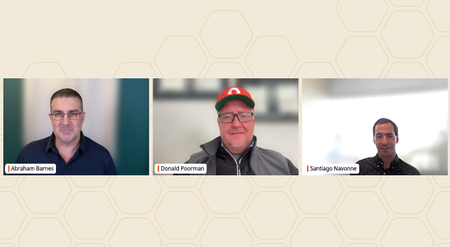
💬 Have more questions for our experts around Evergreen//One after today's live "Ask Us Everything"? Feel free to drop them below and our experts will answer! dpoorman abarnes and Tago- - Tag! You're it! Or, check out some of these self-serve resources: EG//1 website Introduction to Evergreen//One (video) Evergreen//One for AI: Modern Storage Economics for the AI Era (blog) The Economics of Pure Storage Evergreen Subscriptions (blog) DATIC Protects Citizen Data from Attack (customer case study)185Views3likes0Comments
Ask Us Everything Recap: Making Purity Upgrades Simple
At our recent Ask Us Everything session, we put a spotlight on something every storage admin has an opinion about: software upgrades. Traditionally, storage upgrades have been dreaded — late nights, service windows, and the fear of downtime. But as attendees quickly learned, Pure Storage Purity upgrades are designed to be a very different experience. Our panel of Pure Storage experts included our host Don Poorman, Technical Evangelist, and special guests Sean Kennedy and Rob Quast, Principal Technologists. Here are the questions that sparked the most conversation, and the insights our panel shared. “Are Purity upgrades really non-disruptive?” This one came up right away, and for good reason. Many admins have scars from upgrade events at other vendors. Pure experts emphasized that non-disruptive upgrades (NDUs) are the default. With thousands performed in the field — even for mission-critical applications — upgrades run safely in the background. Customers don’t need to schedule middle-of-the-night windows just to stay current. “Do I need to wait for a major release?” Attendees wanted to know how often they should upgrade, and whether “dot-zero” releases are safe. The advice: don’t wait too long. With Pure’s long-life releases (like Purity 6.9), you can stay current without chasing every new feature release. And because Purity upgrades are included in your Evergreen subscription, you’re not paying extra to get value — you just need to install the latest version. Session attendees found this slide helpful, illustrating the different kinds of Purity releases. “How do self-service upgrades work?” Admins were curious about how much they can do themselves versus involving Pure Storage support. The good news: self-service upgrades are straightforward through Pure1, but you’re never on your own. Pure Technical Services knows that you're running an upgrade, and if an issue arises you’re automatically moved to the front of the queue. If you want a co-pilot, then of course Pure Storage support can walk you through it live. Either way, the process is fast, repeatable, and built for confidence. Upgrading your Purity version has never been easier, now that Self Service Upgrades lets you modernize on your schedule. “Why should I upgrade regularly?” This is where the conversation shifted from fear to excitement. Staying current doesn’t just keep systems secure — it unlocks new capabilities like: Pure Fusion™: a unified, fleet-wide control plane for storage. FlashArray™ Files: modern file services, delivered from the same trusted platform. Ongoing performance, security, and automation enhancements that come with every release. One attendee summed it up perfectly: “Upgrading isn’t about fixing problems — it’s about getting new toys.” The Takeaway The biggest lesson from this session? Purity upgrades aren’t something to fear — they’re something to look forward to. They’re included with your Evergreen subscription, they don’t disrupt your environment, and they unlock powerful features that make storage easier to manage. So if you’ve been putting off your next upgrade, take a fresh look. Chances are, Fusion, Files, or another feature you’ve been waiting for is already there — you just need to turn it on. 👉 Want to keep the conversation going? Join the discussion in the Pure Community and share your own upgrade tips and stories. Be sure to join our next Ask Us Everything session, and catch up with past sessions here!524Views3likes2Comments
Ask Us Everything About Evergreen//One
Got questions about Evergreen//One? Get answers Get answers. December 11, 2025 | 09:00am PT • 12:00pm ET In this month’s episode of Ask Us Everything, we’re diving into Evergreen//One™—our storage-as-a-service solution that gives you flexibility, protection, and cloud-ready capabilities. Whether you already use Evergreen//One or are exploring it for the first time, you’ll see how to get more value from your storage—without added cost or complexity. Then it’s your turn. Our experts will answer your questions and show you how Evergreen//One enables you to focus on business outcomes, instead of storage management. Reserve your seat! Ask a question for your chance to win: The first 10 eligible Pure Storage customers to submit a question during the live webinar will receive one (1) Pure Storage Customer Appreciation Kit (approximate retail value: $65). Limit one kit per customer. Offer valid only during the live event and while supplies last. See Terms and Conditions.91Views2likes0CommentsDigital Experience Sessions at Accelerate 2026
Accelerate 2026 is fast approaching! Find out how Pure1 and Evergreen® subscriptions provide a unified, AI‑powered control plane to transact, deploy, manage, protect, and optimize your entire Everpure environment across on‑prem and cloud. If this sounds right up your alley, we’ve curated a list of must-attend breakout sessions focused on exactly this. Check out these don’t miss sessions: Enterprise Data Cloud as a Service: Subscription Innovation with Evergreen//One Pure1 Platform Overview: Powering the Intelligent Control Plane Evergreen Portfolio: Always‑On, Always‑Modern Storage Experience Everpure AI Copilot: From Conversations to Intelligent Triaging and Automation Workflow Orchestration in Pure1: Automating Day 2 Operations Will you be joining us in person? Drop a comment below with the session you're most interested in and what you hope to learn! We can’t wait to see you there!19Views1like0CommentsPure User Group - July 2026
Hit the Links... Cincinnati PUG Style What’s up Cincinnati Pure Community? I hope you all are doing well, preparing for the approaching holiday weekend, and making those summer vacation plans. Speaking of, if you are making those summer vacation plans, make sure to avoid the week of June 29th. Why? We’re hosting our next Pure User Group meetup on Wednesday, July 1st, from 3-6pm at Oakley Greens. Join the community once again for an afternoon of conversation, and hit the links afterwards for some community fun! Call for Speakers With that said, we are looking for a speaker for the meetup. I know some don’t enjoy speaking in public. That’s completely understandable. I was one of those people for a long time. If you’re considering speaking, but are nervous, here are a couple of ideas that I can offer to help you. Bring a Friend - Whether it’s a colleague, a partner, or an application vendor; ask someone to present with you. This way you can split the topic in half, and you can help each other if one of you get “stuck” during the presentation. Just make sure the topic is how you and the partner / vendor together helped your business be successful. Upcoming Project - When asked to present, we immediately consider a project or task that we recently completed, that we want to share the success of the project with the community. Another speaking option would be to share an upcoming project or task, and ask the community their thoughts and feedback. Something along the lines, this is what we’re doing, we plan on doing this, but I’ve also considering that. Community, what do you think? Have you done something similar? If so, what worked well? What didn’t? Lean on Everpure - Have a topic in mind, but need help from a content or delivery perspective. A member of the Everpure team would be more than happy to help. We can help with content creation, or create a lab environment that would allow you to perform your own demo. Interested in speaking? Let charles_sheppar or your Everpure AE/SE know. Again, we are all happy to help. Attendance... It's Summer Y'all Make sure to click 'Attending' on the event page to let us know you’re coming. We know the days around the July 4th holiday are a popular choice for vacations, so if we determine that attendance might be a little “light”, we can reschedule for mid to late July. Topics To Be Determined, but we have some ideas. Let's get back to basics and talk about performance and capacity management? Too boring, how about a Fusion enablement session? Or, let's discuss how the community is managing the current supply chain crisis? Or, we can do a little bit of everything. Again, Everpure doesn't determine the topic, the community does. Date & Time Wednesday, July 1st, 3-6pm Location Oakley Greens, 3065 Vandercar Way, Cincinnati, OH 45209 https://oakleygreens.com/547Views1like1Comment