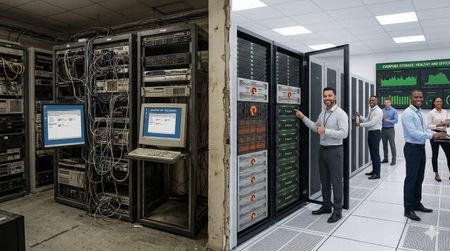
Calling all public servants!
Did you know Evepure has a Public Sector community? Come talk shop with fellow federal, state and local govies, education leaders, and partners who get it. We're talking long procurement and CR-driven buying cycles, figuring out where AI actually fits when your data is spread across different systems, all amid election cycles and shifting political priorities. purecommunity.purestorage.com/group/public-sector If you're a customer or partner, would love to see you there! Leave a comment if you're interested and we'll get you set up.60Views1like0Comments
Get rid of stressful infrastructure headaches. Everpure Fusion handles your data, autonomously.
It happens! It's 11:45 PM on a Friday. An alert fires and storage latency has spiked across a production workload. The operator digs in and traces it back to an automated tiering policy that quietly moved a hot dataset to a slower tier because it looked idle based on a 24-hour access window, right before a scheduled batch job that runs every weekend. Nobody changed anything. The policy did exactly what it was configured to do. But nobody remembers configuring it that way, the documentation hasn't been touched in two years, and the monitoring dashboard shows storage as "healthy" because utilization is fine. It's just in the wrong place. The operator overrides the tier, performance recovers, and spends the next hour writing an incident report for a problem that shouldn't exist. A system that was supposed to make life easier made a decision with no context, no warning, and no visibility into why. That's the anger that doesn't go away quickly. It's not just frustration at the incident. It's the feeling that the tools are working against you instead of with you. The core problem in that story was a system making decisions with no context, no warning, and no visibility. Everpure Fusion attacks each of those problems: Unified visibility across the entire fleet: Everpure Fusion provides a global dataset as a single source of truth for discovery, management, and configuration of storage arrays so the operator isn't piecing together what happened across multiple dashboards, multiple arrays, multiple tickets after the fact. They see the full picture in one place, before things go wrong. Intelligent workload placement: Rather than static policies quietly acting on stale access patterns, Everpure Fusion uses AI-guided placement to boost performance and efficiency for every workload. It understands workload behavior, not just utilization snapshots, the kind of context that would have caught a batch job pattern before tiering the dataset down. Policy-driven governance with real control: Automated orchestration cuts manual tasks and speeds service delivery, while unified controls simplify audits, reduce risk, and prove compliance fast. Policies are visible, documented, and governable. Not buried configs nobody remembers setting. Built into the platform, not bolted on: Evepure Fusion is now simply a part of Purity, meaning it is not an add-on you have to install or buy, but rather a core piece of the Purity operating system. The operator doesn't have to manage another tool. The intelligence is already there. The operator in that story didn't need more alerts. They needed a system that understood context, made decisions transparently, and gave them control without requiring them to be online at midnight to maintain it. That's exactly the gap Everpure Fusion is designed to close - with One Fleet, Zero Complexity. Why policy-driven storage operations matter Everpure Fusion is built as the core of Everpure intelligent control plane that manages all arrays including FlashArray, FlashBlade, and cloud as a unified fleet, with one topology, one API, and one operational framework regardless of protocol or local - datacenter, cloud or edge. That uniformity is what makes policy enforcement reliable at scale. Everpure Fusion introduces workload-based provisioning through presets, which are predefined policy-driven templates for specific workload types, encoding protection policies, replication, and SafeMode retention from the moment a workload is provisioned, not patched in after an incident. Admins no longer need to pre-plan and tune deployments manually, which reduces the risk of non-compliance and improves resiliency by ensuring workloads are provisioned correctly from the beginning. The result is infrastructure that enforces your intent, not just your last manual action. Intelligent placement, rebalancing, and fleet-scale capacity control If you manage storage at scale, you've probably seen this scenario play out more than once. One array is buried, running hot, and screaming for relief. Three aisles over, another array is sitting at 40% utilization, doing almost nothing. And somewhere in between, your team is scrambling to provision capacity, kick off an emergency migration, and explain to stakeholders why an SLA was missed on a workload that, in hindsight, never should have been placed there in the first place. This is not a people problem. It is a tooling problem. And it is remarkably common. Everpure Fusion starts solving this problem at the moment of provisioning. When a new workload lands, most storage systems do a simple capacity check and place it wherever space is available. Everpure Fusion does something fundamentally different. The placement engine evaluates every array in the fleet simultaneously, looking at IOPS headroom, throughput capacity, and physical utilization before making a decision. The goal is not just to find somewhere to put the workload. It is to find the right home for it, one where it can live comfortably for the long term without creating a bottleneck down the road. Think of it as placing workloads with intention rather than convenience. Of course, environments do not stay static. Workloads grow, usage patterns shift, and an array that looked healthy six months ago can become a problem today. Everpure Fusion accounts for this with continuous rebalancing built directly into its operation. When an array starts trending toward overload, Everpure Fusion detects it and begins orchestrating data movement across the fleet automatically. No manual intervention required. No application downtime. Data migrates in the background while workloads keep running, and arrays that were sitting underutilized suddenly become productive members of your infrastructure. At fleet scale, now supporting up to 64 arrays, this turns capacity management from a constant firefight into something that largely runs itself. What makes this possible without disruption is how Everpure Fusion executes the move under the hood. It leverages ActiveCluster to stretch the volume across both the source and target arrays simultaneously, creating a synchronous mirror in place. Once the stretch is established, volumes are connected on the target array and hosts auto-discover the new target paths through standard multipathing. The target then validates that path usage is healthy and confirmed before any cutover begins. Only after that validation is complete are the volumes disconnected from the source, ensuring there is zero gap in access at any point in the sequence. Everpure Fusion then unstretches from the source array to complete the rebalance and release its capacity. The result is a seamless, non-disruptive migration that the application never sees. What truly sets Everpure Fusion apart from a standard load balancer is what happens under the hood. Powered by Pure1 AI and up to 30 days of historical workload data, Everpure Fusion does not just look at what is happening right now. It looks at what is about to happen. Say you have a workload that runs a heavy batch job every Saturday night. Everpure Fusion knows that. It has seen the pattern. So when the placement engine is evaluating tier assignments, it will never recommend moving that workload to a lower-performance tier just because it looks quiet on a Tuesday afternoon. It understands what Tuesday quiet actually means in context. And if that workload somehow ends up on the wrong tier, perhaps through a manual change or a migration gone sideways, Everpure Fusion will proactively raise a violation before the weekend arrives. Not after the SLA is missed. Before. The cumulative effect is that customers can operate their fleets closer to full utilization without the anxiety that normally comes with it. Underused hardware gets activated, incremental purchases get deferred, and the reactive, always-behind-the-curve model of capacity management starts to look like a problem from a previous era. And Everpure Fusion does not stop at the infrastructure layer. Through its integration with Pure1 Application Intelligence, Everpure Fusion gains deeper visibility into the nature of the workloads themselves, not just how they behave, but what they actually are. That additional context means smarter decisions at every level, from initial placement to long-term tier management, grounded in a more complete picture of what your environment is really doing. Workload rebalance and mobility will be available towards the end of 2026. Compliance as part of the control plane Most storage compliance workflows follow the same pattern: an audit is announced, someone pulls reports from three different tools, cross-references configuration against a spreadsheet of expected settings, and spends two weeks proving that workloads are protected the way they're supposed to be. Then the audit ends and nothing changes until the next one. That model breaks at fleet scale. When you're managing dozens of arrays across multiple sites and protocols, manual audits don't just slow you down — they leave gaps that only get discovered at the worst possible time. Everpure Fusion Compliance is built into the control plane, not bolted on after provisioning. Because Everpure Fusion presets encode protection policies, replication requirements, SafeMode retention, and QoS settings at deployment time, Everpure Fusion always knows what every workload's intended configuration is. Drift detection is continuous — not periodic. When a workload deviates from its preset, Everpure Fusion instantly surfaces the violation — visible in the UI, queryable via API or CLI, and accessible to AI agents through an MCP server. Remediation can be triggered directly through the same interfaces, without pulling in a separate tool or writing a custom script. Fleet-wide compliance dashboards give storage admins a live view of posture across every array, with exportable audit-ready reports that don't require manual assembly. The shift is meaningful: compliance becomes a property of how the fleet operates, not a project that interrupts how the team works. Everpure Fusion Compliance will be available towards the end of 2026. From dashboards and scripts to natural-language fleet operations You know the drill. A latency spike hits production. You open three dashboards, run a handful of CLI queries, dig through alert logs, and piece together enough context to understand what happened — and by then, you've already spent 45 minutes on a problem that should have taken five. The issue isn't the tools. It's that the context your fleet holds is trapped across systems that don't talk to each other. Everpure Fusion MCP Server changes that. Built on the open Model Context Protocol standard, it connects any MCP-compatible AI assistant — Claude, ChatGPT, Copilot, or internal agents — directly to live Everpure Fusion fleet state. Arrays, workloads, capacity, performance metrics, alert history, configuration, and placement data are normalized into clean, structured JSON and made available to AI in real time, pulled directly from Everpure Fusion and Purity REST APIs. The result: instead of navigating dashboards and stitching together CLI output, you ask a question. "Which arrays are approaching capacity?" "What's driving latency on this workload?" "Which workloads are drifting from their preset?" Everpure Fusion MCP Server answers from live fleet context, not stale snapshots. This is the on-ramp to agentic storage operations. Everpure Fusion already enforces policy and placement across the fleet. Pure1 adds AI-driven analytics and recommendations on top. Together, they give infrastructure operators the foundation to move from reactive troubleshooting to intent-driven, increasingly autonomous fleet management. Using topology groups to encode real infrastructure boundaries If your Everpure Fusion fleet's topology model lives in a color-coded spreadsheet, three wikis, and the institutional memory of one senior admin who never takes vacation — this is for you. Everpure Fusion, built into Purity for FlashArray and FlashBlade, introduces Topology Groups: fleet-scoped objects that let you describe your arrays in the same language your architecture diagrams already use — regions, availability zones, datacenters, rows, racks. No more provisioning a Everpure Fusion workload and hoping it lands in the right building. A Everpure Fusion Topology Group is a hierarchical, tree-structured object. Groups nest up to 10 levels deep (global → us-east → az-us-east-1a → dc01 → row3 → rack12), each array belongs to exactly one parent, and cycles are rejected at write time. Critically, they encode placement semantics — not access control. RBAC stays in Pure1 Resource Groups; topology stays in Everpure Fusion topology. Once modeled, Everpure Fusion presets reference groups using <group>.arrays notation. Everpure Fusion intersects the preset's allowed arrays with the group's membership at placement time. If there's no overlap, Everpure Fusion provisioning fails fast with a clear error — not silently in the wrong zone. The Everpure Fusion CLI shorthand makes automation clean: purevol list --context az-us-east-1a.arrays Everpure Fusion membership changes propagate automatically across the fleet. You stop maintaining a second source of truth outside the control plane. Stop treating topology as tribal knowledge. With Everpure Fusion, make it a first-class part of the intelligent control plane. Extending the model to Kubernetes and virtualization Most infrastructure operators are managing two parallel storage worlds right now: traditional VMs and databases on one side, Kubernetes-based containerized workloads on the other. Separate toolchains. Separate provisioning workflows. Separate everything. Everpure Fusion changes that. Through the Portworx Fusion Controller, Everpure Fusion extends its policy and placement control plane directly into Kubernetes — without forcing developers to change their existing workflows. Everpure Fusion auto-discovers your FlashArray and FlashBlade fleet, then exposes Everpure Fusion presets as native Kubernetes StorageClasses. That means when a developer requests a persistent volume, Everpure Fusion's placement engine resolves it against your existing policy constraints — storage class, protection policy, topology group, replication requirements — the same way it does for any other Everpure Fusion workload. No separate control plane for modern environments. No array-by-array configuration for each cluster. New arrays added to the fleet are automatically discovered and configured, so the operational model stays consistent as infrastructure grows. For VMware environments, Everpure Fusion extends the same operational model through the Everpure Fusion vSphere plugin, connecting storage management directly into virtualization workflows instead of running it as a separate administrative domain. The result: one control plane, one set of policies, one placement engine — spanning VMs, containers, and databases across the fleet. That is fewer parallel stacks to operate, less configuration drift between environments, and a more scalable path to consistent storage operations across the full infrastructure stack. Everpure Fusion as the storage admin foundation for autonomous operations The through-line across everything covered in this blog is simple: Everpure Fusion gives infrastructure operators a unified, policy-driven control plane that enforces intent consistently — across provisioning, placement, compliance, topology, and now Kubernetes and virtualization. That foundation matters because autonomous storage operations do not start with AI. They start with structure. Topology groups encode where workloads belong. Presets encode how they should be configured. Everpure Fusion presets exposed as StorageClasses ensure Kubernetes environments follow the same rules as everything else. When that structure is in place, AI can recommend, optimize, and eventually act — because the context is already clean, trusted, and machine-readable. For storage admins, the shift is real: less time resolving incidents caused by placement decisions nobody remembers making, more time defining the intent that governs the fleet. Everpure Fusion is that foundation — built into Purity, not bolted on. Want to learn more about Everpure Fusion? Check out the following links to dive deeper: Join the Everpure Fusion Mastery Program to build expertise, complete hands-on activities and earn rewards. Sign up for a Fusion test drive to try it out on your own time. Check out more about Fusion product details. Watch our cool new Fusion demo videos. Read Everpure Fusion Datasheet117Views0likes0Comments"Where’s Waldo?", But for your Data
This past Saturday, my wife and I sat at my son’s college graduation ceremony doing what every proud parent does after running out of tears and tissues: staring at the giant screen, scanning a crowd of thousands, and playing a very emotional, very expensive version of Where’s Waldo? The camera pulled back and showed the graduating class. Thousands of caps. Thousands of gowns. Thousands of people who had just survived exams, group projects, late-night studying, bad cafeteria decisions, emotional phone calls home, and whatever personal version of “I’ll start the paper tomorrow” they subscribed to. Somewhere in that sea of mostly identical academic robes was my son. I knew he was there. We had dropped him off at college years earlier, paid tuition, bought supplies, endured move-in day, survived the separation anxiety, worried about him, cheered for him, and occasionally pretended to be calmer than we actually were. I knew exactly why we were in that room. But on that screen, in that moment, he was just one face among thousands. So I started searching for him. Every parent around me was probably doing some version of the same thing. We were not looking at a graduating class in the abstract. We were looking for our graduate. Everyone else on that screen mattered deeply to someone, but to us they were mostly context without identity: a massive, moving, emotional dataset with almost no metadata attached. That was the strange thing about the picture. It showed us everything and told us almost nothing. There were thousands of people on the screen, but unless you already knew who you were looking for, you did not really know what you were looking at. Somewhere between the pride, the camera angle, and my increasingly poor performance at parental facial recognition, my brain did what my brain unfortunately does. It connected a very human moment to the way enterprises think about data. Because this is exactly the problem most organizations have with their data. They know it is there. They know there is a lot of it. They know some of it is incredibly valuable, some of it is probably risky, and some of it is duplicated, outdated, forgotten, regulated, misplaced, or being accessed by people and systems nobody has thought about in years. But knowing there is a crowd is not the same thing as knowing who is in it. That is the part we do not talk about enough. For years, data management conversations were mostly about where the data lived, how it was protected, how fast it could be accessed, and how much it cost to keep it all running. Those things still matter. They will always matter. But they are no longer enough. The new question is not simply, “Where is the data?” The better question is, “What is this data, who does it belong to, why does it exist, who is using it, where has it moved, what risk does it carry, and should this AI model, business process, analyst, application, or employee be touching it at all?” That is a very different conversation, and that is why 1touch matters. Not because the industry needed one more product logo, one more acronym, or one more keynote phrase that sounds important until everyone quietly admits they are not exactly sure what it means. 1touch matters because it is aimed directly at the problem of not knowing. The lie of visibility Most organizations believe they have visibility into their data because they have tools that can show them infrastructure. They can show arrays, volumes, file systems, buckets, databases, dashboards, latency charts, replication status, backup jobs, snapshots, anomalies, alerts, and the occasional red icon that ruins someone’s morning. All of that is useful. None of it guarantees understanding. An IT team can tell you a volume is 87 percent full, but that does not mean they know it contains expired customer records, old HR exports, forgotten underwriting files, production data copied into a test environment, or a spreadsheet with 40,000 Social Security numbers created in 2018 by someone who left the company three reorganizations ago. A security team can tell you an alert fired, but that does not mean they know whether it represents real exposure, a false positive, or just another noisy event in a pile nobody has enough hours to investigate. A data team can point to a lake, a warehouse, a catalog, and a governance process, but that does not mean the data is clean, trusted, current, properly classified, or safe to feed into an AI workflow. This is the uncomfortable truth: enterprise data visibility has often meant visibility into containers, not contents. We could see the auditorium. We could count the very uncomfortable seats. But we still could not tell which graduate was my son. The graduation screen was not useless. It showed scale. It proved the event was real. It helped me understand the crowd. But until I could identify the person I cared about, the picture was incomplete. Enterprise data estates work the same way. The problem is not that organizations have no tools. They often have too many. The problem is that many tools see the surface of the environment but miss the identity, relationship, movement, and meaning of the data inside it. That gap was inconvenient in the old world. In the AI world, it is dangerous. AI does not forgive ignorance Before generative AI entered every boardroom conversation, the consequences of not knowing your data were already serious: compliance exposure, bloated infrastructure costs, security blind spots, slow audits, manual discovery, painful legal requests, cloud migration delays, and business users waiting weeks for access to information because nobody could confidently say what was safe to use. Then AI showed up and made the problem louder. AI feeds on data. Lots of it. Structured data, unstructured data, documents, emails, transcripts, PDFs, customer records, logs, knowledge bases, support case histories, SaaS exports, file shares, objects, and anything else that might help a model answer a question, summarize a situation, automate a workflow, or make a decision. That sounds exciting until you remember that most enterprises do not fully know what is in all of those places. And AI is not magic. If the input is wrong, the output inherits that problem. Sometimes the model hallucinates. Sometimes it exposes something it should not. Sometimes it makes a recommendation based on data that was never supposed to leave a specific jurisdiction. Sometimes it answers confidently from a document that was obsolete three policies ago. Sometimes it gives the right answer to the wrong person, which may be the scariest version of all because the technology can look like it is working while quietly violating the trust model of the business. That is why “AI-ready data” cannot simply mean “we pointed a model at a repository.” That is not readiness. That is hope with an API call. AI-ready data needs context. It needs classification, identity, policy, and confidence. It needs a way to distinguish between a harmless document, a restricted record, a regulated attribute, an exposed credential, and a data fragment that only becomes sensitive when connected to other fragments somewhere else. A number or a name by itself may not mean much. A location, transaction, or timestamp by itself may not mean much either. But connect the number to the name, the name to the patient record, the patient record to a geography, the geography to a regulation, the regulation to a storage location, and the storage location to an access path, and suddenly you are not looking at random data anymore. You are looking at risk. Or value. Often both. This is where 1touch becomes important, because its value is not just identifying patterns and sticking labels on files. Its value is in discovering, classifying, and contextualizing data across environments so organizations can understand not only what exists, but what it means. That distinction matters. The difference between labeling and knowing At graduation, every student had the same basic label: graduate. That label was accurate, but it was wildly insufficient. One graduate may be heading to medical school. Another may be joining a startup. Another may be the first person in their family to earn a degree. Another may have worked two jobs to get there. Another may have changed majors three times and somehow still finished on time, which frankly deserves its own medal. The label tells you the category. The context tells you the story. Data works the same way. A traditional tool might identify something that looks like a credit card number, Social Security number, email address, medical code, account number, or passport field. That is useful, but it can also create noise. Strings of digits appear everywhere. Test data looks real. Real data looks fake. A file name can lie. A folder path can be misleading. A database column called “ID” might be harmless, or it might be the key to everything. Context is what turns a guess into intelligence. 1touch approaches this problem by looking at the broader semantic environment around the data. It is not just asking, “Does this pattern match something sensitive?” It is asking, “What surrounds it? What system did it come from? Who accesses it? Where does it move? What other data is connected to it? What business process does it support? What regulatory meaning does it carry?” That matters because in the real world, data risk rarely lives in a single isolated field. It lives in relationships. The same way my son was not immediately identifiable to the room because he was wearing a cap and gown like everyone else, sensitive enterprise data is often not obvious because it is dressed like everything else. It sits in file shares, databases, cloud repositories, SaaS platforms, mainframes, archives, exports, and forgotten project folders. It blends into the crowd. The old approach was to scan the crowd every so often and hope you recognized enough faces. The newer requirement is continuous understanding: discovering data where it lives, watching how it moves, connecting fragments across systems, and building a living map of identity, access, classification, and risk. Not a once-a-year inventory. Not a spreadsheet. Not a governance theater exercise where everyone nods in a meeting and then goes back to copying production data into development because the test system “needed something realistic.” A living map. That is the real promise. Why this matters The value of 1touch can be easy to undersell if we describe it only as sensitive data discovery or Data Security Posture Management (DSPM). Those descriptions may be accurate, but they are not the business problem. A prospect is not waking up hoping to buy a classification engine. They are waking up with pressure from the board, auditors, regulators, cyber insurers, application owners, AI initiatives, cloud migration teams, and business leaders who want faster access to “clean” data without increasing risk. And for those of us who have been around this industry long enough to have a few emotional support scars, this problem is not new. We were talking about lifecycle data management and data classification projects 20 years ago. Kazeon, StoredIQ, and others were all trying to help customers understand what was hiding inside their unstructured data environments before the phrase “dark data” became a fashionable way to describe a very unfashionable mess. I personally used Kazeon back in 2006, before EMC acquired it and eventually killed it. The idea was right. The experience was painful. I remember a project where it took almost two months to scan the environment, process the results, and prepare the report. We finally sat down with the customer, proudly showed them the findings from roughly 5TB of unstructured data, and waited for the moment where they would appreciate all the classification goodness we had brought into their lives. Instead, the customer looked at us and asked the only question that mattered: “Where is the rest of my 55TB?” There are moments in a technical meeting when the room temperature changes without the thermostat being involved. This was one of them. Apparently the tool did not have permissions to scan the rest of the environment. So after two months of work, the result was technically accurate and practically incomplete, which is the most dangerous kind of confidence. We had a report. We had charts. We had findings. What we did not have was the whole truth. That is why this matters now. The enterprise data problem did not begin with AI. AI simply made the consequences of incomplete understanding much harder to ignore. Twenty years ago, a bad classification project meant a frustrated customer, an awkward meeting, and a lot of manual cleanup. Today, the same kind of blind spot can contaminate an AI pipeline, expose regulated data, break a sovereignty policy, delay a migration, or give executives a false sense of security. For existing customers, the value is even more strategic. They already trust the platform to store, protect, move, and serve their data. The next logical question is whether it can help them understand the data as well. That is the bridge 1touch helps build. That is important because customers are tired of stitching together disconnected tools where one product sees storage, another sees identity, another sees security events, another sees data catalogs, another sees cloud posture, and another sees compliance workflows. Everyone sees something, but nobody sees enough. Customers do not need more fragmented visibility. They need connected context. Most importantly, it helps us explain why the conversation has moved from where data sits to what the data actually means. Back to the screen Eventually, during the ceremony, I found my son. Definitely when his name was announced and he walked across that stage. But the moment stayed with me because it was such a simple reminder: seeing a crowd is not the same as knowing the people in it. Every person on that screen had a story, a history, a family somewhere in the stands trying to yell the loudest, and a future that was about to begin. From a distance, they looked identical. Up close, they were anything but. Enterprise data is like that too. From a dashboard, it can look like capacity, files, objects, tables, volumes, buckets, repositories, shares, records, and logs. But inside that data are customer identities, patient histories, citizens tax records, contracts, intellectual property, employee information, business secrets, stale copies, duplicate exports, forgotten archives, useful insights, hidden risks, and the raw material for the next generation of AI-driven business processes. The organizations that win will not be the ones that simply store the most data. They will be the ones that know what their data means. That is why 1touch matters. Because the future of data management is not just finding Waldo. It is understanding the entire crowd. Appreciate you reading. Dmitry Gorbatov © 2025 Dmitry Gorbatov | #dmitrywashere57Views0likes0CommentsNFS over TLS on FlashArray (Purity//FA 6.10.6)
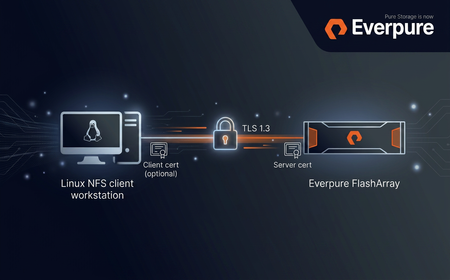
Purity//FA 6.10.6 introduces NFS over TLS for FlashArray File Services: an in-transit encryption layer that wraps NFSv3 and NFSv4.1 RPC traffic in a TLS 1.3 session as defined by RFC 9289 - Towards Remote Procedure Call Encryption By Default. Server authentication is mandatory, and mutual TLS (mTLS) is available as an optional second factor. This post is a technical feature description plus a minimum viable configuration walkthrough. It assumes you are already comfortable with FlashArray File Services (file servers, exports, policies) and Linux NFS clients. What the feature actually is Transport encryption for NFS - NFSv3 and NFSv4.1 RPC traffic is carried inside a TLS 1.3 record layer over TCP/2049. No NFS-level changes; applications and mount paths stay the same. Server authentication - the FlashArray presents an X.509 certificate; the client validates it against its own trust store. Server certificates must include the file-server VIF in the SAN. Optional mTLS - the array can require and verify a client certificate against a configured trusted CA (single certificate or a certificate group). Per-server policy - TLS configuration is a first-class tls policy attached to a specific file server, not a global toggle. End-to-end data path NFS over TLS data path. tlshd on the client performs the TLS handshake against the FlashArray; the resulting session encrypts all consequent NFS traffic on established connection. Building blocks on the FlashArray The feature is exposed as a new tls policy type that ties together three existing concepts: certificates (imported or self-signed), the tls-policy object, and a file server. The policy holds the appliance certificate, the TLS version/cipher constraints, the protocols TLS is enforced for, and (optionally) the trusted CA used to authenticate clients. TLS versions and cipher suites NFS over TLS on FlashArray negotiates TLS 1.3 for the NFS data path. The tls-policy object accepts --minimum-tls-version values of 1.2 or 1.3 , but that minimum is a floor, not a contract - for NFS the negotiated version will always be 1.3. The default TLS 1.3 cipher set is: TLS_AES_256_GCM_SHA384 TLS_CHACHA20_POLY1305_SHA256 TLS_AES_128_GCM_SHA256 (mandatory per RFC 8446) On clients with AES-NI, TLS_AES_256_GCM_SHA384 is the natural choice. TLS_CHACHA20_POLY1305_SHA256 is the cipher to prefer on clients without AES hardware acceleration. NFS protocol versions and mount options Both NFSv3 and NFSv4.1 are supported. The Linux client opts into TLS at mount time via the xprtsec option, mediated by tlshd : Option Meaning xprtsec=tls One-way TLS, server authentication only xprtsec=mtls Mutual TLS - client also presents a certificate vers=4.1 / vers=3 NFS protocol version Prerequisites FlashArray: Purity//FA 6.10.6 or later, with at least one configured file server. Client OS: a recent Linux distribution with NFS-over-TLS support (e.g. Rocky Linux 10), including nfs-utils , tlshd and openssl (for certificate handling). Certificates: a server certificate signed by a CA the client trusts; if there is no proper DNS record set up, the certificate must include the file-server IP Address in its subjectAltName . For mTLS, a client certificate signed by a CA the array trusts. Configuration walkthrough This is the minimum sequence to land an encrypted NFS mount. Replace IPs, names and certificate paths to taste. If you don't yet have a CA to issue the server (and, for mTLS, client) certificate from, see the test-CA appendix at the end of this post. 1. FlashArray - import the appliance certificate # on the FlashArray CLI - interactive paste of key, then certificate purecert imported create nfs-server-cert --key # for mTLS only: import the CA used to sign client certificates purecert imported create nfs-client-ca 2. FlashArray - create a TLS policy Server-auth-only policy: purepolicy tls create nfs-tls-policy \ --appliance-certificate nfs-server-cert \ --tls-enforced-for nfs mTLS variant - require the client to present a certificate and verify it against a trusted CA (the trusted CA argument accepts either a single certificate or a certificate_group ): purepolicy tls create nfs-mtls-policy \ --appliance-certificate nfs-server-cert \ --tls-enforced-for nfs \ --client-certificates-required \ --client-certificate-trust-verify-enabled \ --trusted-client-ca-certificate nfs-client-ca Optional version / cipher tuning: purepolicy tls setattr nfs-tls-policy --minimum-tls-version 1.3 purepolicy tls setattr nfs-tls-policy \ --enabled-tls-ciphers TLS_AES_256_GCM_SHA384,TLS_CHACHA20_POLY1305_SHA256 purepolicy tls list --effective 3. FlashArray - attach the policy to a file server pureserver list purepolicy tls add nfs-tls-policy --server your-file-server purepolicy tls list --member Once the policy is attached, the file server starts requiring TLS for any new NFS connection on that VIF. Existing un-encrypted sessions are not renegotiated or dropped on policy change - clients must remount or restart their NFS service to pick up the new requirements. The same caveat applies when removing or rotating the trusted client CA. 4. FlashArray - create the export (unchanged from regular NFS) purefs create your-filesystem puredir create your-filesystem:your-managed-dir purepolicy nfs create your-nfs-policy purepolicy nfs rule add your-nfs-policy \ --client "*" --no-root-squash --rw --version nfsv3,nfsv4 puredir export create your-export \ --dir your-filesystem:your-managed-dir \ --policy your-nfs-policy \ --server your-file-server The export must live on the same file server that the TLS policy is attached to (note the --server argument). 5. Linux client - install and configure tlshd dnf install -y nfs-utils ktls-utils systemctl enable --now tlshd mkdir -p /etc/pki/nfs cp ca.crt /etc/pki/nfs/ca.crt chmod 644 /etc/pki/nfs/ca.crt Minimal /etc/tlshd.conf for server-only TLS: [debug] loglevel=1 tls=1 nl=0 [authenticate] [authenticate.client] x509.truststore=/etc/pki/nfs/ca.crt [authenticate.server] For mTLS, add the client identity: [authenticate.client] x509.certificate=/etc/pki/nfs/client.crt x509.private_key=/etc/pki/nfs/client.key x509.truststore=/etc/pki/nfs/ca.crt Restart tlshd after any change: systemctl restart tlshd . 6. Mount # server authentication only mount -t nfs -o vers=4.1,xprtsec=tls,rw \ 10.0.0.100:/your-export /mnt/nfs-tls # mutual TLS mount -t nfs -o vers=4.1,xprtsec=mtls,rw \ 10.0.0.100:/your-export /mnt/nfs-mtls # verify mount | grep xprtsec What the wire actually looks like Connection bring-up: AUTH_TLS probe per RFC 9289 → TLS 1.3 handshake brokered by tlshd → encrypted NFS traffic on the same TCP connection. Operational notes Policy changes are not retroactive. Tightening a policy (turning TLS on, switching to mTLS, removing a cipher in use) does not drop or renegotiate existing connections. Affected clients need to remount or restart NFS. Same applies to CA removal/expiry. Server certificate must carry the VIF in SAN. Without a matching subjectAltName entry the client refuses the certificate; common symptom is a mount failure with Protocol not supported and tlshd logging a verification error. NFSv4.1 connection reuse amortises the handshake cost across many operations; NFSv3 mounts re-do the handshake more often, so the relative cost is higher on connection churn. Troubleshooting cheat sheet Symptom Likely cause First thing to check mount.nfs: Connection refused Policy enforces TLS, client mounts plain NFS, or tlshd not running systemctl status tlshd ; add xprtsec=tls access denied by server while mounting mTLS client cert missing/untrusted, or export rule mismatch journalctl -u tlshd -n 100 ; puredir export list Protocol not supported Server certificate SAN does not include the mounted IP, or CA not trusted openssl x509 -in server.crt -text -noout | grep -A1 "Subject Alternative Name" Useful diagnostics on the client: journalctl -u tlshd -f sysctl -w sunrpc.rpc_debug=0x7fff sunrpc.nfs_debug=0x7fff tcpdump -i any -nn -v 'host <file-server-ip> and port 2049' -w /tmp/nfs-tls.pcap # remember to restore: sysctl -w sunrpc.rpc_debug=0 sunrpc.nfs_debug=0 Appendix: a throwaway CA for testing For lab and PoC work it is much more useful to stand up a tiny local CA than to hand out self-signed certs. The workflow mirrors what you would do with a real PKI - the array trusts a CA, that CA signs the appliance certificate, and (for mTLS) the same or a different CA signs each client certificate. Anything below is for non-production use; do not reuse these keys anywhere you care about. Set a couple of variables to keep the commands short: mkdir -p ~/nfs-tls-ca && cd ~/nfs-tls-ca VIP=10.0.0.100 # file-server VIP the client will mount FQDN=nfs.lab.example.com # optional DNS name for the same VIP CLIENT_CN=client01.lab.example.com # only needed for mTLS 1. Root CA # 4096-bit RSA root, valid 10 years openssl genrsa -out ca.key 4096 openssl req -x509 -new -nodes -key ca.key -sha256 -days 3650 \ -subj "/CN=NFS-TLS Lab Root CA/O=Lab" \ -out ca.crt # inspect openssl x509 -in ca.crt -noout -subject -issuer -dates 2. Appliance (server) certificate The server certificate must include the file-server VIP in subjectAltName ; without it the client refuses the certificate during handshake. Add the FQDN as well if you have DNS for it. openssl genrsa -out server.key 2048 openssl req -new -key server.key \ -subj "/CN=${FQDN}/O=Lab" \ -addext "subjectAltName=DNS:${FQDN},IP:${VIP}" \ -out server.csr cat > server.ext <<EOF basicConstraints = CA:FALSE keyUsage = digitalSignature, keyEncipherment extendedKeyUsage = serverAuth subjectAltName = DNS:${FQDN},IP:${VIP} EOF openssl x509 -req -in server.csr -CA ca.crt -CAkey ca.key -CAcreateserial \ -out server.crt -days 825 -sha256 -extfile server.ext # verify the chain and the SAN openssl verify -CAfile ca.crt server.crt openssl x509 -in server.crt -noout -ext subjectAltName Import this pair into the FlashArray as nfs-server-cert and reference it from the TLS policy as --appliance-certificate : # key first, then certificate, when prompted purecert imported create nfs-server-cert --key 3. Client certificate (mTLS only) openssl genrsa -out client.key 2048 openssl req -new -key client.key \ -subj "/CN=${CLIENT_CN}/O=Lab" \ -out client.csr cat > client.ext <<EOF basicConstraints = CA:FALSE keyUsage = digitalSignature extendedKeyUsage = clientAuth EOF openssl x509 -req -in client.csr -CA ca.crt -CAkey ca.key -CAcreateserial \ -out client.crt -days 825 -sha256 -extfile client.ext openssl verify -CAfile ca.crt client.crt 4. What goes where File Goes to Used as server.key + server.crt FlashArray ( purecert imported create nfs-server-cert ) TLS policy --appliance-certificate ca.crt (for mTLS) FlashArray ( purecert imported create nfs-client-ca ) TLS policy --trusted-client-ca-certificate ca.crt NFS client ( /etc/pki/nfs/ca.crt ) tlshd truststore ( x509.truststore ) client.key + client.crt (for mTLS) NFS client ( /etc/pki/nfs/ ) tlshd client identity ( x509.private_key , x509.certificate ) From here, finish with the Configuration walkthrough steps above: create the TLS policy, attach it to the file server, create the export, configure tlshd , mount with xprtsec=tls or xprtsec=mtls . References RFC 9289 - Towards Remote Procedure Call Encryption By Default RFC 8446 - TLS 1.3 tlshd(8) and tlshd.conf(5) manual pages Everpure FlashArray File Services administration guide (Purity//FA 6.10.6)523Views1like0CommentsFlashArray File Multi-Server
File support on FlashArray gets another high demanded feature. With version 6.8.7, purity introduces a concept of Server, which connects exports and directory services and all other necessary objects, which are required for this setup, namely DNS configuration and networking. From this version onwards, all directory exports are associated with exactly one server. To recap, server has (associations) to following objects: DNS Active Directory / Directory Service (LDAP) Directory Export Local Directory Service Local Directory Service is another new entity introduced in version 6.8.7 and it represents a container for Local Users and Groups. Each server has it's own Local Directory Service (LDS) assigned to it and LDS also has a domain name, which means "domain" is no longer hardcoded name of a local domain, but it's user-configurable option. All of these statements do imply lots of changes in user experience. Fortunately, commonly this is about adding a reference or possibility to link a server and our GUI contains newly Server management page, including Server details page, which puts everything together and makes a Server configuration easy to understand, validate and modify. One question which you might be asking right now is - can I use File services without Servers? The answer is - no, not really. But don't be alarmed. Significant effort has been made to keep all commands and flows backwards compatible, so unless some script is parsing exact output and needs to be aligned because there is a new "Server" column added, there should be any need for changing those. How did we managed to do that? Special Server called _array_server has been created and if your configuration has anything file related, it will be migrated during upgrade. Let me also offer a taste of how the configuration could look like once the array is updated to the latest version List of Servers # pureserver list Name Dns Directory Services Local Directory Service Created _array_server management - domain 2025-06-09 01:00:26 MDT prod prod - prod 2025-06-09 01:38:14 MDT staging management stage staging 2025-06-09 01:38:12 MDT testing management testing testing 2025-06-09 01:38:11 MDT List of Active Directory accounts Since we can join multiple AD servers, we now can have multiple AD accounts, up to one per server # puread account list Name Domain Computer Name TLS Source ad-array <redacted>.local ad-array required - prod::ad-prod <redacted>.local ad-prod required - ad-array is a configuration for the _array_server and for backwards compatibility reasons, the prefix of the server name hasn't been added. The prefix is there for account connected to server prod (and to any other server). List of Directory Services (LDAP) Directory services got also slightly reworked, since before 6.8.7 there were only two configurations, management and data. Obviously, that's not enough for more than one server (management is reserved for array management access and can't be used for File services). After 6.8.7 release, it's possible to completely manage Directory Service configurations and linking them to individual servers. # pureserver list Name Dns Directory Services Local Directory Service Created _array_server management - domain 2025-06-09 01:00:26 MDT prod prod - prod 2025-06-09 01:38:14 MDT staging management stage staging 2025-06-09 01:38:12 MDT testing management testing testing 2025-06-09 01:38:11 MDT Please note that these objects are intentionally not enabled / not configured. List of Directory exports # puredir export list Name Export Name Server Directory Path Policy Type Enabled prod::smb::accounting accounting prod prodpod::accounting:root / prodpod::smb-simple smb True prod::smb::engineering engineering prod prodpod::engineering:root / prodpod::smb-simple smb True prod::smb::sales sales prod prodpod::sales:root / prodpod::smb-simple smb True prod::smb::shipping shipping prod prodpod::shipping:root / prodpod::smb-simple smb True staging::smb::accounting accounting staging stagingpod::accounting:root / stagingpod::smb-simple smb True staging::smb::engineering engineering staging stagingpod::engineering:root / stagingpod::smb-simple smb True staging::smb::sales sales staging stagingpod::sales:root / stagingpod::smb-simple smb True staging::smb::shipping shipping staging stagingpod::shipping:root / stagingpod::smb-simple smb True testing::smb::accounting accounting testing testpod::accounting:root / testpod::smb-simple smb True testing::smb::engineering engineering testing testpod::engineering:root / testpod::smb-simple smb True testing::smb::sales sales testing testpod::sales:root / testpod::smb-simple smb True testing::smb::shipping shipping testing testpod::shipping:root / testpod::smb-simple smb True The notable change here is that the Export Name and Name has slightly different meaning. Pre-6.8.7 version used the Export Name as a unique identifier, since we had single (implicit, now explicit) server, which naturally created a scope. Now, the Export Name can be the same as long as it's unique in scope of a single server, as seen in this example. The Name is different and provides array-unique export identifier. It is a combination of server name, protocol name and the export name. List of Network file interfaces # purenetwork eth list --service file Name Enabled Type Subnet Address Mask Gateway MTU MAC Speed Services Subinterfaces Servers array False vif - - - - 1500 56:e0:c2:c6:f2:1a 0.00 b/s file - _array_server prod False vif - - - - 1500 de:af:0e:80:bc:76 0.00 b/s file - prod staging False vif - - - - 1500 f2:95:53:3d:0a:0a 0.00 b/s file - staging testing False vif - - - - 1500 7e:c3:89:94:8d:5d 0.00 b/s file - testing As seen above, File network VIFs now are referencing specific server. (this list is particularly artificial, since neither of them is properly configured nor enabled, anyway the main message is that File VIF now "points" to a specific server). Local Directory Services Local Directory Service (LDS) is a newly introduced container for Local Users and Groups. # pureds local ds list Name Domain domain domain testing testing staging staging.mycorp prod prod.mycorp As already mentioned, all local users and groups now has to belong to a LDS, which means management of those also contains that information # pureds local user list Name Local Directory Service Built In Enabled Primary Group Uid Administrator domain True True Administrators 0 Guest domain True False Guests 65534 Administrator prod True True Administrators 0 Guest prod True False Guests 65534 Administrator staging True True Administrators 0 Guest staging True False Guests 65534 Administrator testing True True Administrators 0 Guest testing True False Guests 65534 # pureds local group list Name Local Directory Service Built In Gid Audit Operators domain True 65536 Administrators domain True 0 Guests domain True 65534 Backup Operators domain True 65535 Audit Operators prod True 65536 Administrators prod True 0 Guests prod True 65534 Backup Operators prod True 65535 Audit Operators staging True 65536 Administrators staging True 0 Guests staging True 65534 Backup Operators staging True 65535 Audit Operators testing True 65536 Administrators testing True 0 Guests testing True 65534 Backup Operators testing True 65535 Conclusion I did show how the FA configuration might look like, without providing much details about the actual way how to configure or test these configs, anyway, this article should provide a good overview about what to expect from 6.8.7 version. There is plenty of information about this particular aspect of the release in the updated product documentation. Please let me know if there is any demand to deep-dive into any aspect of this feature.869Views2likes2CommentsWhy Object Storage Still Matters
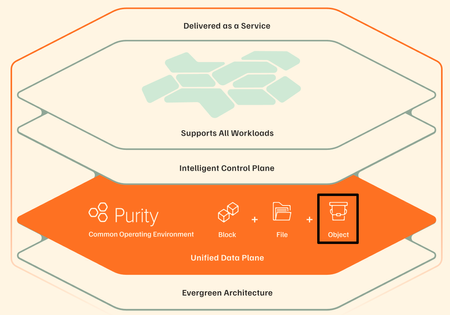
In Part 2, I wrote a line that, at the time, felt almost like a side comment — something I typed without fully appreciating how much it would change the direction of the story: “BREAKING NEWS: The FlashArray now supports Object??? What in the world? I may need to write an article about that!!” That reaction wasn’t planned, and it definitely wasn’t me being clever. It was me looking at the GUI and thinking, “that can’t be right… can it?” It didn’t line up with how I’ve been modeling storage architectures in my head for years, which usually means one of two things: either something fundamentally changed… or I’ve been confidently wrong about part of this for a while. And if I’m being completely honest, there was also a second reaction happening in parallel — one that I didn’t write down at the time because it sounded slightly ridiculous even in my own head: “Wait… do I actually understand why object storage exists in the first place? And more importantly… what exactly was wrong with files?” That’s the part nobody likes to admit out loud. We’ve all spent years confidently explaining block, file, and object as if we were born with that knowledge, when in reality most of us learned it incrementally, retroactively, and with just enough conviction to sound credible in front of a customer. Object storage, in particular, has always carried this aura of inevitability — like of course it’s better, of course it scales, of course it’s what modern applications need — without always forcing us to question why the previous model stopped being enough. Because for as long as most of us have been designing infrastructure, object storage has not simply been another protocol layered onto an existing system. It has represented a fundamentally different way of organizing and accessing data, one that required its own architectural approach, its own scaling model, and, more often than not, its own dedicated platform. The separation between block, file, and object was not arbitrary; it was a reflection of how deeply different those paradigms were in terms of metadata handling, access patterns, and performance expectations. This is precisely why platforms such as Everpure FlashBlade exist in the first place. They were not created as extensions of traditional storage systems but as purpose-built architectures designed to treat unstructured data — and particularly object data — as a first-class citizen. The use of distributed metadata services, sharded across independent nodes, combined with a key-value store storage model, allows such systems to achieve levels of parallelism and throughput that simply cannot be replicated within a controller-based design. In that context, object storage is not something that is “added” to the system; it is the system. Which is why seeing S3 support appear on FlashArray required a pause. Not excitement. Not skepticism alone. Something closer to intellectual friction. Reconciling Two Architectural Worlds The most important step in understanding what FlashArray has introduced is to resist the temptation to treat it as a direct comparison to FlashBlade. These aren’t two different ways of solving the same problem. They’re two different answers to two different problems—and pretending otherwise is where people get themselves into trouble. FlashBlade is built for object, not adapted to it. S3 talks directly to a distributed engine that thinks in objects, not files pretending to be objects. Metadata is spread across blades instead of becoming a centralized choke point, and the whole system scales the way modern workloads actually need it to. There’s no file system layer to fight with, no directory structure to navigate, no POSIX semantics getting in the way. It just does what you’d expect when you remove all of that: it goes fast, it scales cleanly, and it keeps up with workloads like HPC, AI and analytics without breaking a sweat. FlashArray takes a very different path, and in reality, it’s not what most people expect. It doesn’t try to reinvent itself as an object platform, and it doesn’t throw an S3 gateway in front of the array and call it a day. With Purity 6.10.5+, S3 just shows up as another protocol the system understands, right next to block and file. That distinction matters more than it seems. This isn’t something duct-taped on the side — it’s part of the same control plane, the same data path, the same system you’ve already been running. But let’s not pretend it turned into FlashBlade overnight. This is still a controller-driven architecture. The primary controller does the heavy lifting — handling requests, authenticating them, coordinating operations — before anything actually hits the storage engine. Which means it behaves differently, especially as workloads scale. So it ends up in this interesting middle ground. Not a native object system in the pure sense, but not a hack either. Just a different way of exposing what’s already there. The Translation Layer and Its Consequences It would be irresponsible to discuss FlashArray S3 without explicitly addressing the implications of this design. Even with its native integration into Purity, S3 operations are still subject to the realities of a controller-bound architecture. Every request must be processed, authenticated, and coordinated before it is executed, introducing a measurable difference in behavior compared to both native block operations and distributed object systems. The most immediate effect is latency. While FlashArray continues to deliver sub-150 microsecond performance for block workloads, S3 operations typically operate at higher latencies (in 1 millisecond range) due to the additional processing steps involved. This is not a flaw; it is the natural outcome of introducing a protocol that was designed for scale and flexibility into a system optimized for low-latency transactional workloads. Metadata handling further reinforces this distinction. FlashBlade distributes metadata across its architecture, enabling massive parallelism and consistent performance at scale. FlashArray processes metadata through its controller framework, which introduces natural serialization points under high concurrency. As workloads become increasingly metadata-heavy — particularly with small objects — this difference becomes more pronounced. The system also enforces clearly defined operational limits to maintain predictable performance. As of Purity 6.10.5+, FlashArray supports up to 250 S3 buckets per array and a maximum of 1,000,000 objects per bucket. FlashArray Object Store Limits Object storage operates at the array scope and does not integrate with multi-tenancy or “realms”, which has implications for service provider models and strict tenant isolation requirements. These constraints are not arbitrary limitations; they are guardrails that ensure the system behaves consistently within its architectural boundaries. Where the Architecture Becomes Secondary Having established those boundaries, the conversation naturally shifts from “how it works” to “why it matters”. In many enterprise environments, particularly within SLED organizations, the challenge is not achieving exabyte-scale throughput or supporting billions of objects. The challenge is delivering capabilities in a way that is operationally sustainable, economically efficient, and aligned with existing infrastructure. This is where FlashArray’s approach becomes compelling. By exposing object storage within the same platform that already supports block and file workloads, it eliminates the need to introduce a separate system, a separate operational model, and a separate set of dependencies. The same management interface, the same automation framework, and the same data services extend across all protocols. More importantly, object data inherits the full set of Purity capabilities. Global inline deduplication and compression apply to S3 workloads, significantly improving storage efficiency compared to many object-native platforms. SafeMode snapshots extend immutability to object storage, providing a critical layer of protection against ransomware. ActiveCluster, combined with ActiveDR, enables a three-site resilience model that ensures data availability across multiple locations with zero RPO between primary sites. These are not incremental improvements. They represent a shift in how object storage can be consumed within an enterprise. Practical Use Cases in a Unified Model When viewed through this lens, the use cases for FlashArray S3 become both clear and grounded in reality. Development and Staging Environments Some applications rely on S3 APIs but do not require massive scale, FlashArray provides a consistent and integrated object interface without introducing additional infrastructure. Developers can build and test against a familiar model while remaining within the same operational environment. Backup and Recovery Workflows FlashArray S3 enables modern data protection strategies that leverage object storage while benefiting from flash performance, deduplication, and indelible snapshots. This combination improves both recovery times and storage efficiency. Tier-two repositories and application-integrated storage represent another natural fit. Workloads such as document management systems, logs, and archival data often require object semantics but do not justify the higher cost of a dedicated object platform. Consolidating these workloads onto FlashArray simplifies operations while maintaining reliability and performance. Where the Boundaries Still Matter None of this diminishes the importance of selecting the appropriate platform for workloads that demand a different architecture. High-performance AI pipelines, large-scale analytics environments, and use cases requiring massive parallelism remain firmly within the domain of FlashBlade. The ability to scale performance linearly, distribute metadata across many nodes, and support billions of objects is not optional in these scenarios — it is essential. What has changed is not the relevance of those systems, but the necessity of deploying them for every object storage use case. A Subtle but Significant Shift The introduction of S3 on FlashArray does not represent a replacement of one architecture with another. It represents a convergence of capabilities within a unified operational framework. Object storage, in this model, is no longer a destination that requires its own platform. It becomes a capability — one of several ways to access and manage data within the same system. That shift is easy to overlook, but its implications are significant. It allows organizations to design around outcomes rather than protocols, to reduce complexity without sacrificing capability, and to align infrastructure more closely with the needs of modern applications. Closing Reflection Looking back at that line in Part 2, it is clear that the reaction was not just about a new feature appearing in the interface. It was about the recognition — however incomplete at the time — that something foundational was beginning to change. Object storage did not suddenly become simpler, nor did it lose the architectural complexity that defines it. What changed is where it lives. And once that becomes clear, you start asking a slightly uncomfortable but very honest question: If this works… and it works well enough for most of what I actually need… why was I so convinced it had to live somewhere else in the first place? That is usually where the interesting work begins. Appreciate you reading. Dmitry Gorbatov © 2025 Dmitry Gorbatov | #dmitrywashere313Views1like0CommentsFusion for the Win: You No Longer Have to Decide Where the Data Lives
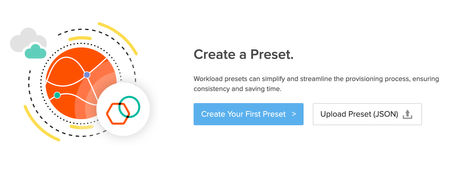
Dmitry Gorbatov Apr 10, 2026 In the first post, I walked through enabling file services on a FlashArray. There was nothing particularly complicated about it. The process was clean, predictable, and by the end of it I had a fully functional file platform running on the same system that was already supporting the rest of the environment. It behaved exactly the way you would expect it to behave. And that is precisely what started to bother me. Because if you step back and look at what we actually did, the workflow has not really changed in years. I still made a series of decisions in a very specific order. I chose where the workload should live, I created the file system, I attached protection, and I made sure everything was named and organized in a way that made sense at that moment. It was structured. It was controlled. It was also entirely dependent on me. That model works well enough when the environment is small or when the same person is making the same decisions repeatedly. But as soon as you introduce scale, or simply more people, those decisions start to drift. Not in a dramatic way, but in small inconsistencies that accumulate over time. A slightly different naming convention here, a missed policy there, a workload placed somewhere because it “felt right.” Nothing breaks. It just becomes harder to operate. When the model stops making sense What stood out to me after going through the manual process is that we are still treating storage as something that needs to be individually managed, even though the platform itself has already moved beyond that. We have systems that can deliver consistent performance, global data services, and non-disruptive operations, yet we still rely on human judgment to decide where things go and how they should be configured. That disconnect is where Everpure Fusion begins to make sense. Not as an additional feature, but as a way to remove an entire class of decisions that we have simply accepted as part of the job. From managing infrastructure to defining intent The idea behind the Enterprise Data Cloud is not particularly complicated, but it does require a shift in perspective. Instead of treating each array as a separate system with its own boundaries, the environment becomes a unified pool of resources. Data is no longer something that you place on a specific array. It is something that exists within a global pool, governed by policies that define how it should behave. Once you start thinking this way, the questions change. You are no longer asking where a workload should go. You are asking what that workload needs to look like. Performance expectations, protection requirements, naming, and lifecycle behavior become the inputs, and the system automation takes responsibility for everything else. That is the role of Everpure Fusion. What actually changes in practice The easiest way to understand Fusion is to look at what it removes. In the manual model, every step is explicit. You build storage object by object, and then you attach policies to those objects. You rely on memory, experience, and sometimes documentation to make sure everything is done correctly. With Fusion, that entire process becomes declarative. Instead of building storage step by step, you define a preset. A preset is a reusable definition of what “correct” looks like for a given workload. It captures performance expectations, protection policies, naming conventions, and any constraints that should apply. Once that definition exists, it becomes the standard. When you create a workload from that preset, Fusion evaluates the environment and places it on the array that best satisfies those requirements. It creates the necessary objects, applies the policies, and ensures that everything is consistent with the definition. The important shift is not that tasks are automated. It is that decisions are no longer made ad hoc. Trying it in the lab After building file services manually in the previous post, I wanted to see what this would look like using the same environment, but driven through Fusion. I started by defining a fleet, grouping the array into a logical boundary where resources and policies could be managed collectively. Once the array becomes part of a fleet, you stop thinking of it as an individual system and start treating it as part of a shared pool. From there, identity becomes the next requirement. Fusion relies on centralized authentication, typically through secure LDAP backed by Active Directory. This is what governs access to presets and workloads, and it ensures that everything aligns with existing organizational controls. Up to this point, everything felt exactly like I expected. Then I moved to the part I was actually interested in. Where things didn’t quite line up The goal was to take the file services I had already built and express them as a preset. I wanted a single definition that would describe the file system, its structure, its policies, and its behavior, and then use that definition to create workloads without going through the manual steps again. Conceptually, that is exactly what Fusion is supposed to do. In practice, I ran into a limit that I had not fully appreciated at the start. I was running Purity OS 6.9.2. Which, to be fair, is where most production environments should be. It is a Long-Life Release, stable, predictable, and already capable of delivering Fusion for fleet management, intelligent placement, and policy-driven storage classes. You can create Presets and Workloads for block workloads. What it does not include is full support for File Presets on FlashArray. That capability, where a file system, its directories, and its access policies are all defined and deployed as a single unit, arrives in the 6.10.X Feature Release line. Which means that the exact outcome I was trying to demonstrate was sitting just one version ahead of me. This is where I had to laugh at myself There is always a moment in a lab where you realize that the limitation is not the platform. It is you. In this case, it was me getting ahead of the version I was actually running. My intentions were “ever” so “pure” (IYKYK). The execution was slightly behind the feature set. So I upgraded One of the advantages of working with this platform is that upgrading does not carry the same weight it used to. The system is designed for non-disruptive operations, and moving between versions does not require downtime or migration. The upgrade to 6.10.5 was uneventful in the best possible way. Controllers were updated in sequence, workloads continued to run, and the system transitioned to a new set of capabilities without introducing risk. There is something very satisfying about performing an upgrade not because something is broken, but because you want access to what comes next. BREAKING NEWS: The FlashArray now supports Object??? What in the world? I may need to write an article about that!! When it finally clicks Once on 6.10.5, the model finally aligns with the intent. Once I clicked on Create Your First Preset, it gave me these options: I defined a preset that described the file workload I had previously built manually. It included the expected behavior, protection policies, and naming conventions. Instead of creating individual components, I was defining the service as a whole. Now this was really neat - when you select Storage Class, it knows that arrays are available in your environment. In my case, I only have FA //X. At this point a new field opens and allows you to select the Storage Resources. Once I hit “Publish'“ this was the result: Think of this entire process like this: Define your Recipe (Preset) Order from the Menu (Workload) Lets create a workload from that preset. Once I clicked on + to add a new Workload, the Wizard opened: Give a name to that Workload: Since Fusion Fleet has both of my lab arrays, I have an option to select an array for the workload placement. Our of curiosity I clicked: “Get Recommendations” and this was the result: Once I hit Deploy, within seconds, the workflow executed and I had my File System created. How awesome is this? Come on, give me a cheer! Think about the magnitude of what just happened. I provided minimal input, and Fusion handled the rest. It selected the appropriate array based on capacity and performance, created the file system, applied the policies, and ensured that everything matched the definition. There was no second pass. There were no additional steps. The outcome matched the intent. By moving to this model, I just shifted from being a "storage admin" to a "data architect." I defined the outcomes and it happened “automagically”. Why this matters more than efficiency It would be easy to describe this as a way to reduce manual effort, but that misses the point. The real value is consistency. When every workload is created from a defined preset, variability disappears. Policies are enforced by default. Naming is consistent. Placement is based on a complete view of the environment rather than individual judgment. Over time, that consistency reduces operational friction and lowers risk in ways that are difficult to measure but easy to recognize. Environments behave predictably, scaling becomes simpler, and the likelihood of human error decreases. Where this leads In the first post, I showed that file services can run natively on the array without additional infrastructure. In this post, the focus shifted to removing the manual decisions involved in building and managing those services. The next step is where things move beyond automation. As capabilities like ActiveCluster for File continue to evolve, the conversation shifts toward mobility and continuous availability. At that point, it is no longer just about simplifying operations, but about removing the constraints that tie workloads to a specific system or location. That is a conversation for Part 4. Appreciate you reading. © 2025 Dmitry Gorbatov | #dmitrywashere85Views0likes0CommentsStop Running File Servers on VMs
Dmitry Gorbatov Apr 06, 2026 One of the superstar Pre-Sales Systems Engineers on my team was in a customer meeting not too long ago, walking through what was, by all accounts, a well-run environment. The team knew what they were doing, the infrastructure was stable, and nothing stood out as particularly problematic. It was one of those conversations where everything feels “fine,” which in our world usually means there are inefficiencies hiding in plain sight. Then he started asking questions about enterprise file services. They were running a couple of Windows Server virtual machines on top of VMware vSphere, serving SMB shares to the rest of the organization. Again, nothing unusual there. This is still the default design in a lot of places, and it works well enough that nobody feels compelled to question it. But as the meeting on, a few details started to surface. One of the VMs was consistently running hot during backup windows. Another one hadn’t been patched in a while because nobody wanted to risk disrupting access to shared data. The storage policies applied at the VM layer didn’t quite line up with what was actually configured on the array. And there was an unspoken understanding that maintaining these systems was just part of the job — something you deal with, not something you optimize. What made it more interesting was that the same environment had an Everpure FlashArray running their critical workloads. It was handling databases, transactional systems, and anything else that required consistent performance and reliable data services. It was protected, replicated, and trusted. File services, however, were living on top of virtual machines, with their own lifecycle (please, please… don’t say VMware snapshots), their own dependencies, and their own set of operational overhead. That disconnect is what stuck with me. So instead of continuing the theoretical discussion about architecture and “best practices,” I went back to my lab and decided to try something very simple. I wanted to see what would actually happen if I enabled file services directly on the array and treated it as a first-class file platform instead of assuming that role belonged to something else. There was no redesign exercise, no migration plan, and no phased rollout. I wasn’t trying to prove a point on a whiteboard. I just wanted to turn it on and see if the experience matched what we tend to claim in conversations. Nothing broke. Nothing felt forced. And more importantly, nothing about it felt like a compromise. This post walks through exactly what I did to enable and run file services on a FlashArray //X20R4 running Purity 6.9.2. The goal is not to explain the architecture in abstract terms, but to show how straightforward it is to take something that already exists in your environment and use it in a way that removes unnecessary complexity. What I realized (and why this matters) Once everything was up and running, the first realization was that this is not a workaround or a secondary feature designed to fill a gap. FlashArray File is integrated into the platform in a way that makes it behave like a natural extension of what the system already does well. It uses the same controllers, the same global storage pool, and the same data services that are already in place for block workloads. There is no separate management layer, no additional appliance (remember Data Movers and NAS Personas?), and no need to think about it as something different from the rest of the system. That by itself is useful, but it is not the most important part. What stood out more was the amount of operational overhead that simply disappeared. When file services run on virtual machines, you inherit everything that comes with them. You are responsible for the guest operating system, including patching cycles, security updates, and the occasional issue that appears at the worst possible time. You are also consuming hypervisor resources and, in many cases, paying for licensing that exists solely to support a function that could be handled elsewhere. On top of that, you end up managing data protection, performance, and capacity in two different places (remember RDMs, or in-guest iSCSI?), which introduces opportunities for inconsistency. By moving file services onto the array, that entire layer is removed. You are not just changing where the workload runs; you are simplifying how it is operated, protected, and maintained over time. The second realization was that this approach aligns with where things are clearly heading. Everpure is already extending these capabilities with ActiveCluster for File, which will bring synchronous replication and continuous availability to unstructured data. I do not have that running in my lab yet, but it is not difficult to see the direction. As those capabilities become more widely available, the remaining reasons to maintain separate file platforms will continue to shrink. That will be a conversation for a future post. Let’s tentatively call it Part 3 of the series. Before you start (the part that actually matters) Enabling file services on the array is straightforward. The part that tends to create friction is everything that surrounds the configuration, particularly networking and integration with existing services. The first consideration is the choice of network interfaces. Although the array provides 1GbE management ports, those interfaces are not intended for serving file workloads. Using them for SMB or NFS traffic introduces an artificial bottleneck that will affect performance and, more importantly, perception. File services should be configured on the 10 or 25GbE data ports, which are designed to handle production traffic and provide the throughput expected from the platform. Here is what my array looked like earlier today: The highlighted ports are ETH10 and ETH11 on both controllers. Redundancy should be planned, but it does not need to be over engineered. A simple and reliable starting point is to use at least two ports per controller, ensuring that the configuration remains consistent across both sides. The goal is to achieve predictable failover behavior rather than to build a complex network design that is difficult to troubleshoot. One concept that is worth understanding early is the File Virtual Network Interface, or File VIF. This is the logical identity of the file service—the IP address that clients use to connect. It is designed to move between controllers as needed, maintaining availability during failover events. Once this concept is clear, the rest of the networking configuration becomes much easier to follow. My lab was built within budgetary constraints - that means I don’t have separate ethernet switches and I don’t have the time to build a separate DNS Server for FA File Services. Everpure recommends separating file client traffic from management traffic, but that’s a best practice, not a requirement. Since my lab switch is a single flat, untagged network and the environment is really just 192.168.1.0/24, I will just us the most practical approach - put the FA File VIFs on that same 192.168.1.0/24 network with their own IP addresses. Here is what I did: I just kept the file VIFs on 192.168.1.0/24 since that is the only real network available. FlashArray expects unique layer-3 subnets and does not support overlapping networks. DNS In my specific configuration, I don’t need a new DNS server. My existing management DNS servers can resolve the AD/DC hostnames and the FA File names/computer object. FA File can use the same DNS as management with no extra file-DNS configuration. By default, DNS lookups will go out the management interfaces, so my DNS server just needs to be reachable from the management network. And it is. Let’s turn the lights on, shall we? After assigning the IP addresses and enabling the ports, the lights came on. Important design note I will use one client-facing VIF IP for the file service, for example: File VIF IP: 192.168.1.135 Netmask: 255.255.255.0 Gateway: 192.168.1.2 default gateway Do not try to use 192.168.1.131-134 as four separate FA File IPs unless you intentionally want multiple VIFs. The ct*.eth* ports are transport underlay, not the SMB/NFS endpoint IPs. Configuring a File Server and File VIF Open the File Services server page Go to Storage → Servers. Open the default server (_array_server) or create a new file server if you want a dedicated namespace. Stay on that server’s details page. 3. Create the File VIF Use physical bonding first; it’s the simplest. In the Virtual Interfaces section, click + Create VIF. Choose Physical Bonding. Select the underlying port pairs: Pair 1: ct0.eth10 and ct1.eth10 Pair 2: ct0.eth11 and ct1.eth11 Name the VIF something simple, e.g.: filevip1 Enter network settings: IP Address: 192.168.1.135 Netmask: 255.255.255.0 Gateway: 192.168.1.1 Leave VLAN blank since there are no VLANs. Save and Enable the VIF. That creates the client-facing IP for SMB/NFS. 4. Configure DNS Integration with DNS and Active Directory is another area where a bit of preparation goes a long way. File services rely on proper name resolution and domain integration, and it is important to recognize that file-related DNS settings are separate from the array’s management DNS configuration. The system effectively becomes a participant in the domain as a file server, which means that DNS records, domain join operations, and permissions should be planned accordingly rather than improvised during setup. Since my DNS is 192.168.1.2 and I want to reuse management DNS: Go to the server’s DNS Settings. My management DNS is already configured and points to 192.168.1.2 If you want to explicitly add file DNS: Click + in DNS Name: file-dns Domain suffix: your AD/domain suffix DNS server: 192.168.1.2 Service: file Source interface can remain default unless you specifically need file VIF sourcing. 5. Create required DNS A records On my DNS server 192.168.1.2, I created an A record for the file service name pointing to the File VIF IP. Name: fa-file01 IP: 192.168.1.135 If you are joining AD for SMB/Kerberos: Make sure DNS also has A records for all relevant domain controllers. Create the A record that matches the AD computer object / FA File service name. 6. Join Active Directory or configure LDAP If using SMB Use Active Directory. Go to: Storage → Servers → _array_server Then look for one of these panels: Remote Directory Service Click Edit Configuration Select Active Directory Enter: Name Domain DNS Name Computer Name Use Existing Account if applicable AD User Password TLS Mode Save / Join This part took me 2 hours. I was getting some crazy error messaged that I’m simply embarrassed to share here. It was not the DNS. It was an NTP server misconfiguration that was causing Kerberos to not authenticate properly. There was a 10 minute time skew between the FlashArray and the domain controller. 7. Create a File System The file system is the top-level container for your unstructured data. GUI Method: Navigate to Storage > File Systems and click the plus sign (+). Enter a name and click Create. CLI Method: Use the following command: purefs create <file-system-name>. 8. Create a Managed Directory Managed directories allow you to apply specific policies (like quotas or snapshots) to subfolders within a file system. GUI Method: Go to Storage > File Systems. Click on the name of the file system you just created. Select the Directories tab and click the plus sign (+). Enter the directory name and the internal path (e.g., /users). CLI Method: Use the following command: puredir create filesystem1:users --path /users. 9. Create an Export The export makes the managed directory accessible to clients over the network. GUI Method: Navigate to Storage > Policies > Export Policies. Select an existing policy (e.g., a standard SMB or NFS policy) or create a new one. Within the policy view, click the plus sign (+) to add an export. Select your Managed Directory, choose the appropriate Server (use _array_server for standard configurations), and provide an Export Name (this is the name clients will use to mount the share). CLI Method: Use the following command: puredir export create --dir <file-system-name>:<directory-name> --policy <policy-name> --server <server-name> --export-name <client-facing-name>. A quick validation step At this point, it is worth validating access from a client system. Map the SMB share and perform a simple set of operations—create files, read data, and verify permissions. This is less about testing performance and more about confirming that networking, authentication, and access controls are behaving as expected. In most cases, if the earlier steps around DNS and Active Directory were done correctly, this validation step is uneventful, which is exactly what you want. And now let the data migration begin. I am actually doing it from my Mac. And it just works!!! What becomes apparent after completing these steps is how little effort is required to stand up a fully functional file platform on infrastructure that is already in place. Unless, of course, your NTP server crashed. The system behaves predictably, integrates cleanly with existing services, and avoids many of the operational burdens associated with VM-based file servers. And that is where things start to get interesting. Because everything described so far is still being done manually—selecting where things live, defining configurations, and applying policies one step at a time. It works, and it works well, but it also mirrors the way storage has traditionally been managed. In the next post, I will show what happens when you stop doing these steps manually and let Pure Fusion handle placement, policy, and provisioning instead. Appreciate you reading. © 2025 Dmitry Gorbatov | #dmitrywashere258Views1like0Comments