Cooking with “Enterprise Data Cloud”: Recipes for your Datacenter
September 24 | Register Now! Looking for practical ways to streamline your datacenter or hybrid cloud environment and run it more reliably? Following up from last September’s episode, “Cloud - A Place or a Strategy? Unpacking the Everpure Enterprise Data Cloud” (EDC) with JD Wallace, host Andrew Miller invites Michael Sasse (Principal Technology Strategist with Everpure for 11 years) to discuss how to make EDC real for YOU in the midst of the many industry changes from even just 12 months ago. We’ll explore: Changing customer needs: What Michael has heard as he discusses EDC with customers, including how speed and efficiency matters more than ever and the risk of being replaced if you’re perceived as the “department of no”. What EDC is: If you love dogs, you’ll love this (join us to see why). We’ll look at how EDC is driving the simplicity that FlashArray™ brought to the storage industry throughout the datacenter and cloud. Cooking the EDC souffle (making It real): We’ll look at the building blocks of EDC from a technical perspective — things like Fleets, Topology Groups, Presets, observability, governance, automation and more. Of course, underpinning all of this is Evergreen//One™. Presenting to the (exec) table: Think of this as delivering the meal. Having reviewed the building blocks, we’ll look at the outcomes both you and your executives care about. Think of this as 1) who is leveraging EDC, 2) how has it helped (measurable outcomes), and 3) why does it matter? Even better, we’ll discuss the EDC Blueprint: how Everpure is linking our products and features to outcomes that your CIO and CTO care about. September 24 | Register Now!81Views0likes0Comments
Snapshot protection
Hi guys, i'm trying to implement some kind of snapshot protection throughout all of our arrays. I have enabled Fusion. We're currently protecting the data with a 3rd party backup solution. I'm wondering how much of an impact to performance and space is enabled snapshots going to cause?. Since we're already protected, we're not looking into a very long retention with these backups (probably a week or so). I'm open to recommendations around this topic. Thanks!Solved1.2KViews1like5CommentsThe Art of Sizing: The Seven Signals That Help Decide Oracle 26ai Readiness
The Art of Sizing — Series Categories: Databases · Oracle · AI and Machine Learning By Thomas Stutesman, Principal Field Solutions Architect, Everpure A migration readiness scorecard turns raw Oracle AWR telemetry into seven plain-language signals — and shows you exactly where a lift-and-shift would carry yesterday's problems into tomorrow's platform. The migration everyone is planning for Across the industry, many organizations are now looking to move to Oracle AI Database 26ai. The release promises autonomous efficiency, AI-driven insight, and native vector search — but for most teams the path forward is clouded by one uncomfortable question: is our current infrastructure sized for tomorrow, or are we carrying the weight of yesterday's inefficiencies? The 26ai Migration Readiness scorecard is one of the helpful tools Everpure has created to make that migration easier. It takes the telemetry you already have — your Oracle Automatic Workload Repository (AWR) reports — and translates it into a clear, consistent read on where each database stands, so you move with evidence instead of assumptions. This is the first idea in our Art of Sizing series: for a decade, cheap flash and fast cores let us over-provision and "throw hardware at it." Oracle 26ai — with real vector workloads and a hardware market where components cost more and take longer to arrive — ends that era. Disciplined sizing is back, and it starts with reading the right signals. What the scorecard shows Point the assessment at an estate and it produces a single view: every database, scored across seven signals, rolled up into a combined readiness score. In one illustrative example across eight databases, the combined readiness score was 118 out of 168 — with 0 Ready, 7 Caution, and 1 Risk. None were a clean lift-and-shift: seven needed validation and tuning, and one needed remediation before it could move. Each database is scored across the seven signals with a simple traffic light, and the lights roll up into a score out of 21 — seven signals, three points each: Ready — 3 points — inside the healthy threshold Caution — 2 points — worth validating Risk — 1 point — attend to before you move A score of 18–21 is favorable, 13–17 means review needed, and below 13 flags remediation. Think of it as a current-state indicator that tells you where the risk concentrates — not a migration certification. A red flag doesn't mean "cannot migrate." It means the problem will follow you into 26ai — or get worse — if you size the new environment from the old box instead of from the evidence. The seven signals, one by one These are the value items to worry about when sizing for and moving to 26ai. For each, here is what it reads from AWR, why it drives your target design, what a red is telling you, and how Everpure helps you act on it. Signal 01 — System Capacity Reads DB Time against available CPU cores, average active sessions, and host CPU pressure. This sets the compute floor for the target and drives per-core Oracle licensing — size to the old ceiling and you inherit the old bottleneck. On top of that, 26ai's vector and embedding work adds fresh CPU demand. Red means: the source is already CPU-bound; moving as-is relocates the constraint. You need real headroom, not a like-for-like footprint. How Everpure helps: the assessment reports peak (not averaged) CPU demand per database and translates it into a right-sized core count — so the target is provisioned for the real workload plus deliberate headroom, and licensing is planned rather than guessed. Signal 02 — SQL & Parse Reads hard-parse rate, literal (non-bind) SQL, library-cache and cursor-sharing behaviour. 26ai changes optimizer behaviour, so heavy hard-parsing burns CPU, pressures the shared pool, and invites plan regressions on the new release. Red means: application-level SQL that will keep burning CPU or regress on cutover. Plan-stability work (SQL Plan Management, baselines) and shared-pool sizing belong before the move. How Everpure helps: because the assessment looks at the whole estate, not one instance, it surfaces shared SQL/parse patterns across databases — so one remediation effort (often "add bind variables") protects many migrations and lowers the CPU you have to size and license for. Signal 03 — Wait Profile Shows how DB Time splits across CPU, I/O, concurrency, and commit/log waits. It tells you what kind of bottleneck you are actually sizing for — a commit-bound database and an I/O-bound one need very different target designs. Red means: DB Time is dominated by a problematic wait (log file sync, buffer busy, latch/enqueue). Sizing CPU or storage without addressing it just moves the pain. How Everpure helps: Everpure maps the dominant wait class to the right lever — low, predictable write latency on FlashArray for commit/log waits; CPU or memory changes for concurrency waits — so the target attacks the real bottleneck instead of over-buying everywhere. Signal 04 — I/O Profile Reads read/write IOPS, throughput, block size, and latency. This is the direct input to storage sizing, and it separates latency-sensitive OLTP from bandwidth-driven scan/DW workloads — which size very differently. Averages hide the peak windows that actually test the array. Red means: real I/O demand the target tier must sustain. Under-provision here and everything above it — waits, capacity, response time — degrades. How Everpure helps: the assessment moves beyond averages to hour-by-hour peak-window analysis and turns it into a concrete IOPS/throughput/latency target for FlashArray — sub-millisecond and consistent, so the design performs at peak, not just on paper. Signal 05 — Memory Reads SGA/PGA sizing, buffer-cache behaviour, and Oracle's own memory advisories. Right-sizing memory on the target avoids trading RAM savings for a flood of avoidable physical I/O — and under-sized memory quietly inflates the I/O profile, so the two signals move together. Red means: memory is under-provisioned and driving physical reads that should be cache hits. Size SGA/PGA to demand rather than copying the old config. How Everpure helps: Everpure correlates memory pressure with observed I/O, so recommendations account for both together — enough memory to cut needless physical reads, and storage sized for what genuinely reaches disk. Signal 06 — Temp & Work Reads temp tablespace usage, sort/hash spills, PGA work-area activity, and multipass operations. Analytics, reporting, and AI-adjacent workloads live or die on temp and PGA — and 26ai vector operations add sort/compute patterns you have not sized for before. Red means: large sorts/hashes are spilling to temp; without PGA and temp sizing, the workload is slow on day one regardless of platform. How Everpure helps: the assessment quantifies spill behaviour and feeds it into PGA and temp-tier sizing, while FlashArray's consistent low latency keeps unavoidable spill cheap rather than catastrophic. Signal 07 — Segment Risk Reads large or fast-growing segments, chaining, LOBs, partitioning, and use of features like TDE, Hybrid Columnar Compression, and Smart Scan. These are the objects that don't migrate cleanly — reorg candidates, feature-compatibility items, and capacity-growth landmines. Red means: schema-level cleanup, not just capacity: objects that need reorg, or that depend on features the target must be configured to support from day one. How Everpure helps: Everpure auto-detects active features (TDE, HCC, Smart Scan) so the target is configured for them without over-provisioning, and replaces full clones and legacy triple-copy redundancy with space-efficient snapshots and external redundancy to reclaim capacity. From evidence to a right-sized migration The scorecard is the front door. Behind it is an assessment built to turn these seven signals into decisions you can defend to procurement and operations alike. It captures every instance for an ecosystem view, replaces multi-day averages with peak-window analysis, and translates raw metrics into specific storage and configuration recommendations for a 26ai target. It runs privacy-first — hostnames and SQL identifiers are masked, and only the actionable results are shared. Sometimes the biggest finding is what you don't need to buy. One prospect expected to buy 200 TB. The workload needed 18 TB. The gap was legacy ASM high-redundancy (three data copies) plus full clones for dev/test. Moving to Oracle-recommended external redundancy on Everpure and space-efficient snapshots reclaimed roughly two-thirds of the footprint and eliminated over 180 TB of wasted capacity — exactly the kind of trap that nameplate-based sizing would have locked in. From there, a right-sized design lands on a platform built for database density: Everpure FlashArray//XL R5 delivers sub-millisecond, consistent latency and industry-leading data reduction that absorbs vector growth economically. Pure Fusion presets encode your sizing discipline once so every 26ai environment is provisioned the same way, and Pure1 adds fleet-wide performance, capacity forecasting, and application-level context. A sizing-first path to 26ai Assess. Send your AWR reports; the 26ai Readiness Assessment is generated automatically, with identifiers masked. Interpret the signals. Reds are the pre-migration punch list; cautions are the validate list. Watch for fleet-wide patterns. Remediate reds first. Fix CPU, SQL/parse, dominant waits, and segment issues before cutover. Right-size the target. Size compute, memory, temp/PGA, and storage to the measured peak — and strip out redundancy and clone inflation. Provision consistently. Use Pure Fusion presets so every environment is built to the same standard. Validate with a pilot. Confirm behaviour against a representative pilot and target telemetry before scaling the wave. Summary Oracle 26ai brings back the art of sizing. The 26ai Migration Readiness scorecard reads seven signals from your AWR data — System Capacity, SQL & Parse, Wait Profile, I/O Profile, Memory, Temp & Work, and Segment Risk — so you can remediate the reds, right-size the target to your real workload, and move to 26ai with confidence instead of guesswork. Know where you stand — send us an AWR report, and Everpure's Oracle experts will run the 26ai Readiness Assessment on your environment and walk you through the seven signals, your remediation punch list, and a right-sized target design. The readiness score is an AWR-derived, current-state indicator to guide investigation and planning. It is not a migration certification, a final target-platform sizing, or a target-array headroom calculation — those decisions require workload requirements, target telemetry, compatibility checks, and a representative pilot. Database figures shown are illustrative. Oracle is a trademark of Oracle Corporation. © 2026 Everpure, Inc.39Views0likes0Comments
Enterprise Data Cloud: Managing Data, Not Just Storage
August 6 | Register Now Infrastructure teams have always managed applications. AI requires them to manage data. That's a different challenge, and most platforms weren't built for it. The Enterprise Data Cloud architecture from Everpure bridges that gap, bringing data intelligence into the same platform infrastructure teams already manage, so infrastructure and data teams are finally working from a single, unified view. In this session, we'll dig into what it means to manage a platform built for both operational performance and AI readiness, and the changes when infrastructure can finally gain visibility into its data, not just storage. Key takeaways: Why the shift from application-centric to data-first infrastructure changes how platforms need to be managed How Everpure brings data intelligence into the operational layer without adding tools, teams, or complexity What shared visibility across infrastructure and data teams actually unlocks for AI initiatives How to manage a platform that serves every workload, from archive to AI Register Now!188Views0likes0CommentsClaude Code as Database SRE: Catching What Your Monitoring Never Will with Everpure Fusion MCP
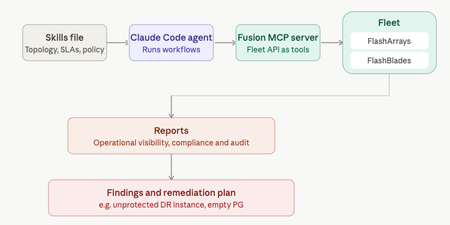
Your DR site might be quietly unprotected and no alert will tell you. That's the gap Anthony Nocentino, Principal Architect at Everpure, Microsoft Data Platform MVP, and self-described computer nerd set out to catch. He built a Database SRE agent using Claude Code and the Everpure Fusion MCP server to audit SQL Server fleets against compliance policy, uncovering a silently unprotected DR instance before disaster struck. Read the full report at "Using Claude Code as a Database SRE Agent with the Everpure Fusion MCP Server"36Views0likes0CommentsFusion MCP Server Is Now Released & Open Source
There’s a narrow band between “AI demo” and “actually useful in production,” and most tools miss it by a country mile. Fusion MCP Server doesn’t. Now that it’s open source, MCP-compatible AI assistants get a controlled bridge into Everpure FlashArray and FlashBlade environments, one built to answer real operational questions about fleet inventory, capacity, performance, alerts, volumes, file systems, workloads, and presets, without turning your storage estate into a science fair project. The AI Agent doesn’t get to vibe its way through your infrastructure. It works through a clean tool surface backed by real Everpure APIs, and writes stay hidden until you flip them on yourself. What it actually solves If you’ve ever wanted to ask a storage question in plain English and get something better than a dashboard scavenger hunt, this is that. Fusion MCP Server sits between your AI agent and your arrays: the assistant talks to the server, the server authenticates with configured array API tokens, calls supported Everpure APIs, and returns structured results. Your assistant never touches the arrays directly. Practically, that means engineers can ask things like: Show me the fleet overview Which arrays have capacity concerns Show array performance for the last 24 hours List workload presets available in this fleet Show active alerts with remediation links The data was never the problem. Storage teams already have it. What eats the day is bouncing between menus, tabs, and API docs just to answer something like “which arrays are closest to full?” Think of it like swapping a pile of ad hoc curl commands and tribal knowledge for a typed interface your AI assistant can reason over. Calling it “screen scraping with confidence” undersells it. It behaves more like a junior SRE who actually reads the schema. Why engineers should care The release leads with reads, which is exactly the right default for infrastructure tooling. Out of the box, Fusion MCP Server covers fleet overview, capacity and performance, storage objects, configuration audit, and optional supervised actions for placement recommendations, preset creation and updates, and workload deployment. A few details stand out: It works with FlashArray and FlashBlade environments in a Fusion fleet, including mixed environments, as long as you provide at least one token for each platform type for Remote Execution. If the API version you have on your arrays does not yet have the endpoints with Remote Execution capability enabled, you must supply an API token for every array in the fleet. More on that in the next section. Fleet discovery covers the supported read workflows broadly, though some, especially performance, still need a direct token for each array you want to query. Built-in prompts handle fleet, performance, and config workflows, and it also works through plain natural-language questions if your agent doesn’t expose MCP prompts directly. Read-only endpoint documentation plus a whitelisted authenticated GET fetch tool cover supported API surface beyond the dedicated tools. Let’s talk Tokens first Back in Purity REST API version 2.38, Everpure started to include a capability for API endpoints called Remote Execution. This is the mechanism that lets a client invoke a Purity REST API request on a different fleet member, and that request executes as though it were initiated locally on that remote member. The catch is that both arrays must have the same API version available on them as well as the endpoint being executed against must have Remote Execution capability. As of today, not all endpoints have this capability, so there must be an API token specified for each array in the fleet until they have all been enabled. We are diligently working to get all endpoints enabled to make this easier for everyone. Stay tuned! Installation (that does not require a PhD) The setup flow is refreshingly direct: Download the latest binary from GitHub Releases or build from source. Generate API tokens for the arrays you want to query. Run generate-config with your FlashArray and/or FlashBlade targets. Drop the generated config into your MCP-capable agent using the standard start --auth-config pattern over STDIO. generate-config does more than write boilerplate. It validates tokens, detects each array’s API version, resolves array names, and writes the auth config with restrictive permissions: the config directory gets 0700 and the file gets 0600. Want an even easier way? How you just tell your AI Agent to “Read this repository at https://github.com/PureStorage-OpenConnect/fusion-mcp-server and the included USER_GUIDE.md file and add the Fusion MCP server to this agent.” Easy-peasy as it’ll step you thought the process and create the config file for you. A few caveats are worth flagging before you point this at anything that matters: The published binaries aren’t signed, so macOS and Windows may throw a warning on first run. Build from source if that’s a dealbreaker. It’s all there, have at it! Keep the generated auth-config.json local, don’t share it, and rotate tokens if one ever leaks. None of that is friction. It’s the fine print you’d want before trusting a tool with API tokens. Supervised write actions: powerful, optional, and very much not on by default Now for the part everyone asks about first, and the part some people should absolutely not enable first: write actions. Fusion MCP Server hides write tools by default. You turn them on explicitly, either during config generation with --enable-write-tools or later with update-config --enable-write-tools. Enabled, the supervised actions cover these processes with more to come as the product evolves: Placement recommendations Workload preset creation Workload preset updates Workload deployment The approval step is the clever bit. Write operations sit behind an explicit confirmation. If the agent supports MCP Elicitation, the server pops up an interactive dialog for every write tool, so you can review the proposed action and approve or decline before anything changes. If the agent doesn’t support Elicitation, it falls back to telling the agent, in plain instructions, to ask you for approval before resubmitting the call. One practical wrinkle: the write tools inherit whatever permissions live on the API tokens you configure, so the workflow only works if those tokens can perform the write. So when should you flip the switch? Enable write tools if you want supervised acceleration on repeatable workflows: placing a workload from a known preset, updating a policy-backed preset, or turning a natural-language request into a deployment action that still needs a human to sign off. Skip it if you’re still validating token scope, using the server mainly for observability, or introducing MCP to a team that hasn’t built trust in the read-only workflows yet. Start with read-only. Make it boring. Then decide whether supervised writes are the next move. Write tools toggle on and off with a simple update-config command, so this isn’t a one-way door: turn them off again anytime with update-config --enable-write-tools=false. Use cases that actually matter This release isn’t for people who like screenshots of AI chats. It’s for engineers and operators who want faster answers and safer workflows. A few obvious wins: Fleet triage Ask for a fleet overview with alerts, array inventory, Purity version, and fleet connections, the kind of first-response context you want before guessing which dashboard to open. Capacity and performance review Ask which configured arrays have the highest used capacity, which have high latency, or pull performance for the last 24 hours. For teams juggling multiple arrays, this turns routine health checks into a single conversation. Storage object lookup Query volumes by naming pattern, list file systems on FlashBlade, or inspect workloads on a specific array. Useful for anyone who inherited naming conventions from a previous geological era. Configuration audit Use the built-in documentation and read-only fetch coverage to compare settings across arrays and check for policy consistency. Handy if you’re trying to catch drift without hand-rolling an audit script every quarter. Workload lifecycle acceleration Enable supervised writes and the assistant can recommend placement, create or update presets, and deploy workloads from those presets. At that point the server stops acting like a reporting tool and starts acting like an interface layer for intent-driven operations. On My Soapbox: Why the Open Source release matters Being open source here changes the trust model, not just the distribution channel. You can inspect how the bridge works, check the security assumptions yourself, and contribute fixes instead of filing a ticket into the void. When reality disagrees with the documentation, which happens to every project sooner or later, you can open an issue instead of just living with it. The repository is public under Apache 2.0, with contribution guidance, architecture notes, a developer guide, and a dedicated issue tracker for support, issues, and feature requests. That means the people who’ll stress-test this in real environments can also be the ones fixing it. For a tool sitting between AI agents and production-adjacent storage workflows, that’s where the engineering conversation belongs. Final thought Fusion MCP Server is short on hype and long on mechanical sympathy. Read workflows stay front and center, write workflows require your explicit sign-off, and installation doesn’t eat your afternoon. If you’re running Fusion-managed fleets (which y’all should be!), it’s worth a look. Grab the latest release, point it at your MCP-capable agent, start read-only, and see how fast “show me my fleet overview” becomes second nature. It’s open source. Once you’ve kicked the tires, contribute code if you build something useful, and open an issue when you hit an edge case. That’s the whole deal.315Views6likes0CommentsPurity Fusion Recipes
I have been loading up our fleet with a bunch of these predefined recipes and management have really enjoyed the information. I will say that most of these are very straight forward to setup but the Rubrik one was giving me troubles. I stumbled upon this link and it walked me everything perfectly. Almost all the recipes are listed here step by step and make this so easy. https://support.purestorage.com/bundle/m_pure1_manage_workflows/page/Pure1/Pure1_Manage/pure1_manage_workflows/topics/reference/recipe_template/protection/r_rubrik_cyber_resilience_visibility_template.html85Views4likes0Comments