Accelerate 2026 - Part 1 - Everyone Wants Your Data
Back in February, I wrote that I had never been to Pure//Accelerate. This year, I still am not in Las Vegas. I watched the Everpure Accelerate 2026 opening keynote live from my home office, which turned out to be a different kind of vantage point. Not better than being there. Not worse. Just different. You do not get the hallway energy. You do not get the sponsor booths. You do not get the accidental conversations that happen while looking for coffee (or tea in my case). You do not get to read the room in the same way. You are not surrounded by the noise, the music, the badge lanyards, the customer reactions, or that strange conference feeling where everyone is tired and energized at the same time. A keynote viewed remotely has to work harder because the production does not carry you in the same way. If the speakers are just reading slides, you feel it immediately. If the story is thin, the distance makes it thinner. If the message is only a collection of announcements, you start checking email. But if the story is real, the distance does something interesting. It removes some of the theater. You are left with the words, the pacing, the ideas, and whether the people on stage actually believe what they are saying. This morning, the parts that landed with me were not the parts that felt the most polished. They were the parts where the keynote stopped sounding like a keynote and started sounding like people trying to explain a real shift in the industry. For me, the strongest moments came from Charlie Giancarlo, Chadd Kenney, Shawn Rosemarin, and the NVIDIA conversation. Not because they had the most slides. Not because they had the most numbers. They landed because they are storytellers. That matters more than we sometimes admit in enterprise technology. A slide reader can tell you what a product does. A storyteller can tell you why the product had to exist and why it matters to the customer or partner. There is a difference. And this morning, the difference mattered. Charlie’s most important line came early, and it changed the shape of the keynote. He said he was not going to talk about data storage. He was going to talk about data. For a storage company’s major customer event, that is not a small pivot. It would have been easy for Everpure to spend the morning celebrating the familiar things. Growth. Customer count. Market share. Flash leadership. Subscription run rate. Fusion adoption. Gartner recognition. Net Promoter Score. Performance numbers. Efficiency numbers. All of that was there, and all of that matters. But the real keynote was not about proving that Everpure is good at storage. The real keynote was about arguing that storage is no longer the highest-level conversation. Data is. That is where the rebrand from Pure Storage to Everpure starts to become more than a name change. A company called Pure Storage can be excellent at arrays, controllers, upgrades, density, performance, and simplicity. A company called Everpure has to earn the right to talk about the enterprise data cloud, and that is a much larger promise. It is also a much riskier promise. Because once you move north of storage, you are no longer talking only about where data lives. You are talking about who controls it, who understands it, who governs it, who protects it, and who gets to use it. That is where Charlie’s message became interesting. His argument was that the enterprise has spent decades living in an application-centric architecture. ERP had one version of the business. CRM had another. ServiceNow had another. HR systems had another. Analytics platforms copied data out of all of them. Data lakes were built to make sense of the mess. Now AI agents are being asked to reason across that same fragmented landscape. That is the problem. Not AI in theory. AI on top of fragmented truth. We have all seen some version of this. The definition of a customer changes depending on which system you ask. The data in one application does not quite match the data in another. A report is technically correct, but only according to one source. A copy was made for analytics, another for backup, another for a project, another for a data science team, and one more because someone needed it urgently two years ago and nobody knows if it is still being used. Now imagine asking an AI agent to act on that. That is where the phrase “Data Primacy” becomes more than keynote language. From what I understood this morning, Data Primacy is Everpure’s argument that data should no longer be trapped inside applications as a secondary object. The data itself, along with its context, relationships, governance, and sources of truth, has to become primary. Applications still matter. Workflows still matter. SaaS still matters. But the enterprise cannot keep allowing every application to define its own version of reality and then expect AI to make intelligent decisions across the pile. That is not sustainable. One of the strongest lines from Charlie was the idea that every vendor wants your data. Every SaaS vendor wants your data. Every analytics vendor wants your data. Every AI vendor wants your data. But what they really want is not just the data. They want the context. They want the meaning. They want to know how a customer in one system relates to a contract in another, a support case in another, an invoice in another, a shipment in another, a security policy in another, and a business outcome somewhere else entirely. In the AI era, context is the new land grab. That is the sentence I kept coming back to during the keynote. Everyone wants your data, but the bigger fight is over who owns the context. That is why this morning did not feel like just another AI infrastructure pitch. It felt like Everpure trying to move the conversation from managing arrays to managing truth. That is a big claim. It needs proof. And that is where Chadd Kenney’s part of the keynote mattered. Chadd is one of those speakers who can make infrastructure feel like an actual story instead of a list of capabilities. That is not easy. Storage features can get very technical very quickly, and if you are not careful, everything turns into a blur of replication, snapshots, policies, performance, controllers, and acronyms. But Chadd framed the platform in a way that made sense. First, the unified data plane stores the data. Then the intelligent control plane governs and operates it. Then the universal data intelligence layer helps understand it. Together, those pieces create a different operating model. That phrase, operating model, is important. Because the most interesting part of the demo was not just that Fusion can automate tasks. It was that Everpure is trying to change the relationship between people and infrastructure. The old world asks humans to be perfect by hand. Log into this array. Check that policy. Fix that snapshot setting. Compare it to the spreadsheet. Make sure the production workloads are covered. Exclude dev and test. Check compliance. Update the retention period. Open the change. Wait for the window. Hope nobody missed one. We have normalized that kind of work for years. Then we call it operational discipline. Sometimes it is. But sometimes it is just human beings being forced to compensate for systems that do not understand intent. The Fusion demos showed something better. Define the policy once. Attach intent to the workload. Let the control plane detect drift. Let it show violations. Let it recommend a fix. In some cases, let it act. In other cases, keep the human in the loop, but stop making the human do repetitive work that the platform should be able to understand. The ransomware snapshot example was a perfect illustration. A customer mandate changes retention from fifteen days to thirty days. In many environments, that becomes a manual chase across infrastructure. In the keynote demo, it became a policy problem, a compliance view, a remediation path, and an audit trail. That is what infrastructure teams actually need. Not another dashboard that tells them something is broken. A system that understands what “correct” looks like and helps keep the environment there. The workload mobility demo made the same point from a performance angle. If the platform can see that a workload is trending toward a service level violation, recommend a better placement, validate the move, and relocate that workload without the application owner noticing, that is not just automation. That is infrastructure keeping a promise quietly. And quiet matters. The best infrastructure usually disappears. Nobody sends a thank-you note because latency did not spike. Nobody opens a champagne bottle because a replication policy worked. Nobody celebrates the outage that did not happen. But those invisible wins are the difference between a team that spends its life firefighting and a team that gets to work on the next thing. That is why the Active Cluster for File demo also worked. Synchronous replication for file sounds technical, and it is. But the emotional value is simple. When something fails, the business does not want a heroic recovery story. It wants no story at all. The workload quietly packed its bags and moved. That line stayed with me because disaster recovery should be boring. Boring is the goal. Boring means the policy worked, the automation worked, the architecture worked, and the humans did not have to assemble on a bridge call at 2 a.m. to save the day. Then Shawn Rosemarin took the keynote into the AI conversation, and again, the strength was in the framing. The bottleneck stalling AI is not compute. It is not models. It is not tooling. It is data. That is the part of the AI conversation that I think many customers are starting to feel more clearly. For the last few years, the market has been obsessed with models and GPUs. That made sense. There was a lot to understand, and the infrastructure requirements are real. But most customers are not trying to build the next frontier model. They are trying to unlock the intelligence that already exists inside their own business. Their documents. Their contracts. Their transactions. Their support history. Their clinical records. Their policies. Their engineering files. Their internal knowledge. Their institutional memory. That does not become useful just because someone points a model at it. It becomes useful when the data is prepared, classified, curated, governed, indexed, vectorized, and delivered with the right context at the right time. That is why the Everpure Data Stream announcement with NVIDIA mattered. The message was not simply, “We can feed GPUs fast,” although performance absolutely matters. The more important message was that enterprise AI needs a way to make data AI-ready without creating another silo, another copy, another stale version of the truth. Shawn made the point clearly: other vendors want you to copy your data into their system. But a copy is always behind. That is such a simple sentence, but it carries a lot of weight. A copy has to be protected. A copy has to be governed. A copy has to be reconciled. A copy has to be secured. A copy can drift. If AI is going to answer questions, automate workflows, make recommendations, or support decisions, stale context is not just inefficient. It is dangerous. That is where the NVIDIA conversation added credibility. The point was not just that Everpure has a partner logo on a slide. The point was that AI has become a full-stack infrastructure problem. Data has to move efficiently. GPUs cannot sit idle waiting for bytes. Inference needs low latency and quick access to the right information. Agents need context. Networking matters. Storage matters. Hardware matters again. I liked the line about hardware being cool again. I liked it because it is funny, but also because it is true. For years, parts of the industry talked as if infrastructure had become invisible. Cloud abstracted it. SaaS hid it. Software ate the world, and many people acted as if the physical layer was someone else’s problem. AI ended that illusion. When customers are investing serious money in GPUs and trying to build real AI capability, storage is not a commodity. Networking is not plumbing. Metadata performance is not trivia. Power is not someone else’s concern. Operational excellence is not optional. The physical world is back in the strategy conversation. Maybe it never left. Maybe some people just stopped looking. That is why the keynote worked for me, even from my home office. Not because every demo was relevant to every customer. Not because every phrase was perfect. Not because I think one keynote answers every question. That is what the next two days are for. It worked because the best speakers were not just announcing things. They were connecting the dots. Charlie explained why the application-centric model is running out of room. Chadd showed what it looks like when infrastructure starts operating from intent instead of manual heroics. Shawn connected AI success back to data readiness instead of model worship. The NVIDIA conversation reminded everyone that AI is not magic. It is infrastructure, data movement, context, governance, and execution. That is a story. And in enterprise technology, the story matters because customers are not just buying features. They are buying a way out of the mess they are already in. The mess is fragmentation. AI did not create that mess, but AI is making it impossible to ignore. That may be the real takeaway from day one of Accelerate. The AI era is forcing enterprises to confront the data architecture choices they have been living with for decades. The old model was manageable when humans were the ones reconciling the gaps. It becomes much more dangerous when agents begin acting on top of those gaps at machine speed. That is why Everpure’s move toward Data Primacy is worth paying attention to. It is not just a product direction. It is a point of view. The application should not own the truth. The copy should not become the truth. The dashboard should not pretend to be the truth. The enterprise needs to own its data, understand its context, govern its use, and make it available to applications, analytics, and AI in a way that is coherent and trustworthy. That is easy to say and very hard to do. But this morning, for the first time, I felt the full shape of what Everpure is trying to become after the rebrand. Not just a storage company with a new name. Not just a platform company using AI language because everyone has to. But a company trying to move the enterprise conversation north of storage and into the question that will define the next decade: Who owns the context of your business? Because everyone wants your data. The companies that win will be the ones that know what it means. I appreciate you reading. Dmitry Gorbatov © 2025 Dmitry Gorbatov | #dmitrywashere105Views1like1Comment
The Art of Sizing: The Seven Signals That Help Decide Oracle 26ai Readiness
The Art of Sizing — Series Categories: Databases · Oracle · AI and Machine Learning By Thomas Stutesman, Principal Field Solutions Architect, Everpure A migration readiness scorecard turns raw Oracle AWR telemetry into seven plain-language signals — and shows you exactly where a lift-and-shift would carry yesterday's problems into tomorrow's platform. The migration everyone is planning for Across the industry, many organizations are now looking to move to Oracle AI Database 26ai. The release promises autonomous efficiency, AI-driven insight, and native vector search — but for most teams the path forward is clouded by one uncomfortable question: is our current infrastructure sized for tomorrow, or are we carrying the weight of yesterday's inefficiencies? The 26ai Migration Readiness scorecard is one of the helpful tools Everpure has created to make that migration easier. It takes the telemetry you already have — your Oracle Automatic Workload Repository (AWR) reports — and translates it into a clear, consistent read on where each database stands, so you move with evidence instead of assumptions. This is the first idea in our Art of Sizing series: for a decade, cheap flash and fast cores let us over-provision and "throw hardware at it." Oracle 26ai — with real vector workloads and a hardware market where components cost more and take longer to arrive — ends that era. Disciplined sizing is back, and it starts with reading the right signals. What the scorecard shows Point the assessment at an estate and it produces a single view: every database, scored across seven signals, rolled up into a combined readiness score. In one illustrative example across eight databases, the combined readiness score was 118 out of 168 — with 0 Ready, 7 Caution, and 1 Risk. None were a clean lift-and-shift: seven needed validation and tuning, and one needed remediation before it could move. Each database is scored across the seven signals with a simple traffic light, and the lights roll up into a score out of 21 — seven signals, three points each: Ready — 3 points — inside the healthy threshold Caution — 2 points — worth validating Risk — 1 point — attend to before you move A score of 18–21 is favorable, 13–17 means review needed, and below 13 flags remediation. Think of it as a current-state indicator that tells you where the risk concentrates — not a migration certification. A red flag doesn't mean "cannot migrate." It means the problem will follow you into 26ai — or get worse — if you size the new environment from the old box instead of from the evidence. The seven signals, one by one These are the value items to worry about when sizing for and moving to 26ai. For each, here is what it reads from AWR, why it drives your target design, what a red is telling you, and how Everpure helps you act on it. Signal 01 — System Capacity Reads DB Time against available CPU cores, average active sessions, and host CPU pressure. This sets the compute floor for the target and drives per-core Oracle licensing — size to the old ceiling and you inherit the old bottleneck. On top of that, 26ai's vector and embedding work adds fresh CPU demand. Red means: the source is already CPU-bound; moving as-is relocates the constraint. You need real headroom, not a like-for-like footprint. How Everpure helps: the assessment reports peak (not averaged) CPU demand per database and translates it into a right-sized core count — so the target is provisioned for the real workload plus deliberate headroom, and licensing is planned rather than guessed. Signal 02 — SQL & Parse Reads hard-parse rate, literal (non-bind) SQL, library-cache and cursor-sharing behaviour. 26ai changes optimizer behaviour, so heavy hard-parsing burns CPU, pressures the shared pool, and invites plan regressions on the new release. Red means: application-level SQL that will keep burning CPU or regress on cutover. Plan-stability work (SQL Plan Management, baselines) and shared-pool sizing belong before the move. How Everpure helps: because the assessment looks at the whole estate, not one instance, it surfaces shared SQL/parse patterns across databases — so one remediation effort (often "add bind variables") protects many migrations and lowers the CPU you have to size and license for. Signal 03 — Wait Profile Shows how DB Time splits across CPU, I/O, concurrency, and commit/log waits. It tells you what kind of bottleneck you are actually sizing for — a commit-bound database and an I/O-bound one need very different target designs. Red means: DB Time is dominated by a problematic wait (log file sync, buffer busy, latch/enqueue). Sizing CPU or storage without addressing it just moves the pain. How Everpure helps: Everpure maps the dominant wait class to the right lever — low, predictable write latency on FlashArray for commit/log waits; CPU or memory changes for concurrency waits — so the target attacks the real bottleneck instead of over-buying everywhere. Signal 04 — I/O Profile Reads read/write IOPS, throughput, block size, and latency. This is the direct input to storage sizing, and it separates latency-sensitive OLTP from bandwidth-driven scan/DW workloads — which size very differently. Averages hide the peak windows that actually test the array. Red means: real I/O demand the target tier must sustain. Under-provision here and everything above it — waits, capacity, response time — degrades. How Everpure helps: the assessment moves beyond averages to hour-by-hour peak-window analysis and turns it into a concrete IOPS/throughput/latency target for FlashArray — sub-millisecond and consistent, so the design performs at peak, not just on paper. Signal 05 — Memory Reads SGA/PGA sizing, buffer-cache behaviour, and Oracle's own memory advisories. Right-sizing memory on the target avoids trading RAM savings for a flood of avoidable physical I/O — and under-sized memory quietly inflates the I/O profile, so the two signals move together. Red means: memory is under-provisioned and driving physical reads that should be cache hits. Size SGA/PGA to demand rather than copying the old config. How Everpure helps: Everpure correlates memory pressure with observed I/O, so recommendations account for both together — enough memory to cut needless physical reads, and storage sized for what genuinely reaches disk. Signal 06 — Temp & Work Reads temp tablespace usage, sort/hash spills, PGA work-area activity, and multipass operations. Analytics, reporting, and AI-adjacent workloads live or die on temp and PGA — and 26ai vector operations add sort/compute patterns you have not sized for before. Red means: large sorts/hashes are spilling to temp; without PGA and temp sizing, the workload is slow on day one regardless of platform. How Everpure helps: the assessment quantifies spill behaviour and feeds it into PGA and temp-tier sizing, while FlashArray's consistent low latency keeps unavoidable spill cheap rather than catastrophic. Signal 07 — Segment Risk Reads large or fast-growing segments, chaining, LOBs, partitioning, and use of features like TDE, Hybrid Columnar Compression, and Smart Scan. These are the objects that don't migrate cleanly — reorg candidates, feature-compatibility items, and capacity-growth landmines. Red means: schema-level cleanup, not just capacity: objects that need reorg, or that depend on features the target must be configured to support from day one. How Everpure helps: Everpure auto-detects active features (TDE, HCC, Smart Scan) so the target is configured for them without over-provisioning, and replaces full clones and legacy triple-copy redundancy with space-efficient snapshots and external redundancy to reclaim capacity. From evidence to a right-sized migration The scorecard is the front door. Behind it is an assessment built to turn these seven signals into decisions you can defend to procurement and operations alike. It captures every instance for an ecosystem view, replaces multi-day averages with peak-window analysis, and translates raw metrics into specific storage and configuration recommendations for a 26ai target. It runs privacy-first — hostnames and SQL identifiers are masked, and only the actionable results are shared. Sometimes the biggest finding is what you don't need to buy. One prospect expected to buy 200 TB. The workload needed 18 TB. The gap was legacy ASM high-redundancy (three data copies) plus full clones for dev/test. Moving to Oracle-recommended external redundancy on Everpure and space-efficient snapshots reclaimed roughly two-thirds of the footprint and eliminated over 180 TB of wasted capacity — exactly the kind of trap that nameplate-based sizing would have locked in. From there, a right-sized design lands on a platform built for database density: Everpure FlashArray//XL R5 delivers sub-millisecond, consistent latency and industry-leading data reduction that absorbs vector growth economically. Pure Fusion presets encode your sizing discipline once so every 26ai environment is provisioned the same way, and Pure1 adds fleet-wide performance, capacity forecasting, and application-level context. A sizing-first path to 26ai Assess. Send your AWR reports; the 26ai Readiness Assessment is generated automatically, with identifiers masked. Interpret the signals. Reds are the pre-migration punch list; cautions are the validate list. Watch for fleet-wide patterns. Remediate reds first. Fix CPU, SQL/parse, dominant waits, and segment issues before cutover. Right-size the target. Size compute, memory, temp/PGA, and storage to the measured peak — and strip out redundancy and clone inflation. Provision consistently. Use Pure Fusion presets so every environment is built to the same standard. Validate with a pilot. Confirm behaviour against a representative pilot and target telemetry before scaling the wave. Summary Oracle 26ai brings back the art of sizing. The 26ai Migration Readiness scorecard reads seven signals from your AWR data — System Capacity, SQL & Parse, Wait Profile, I/O Profile, Memory, Temp & Work, and Segment Risk — so you can remediate the reds, right-size the target to your real workload, and move to 26ai with confidence instead of guesswork. Know where you stand — send us an AWR report, and Everpure's Oracle experts will run the 26ai Readiness Assessment on your environment and walk you through the seven signals, your remediation punch list, and a right-sized target design. The readiness score is an AWR-derived, current-state indicator to guide investigation and planning. It is not a migration certification, a final target-platform sizing, or a target-array headroom calculation — those decisions require workload requirements, target telemetry, compatibility checks, and a representative pilot. Database figures shown are illustrative. Oracle is a trademark of Oracle Corporation. © 2026 Everpure, Inc.39Views0likes0CommentsClaude Code as Database SRE: Catching What Your Monitoring Never Will with Everpure Fusion MCP
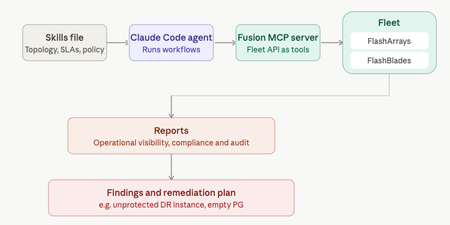
Your DR site might be quietly unprotected and no alert will tell you. That's the gap Anthony Nocentino, Principal Architect at Everpure, Microsoft Data Platform MVP, and self-described computer nerd set out to catch. He built a Database SRE agent using Claude Code and the Everpure Fusion MCP server to audit SQL Server fleets against compliance policy, uncovering a silently unprotected DR instance before disaster struck. Read the full report at "Using Claude Code as a Database SRE Agent with the Everpure Fusion MCP Server"36Views0likes0CommentsAnnouncing the Everpure Fusion™ Mastery Program
Looking for a practical way to build your Everpure Fusion™ expertise? We're excited to introduce the Everpure Fusion™ Mastery Program—a guided, self-paced program designed to help you get more value from Everpure Fusion while earning rewards along the way. Short learning activities are combined with hands-on technical tasks you can apply directly in your own environment. You'll build skills, gain confidence, and put Everpure Fusion to work in real-world scenarios. And the more of the program you complete, the more points you get to use on fun prizes. The program follows three stages: Activation Readiness Prepare your environment and successfully activate Everpure Fusion. Use & Optimization Apply Everpure Fusion to operational workflows, automation, and day-to-day management. Advocacy Share your expertise, contribute to the community, and help others on their journey to unified fleet management. Whether you're just getting started or already using Everpure Fusion, the program meets you where you are. Current users can even earn credit for work they've already completed while continuing to build deeper Everpure Fusion expertise. And because progress deserves recognition, you'll earn Everpure Fusion Points as you complete activities and milestones. Redeem your points for rewards while advancing your Fusion skills. Best of all, the program is designed for busy infrastructure teams. Activities are self-paced and manageable, allowing you to make progress whenever it fits your schedule. Build your skills. Put Everpure Fusion to work. Earn rewards. It’s really that simple. Ready to get started? Click here68Views0likes0CommentsGet rid of stressful infrastructure headaches. Everpure Fusion handles your data, autonomously.
It happens! It's 11:45 PM on a Friday. An alert fires and storage latency has spiked across a production workload. The operator digs in and traces it back to an automated tiering policy that quietly moved a hot dataset to a slower tier because it looked idle based on a 24-hour access window, right before a scheduled batch job that runs every weekend. Nobody changed anything. The policy did exactly what it was configured to do. But nobody remembers configuring it that way, the documentation hasn't been touched in two years, and the monitoring dashboard shows storage as "healthy" because utilization is fine. It's just in the wrong place. The operator overrides the tier, performance recovers, and spends the next hour writing an incident report for a problem that shouldn't exist. A system that was supposed to make life easier made a decision with no context, no warning, and no visibility into why. That's the anger that doesn't go away quickly. It's not just frustration at the incident. It's the feeling that the tools are working against you instead of with you. The core problem in that story was a system making decisions with no context, no warning, and no visibility. Everpure Fusion attacks each of those problems: Unified visibility across the entire fleet: Everpure Fusion provides a global dataset as a single source of truth for discovery, management, and configuration of storage arrays so the operator isn't piecing together what happened across multiple dashboards, multiple arrays, multiple tickets after the fact. They see the full picture in one place, before things go wrong. Intelligent workload placement: Rather than static policies quietly acting on stale access patterns, Everpure Fusion uses AI-guided placement to boost performance and efficiency for every workload. It understands workload behavior, not just utilization snapshots, the kind of context that would have caught a batch job pattern before tiering the dataset down. Policy-driven governance with real control: Automated orchestration cuts manual tasks and speeds service delivery, while unified controls simplify audits, reduce risk, and prove compliance fast. Policies are visible, documented, and governable. Not buried configs nobody remembers setting. Built into the platform, not bolted on: Evepure Fusion is now simply a part of Purity, meaning it is not an add-on you have to install or buy, but rather a core piece of the Purity operating system. The operator doesn't have to manage another tool. The intelligence is already there. The operator in that story didn't need more alerts. They needed a system that understood context, made decisions transparently, and gave them control without requiring them to be online at midnight to maintain it. That's exactly the gap Everpure Fusion is designed to close - with One Fleet, Zero Complexity. Why policy-driven storage operations matter Everpure Fusion is built as the core of Everpure intelligent control plane that manages all arrays including FlashArray, FlashBlade, and cloud as a unified fleet, with one topology, one API, and one operational framework regardless of protocol or local - datacenter, cloud or edge. That uniformity is what makes policy enforcement reliable at scale. Everpure Fusion introduces workload-based provisioning through presets, which are predefined policy-driven templates for specific workload types, encoding protection policies, replication, and SafeMode retention from the moment a workload is provisioned, not patched in after an incident. Admins no longer need to pre-plan and tune deployments manually, which reduces the risk of non-compliance and improves resiliency by ensuring workloads are provisioned correctly from the beginning. The result is infrastructure that enforces your intent, not just your last manual action. Intelligent placement, rebalancing, and fleet-scale capacity control If you manage storage at scale, you've probably seen this scenario play out more than once. One array is buried, running hot, and screaming for relief. Three aisles over, another array is sitting at 40% utilization, doing almost nothing. And somewhere in between, your team is scrambling to provision capacity, kick off an emergency migration, and explain to stakeholders why an SLA was missed on a workload that, in hindsight, never should have been placed there in the first place. This is not a people problem. It is a tooling problem. And it is remarkably common. Everpure Fusion starts solving this problem at the moment of provisioning. When a new workload lands, most storage systems do a simple capacity check and place it wherever space is available. Everpure Fusion does something fundamentally different. The placement engine evaluates every array in the fleet simultaneously, looking at IOPS headroom, throughput capacity, and physical utilization before making a decision. The goal is not just to find somewhere to put the workload. It is to find the right home for it, one where it can live comfortably for the long term without creating a bottleneck down the road. Think of it as placing workloads with intention rather than convenience. Of course, environments do not stay static. Workloads grow, usage patterns shift, and an array that looked healthy six months ago can become a problem today. Everpure Fusion accounts for this with continuous rebalancing built directly into its operation. When an array starts trending toward overload, Everpure Fusion detects it and begins orchestrating data movement across the fleet automatically. No manual intervention required. No application downtime. Data migrates in the background while workloads keep running, and arrays that were sitting underutilized suddenly become productive members of your infrastructure. At fleet scale, now supporting up to 64 arrays, this turns capacity management from a constant firefight into something that largely runs itself. What makes this possible without disruption is how Everpure Fusion executes the move under the hood. It leverages ActiveCluster to stretch the volume across both the source and target arrays simultaneously, creating a synchronous mirror in place. Once the stretch is established, volumes are connected on the target array and hosts auto-discover the new target paths through standard multipathing. The target then validates that path usage is healthy and confirmed before any cutover begins. Only after that validation is complete are the volumes disconnected from the source, ensuring there is zero gap in access at any point in the sequence. Everpure Fusion then unstretches from the source array to complete the rebalance and release its capacity. The result is a seamless, non-disruptive migration that the application never sees. What truly sets Everpure Fusion apart from a standard load balancer is what happens under the hood. Powered by Pure1 AI and up to 30 days of historical workload data, Everpure Fusion does not just look at what is happening right now. It looks at what is about to happen. Say you have a workload that runs a heavy batch job every Saturday night. Everpure Fusion knows that. It has seen the pattern. So when the placement engine is evaluating tier assignments, it will never recommend moving that workload to a lower-performance tier just because it looks quiet on a Tuesday afternoon. It understands what Tuesday quiet actually means in context. And if that workload somehow ends up on the wrong tier, perhaps through a manual change or a migration gone sideways, Everpure Fusion will proactively raise a violation before the weekend arrives. Not after the SLA is missed. Before. The cumulative effect is that customers can operate their fleets closer to full utilization without the anxiety that normally comes with it. Underused hardware gets activated, incremental purchases get deferred, and the reactive, always-behind-the-curve model of capacity management starts to look like a problem from a previous era. And Everpure Fusion does not stop at the infrastructure layer. Through its integration with Pure1 Application Intelligence, Everpure Fusion gains deeper visibility into the nature of the workloads themselves, not just how they behave, but what they actually are. That additional context means smarter decisions at every level, from initial placement to long-term tier management, grounded in a more complete picture of what your environment is really doing. Workload rebalance and mobility will be available towards the end of 2026. Compliance as part of the control plane Most storage compliance workflows follow the same pattern: an audit is announced, someone pulls reports from three different tools, cross-references configuration against a spreadsheet of expected settings, and spends two weeks proving that workloads are protected the way they're supposed to be. Then the audit ends and nothing changes until the next one. That model breaks at fleet scale. When you're managing dozens of arrays across multiple sites and protocols, manual audits don't just slow you down — they leave gaps that only get discovered at the worst possible time. Everpure Fusion Compliance is built into the control plane, not bolted on after provisioning. Because Everpure Fusion presets encode protection policies, replication requirements, SafeMode retention, and QoS settings at deployment time, Everpure Fusion always knows what every workload's intended configuration is. Drift detection is continuous — not periodic. When a workload deviates from its preset, Everpure Fusion instantly surfaces the violation — visible in the UI, queryable via API or CLI, and accessible to AI agents through an MCP server. Remediation can be triggered directly through the same interfaces, without pulling in a separate tool or writing a custom script. Fleet-wide compliance dashboards give storage admins a live view of posture across every array, with exportable audit-ready reports that don't require manual assembly. The shift is meaningful: compliance becomes a property of how the fleet operates, not a project that interrupts how the team works. Everpure Fusion Compliance will be available towards the end of 2026. From dashboards and scripts to natural-language fleet operations You know the drill. A latency spike hits production. You open three dashboards, run a handful of CLI queries, dig through alert logs, and piece together enough context to understand what happened — and by then, you've already spent 45 minutes on a problem that should have taken five. The issue isn't the tools. It's that the context your fleet holds is trapped across systems that don't talk to each other. Everpure Fusion MCP Server changes that. Built on the open Model Context Protocol standard, it connects any MCP-compatible AI assistant — Claude, ChatGPT, Copilot, or internal agents — directly to live Everpure Fusion fleet state. Arrays, workloads, capacity, performance metrics, alert history, configuration, and placement data are normalized into clean, structured JSON and made available to AI in real time, pulled directly from Everpure Fusion and Purity REST APIs. The result: instead of navigating dashboards and stitching together CLI output, you ask a question. "Which arrays are approaching capacity?" "What's driving latency on this workload?" "Which workloads are drifting from their preset?" Everpure Fusion MCP Server answers from live fleet context, not stale snapshots. This is the on-ramp to agentic storage operations. Everpure Fusion already enforces policy and placement across the fleet. Pure1 adds AI-driven analytics and recommendations on top. Together, they give infrastructure operators the foundation to move from reactive troubleshooting to intent-driven, increasingly autonomous fleet management. Using topology groups to encode real infrastructure boundaries If your Everpure Fusion fleet's topology model lives in a color-coded spreadsheet, three wikis, and the institutional memory of one senior admin who never takes vacation — this is for you. Everpure Fusion, built into Purity for FlashArray and FlashBlade, introduces Topology Groups: fleet-scoped objects that let you describe your arrays in the same language your architecture diagrams already use — regions, availability zones, datacenters, rows, racks. No more provisioning a Everpure Fusion workload and hoping it lands in the right building. A Everpure Fusion Topology Group is a hierarchical, tree-structured object. Groups nest up to 10 levels deep (global → us-east → az-us-east-1a → dc01 → row3 → rack12), each array belongs to exactly one parent, and cycles are rejected at write time. Critically, they encode placement semantics — not access control. RBAC stays in Pure1 Resource Groups; topology stays in Everpure Fusion topology. Once modeled, Everpure Fusion presets reference groups using <group>.arrays notation. Everpure Fusion intersects the preset's allowed arrays with the group's membership at placement time. If there's no overlap, Everpure Fusion provisioning fails fast with a clear error — not silently in the wrong zone. The Everpure Fusion CLI shorthand makes automation clean: purevol list --context az-us-east-1a.arrays Everpure Fusion membership changes propagate automatically across the fleet. You stop maintaining a second source of truth outside the control plane. Stop treating topology as tribal knowledge. With Everpure Fusion, make it a first-class part of the intelligent control plane. Extending the model to Kubernetes and virtualization Most infrastructure operators are managing two parallel storage worlds right now: traditional VMs and databases on one side, Kubernetes-based containerized workloads on the other. Separate toolchains. Separate provisioning workflows. Separate everything. Everpure Fusion changes that. Through the Portworx Fusion Controller, Everpure Fusion extends its policy and placement control plane directly into Kubernetes — without forcing developers to change their existing workflows. Everpure Fusion auto-discovers your FlashArray and FlashBlade fleet, then exposes Everpure Fusion presets as native Kubernetes StorageClasses. That means when a developer requests a persistent volume, Everpure Fusion's placement engine resolves it against your existing policy constraints — storage class, protection policy, topology group, replication requirements — the same way it does for any other Everpure Fusion workload. No separate control plane for modern environments. No array-by-array configuration for each cluster. New arrays added to the fleet are automatically discovered and configured, so the operational model stays consistent as infrastructure grows. For VMware environments, Everpure Fusion extends the same operational model through the Everpure Fusion vSphere plugin, connecting storage management directly into virtualization workflows instead of running it as a separate administrative domain. The result: one control plane, one set of policies, one placement engine — spanning VMs, containers, and databases across the fleet. That is fewer parallel stacks to operate, less configuration drift between environments, and a more scalable path to consistent storage operations across the full infrastructure stack. Everpure Fusion as the storage admin foundation for autonomous operations The through-line across everything covered in this blog is simple: Everpure Fusion gives infrastructure operators a unified, policy-driven control plane that enforces intent consistently — across provisioning, placement, compliance, topology, and now Kubernetes and virtualization. That foundation matters because autonomous storage operations do not start with AI. They start with structure. Topology groups encode where workloads belong. Presets encode how they should be configured. Everpure Fusion presets exposed as StorageClasses ensure Kubernetes environments follow the same rules as everything else. When that structure is in place, AI can recommend, optimize, and eventually act — because the context is already clean, trusted, and machine-readable. For storage admins, the shift is real: less time resolving incidents caused by placement decisions nobody remembers making, more time defining the intent that governs the fleet. Everpure Fusion is that foundation — built into Purity, not bolted on. Want to learn more about Everpure Fusion? Check out the following links to dive deeper: Join the Everpure Fusion Mastery Program to build expertise, complete hands-on activities and earn rewards. Sign up for a Fusion test drive to try it out on your own time. Check out more about Fusion product details. Watch our cool new Fusion demo videos. Read Everpure Fusion Datasheet117Views0likes0CommentsAccelerate 2026 - Part 2 - The Light Switch Test
Earlier, in Part 1, I wrote that the Everpure Accelerate 2026 opening keynote did not really feel like a storage keynote. My takeaway from day one was simple: Everyone wants your data. The bigger question is who owns the context. Day two answered a different question. If day one was about why the Enterprise Data Cloud matters, day two was about how customers are supposed to get there without turning it into another giant transformation project that sounds great on stage or in a boardroom and then dies somewhere between budget approval, staffing constraints, internal politics, and the next urgent outage. That is why the second keynote mattered. It was not trying to restart the vision. The vision had already been established. It was about turning that vision into something customers could actually use: a methodology, a blueprint, and a way to connect data architecture to risk reduction, efficiency, agility, modernization, and business outcomes. And then John Colgrove, Coz, did what Coz does. He simplified the whole thing. Not by making it smaller. By making it clearer. The phrase that stayed with me from his session was not a technical phrase. It was not Enterprise Data Cloud, Data Primacy, Fusion, data intelligence, or workload mobility, even though all of those ideas were underneath what he was saying. It was the light switch. Coz talked about walking into a room at home and turning on the light. You know exactly what is going to happen. It is simple. It is obvious. It works the way you expect it to work. Then he compared that to walking into a conference room at the office, where five people spend the first few minutes trying to figure out how to turn on the right lights, dim the screen area, wake up the display, connect the laptop, and make the audio work. Everyone has lived that moment. It is also a perfect way to explain what Everpure has been trying to do since the beginning. Make the complicated thing feel like the light switch. That may sound too simple for enterprise infrastructure, but I think it is exactly the point. The best infrastructure does not feel simple because the problem is simple. It feels simple because somebody did the hard engineering work to hide complexity without hiding control. That has always been part of the Everpure story. When Pure Storage first became known in the market, the message was not only flash performance. Performance mattered, of course. But the thing customers really felt was that the experience was different. The arrays were simpler. The upgrades were non-disruptive. The support model was different. Evergreen architecture was different. The idea that you could keep modernizing without the usual forklift pain was different. Over time, that simplicity moved from one array to more of the environment. Fusion extended the idea from a single system to a fleet. Policy, placement, automation, workload mobility, service levels, compliance, and lifecycle management started to move from device-by-device thinking toward something broader. Now, with the Enterprise Data Cloud, Everpure is trying to move that simplicity again. From array to fleet. From fleet to data. From data storage to data management. That was the thread both Nirav Sheth and Coz pulled through the keynote, and I think it connected day two back to day one in a very useful way. They made it clear that the move from Pure Storage to Everpure is not an abandonment of what got the company here. It is a continuation of the same journey. That matters because customers are rightfully skeptical when technology companies rebrand or expand their message. They wonder whether the company is moving away from the thing they trusted. They wonder whether the new story is strategy or just vocabulary. Coz addressed that directly. We are not abandoning storage infrastructure. We are going to keep building the best storage infrastructure we can. But we are also going higher, because to build better infrastructure, you have to understand more about the data above it. That is a founder’s version of the message. Less theater. More first principles. If you store data, you want to know what it is. You want to know how it will be accessed. You want to know how often. You want to know what it relates to. You want to know whether there are copies. You want to know whether those copies create risk. You want to know whether the rules are being followed. The problem, as Coz pointed out, is that nobody really knows the future. The infrastructure has to be built for agility. That word gets overused, but in this context it matters. Agility is the ability to change without breaking everything. It is the ability to move workloads non-disruptively. It is the ability to rebalance a fleet. It is the ability to modernize hardware without turning it into a migration event. It is the ability to adjust policies as risk changes. It is the ability to bring intelligence to data that already exists instead of forcing the business to start over. That is where the Enterprise Data Cloud story becomes more practical. And I personally think the Enterprise Data Cloud Success Blueprint was the clearest example of that. I liked this part because it moved the conversation away from “look at all these capabilities” and toward “here is why it matters to you” and “what outcomes are you trying to drive?” That is where a lot of technology conversations go wrong. We get excited about the architecture and forget that customers are not buying architecture for the sake of architecture. They are trying to solve business problems with limited people, limited time, limited budget, and increasing pressure from every direction. They are dealing with supply chain constraints. They are being asked to do more with the same team. They are trying to create VMware optionality without making a reckless move. They are modernizing applications while still running legacy workloads that cannot just disappear. They are dealing with cyber risk, ransomware, and minimum viable business recovery. They are being asked to support AI before the data foundation is ready. The blueprint framework organized those pressures into three simple categories: risk reduction, efficiency, and agility. That may seem obvious, but obvious is underrated. Risk reduction is not just a security feature. It is knowing whether your data is protected, whether your snapshot policies are aligned, whether you can recover the minimum viable business, whether sensitive data is duplicated everywhere, and whether compliance follows the data instead of living in someone’s spreadsheet. Efficiency is not just a density number. It is energy efficiency, automation, operational scale, fewer manual tasks, fewer migrations, and fewer people spending nights and weekends babysitting infrastructure that should be managing itself. Agility is not just modernization language. It is VMware optionality, container readiness, AI readiness, cloud flexibility, application mobility, and the freedom to make the next decision without being trapped by the last one. I think that is a much better way to have the conversation with customers. Not “Do you want this product?” But “Which business outcome are you trying to improve, and what is standing in the way?” The Red Hat and CSX discussion made that practical. When Eric Grabill from CSX talked about Positive Train Control, sensors along the tracks, safety requirements, and systems where a loss of data can affect train operations, the conversation moved from platform strategy into the real world. That is where infrastructure earns its keep. CSX has already moved a large portion of its applications to Kubernetes on OpenShift, but still has legacy VMs remaining. That is the real enterprise pattern. It is not containers or VMs. It is containers and VMs. It is cloud and on-premises. It is modern and legacy. It is AI coming next while everything else still has to run today. The Red Hat and Portworx conversation made the point that modernization cannot mean creating another disconnected stack. Customers need one operating model across VMs, containers, and eventually AI workloads. They need a practical transition path, not a big bang migration. They need data services that protect the applications, not just compute platforms that can host them. The St. Elizabeth Healthcare conversation made the same point in a more personal way. Charles Shepherd talked about joining St. Elizabeth in 1997, starting at the help desk, moving through Novell, GroupWise, backups, storage, and eventually becoming part of the team responsible for systems that support a healthcare environment that never really stops. What stayed with me was not only the technical story. It was the laptop on vacation. Anyone who has worked in infrastructure understands that detail. The laptop that comes with you just in case. The phone you keep checking because maybe something happened. The family event where part of your brain is still in the data center. The trip where you are physically present but operationally on standby. That is not a feature comparison. That is a life comparison. Charles said he recently was able to go to his niece’s graduation and not get called. That sounds small only if you have never been the person who always gets called. He also talked about more than one hundred hardware upgrades and more than one hundred fifty Purity upgrades without downtime. He talked about moving from older systems to modern ones without the traditional forklift migration pain. He talked about change boards becoming comfortable with upgrades during the day because the process had earned trust. That is the kind of customer proof that matters. It shows what the solution that was delivered gives back. It gives back time, trust and confidence. That connects directly to the light switch idea. Simplicity is not cosmetic. It is not just a better UI. It is not just fewer clicks. Simplicity changes what people can spend their time on. It changes what teams believe they can safely do. And it changes whether the infrastructure team is trapped maintaining the past or free to prepare for what comes next. Coz also said something important about time. This Enterprise Data Cloud journey is not a one-year story. It is not one product cycle. It is not done because it showed up in an Accelerate keynote. Coz described it as a journey that will take five to ten years, and even then, it will not really be done because the solution will keep improving. I appreciate that kind of honesty. So when a founder says this is a long journey, I believe that more than I believe a slide that says “seamless transformation” in large font. But I also think now is the right time for the journey to become possible. And Coz reminded us that the best version of this is not complexity with better branding. The best version is the light switch. Coz, in the most Coz way possible, reminded everyone that the goal is not to make enterprise infrastructure sound impressive. The goal is to make the hard things feel obvious. Like turning on the lights. I appreciate you reading. Dmitry Gorbatov © 2025 Dmitry Gorbatov | #dmitrywashere74Views0likes0CommentsThe Lost Art of Sizing
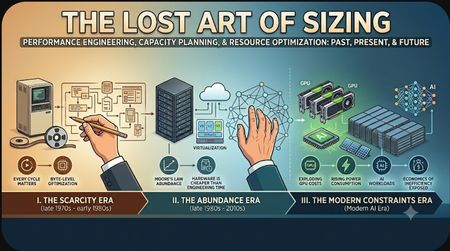
Introduction — Why This Series Exists Technology has gone through one of the most extraordinary economic transformations in modern history. For over four decades, the industry benefited from continuously cheaper computing resources, exponentially faster processors, collapsing storage costs, and an almost limitless ability to scale systems through virtualization and cloud computing. During that time, many of the operational disciplines that once defined great engineering slowly faded into the background. Precise sizing, deep performance analysis, workload modeling, and resource optimization became less visible as organizations increasingly relied on abundant infrastructure to compensate for inefficiencies. But the economics are changing. Today we are entering an era defined by: exploding GPU costs massive AI infrastructure investments rising power consumption thermal and density limitations increasingly expensive semiconductor fabrication and cloud bills that are exposing years of architectural inefficiency As these pressures grow, the industry is rediscovering something earlier generations of technologists already understood: Efficiency matters. And ultimately: Sizing matters. This blog series is intended to explore both the history and the future of performance engineering, capacity planning, and system sizing. The first blog — this one — focuses on how the industry arrived where it is today: the Scarcity Era of computing the transition into abundance the rise of cloud abstraction and the re-emergence of constraints in the modern AI era Future blogs will move from theory and history into practical engineering. They will examine modern system architectures and explore the many bottlenecks that organizations often overlook, including: CPU saturation memory pressure NUMA effects storage latency queue depth issues network bottlenecks virtualization overhead cloud inefficiencies database scaling challenges and workload contention patterns The series will also discuss methods for properly monitoring, modeling, tuning, and sizing these environments. Because the scope of the subject is so large, future entries will likely be broken into multiple specialized blogs by technology area. Some topics may themselves require multi-part deep dives. About the Author I started my career in technology in 1978 working on a Basic Four-computer system during the early years of enterprise computing. Over the decades, I have worked across operations, engineering, architecture, product management, database performance tuning, and large-scale infrastructure analysis. I have architected sizing and performance analysis tools for technology vendors, worked internationally on database and infrastructure performance engagements, and spent much of my career focused on understanding how systems behave under real-world workloads. My background includes extensive work with Oracle technologies, enterprise performance tuning, workload analysis, and capacity planning across multiple industries and platforms. Today, I am employed at Everpure as a Field Solution Architect specializing in Oracle technologies and performance engineering. Having worked through the mainframe era, distributed systems revolution, virtualization, cloud computing, and now the rise of AI infrastructure, I believe the industry is once again approaching a point where operational discipline, efficiency, and proper sizing will become critical engineering skills. This series is both a technical discussion and a historical perspective from someone who has watched these cycles evolve over nearly five decades. The Lost Art of Sizing Part I — The Scarcity Era In the late 1970s, I started my career in technology. My first roles were in operations, running jobs on mainframes overnight and performing backups. Over time, I moved throughout the IT organization before eventually transitioning into engineering and product management in the late 1980s. I often refer to the 1970s and early 1980s as The Scarcity Era of computing. During that time, computing resources were extraordinarily expensive: Storage could cost the equivalent of hundreds of thousands of dollars per gigabyte Memory was frequently measured in tens or hundreds of thousands of dollars per megabyte CPU performance was discussed in terms of MIPS (Millions of Instructions Per Second), with systems delivering only a handful of MIPS costing millions of dollars Every component in the system represented a major financial investment. Because resources were scarce and expensive, sizing was treated almost as a science. Capacity planning was not optional — it was foundational to the survival of the business. Over-sizing a system could waste enormous capital. Under-sizing it could bring critical business operations to a halt. Every byte mattered. Every CPU cycle mattered. Every disk spindle mattered. This environment created a culture of discipline: Applications were optimized aggressively Developers understood resource constraints Operations teams monitored utilization closely Architects carefully modeled workloads Performance engineering was considered a core technical skill In many organizations, some of the best engineers were the people who could make systems smaller, faster, and more efficient. Software engineering was deeply connected to hardware realities. You could not simply “add more servers.” There often were no additional servers to add. This scarcity shaped an entire generation of technologists. Part II — The Abundance Era Then something extraordinary happened. Beginning in the late 1980s and accelerating through the 1990s and 2000s, the economics of computing changed completely. Moore’s Law, semiconductor scaling, manufacturing efficiencies, and global supply chains created an era of unprecedented abundance. For nearly forty years: CPUs became exponentially faster Memory became dramatically cheaper Storage costs collapsed Networks became faster Virtualization increased utilization Cloud computing made infrastructure appear almost limitless For the first time in computing history, performance improvements arrived faster than software inefficiencies could consume them. This fundamentally changed engineering culture. Disciplines that had once been mandatory slowly became optional. Applications no longer had to be highly optimized because hardware improvements continuously masked inefficiencies. Instead of tuning software, organizations increasingly solved problems by purchasing more infrastructure. A new mindset emerged: Hardware is cheaper than engineering time. And for many years, that was largely true. The rise of virtualization and cloud computing accelerated this transition even further. Infrastructure became abstracted from the engineers writing the software. Developers no longer saw physical systems, disk arrays, or memory limitations. Resources became API calls and provisioning scripts. Eventually, many organizations evolved toward a model where applications were simply “thrown over the wall” into the cloud. If performance was poor: allocate more CPUs add more memory scale horizontally increase cloud spending The business unit would absorb the cost. The direct connection between engineering decisions and infrastructure economics became increasingly invisible. In many environments: poor code was tolerated inefficient queries were normalized oversized containers became standard massive memory consumption was accepted idle cloud resources accumulated unchecked Traditional sizing disciplines faded because the financial pain was no longer immediate or visible to the engineering teams creating the workloads. The cloud did not eliminate capacity planning — it merely changed who paid for bad sizing decisions. In the mainframe era, poor sizing decisions were catastrophic because hardware was scarce. In the cloud era, poor sizing decisions became operational expenditures hidden inside monthly invoices. The result was a generation of systems that often consumed vastly more resources than their actual business function required. Ironically, many of the operational disciplines developed during the Scarcity Era were not technically obsolete — they had simply become economically unnecessary for a time. But that may now be changing again. Part III — The Return of Constraints For nearly four decades, the technology industry operated under a powerful assumption: Tomorrow’s hardware would solve today’s software problems. For a long time, that assumption held true. If an application consumed too much CPU: processors became faster If memory usage grew: RAM became cheaper If storage exploded: disk costs continued collapsing If workloads increased: cloud platforms scaled almost infinitely The economics of computing continuously compensated for inefficient engineering. But today, something significant is changing. The industry is beginning to encounter limits again. Not theoretical limits — real economic, physical, and operational limits. Modern computing infrastructure is no longer getting dramatically cheaper at the rate it once did. Instead, we are seeing: exploding GPU costs rising power consumption thermal limitations expensive high-bandwidth memory enormous cloud infrastructure bills increasingly expensive semiconductor fabrication AI workloads consuming unprecedented resources For the first time in decades, inefficient software design is becoming economically visible again. And this has exposed a reality that many organizations had quietly ignored for years: poor code oversized architectures inefficient databases excessive abstraction layers uncontrolled cloud sprawl wasteful microservice designs badly tuned queries overallocated Kubernetes clusters massive idle infrastructure footprints For years, these inefficiencies were masked by cheap hardware and elastic cloud scaling. Now they are appearing directly on financial statements. The cloud did not eliminate waste. It made waste easier to hide. Until the bills became too large to ignore. At the same time, another challenge has emerged. Many of the people who developed the operational disciplines of the Scarcity Era are no longer in the industry. They have: retired moved into leadership transitioned into consulting or left technology entirely The generation that deeply understood: workload modeling performance engineering memory optimization queue management efficient batch processing storage layout capacity forecasting low-level tuning is steadily disappearing. Much of that knowledge was never fully documented because it was simply considered part of being an experienced engineer. As a result, many younger organizations grew up in an environment where: infrastructure felt unlimited optimization seemed unnecessary cloud scaling replaced careful design operational cost was someone else’s problem Now the industry faces a difficult transition. The old constraints are returning, but many of the disciplines required to manage those constraints have faded. In many ways, the industry is rediscovering something that earlier generations of technologists already understood: Resources are never truly infinite. Eventually: power matters memory matters storage matters latency matters thermal density matters architecture matters And ultimately: sizing matters. The art of sizing has returned. Not because technology stopped advancing, but because economics, physics, and scale have once again forced the industry to confront efficiency. What was once viewed as an outdated operational skill may soon become one of the most important engineering disciplines again. Part IV — History Does Not Repeat, But It Rhymes What we are seeing today in technology is historically unusual — but it is not entirely unprecedented. Other industries have gone through similar transitions where periods of explosive advancement, falling costs, and seemingly limitless growth eventually collided with economic and physical realities. The railroad industry is one example. In the early days of rail expansion during the Industrial Age, railroads transformed economies. Expansion happened rapidly. Costs initially fell as infrastructure scaled, routes expanded, and technology improved. For a time, railroads represented nearly unlimited economic optimism. But eventually the easy growth ended. The cost of expanding and maintaining rail infrastructure began rising dramatically. Marginal improvements became more expensive. Complexity increased. Maintenance became a larger percentage of operating cost. Competition intensified. Returns diminished. The industry did not disappear. In fact, railroads remained enormously valuable to the economy. But the economics changed. The same pattern appeared in other industrial and technological revolutions: aviation after the jet age nuclear power generation telecommunications infrastructure automobile manufacturing even electrical grid expansion Early stages were driven by rapid gains and falling relative costs. Later stages became dominated by: scale complexity infrastructure costs power requirements operational efficiency regulation and diminishing economic returns on incremental improvements Technology did not stop advancing. It simply became harder, more expensive, and more complex to continue advancing at the same pace. That is increasingly where modern computing appears to be heading. We are now entering the Age of AI. AI will absolutely create enormous value. In many ways, it already has. But there is growing evidence that the economics of this era are going to be very different from the cloud and consumer internet revolutions that preceded it. AI infrastructure is extraordinarily expensive: massive GPU clusters enormous power consumption advanced cooling systems high-bandwidth memory increasingly expensive semiconductor fabrication global supply chain dependencies For years, the technology industry operated almost like a perpetual motion machine where computing became continuously cheaper while performance improved exponentially. Today, the relationship between cost and performance is changing. That does not mean AI is a failure. Far from it. But technological revolutions are not light switches. They are transitions. And transitions are messy. Industries often overspend before they stabilize. Architectures evolve through trial and error. Infrastructure expands ahead of efficient utilization. Economic models mature slowly. The railroad era experienced this. The electrical age experienced this. The internet boom experienced this. And now AI appears to be entering a similar phase. The challenge for the next generation of technologists will not simply be building larger systems. It will be learning how to build efficient, economically sustainable systems again. Which may ultimately bring the industry back to a lesson many believed had become obsolete: The art of sizing never really disappeared. It was merely waiting for constraints to return.299Views0likes0Comments"Where’s Waldo?", But for your Data
This past Saturday, my wife and I sat at my son’s college graduation ceremony doing what every proud parent does after running out of tears and tissues: staring at the giant screen, scanning a crowd of thousands, and playing a very emotional, very expensive version of Where’s Waldo? The camera pulled back and showed the graduating class. Thousands of caps. Thousands of gowns. Thousands of people who had just survived exams, group projects, late-night studying, bad cafeteria decisions, emotional phone calls home, and whatever personal version of “I’ll start the paper tomorrow” they subscribed to. Somewhere in that sea of mostly identical academic robes was my son. I knew he was there. We had dropped him off at college years earlier, paid tuition, bought supplies, endured move-in day, survived the separation anxiety, worried about him, cheered for him, and occasionally pretended to be calmer than we actually were. I knew exactly why we were in that room. But on that screen, in that moment, he was just one face among thousands. So I started searching for him. Every parent around me was probably doing some version of the same thing. We were not looking at a graduating class in the abstract. We were looking for our graduate. Everyone else on that screen mattered deeply to someone, but to us they were mostly context without identity: a massive, moving, emotional dataset with almost no metadata attached. That was the strange thing about the picture. It showed us everything and told us almost nothing. There were thousands of people on the screen, but unless you already knew who you were looking for, you did not really know what you were looking at. Somewhere between the pride, the camera angle, and my increasingly poor performance at parental facial recognition, my brain did what my brain unfortunately does. It connected a very human moment to the way enterprises think about data. Because this is exactly the problem most organizations have with their data. They know it is there. They know there is a lot of it. They know some of it is incredibly valuable, some of it is probably risky, and some of it is duplicated, outdated, forgotten, regulated, misplaced, or being accessed by people and systems nobody has thought about in years. But knowing there is a crowd is not the same thing as knowing who is in it. That is the part we do not talk about enough. For years, data management conversations were mostly about where the data lived, how it was protected, how fast it could be accessed, and how much it cost to keep it all running. Those things still matter. They will always matter. But they are no longer enough. The new question is not simply, “Where is the data?” The better question is, “What is this data, who does it belong to, why does it exist, who is using it, where has it moved, what risk does it carry, and should this AI model, business process, analyst, application, or employee be touching it at all?” That is a very different conversation, and that is why 1touch matters. Not because the industry needed one more product logo, one more acronym, or one more keynote phrase that sounds important until everyone quietly admits they are not exactly sure what it means. 1touch matters because it is aimed directly at the problem of not knowing. The lie of visibility Most organizations believe they have visibility into their data because they have tools that can show them infrastructure. They can show arrays, volumes, file systems, buckets, databases, dashboards, latency charts, replication status, backup jobs, snapshots, anomalies, alerts, and the occasional red icon that ruins someone’s morning. All of that is useful. None of it guarantees understanding. An IT team can tell you a volume is 87 percent full, but that does not mean they know it contains expired customer records, old HR exports, forgotten underwriting files, production data copied into a test environment, or a spreadsheet with 40,000 Social Security numbers created in 2018 by someone who left the company three reorganizations ago. A security team can tell you an alert fired, but that does not mean they know whether it represents real exposure, a false positive, or just another noisy event in a pile nobody has enough hours to investigate. A data team can point to a lake, a warehouse, a catalog, and a governance process, but that does not mean the data is clean, trusted, current, properly classified, or safe to feed into an AI workflow. This is the uncomfortable truth: enterprise data visibility has often meant visibility into containers, not contents. We could see the auditorium. We could count the very uncomfortable seats. But we still could not tell which graduate was my son. The graduation screen was not useless. It showed scale. It proved the event was real. It helped me understand the crowd. But until I could identify the person I cared about, the picture was incomplete. Enterprise data estates work the same way. The problem is not that organizations have no tools. They often have too many. The problem is that many tools see the surface of the environment but miss the identity, relationship, movement, and meaning of the data inside it. That gap was inconvenient in the old world. In the AI world, it is dangerous. AI does not forgive ignorance Before generative AI entered every boardroom conversation, the consequences of not knowing your data were already serious: compliance exposure, bloated infrastructure costs, security blind spots, slow audits, manual discovery, painful legal requests, cloud migration delays, and business users waiting weeks for access to information because nobody could confidently say what was safe to use. Then AI showed up and made the problem louder. AI feeds on data. Lots of it. Structured data, unstructured data, documents, emails, transcripts, PDFs, customer records, logs, knowledge bases, support case histories, SaaS exports, file shares, objects, and anything else that might help a model answer a question, summarize a situation, automate a workflow, or make a decision. That sounds exciting until you remember that most enterprises do not fully know what is in all of those places. And AI is not magic. If the input is wrong, the output inherits that problem. Sometimes the model hallucinates. Sometimes it exposes something it should not. Sometimes it makes a recommendation based on data that was never supposed to leave a specific jurisdiction. Sometimes it answers confidently from a document that was obsolete three policies ago. Sometimes it gives the right answer to the wrong person, which may be the scariest version of all because the technology can look like it is working while quietly violating the trust model of the business. That is why “AI-ready data” cannot simply mean “we pointed a model at a repository.” That is not readiness. That is hope with an API call. AI-ready data needs context. It needs classification, identity, policy, and confidence. It needs a way to distinguish between a harmless document, a restricted record, a regulated attribute, an exposed credential, and a data fragment that only becomes sensitive when connected to other fragments somewhere else. A number or a name by itself may not mean much. A location, transaction, or timestamp by itself may not mean much either. But connect the number to the name, the name to the patient record, the patient record to a geography, the geography to a regulation, the regulation to a storage location, and the storage location to an access path, and suddenly you are not looking at random data anymore. You are looking at risk. Or value. Often both. This is where 1touch becomes important, because its value is not just identifying patterns and sticking labels on files. Its value is in discovering, classifying, and contextualizing data across environments so organizations can understand not only what exists, but what it means. That distinction matters. The difference between labeling and knowing At graduation, every student had the same basic label: graduate. That label was accurate, but it was wildly insufficient. One graduate may be heading to medical school. Another may be joining a startup. Another may be the first person in their family to earn a degree. Another may have worked two jobs to get there. Another may have changed majors three times and somehow still finished on time, which frankly deserves its own medal. The label tells you the category. The context tells you the story. Data works the same way. A traditional tool might identify something that looks like a credit card number, Social Security number, email address, medical code, account number, or passport field. That is useful, but it can also create noise. Strings of digits appear everywhere. Test data looks real. Real data looks fake. A file name can lie. A folder path can be misleading. A database column called “ID” might be harmless, or it might be the key to everything. Context is what turns a guess into intelligence. 1touch approaches this problem by looking at the broader semantic environment around the data. It is not just asking, “Does this pattern match something sensitive?” It is asking, “What surrounds it? What system did it come from? Who accesses it? Where does it move? What other data is connected to it? What business process does it support? What regulatory meaning does it carry?” That matters because in the real world, data risk rarely lives in a single isolated field. It lives in relationships. The same way my son was not immediately identifiable to the room because he was wearing a cap and gown like everyone else, sensitive enterprise data is often not obvious because it is dressed like everything else. It sits in file shares, databases, cloud repositories, SaaS platforms, mainframes, archives, exports, and forgotten project folders. It blends into the crowd. The old approach was to scan the crowd every so often and hope you recognized enough faces. The newer requirement is continuous understanding: discovering data where it lives, watching how it moves, connecting fragments across systems, and building a living map of identity, access, classification, and risk. Not a once-a-year inventory. Not a spreadsheet. Not a governance theater exercise where everyone nods in a meeting and then goes back to copying production data into development because the test system “needed something realistic.” A living map. That is the real promise. Why this matters The value of 1touch can be easy to undersell if we describe it only as sensitive data discovery or Data Security Posture Management (DSPM). Those descriptions may be accurate, but they are not the business problem. A prospect is not waking up hoping to buy a classification engine. They are waking up with pressure from the board, auditors, regulators, cyber insurers, application owners, AI initiatives, cloud migration teams, and business leaders who want faster access to “clean” data without increasing risk. And for those of us who have been around this industry long enough to have a few emotional support scars, this problem is not new. We were talking about lifecycle data management and data classification projects 20 years ago. Kazeon, StoredIQ, and others were all trying to help customers understand what was hiding inside their unstructured data environments before the phrase “dark data” became a fashionable way to describe a very unfashionable mess. I personally used Kazeon back in 2006, before EMC acquired it and eventually killed it. The idea was right. The experience was painful. I remember a project where it took almost two months to scan the environment, process the results, and prepare the report. We finally sat down with the customer, proudly showed them the findings from roughly 5TB of unstructured data, and waited for the moment where they would appreciate all the classification goodness we had brought into their lives. Instead, the customer looked at us and asked the only question that mattered: “Where is the rest of my 55TB?” There are moments in a technical meeting when the room temperature changes without the thermostat being involved. This was one of them. Apparently the tool did not have permissions to scan the rest of the environment. So after two months of work, the result was technically accurate and practically incomplete, which is the most dangerous kind of confidence. We had a report. We had charts. We had findings. What we did not have was the whole truth. That is why this matters now. The enterprise data problem did not begin with AI. AI simply made the consequences of incomplete understanding much harder to ignore. Twenty years ago, a bad classification project meant a frustrated customer, an awkward meeting, and a lot of manual cleanup. Today, the same kind of blind spot can contaminate an AI pipeline, expose regulated data, break a sovereignty policy, delay a migration, or give executives a false sense of security. For existing customers, the value is even more strategic. They already trust the platform to store, protect, move, and serve their data. The next logical question is whether it can help them understand the data as well. That is the bridge 1touch helps build. That is important because customers are tired of stitching together disconnected tools where one product sees storage, another sees identity, another sees security events, another sees data catalogs, another sees cloud posture, and another sees compliance workflows. Everyone sees something, but nobody sees enough. Customers do not need more fragmented visibility. They need connected context. Most importantly, it helps us explain why the conversation has moved from where data sits to what the data actually means. Back to the screen Eventually, during the ceremony, I found my son. Definitely when his name was announced and he walked across that stage. But the moment stayed with me because it was such a simple reminder: seeing a crowd is not the same as knowing the people in it. Every person on that screen had a story, a history, a family somewhere in the stands trying to yell the loudest, and a future that was about to begin. From a distance, they looked identical. Up close, they were anything but. Enterprise data is like that too. From a dashboard, it can look like capacity, files, objects, tables, volumes, buckets, repositories, shares, records, and logs. But inside that data are customer identities, patient histories, citizens tax records, contracts, intellectual property, employee information, business secrets, stale copies, duplicate exports, forgotten archives, useful insights, hidden risks, and the raw material for the next generation of AI-driven business processes. The organizations that win will not be the ones that simply store the most data. They will be the ones that know what their data means. That is why 1touch matters. Because the future of data management is not just finding Waldo. It is understanding the entire crowd. Appreciate you reading. Dmitry Gorbatov © 2025 Dmitry Gorbatov | #dmitrywashere57Views0likes0CommentsPart 2: MCP Is Interesting. Everpure Fusion Makes It Useful.
In Part 1, I tried to give MCP a proper “…splanation,” mostly because the first several times I heard people talking about Model Context Protocol, I had the same look Joey had in Friends when the salesman asked him if his friends ever had a conversation and he just nodded along without really knowing what they were talking about. That was me. MCP this. MCP server that. Agentic AI. Tool calling. Context windows. Protocols. Hosts. Clients. Servers. At some point, I realized I was nodding with the confidence of a man who had understood approximately 41% of the conversation and was hoping nobody asked a follow-up question. The simple version is this: MCP is a standard way for AI applications to connect to tools and data. It is not the AI model itself. It is not the magic brain. It is the plumbing that lets the AI reach into approved systems, ask better questions, retrieve useful context, and potentially take action through well-defined tools. That is important in the abstract. But for Everpure customers and prospects, it becomes much more interesting when we stop talking about MCP as a general AI concept and start talking about what it could mean for storage operations, data infrastructure, and Everpure Fusion. Because this is where the conversation moves from “AI is coming someday” to “your infrastructure may already need to be ready for how AI will interact with it.” Everpure recently published a blog with a sneak peek of the Everpure Fusion MCP Server, describing it as an open-source service that connects AI assistants to Everpure Fusion storage fleets through the Model Context Protocol. The important part is not simply that an AI assistant can talk to storage. That would be interesting, but it would also be easy to misunderstand. The important part is that the assistant can interact with the storage environment through the Fusion control plane, which already understands fleet-wide context across FlashArray and FlashBlade. That distinction matters. Without Fusion, many environments are still managed in a way that looks very familiar to anyone who has spent time supporting infrastructure. One array over here. Another array over there. Scripts in one folder. Notes in another. Naming standards that started strong and then apparently met reality. Screenshots in tickets. Tribal knowledge in the heads of a few people who somehow remember which workload lives where, which array is doing what, and why nobody should touch that one volume because “there was a reason,” even if nobody is entirely sure what the reason was anymore. That model may work, but it does not scale gracefully. More importantly, it is not especially friendly to automation, and it is definitely not ideal for AI-assisted operations. Most troubleshooting in mature environments is not hard because people lack tools. It is hard because the context is not immediately obvious. The storage admin has one view. The DBA has another view. The virtualization team has another view. The application owner has a completely different view, usually delivered through a ticket that says something deeply scientific like “the app feels slow.” Everyone may be looking at a valid piece of the puzzle, but the real work is in the correlation. Which volume maps to which workload? Which array is hosting it? What did latency look like during the reported window? Were IOPS elevated? Was bandwidth constrained? Did anything change recently? Are we looking at a storage issue, a database issue, an application issue, a noisy neighbor, a misconfigured VM, a bad query, or just another case of “the network is innocent until proven guilty, but still somehow looks suspicious standing there”? That is where Fusion and MCP together become compelling. The Everpure Fusion MCP example makes the idea real. Instead of forcing an administrator to manually build low-level REST API calls or jump between tools, the MCP-aware AI assistant can query Fusion through higher-level tools exposed by the MCP server. In the example Everpure blog described, a storage admin can ask about workloads and volumes supporting a production SQL environment, including arrays, IOPS, latency, and bandwidth over a recent time window. The assistant can then correlate that storage perspective with information from another MCP server, such as SQL Server context around database files, wait types, and query behavior. That does not mean the AI replaces the storage admin. It does not mean the AI replaces the DBA. It does not mean everyone goes to lunch while the robot fixes production. And this is where I need to bring in The Big Bang Theory again, because apparently this is who I am now. There is a scene in the show where Raj is very open to the idea of aliens and extraterrestrial life. At the planetarium, Raj can look at flashes of light in the sky and talk about how scientists cannot fully rule out the possibility of alien civilizations. It is funny because Raj is a scientist, but he is also Raj, so the line between rigorous possibility and “maybe the aliens are waving at us” gets wonderfully blurry. That is how some people talk about AI operations right now. A light flashes in the sky, and suddenly someone is ready to announce that the robots are here to run the data center. Let’s not do that. The point is not that the AI is an alien civilization arriving to take over infrastructure operations. The point is that the interface is changing. The way humans interact with infrastructure is starting to move from manual lookup, command execution, and tribal knowledge toward assisted reasoning, guided action, and cross-system correlation. That is much more practical than aliens. It is also much more useful. Fusion already gives customers a fleet-wide control plane. It gives you the ability to think above individual arrays, above one-off configuration, and above the old habit of managing infrastructure like every system is its own little island with its own weather pattern. MCP gives that control plane another interface, one designed for the way AI agents work. This is why Fusion adoption matters. If your environment is still managed mostly array by array, script by script, ticket by ticket, and screenshot by screenshot, then AI can only help so much. It may summarize the pain beautifully, but it is still summarizing pain. When you use Fusion to create a more consistent, policy-driven, fleet-aware operating model, you are not just modernizing storage management. You are making the environment more understandable to automation, to operations teams, and now to AI agents that need structured context in order to be useful. That is a very different conversation from “look, the AI can query storage.” The better conversation is this: if AI is going to become part of operational workflows, then your infrastructure needs to be ready to participate in those workflows. Fusion is one of the ways you prepare for that. Not someday. Now. And Fusion is not the only example of this direction. Another Everpure technical article shows how an MCP server can be built to integrate with FlashBlade, allowing an AI assistant to query system data and even take direct actions through a natural-language interface. That example is useful because it shows the bridge between the old world and the new one. In the old world, storage management often meant CLI commands, scripts, API calls, screenshots, and specialized knowledge living in the heads of a few very tired people. In the new world, those capabilities can be surfaced through an AI-assisted experience that understands the available tools and can help operators ask better questions in plain English. Again, that does not mean the AI should blindly run your infrastructure while everyone disappears. Please do not read this article and tell your change advisory board that “the blog guy said the robot can handle it.” That is not the point, and I would like to remain welcome in polite infrastructure society. The point is that the operational model is changing. For years, we have talked about automation in infrastructure, but a lot of what we called automation still required a human to know exactly what to automate, where to look, which command to run, which script was safe, which API endpoint mattered, and which piece of documentation had not quietly aged into fiction. AI-assisted operations changes the interaction pattern. Instead of always beginning with the operator knowing the exact command or API call, the operator can begin with the question. Why did this workload slow down? Which volumes support this application? What changed in the last four hours? Which arrays are carrying the highest latency? Which workloads are consuming the most bandwidth? Which policies are inconsistent across the fleet? Where do we have capacity pressure? Which storage objects are tied to this SQL environment? Those are the kinds of questions humans actually ask when something is happening. MCP gives AI assistants a standard way to ask approved systems for the data behind those questions. Fusion gives the storage estate a more consistent, policy-aware, fleet-level way to answer. That combination is where the opportunity lives. Now, because this is enterprise technology and not a children’s book, we also need to talk about the dangerous part. One of the readers posted this comment on Linked in yesterday: The moment an AI system can access tools and data, the conversation changes. A chatbot that gives a bad answer is annoying. An agent that takes the wrong action in a business system can become a real incident. If a model can read sensitive files, query databases, send messages, modify records, trigger workflows, or touch infrastructure, then security is not a feature. Security is the premise. This is where some of the MCP enthusiasm needs adult supervision. We have spent years telling users not to click strange links, not to approve unknown applications, not to reuse passwords, and not to download random files. Now we are building systems where an AI assistant might read strange content, call external tools, and act on behalf of the user. That can be incredibly powerful, but only if we are honest about the risk. In some ways, MCP may expose organizational problems faster. If your data is scattered, stale, contradictory, or politically curated, an AI agent connected to it will not magically produce truth. It may simply produce a more polished version of the confusion. If your workflows are unclear, connecting AI to them may help automate the ambiguity, which is not quite the same thing as progress. The model can gather information, call tools, and complete steps, but people still need to define what should happen, what should not happen, what requires approval, and what good looks like. For Everpure customers and prospects, the more important question is not whether MCP is interesting. It is whether your environment is ready for this kind of interaction. That is where I would encourage customers to take a serious look at Fusion. Not because Fusion is another checkbox on a feature list, and not because every new technology conversation needs to end with someone saying “platform” three times into a mirror. Fusion matters because it changes the operational model. It gives you a way to manage data infrastructure as a fleet, with policy, consistency, automation, and context. Those are exactly the things AI agents need if they are going to do more than produce nicely formatted guesses. If you already met all the prerequisites (Purity 6.8.+, LDAP enabled), use it. Explore it. Get comfortable with it. Stop thinking about Fusion as something reserved for a future automation project after everyone finally gets through the current list of fires, renewals, upgrades, and meetings that should have been emails. MCP may be the plumbing that helps AI connect to the enterprise. Fusion helps make the storage environment worth connecting to. And that is the real call to action. Fusion is how Everpure customers make sure their data infrastructure is ready for it. Appreciate you reading. Dmitry Gorbatov © 2025 Dmitry Gorbatov | #dmitrywashere103Views0likes0CommentsMCP, Joey Tribbiani, and the Moment AI Needed Plumbing - Part 1
People close to me know that I have a very annoying habit of memorizing, remembering, and using movie and TV show lines in normal conversation. I wish I could tell you this is a carefully curated personality trait, but it is probably closer to a long-running defect in the #dmitrywashere operating system. Some people remember birthdays. Some people remember where they parked. I remember a line from a sitcom episode that aired before half the people reading this had a LinkedIn profile. My two favorite sources are Friends and The Big Bang Theory, which probably says something about me that I am not emotionally prepared to unpack in public. There is a scene from Friends that has lived rent-free in my head for years, mostly because it captures something deeply human and mildly embarrassing. A salesman is talking to Joey and asks him a question that is both funny and a little too accurate: “Let me ask you one question. Do your friends ever have a conversation and you just nod along even though you’re not really sure what they’re talking about?” Joey, of course, immediately zones out. Not metaphorically. Not politely. He disappears into that wonderful Joey place where the mouth stays closed, the face stays agreeable, and the brain has clearly left the building. That was me the first few times I started hearing people talk about MCP. Not once. Not twice. Everywhere. MCP this. MCP server that. MCP is the future of agents. MCP is the USB-C of AI. MCP is how models connect to tools. MCP is the protocol that will make agentic AI real. MCP is the standard. MCP is the integration layer. MCP is the thing everyone apparently understood already, except somehow nobody had bothered to send me the memo. So I did what any responsible technology professional does in that situation. I nodded thoughtfully. The next thing I did was call my son, who is a Data Scientist, and ask him what MCP actually was. After listening to his explanation, I had the uncomfortable realization that he knew more about it than I did, which, naturally, did not feel great. That was just my ego talking, of course. He is way smarter than me. Then I went away and tried to figure out whether MCP was actually important or whether it was just another acronym that had wandered into the AI conversation wearing a conference badge. And that brings me to the other sitcom line that kept popping into my head while I was trying to explain this to myself. In The Big Bang Theory, there is a scene where a very drunk Penny says, “I think I owe you …splanation,” clearly attempting to say ‘explanation’ while her brain and mouth are no longer managed by a ‘unified control plane.’ That is exactly how MCP felt to me at first. I did not need another acronym. I needed a …splanation. A real one. Preferably in English. Preferably without requiring a PhD in distributed systems, three browser tabs of developer documentation, and someone on YouTube drawing boxes and arrows while saying “obviously” before explaining the least obvious thing I had heard all week. So this article is my attempt at that …splanation. After spending time researching MCP, I think it is important. More importantly, I think it is important in a very practical way. It is not the kind of important that requires everyone to become an AI researcher, read white papers at midnight, or pretend that “agentic workflow orchestration” is something normal people say at dinner. MCP matters because AI is moving from something that talks to something that can actually do work, and doing real work requires access to real systems. That is the part worth slowing down for. Most people first experienced modern AI as an LLM chat bot window. You typed something in, and the model responded. Sometimes the answer was impressive. Sometimes it was useful. Sometimes it was wrong with the confidence of a man giving directions in a city he has never visited. But the basic pattern was easy to understand. You asked a question. The LLM answered. That was the product experience. The problem is that most real work does not happen inside a blank chat box. Real work lives in messy places. It lives in documents, calendars, databases, code repositories, CRM systems, ticketing tools, emails, Slack messages, service logs, storage platforms, cloud consoles, spreadsheets, procurement systems, and all the other places where business reality hides after the meeting ends. That is why the first wave of AI, as magical as it felt, was also strangely trapped. A model could write a beautiful summary of a business problem, but unless you gave it the actual business context, it was still guessing. An LLM is not programmed to say “Sorry, I don’t know.” So it makes stuff up with proper grammar and punctuation. It could explain how to troubleshoot an issue, but unless it could inspect the logs, check the configuration, or look at the environment, it was still operating from theory. It could tell you how to prepare for a customer meeting, but unless it could see the account history, the open opportunities, the support cases, the renewal status, and the meeting notes from last quarter, it was basically giving you a very articulate horoscope. MCP is one of the attempts to fix that. MCP stands for Model Context Protocol. The name sounds like it was assembled by people who are very good at distributed systems and very bad at naming things for humans, but the words are actually useful. “Model” refers to the AI model. “Context” refers to the information and tools the model needs in order to be useful. “Protocol” means a standard way for systems to communicate. In plain English, MCP is a standard way for AI applications to connect to external tools and data sources. That may sound boring, but boring is often where the real technology changes happen. Nobody gets a standing ovation for plumbing until the plumbing stops working. Nobody thinks about electrical standards when they plug in a night light. Nobody wants to understand every detail of networking just to open a website. Standards become invisible when they succeed, and that invisibility is exactly why they matter. The analogy people use is that MCP is like USB-C for AI. I know that analogy is already dangerously close to becoming a bumper sticker, but it works well enough if we do not abuse it. USB-C did not make your laptop smarter. It did not make your monitor more creative. It did not make your phone more emotionally available, although at this point I would appreciate it if mine at least tried. What USB-C did was standardize connection. Instead of every device requiring its own special cable, adapter, dongle, ritual, and small sacrifice to the drawer of dead electronics, USB-C created a common interface. MCP is trying to do something similar for AI. It gives AI applications a common way to connect to the tools and data they need. The model does not need to know the internal details of every application. The application does not need to build a completely different integration for every model. MCP creates a shared language in the middle. That middle layer is what matters. Without something like MCP, the AI world runs into what technical people call the N-by-M problem. Katie Baker wrote about it last year: NxM Problem If you have ten AI applications and ten systems they need to connect to, you do not want one hundred custom integrations. If you have fifty AI applications and two hundred systems, you definitely do not want ten thousand custom integrations, unless your business model is selling painkillers to integration teams. The better model is not N times M. It is closer to N plus M. Each AI application learns how to speak the protocol. Each tool or data source exposes itself through the protocol. Once both sides understand the same standard, the number of custom connections drops dramatically. This is the point where MCP starts to become more than an AI developer convenience. It starts to look like infrastructure. To understand how it works, you do not need to become a protocol engineer. You just need to understand three roles: the host, the client, and the server. The host is the AI application the user interacts with. That could be Claude Desktop, ChatGPT, Cursor, Visual Studio Code, or an internal enterprise assistant with a name like Atlas, Navigator, Compass, or whatever else the branding team selected after eliminating “Dave.” The host is where the experience lives. It is where the user types the request, where the model reasons, and where the answer or action comes back. The client lives inside the host and manages the connection to an MCP server. You can think of it as the part of the application that knows how to speak MCP on behalf of the model. It handles the conversation between the AI application and the external capability. The server is the wrapper around a data source. There might be an MCP server for GitHub, another for Slack, another for a database, another for a filesystem, another for a CRM, another for a cloud service, and eventually one for every system that vendors decide must now be described as “AI-ready” in a press release. The server’s job is to expose what it can provide in a way the AI application can understand. It might say, in effect, “Here are the documents I can make available. Here are the actions I support. Here is the format you need to use if you want to call one of those actions. Here are the permissions required. Here is the result you can expect back.” That is where the value appears. The AI application does not need to understand every internal detail of GitHub, Slack, Salesforce, Postgres, Kubernetes, or your company’s deeply loved but spiritually exhausted internal ServiceNOW ticketing system. It needs a standard way to discover and use the capabilities exposed by those systems. MCP gives it that standard way. The protocol itself is built around a few core ideas that are easier to understand than the terminology makes them sound. MCP servers can expose tools, resources, and prompts. Tools are actions the model can ask to perform. A tool might search a database, send a Slack message, create a support ticket, run a test, update a CRM record, query an API, or retrieve the status of a system. Tools are where the AI starts moving from “I can answer your question” to “I can help complete the task.” Resources are information the model can read. These could be files, documents, schemas, database records, logs, API responses, or other pieces of context. Resources matter because AI without context is mostly a very confident intern on the first day of work. It may be talented, it may be fast, and it may be enthusiastic, but it does not know where anything is. Prompts are reusable instructions or workflows. That sounds small, but it is not. In business, consistency matters. You may not want every user inventing their own version of “analyze this account,” “review this code,” “summarize this incident,” or “prepare this forecast update.” A prompt can define how a model should approach a task, what standards it should follow, what inputs it should consider, and what kind of output is expected. Tools let the model act. Resources give the model context. Prompts help shape the model’s behavior. That combination is what makes MCP useful. Let’s make this practical. Suppose you ask an AI assistant to help prepare you for a customer meeting. Without access to your systems, the assistant can give you a generic meeting prep template. It can tell you to understand the customer’s goals, review previous discussions, identify risks, prepare discovery questions, and align to business outcomes. None of that is wrong. It is also not especially magical. It is the kind of advice that sounds helpful until you realize it could apply to almost any meeting with almost any customer in almost any industry. Now imagine that same assistant has controlled access to the right systems through MCP servers. It can read the meeting notes from prior briefings, pull the current opportunity data, review support tickets, check the renewal timeline, inspect open technical issues, summarize the customer’s stated initiatives, and identify where the account team may be telling itself a story that is more optimistic than the facts support. It can then generate a briefing that is not generic at all. It is specific, grounded, and useful. That is the difference between AI as a writing assistant and AI as a work assistant. This is why MCP keeps showing up in conversations about agents. An agent is not just a chatbot with a better title. An agent is expected to reason through a goal, choose tools, gather information, take steps, observe results, and continue until the task is complete or until it needs human help. That requires a standard way to connect reasoning to action. MCP is one of the strongest candidates for that standard layer. This is also where the MCP conversation stops being abstract for anyone running Everpure Fusion. It is one thing to say that MCP allows AI agents to connect to enterprise systems. That sounds interesting, but it can still feel like one of those technology ideas that lives safely inside a product roadmap, an architecture diagram, or a conference session where the coffee is somehow both expensive and terrible. It becomes much more practical when you look at what Everpure is doing with the Everpure Fusion MCP Server. I can almost guarantee that you will not click the link below, so I read it for you. But that will be in Part 2. I already drafted it, but I want to be respectful of your time. Not all of my readers are Everpure customers (yet). So that is my MCP “…splanation,” at least the Part 1 version. MCP is not the robot, and it is not the magical brain that suddenly makes every workflow intelligent. It is the standard connection layer that helps AI move from “I can answer your question” to “I can interact with the systems where your work actually happens.” That may not sound glamorous, but neither does plumbing, electricity, networking, or storage until something important depends on it. And that is why MCP matters. Because the next phase of AI will not be defined only by which model sounds the smartest in a chat window. It will be defined by how safely, consistently, and usefully those models can connect to real tools, real data, and real workflows. In Part 2, I will bring this closer to home and look at what this means for Everpure Fusion, because once AI starts needing context from infrastructure, the way we manage that infrastructure starts to matter a lot more. Appreciate you reading. Dmitry Gorbatov © 2025 Dmitry Gorbatov | #dmitrywashere90Views0likes0Comments