Layered Resilience
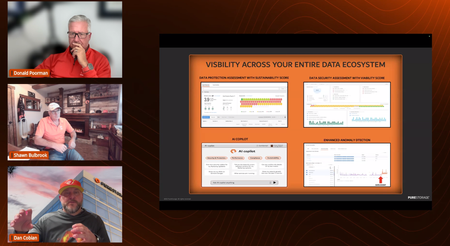
Accelerate 2026 is approaching, and I’ve been preparing to speak on a cyber resilience panel. It’s prompted me to reflect on how prepared my organization really is—and I’m curious where others stand. This topic is never far from the headlines and feels like a great discussion point for this community or even a future meet-up. Here’s a snapshot of the layers we currently have in place: Immutable local Snapshots Immutable replication to a secondary site SRM Local WORM copy backups Auxiliary long-term WORM backups Air-gapped replication copy Investigating Cloud snap and Pure Protect This doesn't even include other tools like Varonis, Defender, Cortex...etc. What layers are you implementing today, and what are you working on to better protect your data? Sharing our successes and failures makes us all stronger! -Charlie592Views3likes1CommentPure Protect - What Do I Need For Initial Setup With FlashArray?
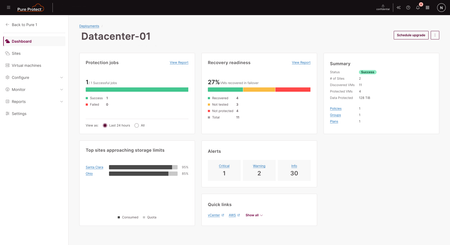
Gathering the details needed for installation, and reviewing the steps before hand, are an important part of any implementation. With Pure Protect v2.6, there are a few details to review and gather to ensure your deployment goes smoothly. Review the Quick Start Guide on the Pure1 Support Portal Review and verify or modify your firewall rules to support Pure Protect communication & workflows Create a vCenter user in each vCenter you will be connecting as a Site, which should be at least 2. You may use an administrative service account, or a limited role service account as defined in our vCenter Roles/Permissions document on the Pure1 Support Portal Verify that vSphere/vCenter is at v 7.0 or higher Verify that any FlashArrays that will be managed are at 6.6.3 or higher. Releases below 6.6.3 are not supported. Use the Pure1 NDU service for a quick, easy, and painless upgrade! Connect the FlashArrays that will be used in source/target pairs. Best Practice details for configuring FlashArray replication should be reviewed, and reach out to your Systems Engineer or Principal Technologist if you have any questions. Complete the Pure Protect Pre-Install Checklist - reach out to your Cyber Resilience FSA and/or Systems Engineer for a copy with the full details. Details of the Pre-Install checklist needed for initial Site setup are here. Additional may be needed for configuration of Policies, Groups, and Plans. For Each FlashArray: Management IP Address & API Token. If you create an API token with an expiration, you will need to remember to rotate the token in the Pure Protect Site Configuration before it expires. For Each vCenter: Site Name DRaaS VM Management IP Address & DRaaS VM name Subnet Mask & Default Gateway Domain name DNS Server Quota (if also using non-FlashArray replication) We look forward to hearing how you are using Pure Protect!302Views2likes0Comments
From Passive to Proactive: A New Cyber Resilience Foundation
We are thrilled to announce a significant evolution of the Pure Storage Cyber Resilience solution, designed to transform your defense posture from passive to proactive. The announcements on September 25th deliver on three core pillars that are essential for modern defense: 1. Dynamic Response and Recovery: Recovery time must be measured in minutes, not days. We're introducing Pure Protect™ Recovery Zones to automatically provision Isolated Recovery Environments (IREs), plus a new Cyber Resilience delivered as a Service model with Veeam to guarantee instant, validated recovery. 2. Connected Detection: We’re eliminating security blind spots by embedding detection into the data layer itself. We have several new native detection capabilities and new integrations with CrowdStrike Real-Time Threat Graph and Superna Next-Gen SIEM to accelerate threat detection and remediation. 3. Built-in Security: Security is foundational. Our platform now features mandatory safeguards like TPM and UEFI Secure Boot and Enterprise-Grade Identity and Access Management to ensure the integrity of your platform from the ground up. See our Cyber Resilience announcement blog for more details.129Views2likes0CommentsRansomware’s Worst Nightmare: New Cyber Resilience Arsenal (new blog post)
With the barrage of new announcements coming out of NYC Accelerate, I wrote a new blog post that is relevant to all customers, but specific to State / Local Government and Education customers summarizing what is new and the value it brings in terms of Active Cyber Resilience. Your feedback is welcome: https://goo.gle/3xzWj8P z150Views2likes0CommentsDisaster Recovery for Your VMware Environments: Pure Protect
Hey everyone, I wanted to share some exciting news about updates to Pure Protect. We know how critical it is to protect your VMware environments, and our product is designed to make disaster recovery simpler and more efficient for you. We have added support for VMware as a recovery target, new interface, along with many other updates. If you are not familiar with Pure Protect, here are a few things that it offers to protect your applications in the event of a disaster. What Pure Protect Offers You: Flexible Recovery: You can choose to recover to AWS or a secondary VMware site. Application-Aware Protection: It protects common Microsoft applications like SQL, Active Directory, and Exchange. If you have VMware Tools installed, it takes application-consistent snapshots; otherwise, it takes a crash-consistent snapshot. Broad Compatibility: You don't need to be an existing Pure Storage customer or have FlashArray, Cloud Block Store, or FlashBlade. Pure Protect supports both Pure and non-Pure environments. Pure1 Integration: The service is managed through Pure1. If you're not already a Pure1 user, we'll get you set up. Your Data, Your Control (Cloud): You use your own AWS account for the service, and AWS will bill you directly for your usage. This approach ensures you maintain full ownership and control over your data, addressing concerns about data custody, residency, and sovereignty. For VMware, you already have control of that environment, so no concerns about control there. Automated AWS Setup: Pure Protect automates the entire AWS target site installation process with a single click, setting up things like VPCs, subnets, firewall rules, and S3 buckets. Multi-Site Protection: If you have multiple VMware vCenter sites, Pure Protect can protect them all to a single AWS account, secondary VMware location. Manual Failover: Failovers are initiated by you, on-demand. There's no automatic failover feature. This means you are in total control of your environment, run tests on-demand to ensure everything runs as expected. This gives you the peace of mind that when a disaster happens, you can fail over with confidence. Things to Keep in Mind: Pure Protect is a disaster recovery service, is not a backup software. It focuses on getting your application infrastructure back up and running, rather than performing log backups. We use orchestration for network mapping, resizing as needed, and scripting will be available soon. Licensing is based on the front-end application capacity of your protected VMs, measured in TiBs as reported by VMware. How to Learn More: Demos or PoCs: If you're interested in seeing Pure Protect in action or trying it out, please reach out, or check out the page on www.purestorage.com/draas. Have Questions? We're here to answer your questions. We're really looking forward to hearing your thoughts on Pure Protect and how it can benefit your operations. -Lance182Views2likes0CommentsEverpure Protect - Tools for Network Configuration
A key workflow item, especially when building Isolated Recovery Environments (IRE), Clean Rooms, test or production Disaster Recovery, or any other environment personality, is to reconfigure the network. Doing so automatically and per a plan is important to an automated, fast, and predictable workflow. We have built Everpure Protect Tools, which is a lightweight tool, registered with VMtools within a guest, that allows us to automate network configuration changes, per the individual Recovery Plan. Included in the download is a Powershell script for Windows, or a Shell script for Linux/Unix, which registered our tool with VMtools to perform the changes. The scripts can be loaded and ran manually in each guest, or distributed and executed as part of a workflow such as Microsoft MCM/SCCM. Everpure Protect Tools Once deployed, network changes on a per-VM or per-Recovery Plan basis will be automatically performed based upon the unique settings in the Recovery Plan being executed.706Views1like0Comments