Why You Should Make Adopting Current Long-Life Releases a Habit
Hey everyone — At Pure Storage, we see many customers who still think about storage upgrades like old-school firmware: “set it and forget it” until it’s forced to change. But FlashArray isn’t firmware it’s modern, continually improved, and designed for an agile, secure, predictable data platform. That means it’s time to make adopting recent Long-Life Releases (LLRs) a regular habit not just something you reluctantly do, "when you have to". LLRs should be your standard practice: ✅ Fresh Features, Mature Code Each LLR is built on code that’s been running in production for at least 8 months before it branches. That means you get the innovations from recent Feature Releases — tested, stabilized, and production-proven. You avoid missing out on valuable improvements while still benefiting from enterprise-grade predictability. ✅ Consistent Security and Compliance Aging too far behind, even on an LLR, can expose you to security vulnerabilities and unsupported configurations. By habitually adopting recent LLRs, you ensure you’re in the supported window for critical patches and compliance audits and avoiding fire drills later. ✅ Reduce Technical Debt Getting stuck on very old LLRs can build up technical debt. Skipping multiple versions makes your next upgrade harder, riskier, and more time-consuming. Keeping up with recent LLRs means smoother transitions, less operational friction, and easier adoption of the next improvements. ✅ Keep Innovation Flowing The idea that an LLR is “old code” is a myth. Recent LLRs contain carefully chosen, well-hardened feature improvements. If you wait too long, you lock yourself out of meaningful performance, efficiency, and capability gains that your peers are already using. ✅ Break the Firmware Mentality FlashArray is software-driven, and has a rapid but reliable development model. Treating it like outdated firmware, and you miss the true value. The LLR program is designed precisely to let you safely adopt modern features and maintain enterprise-grade stability and maintain a predictable cadence. Bottom line? Adopting recent Long-Life Releases, habitually, is the best way to get modern features, maintain security, reduce upgrade risk, and keep your environment aligned with Pure’s best practices. You deserve innovation and peace of mind. Don’t settle for less by sticking with outdated code. If you want help reviewing which LLR is right for you, or understanding the timelines, just reach out — we’re here to help you stay current, secure, and ahead of the game.1.3KViews8likes2CommentsFusion MCP Server Is Now Released & Open Source
There’s a narrow band between “AI demo” and “actually useful in production,” and most tools miss it by a country mile. Fusion MCP Server doesn’t. Now that it’s open source, MCP-compatible AI assistants get a controlled bridge into Everpure FlashArray and FlashBlade environments, one built to answer real operational questions about fleet inventory, capacity, performance, alerts, volumes, file systems, workloads, and presets, without turning your storage estate into a science fair project. The AI Agent doesn’t get to vibe its way through your infrastructure. It works through a clean tool surface backed by real Everpure APIs, and writes stay hidden until you flip them on yourself. What it actually solves If you’ve ever wanted to ask a storage question in plain English and get something better than a dashboard scavenger hunt, this is that. Fusion MCP Server sits between your AI agent and your arrays: the assistant talks to the server, the server authenticates with configured array API tokens, calls supported Everpure APIs, and returns structured results. Your assistant never touches the arrays directly. Practically, that means engineers can ask things like: Show me the fleet overview Which arrays have capacity concerns Show array performance for the last 24 hours List workload presets available in this fleet Show active alerts with remediation links The data was never the problem. Storage teams already have it. What eats the day is bouncing between menus, tabs, and API docs just to answer something like “which arrays are closest to full?” Think of it like swapping a pile of ad hoc curl commands and tribal knowledge for a typed interface your AI assistant can reason over. Calling it “screen scraping with confidence” undersells it. It behaves more like a junior SRE who actually reads the schema. Why engineers should care The release leads with reads, which is exactly the right default for infrastructure tooling. Out of the box, Fusion MCP Server covers fleet overview, capacity and performance, storage objects, configuration audit, and optional supervised actions for placement recommendations, preset creation and updates, and workload deployment. A few details stand out: It works with FlashArray and FlashBlade environments in a Fusion fleet, including mixed environments, as long as you provide at least one token for each platform type for Remote Execution. If the API version you have on your arrays does not yet have the endpoints with Remote Execution capability enabled, you must supply an API token for every array in the fleet. More on that in the next section. Fleet discovery covers the supported read workflows broadly, though some, especially performance, still need a direct token for each array you want to query. Built-in prompts handle fleet, performance, and config workflows, and it also works through plain natural-language questions if your agent doesn’t expose MCP prompts directly. Read-only endpoint documentation plus a whitelisted authenticated GET fetch tool cover supported API surface beyond the dedicated tools. Let’s talk Tokens first Back in Purity REST API version 2.38, Everpure started to include a capability for API endpoints called Remote Execution. This is the mechanism that lets a client invoke a Purity REST API request on a different fleet member, and that request executes as though it were initiated locally on that remote member. The catch is that both arrays must have the same API version available on them as well as the endpoint being executed against must have Remote Execution capability. As of today, not all endpoints have this capability, so there must be an API token specified for each array in the fleet until they have all been enabled. We are diligently working to get all endpoints enabled to make this easier for everyone. Stay tuned! Installation (that does not require a PhD) The setup flow is refreshingly direct: Download the latest binary from GitHub Releases or build from source. Generate API tokens for the arrays you want to query. Run generate-config with your FlashArray and/or FlashBlade targets. Drop the generated config into your MCP-capable agent using the standard start --auth-config pattern over STDIO. generate-config does more than write boilerplate. It validates tokens, detects each array’s API version, resolves array names, and writes the auth config with restrictive permissions: the config directory gets 0700 and the file gets 0600. Want an even easier way? How you just tell your AI Agent to “Read this repository at https://github.com/PureStorage-OpenConnect/fusion-mcp-server and the included USER_GUIDE.md file and add the Fusion MCP server to this agent.” Easy-peasy as it’ll step you thought the process and create the config file for you. A few caveats are worth flagging before you point this at anything that matters: The published binaries aren’t signed, so macOS and Windows may throw a warning on first run. Build from source if that’s a dealbreaker. It’s all there, have at it! Keep the generated auth-config.json local, don’t share it, and rotate tokens if one ever leaks. None of that is friction. It’s the fine print you’d want before trusting a tool with API tokens. Supervised write actions: powerful, optional, and very much not on by default Now for the part everyone asks about first, and the part some people should absolutely not enable first: write actions. Fusion MCP Server hides write tools by default. You turn them on explicitly, either during config generation with --enable-write-tools or later with update-config --enable-write-tools. Enabled, the supervised actions cover these processes with more to come as the product evolves: Placement recommendations Workload preset creation Workload preset updates Workload deployment The approval step is the clever bit. Write operations sit behind an explicit confirmation. If the agent supports MCP Elicitation, the server pops up an interactive dialog for every write tool, so you can review the proposed action and approve or decline before anything changes. If the agent doesn’t support Elicitation, it falls back to telling the agent, in plain instructions, to ask you for approval before resubmitting the call. One practical wrinkle: the write tools inherit whatever permissions live on the API tokens you configure, so the workflow only works if those tokens can perform the write. So when should you flip the switch? Enable write tools if you want supervised acceleration on repeatable workflows: placing a workload from a known preset, updating a policy-backed preset, or turning a natural-language request into a deployment action that still needs a human to sign off. Skip it if you’re still validating token scope, using the server mainly for observability, or introducing MCP to a team that hasn’t built trust in the read-only workflows yet. Start with read-only. Make it boring. Then decide whether supervised writes are the next move. Write tools toggle on and off with a simple update-config command, so this isn’t a one-way door: turn them off again anytime with update-config --enable-write-tools=false. Use cases that actually matter This release isn’t for people who like screenshots of AI chats. It’s for engineers and operators who want faster answers and safer workflows. A few obvious wins: Fleet triage Ask for a fleet overview with alerts, array inventory, Purity version, and fleet connections, the kind of first-response context you want before guessing which dashboard to open. Capacity and performance review Ask which configured arrays have the highest used capacity, which have high latency, or pull performance for the last 24 hours. For teams juggling multiple arrays, this turns routine health checks into a single conversation. Storage object lookup Query volumes by naming pattern, list file systems on FlashBlade, or inspect workloads on a specific array. Useful for anyone who inherited naming conventions from a previous geological era. Configuration audit Use the built-in documentation and read-only fetch coverage to compare settings across arrays and check for policy consistency. Handy if you’re trying to catch drift without hand-rolling an audit script every quarter. Workload lifecycle acceleration Enable supervised writes and the assistant can recommend placement, create or update presets, and deploy workloads from those presets. At that point the server stops acting like a reporting tool and starts acting like an interface layer for intent-driven operations. On My Soapbox: Why the Open Source release matters Being open source here changes the trust model, not just the distribution channel. You can inspect how the bridge works, check the security assumptions yourself, and contribute fixes instead of filing a ticket into the void. When reality disagrees with the documentation, which happens to every project sooner or later, you can open an issue instead of just living with it. The repository is public under Apache 2.0, with contribution guidance, architecture notes, a developer guide, and a dedicated issue tracker for support, issues, and feature requests. That means the people who’ll stress-test this in real environments can also be the ones fixing it. For a tool sitting between AI agents and production-adjacent storage workflows, that’s where the engineering conversation belongs. Final thought Fusion MCP Server is short on hype and long on mechanical sympathy. Read workflows stay front and center, write workflows require your explicit sign-off, and installation doesn’t eat your afternoon. If you’re running Fusion-managed fleets (which y’all should be!), it’s worth a look. Grab the latest release, point it at your MCP-capable agent, start read-only, and see how fast “show me my fleet overview” becomes second nature. It’s open source. Once you’ve kicked the tires, contribute code if you build something useful, and open an issue when you hit an edge case. That’s the whole deal.315Views6likes0CommentsFREE BEER FOR ALL!!! Now That I Have Your Attention, Let's Talk About Purity Updates.
WAIT WAIT WAIT - don't leave yet because of my free beer tomfoolery....hear me out. Listen, we get it. Storage OS updates are historically the LAST thing you ever want to consider for your already impossibly thin maintenance windows. And, we all know NOBODY ever grew up saying, "When I get older, I want to manage enterprise storage for its rock and roll lifestyle." 😀 But - hear me out. Any past pain, suffering, or heavy drinking you may have taken on during previous OS updates with other legacy vendors has been minimized or even flat out eliminated by how we handle updating Purity for FlashArray and FlashBlade. We offer two tracks you can leverage for making them happen by either working directly with support for a white glove update experience where they do all the work remotely, or you can complete them via the Self Support Update (SSU) feature built into Pure1. We encourage regular Purity updates for two reasons: Performance. stability and security improvements...obviously New feature adoption. Want Fusion 2.0? Want the ability to deliver NFS/SMB shares on your FlashArray? These are bundled into your Purity updates and require no additional licensing costs to adopt if you want them. Think of them as over the air feature updates that are all the rage for EVs... For now, take a quick look at the Purity version you are running. If you haven't updated it in a year or two (which many of you probably haven't), you're missing out on being able to squeeze extra value out of your storage. I will be posting some supporting demos and other materials to help you visualize the process in the coming month or so. I would LOVE any feedback from the community, good or bad, on current or past experiences with our updating experience...through it all we can get more boats to rise with the tide! Stay tuned! DP498Views6likes1Comment
ActiveCluster for File
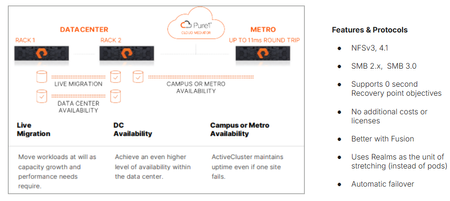
We’re proud to announce the availability of ActiveCluster for file, Everpure’s premier business continuity solution and a fundamental enabler of our Enterprise Data Cloud vision, where Service Level Agreements define what storage, network and compute resources are assigned dynamically to application data sets rather than an hardware-to-app architectures. With ActiveCluster for file, Everpure is extending the benefits of data mobility, continuous access and policy-driven management to file workloads. What is ActiveCluster? Everpure launched ActiveCluster in 2017, and rapidly took the mission critical, enterprise block storage world by storm. ActiveCluster rapidly enabled enterprise customers with the most demanding block workloads to deploy synchronous, always available, always up-to-date, LUNs or volumes to hosts stretched across geographic distances. What set ActiveCluster apart from the existing solutions at the time, and even now, is how simple to set up Everpure RTO-0 and RPO-0 file solutions are, and how flexible and adaptable to the ever changing business needs hosting these data sets become after being deployed on a Everpure Fusion fleets. Today, we’re adding file protocol support like NFSv3, NFSv4.1, SMB 2.0, and SMB 3.0 w/ continuously available shares to our ActiveCluster solution. Realms as a new container ActiveCluster for file utilizes a new, high-level container called a Realm, to synchronously mirror both user data and storage configuration information necessary to provide data access to authorized users on either side of the stretched file system(s). Realms are handy to put applications with similar Recovery Point Objectives and similar Recovery Time Objectives together. Realm Synchronous Replication The act of synchronously mirroring both the user data and storage configuration information across two different FlashArrays is called ‘stretching’. Similar to how a pod is stretched across two FlashArrays, a Realm can be stretched between any FlashArray system that has no more than 11ms Round Trip Time average latencies on their array replication links. Either Fibrechannel or Ethernet array replication links can be used to replicate file data synchronously. Figure 1. ActiveCluster for file can be deployed in different modalities Realms as namespaces for policies Realms contain unique snapshot, audit logging, replication and export policies. These policies are only viewable and attachable to storage objects within the Realm, creating a building block for hosting multiple different end customers or tenants on Fusion fleets. These policies are automatically replicated over to the other array if the Realm is stretched, reducing operator burden in failover scenarios. To prevent split brain scenarios (where a network partition in the array links or replication links stop communication between the pair of FlashArrays) Everpure’s fully managed Cloud Mediator service will determine which remaining FlashArray controller pair can process writes, and which array will not. Unlike other business continuity solutions, ActiveCluster customers don’t have to worry about patching or maintaining the security of separate VMs to act as a mediator service to prevent split brain scenarios. Multiple servers supported per Realm, different IDPs allowed. Each Realm can have one or more servers configured in it, which act as protocol end points for clients and hosts to connect to. Each server in a Realm can have a different IP address, or utilize a different Identity Provider Service. When a failover condition occurs (like a site disaster on one side), automatic failover and the clients in either data center are on the same Ethernet segment or broadcast domain, a failover condition will emit a gratuitous Reverse Address Resolution Protocol request (RARP), mapping the new MAC address of the ethernet interface on one side to a same IP address being used. Applications may see a small pause in reads or writes being serviced, but will not have to re-issue I/O or remount / remap shares or exports. Managed directory quotas can also be used for any filesystem or managed directory attached to the servers in the Realm being stretched. These quota policies automatically get replicated with user data, so the same customer experience in terms of usable space exists both before and after an automatic failover. New Guided Setup available for ActiveCluster for file Deploying new ActiveCluster for file solutions can occur in less than five minutes on already racked and powered arrays. A Guided Setup wizard is available to quickly capture the necessary information to stretch a Realm. This wizard can be started from multiple locations within the Purity GUI. ActiveCluster for file fully takes advantage of Fusion fleets and the ability to manage storage infrastructure as code, programmatically and via policy. Realms are not tied to hardware, and can ‘float’ Realms with ActiveCluster for file support not only provide a 0-RTO and 0-Recovery Point Object at the storage layer for mission critical applications, but they also provide a mechanism to transparently move the data and configuration in the Realm non-disruptively somewhere else within your fleet, whether it’s follow the Sun type round-robin hops, where the Realm’s location changes depending on the time of day, or is moved as a part of a data-center migration. Coupled with Fusion, Everpure’s intelligent control plane, ActiveCluster for file enables workloads and application data and their configuration information to dynamically and seamlessly move to the right location, at the right time, at the right granularity. Seamless movement across greater geographic distances can be accomplished by stretching and unstretching the same Realm between different arrays, as long as the RTT latency between them is <11ms. Service Level Agreements are the lingua franca of the Enterprise Data Cloud Service Level Agreements are the natural language of business owners, and are integral for companies who want to move away from managing storage arrays to managing their business data. They capture answers to questions like “How fast do you need access to this data? Does it need to be backed up or otherwise protected against site-wide failure? SLAs are what forms our vision behind the App-to-data operational model. This App-to-data model takes abstract, high level business requirements as input, and then automatically configures and deploys the required storage services to meet the service level agreement just defined. A Fusion fleet manager’s perspective is one of many different application tiles, and their health, not just a series of HA pairs spread out across different data centers. Data management operations, like instant backups, cloning, movement is applied as “verbs” to the application data set’s name or workload ID, and not to a mismatched storage container whose hardware boundaries impose limits on your app team. An Intelligent, unified control plane manages and enforces SLA’s across the fleet autonomously, like a modern cloud operating model but that can be deployed in any modality, whether on-prem, in the cloud or a hybrid. This scalable model, with Fusion’s intelligent control plane, supports ALL workloads, from modern AI workloads, containers and High Performance Workloads to extremely large image or rich media archives. An Enterprise Data Cloud, made up of discrete nodes tied loosely together, where Service Level Definitions define autonomous system behavior. Stop managing your storage arrays, and start managing your data. Learn more about ActiveCluster for file Read the support documentation for Purity 6.12.0 Test and deploy Fusion fleets and file presets Ask your account executive or system engineer for a demo!1.1KViews4likes0CommentsAnnouncing the General Availability of Purity//FA 6.7.4 LLR
We are happy to announce the general availability of 6.7.4, the fifth release in the 6.7 Long-Life Release (LLR) line! This release line is based on the feature set introduced in 6.6, providing long-term consistency in capabilities, user experience, and interoperability, with the latest fixes and security updates. When the 6.7 LLR line demonstrates sufficient accumulated runtime data to be recommended for critical customer workloads, it will be declared Enterprise Ready (ER). Until then, Purity//FA 6.5 is the latest ER-designated LLR line. For more detailed information about bug fixes and security updates included in each release, see the release notes. UPGRADE RECOMMENDATIONS AND EOL SCHEDULE We recommend customers with compatible hardware who are looking for the latest feature set offered for long-term maintenance upgrade to this long-life release. When possible, customers should make use of Self-Service Upgrades (SSU) to ease the process of planning and executing non-disruptive Purity upgrades for their fleet. The 6.7 LLR line is planned for development through October 2027. HARDWARE SUPPORT This release is supported on the following FlashArray Platforms: Cloud Block Store for Azure and AWS, FA//X (R2, R3, R4), FA//C, FA//XL, and FA//E. Note, DFS software version 2.2.3 is recommended with this release. ACKNOWLEDGEMENTS We would like to thank everyone within the engineering, support, technical program management, product management, product marketing, finance and technical product specialist teams who contributed to this release. LINKS AND REFERENCES Purity//FA 6.7 Release Notes Purity//FA 6.6/6.7 Feature Content Self-Service Upgrades Purity//FA Release and End-of-Life Schedule FlashArray Hardware and End-of-Support DirectFlash Shelf Software Compatibility Matrix FlashArray Capacity and Feature Limits FlashArray Feature Interoperability Matrix557Views4likes0Comments
Backup and Restore FA Configuration
Hi All, Purestorage has how to save or backup and restore configuration when an issue occurs? For example, the software crashed and could not be used anymore. Once the problem was fixed, we restored the existing configuration file from backup.Solved1.4KViews4likes6CommentsAsk Us Everything about Purity Upgrades!
💬 We had an amazing Ask Us Everything, this past Friday, June 5th at 9 AM Pacific. It was all about Purity Upgrades. If you missed it or still have a burning question, don't fret! Feel free to ask it here and we'll get it answered for you by our experts! mbednar, greGPT plus kevinr were the moderators and experts who answered your questions during the conversation and will get to here on the community as well. If you want to catch the replay, check out the recording here!67Views3likes0CommentsFlash Array Certification
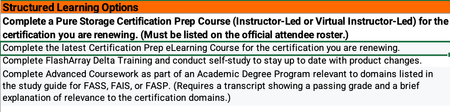
All FlashArray Admins, If any of you currently hold a Flash Array certification there is an alternative to retaking the test to renew your cert. The Continuing Pure Education (CPE) program takes into account learning activities and community engagement and contribution hours to renew your FA certification. I just successfully renewed my Flash Array Storage Professional cert by tracking my activities. Below are the details I received from Pure. Customers can earn 1 CPE credit per hour of session attendance at Accelerate, for a maximum of 10 CPEs total (i.e., up to 10 hours of sessions). Sessions must be attended live. I would go ahead and add all the sessions you attended at Accelerate to the CPE_Submission form. Associate-level certifications will auto-renew as long as there is at least one active higher-level certification (e.g., Data Storage Associate will auto-renew anytime a Professional-level cert is renewed). All certifications other than the Data Storage Associate should be renewed separately. At this time, the CPE program only applies to FlashArray-based exams. Non- FA exams may be renewed by retaking the respective test every three years. You should be able to get the CPE submission form from your account team. Once complete email your recertification Log to [email protected] for formal processing. -Charlie326Views3likes0CommentsPure Fusion File Presets & Workloads on FB 4.6.7 and FA 6.10.4: Less Click‑Ops, More Policy
If you’ve ever built the “standard” NFS/SMB layout for an app for the fifth time in a week and thought “this should be a function, not a job”, this release is for you. With FlashBlade version 4.6.7 and FlashArray version 6.10.4, Pure Fusion finally gives file the same treatment block has had for a while: presets and workloads for file services across FlashBlade and FlashArray, a much sharper Presets & Workloads UI, plus smarter placement and resource naming controls tuned for real environments—not demos. This post is written for people who already know what NFS export policies and snapshot rules are and are mostly annoyed they still have to configure them by hand. Problem Statement: Your “Standard” File Config is a Lie Current pattern in most environments: Every app team needs “just a few file shares”. You (or your scripts) manually: Pick an array, hope it’s the right one. Create file systems and exports. Glue on snapshot/replication policies. Try to respect naming conventions and tagging. Six months later: Same logical workload looks different on every array. Audit and compliance people open tickets. Nobody remembers what “fs01-old2-bak” was supposed to be. Fusion File Presets & Workloads exist to eradicate that pattern: Presets = declarative templates describing how to provision a workload (block or file). Workloads = concrete instances of those presets deployed somewhere in a Fusion fleet (FA, FB, or both). In nerd-speak, think: Helm chart for storage (preset) vs Helm release (workload). Quick Mental Model: What Presets & Workloads Actually Are A File Preset can include, for example: Number of file systems (FlashBlade or FlashArray File). Directory layout and export policies (for NFS/SMB). Snapshot policies and async replication (through protection groups or pgroups). Per‑workload tags (helps in finding a needle in a haystack & more) Quota and Snapshot parameters A Workload is: A Fusion object that: References the preset in it’s entirety. Tracks where the underlying Purity objects live. Surfaces health, capacity, and placement at the fleet level. In code‑brain terms: preset: app-file-gold parameters: env: prod fs_count: 4 fs_size: 10TB qos_iops_max: 50000 placement: strategy: recommended # Pure1 or dark‑site heuristic depending on connectivity constraints: platform: flashblade Fusion resolves that into resources and objects on one or more arrays: purefs objects, exports, pgroups, QoS, tags, and consistently named resources. So, what’s new you ask? What’s New on FlashBlade in Purity//FB 4.6.7 1. Fusion File Presets & Workloads for FlashBlade Purity//FB 4.6.7 is the release where FlashBlade joins the Fusion presets/workloads party for file. Key points: You can now define Fusion file presets that describe: Number/size of file systems. Export policies (NFS/SMB). Snapshot/replication policies. Tags and other metadata. You then create Fusion file workloads from those presets: Deployed onto any compatible FlashBlade or FlashArray in the fleet, depending on your constraints and placement recommendations. That means you stop hand‑crafting per‑array configs and start stamping out idempotent policies. 2. New Presets & Workloads GUI on FlashBlade Putrity//FB version 4.6.7 brings proper Fusion GUI surfaces to FB: Storage → Presets Create/edit/delete Fusion presets (block + file). Upload/download preset JSON directly from the GUI. Storage → Workloads Instantiate workloads from presets. See placement, status, and underlying resources across the fleet. Why this is a real improvement, not just new tabs: Single mental model across FA and FB: Same abstractions: preset → workload → Purity objects. Same UX for block and file. Guard‑railed customization: GUI only exposes parameters marked as configurable in the preset (with limits), so you can safely delegate provisioning to less storage‑obsessed humans without getting random snapshot policies. 3. JSON Preset Upload/Download (CLI + GUI) This new release also adds full round‑trip JSON support for presets, including in the GUI: On the CLI side: # Export an existing preset definition as JSON purepreset workload download app-file-gold > app-file-gold.json # Edit JSON, save to file share, version control, commit to git, run through CI, etc… # Import the preset into another fleet or array purepreset workload upload --context fleet-prod app-file-gold < app-file-gold.json Effects: Presets become versionable artifacts (Git, code review, promotion). You can maintain a central preset catalog and promote from dev → QA → prod like any other infra‑as‑code. Sharing configs stops being “here’s a screenshot of my settings.”, 4. Fusion Dark Site File Workload Placement + Get Recommendations Many folks run fleets without outbound connectivity, for various reasons. Until now, that meant “no fancy AI placement recommendations” for those sites. Fusion Dark Site File Workload Placement changes that: When Pure1 isn’t reachable, Fusion can still compute placement recommendations for file workloads across the fleet using local telemetry: Capacity utilization. Performance headroom. QoS ceilings/commitments (where applicable). In the GUI, when you’re provisioning a file workload from a preset, you can hit “Get Recommendations”: Fusion evaluates candidate arrays within the fleet. Returns a ranked list of suitable targets, even in an air‑gapped environment. So, in dark sites you still get: Data‑driven “put it here, not there” hints. Consistency with what you’re used to on the block side when Pure1 is available, but without the cloud dependency. What’s New on FlashArray in Purity//FA 6.10.4 1. Fusion File Presets & Workloads for FlashArray File Version 6.10.4 extends Fusion presets and workloads to FlashArray File Services: You can now: Define file presets on FA that capture: File system count/size. NFS/SMB export behavior. QoS caps at workload/volume group level. Snapshot/async replication policies via pgroups. Tags and metadata. Provision file workloads on FlashArray using those presets: From any Fusion‑enabled FA in the fleet. With the same UX and API that you use for block workloads. This effectively normalizes block and file in Fusion: Fleet‑level view. Same provisioning primitives (preset→workload). Same policy and naming controls. 2. Fusion Pure1‑WLP Replication Placement (Block Workloads) Also introduced is Fusion Pure1 Workload Replication Placement for Block Workloads: When you define replication in a block preset: Fusion can ask Pure1 Workload Planner for a placement plan: Primary/replica arrays are chosen using capacity + performance projections. It avoids packing everything onto that one “lucky” array. Workload provisioning then uses this plan automatically: You can override, but the default is data‑backed rather than “whatever’s top of the list.” It’s the same idea as dark‑site file placement, just with more telemetry and projection thanks to Pure1. Resource Naming Controls: Have it your way If you care about naming standards, compliance, and audit (or just hate chaos and stress), this one matters. Fusion Presets Resource Naming Controls let you define deterministic naming patterns for all the objects a preset creates: Examples: Allowed variables might include: workload_name tenant / app / env platform (flasharray-x, flashblade-s, etc.) datacenter site code Sequenced IDs You can also define patterns like: fs_name_pattern: "{tenant}-{env}-{workload_name}-fs{seq}" export_name_pattern: "{tenant}_{env}_{app}_exp{seq}" pgroup_name_pattern: "pg-{app}-{env}-{region}" Result: Every file system, export, pgroup, and volume created by that preset: Follows the pattern. Satisfies internal CS/IT naming policies for compliance and audits. You can still parameterize inputs (e.g., tenant=finops, env=prod), but the structure is enforced. No more hunting down “test2-final-old” in front of auditors and pretending that was intentional. Not speaking from experience though :-) The Updated Presets & Workloads GUI: Simple is better Across Purity//FB v4.6.7 and Purity//FA v6.10.4, Fusion’s UI for presets and workloads is now a graphical wizard-type interface that is easier to follow, with more help along the way.. Single Pane, Shared Semantics Storage → Presets Block + file presets (FA + FB) in one place. JSON import/export. Storage → Workloads All workloads, all arrays. Filter by type, platform, tag, or preset. Benefits for technical users: Quick answer to: “What’s our standard for <workload X>?” “Where did we deploy it, and how many variants exist?” Easy diff between: “What the preset says” vs “what’s actually deployed.” Guard‑Rails Through Parameterization Preset authors (yes, we’re looking at you) decide: Which fields are fixed (prescriptive) vs configurable. The bounds on configurable fields (e.g., fs_size between 1–50 TB). In the GUI, that becomes: A minimal set of fields for provisioners to fill in. Validation baked into the wizard. Workloads that align with standards without needing a 10‑page runbook. Integrated Placement and Naming When you create a workload via the new GUI, you get: “Get Recommendations” for placement: Pure1‑backed in connected sites (block). Dark‑site logic for file workloads on FB when offline. Naming patterns from the resource naming controls baked in, not bolted on afterward. So you’re not manually choosing: Which array is “least bad” today. How to hack the name so it still passes your log‑parsing scripts. CLI / API: What This Looks Like in Practice If you prefer the CLI over the GUI, Fusion doesn’t punish you. Example: Defining and Using a File Preset Author a preset JSON (simplified example): { "name": "app-file-gold", "type": "file", "parameters": { "fs_count": { "min": 1, "max": 16, "default": 4 }, "fs_size_tib": { "min": 1, "max": 50, "default": 10 }, "tenant": { "required": true }, "env": { "allowed": ["dev","test","prod"], "default": "dev" } }, "naming": { "filesystem_pattern": "{tenant}-{env}-{workload_name}-fs{seq}" }, "protection": { "snapshot_policy": "hourly-24h-daily-30d", "replication_targets": ["dr-fb-01"] } } Upload preset into a fleet: purepreset workload upload --context fleet-core app-file-gold < app-file-gold.json Create a workload and let Fusion pick the array: pureworkload create \ --context fleet-core \ --preset app-file-gold \ --name payments-file-prod \ --parameter tenant=payments \ --parameter env=prod \ --parameter fs_count=8 \ --parameter fs_size_tib=20 Inspect placement and underlying resources: pureworkload list --context fleet-core --name payments-file-prod --verbose Behind the scenes: Fusion picks suitable arrays using Pure1 Workload Placement (for connected sites) or dark‑site logic purefs/exports/pgroups are created with names derived from the preset’s naming rules. Example: Binding Existing Commands to Workloads The new version also extends several CLI commands with workload awareness: purefs list --workload payments-file-prod purefs setattr --workload payments-file-prod ... purefs create --workload payments-file-prod --workload-configuration app-file-gold This is handy when you need to: Troubleshoot or resize all file systems in a given workload. Script around logical workloads instead of individual file systems. Why This Matters for You (Not Just for Slides) Net impact of FB 4.6.7 + FA 6.10.4 from an Admin’s perspective: File is now truly first‑class in Fusion, across both FlashArray and FlashBlade. You can encode “how we do storage here” as code: Presets (JSON + GUI). Parameterization and naming rules. Placement and protection choices. Dark sites get sane placement via “Get Recommendations” for file workloads, instead of best‑guess manual picks. Resource naming is finally policy‑driven, not left to whoever is provisioning at 2 AM. GUI, CLI, and API are aligned around the same abstractions, so you can: Prototype in the UI. Commit JSON to Git. Automate via CLI/API without re‑learning concepts. Next Steps If you want to kick the tires: Upgrade: FlashBlade to Purity//FB 4.6.7 FlashArray to Purity//FA 6.10.4 Pick one or two high‑value patterns (e.g., “DB file services”, “analytics scratch”, “home directories”). Implement them as Fusion presets with: Parameters. Placement hints. Naming rules. Wire into your existing tooling: Use the GUI for ad‑hoc. Wrap purepreset / pureworkload in your pipelines for everything else. You already know how to design good storage. These releases just make it a lot harder for your environment to drift away from that design the moment humans touch it.398Views3likes0Comments