Fusion MCP Server Is Now Released & Open Source
There’s a narrow band between “AI demo” and “actually useful in production,” and most tools miss it by a country mile. Fusion MCP Server doesn’t. Now that it’s open source, MCP-compatible AI assistants get a controlled bridge into Everpure FlashArray and FlashBlade environments, one built to answer real operational questions about fleet inventory, capacity, performance, alerts, volumes, file systems, workloads, and presets, without turning your storage estate into a science fair project. The AI Agent doesn’t get to vibe its way through your infrastructure. It works through a clean tool surface backed by real Everpure APIs, and writes stay hidden until you flip them on yourself. What it actually solves If you’ve ever wanted to ask a storage question in plain English and get something better than a dashboard scavenger hunt, this is that. Fusion MCP Server sits between your AI agent and your arrays: the assistant talks to the server, the server authenticates with configured array API tokens, calls supported Everpure APIs, and returns structured results. Your assistant never touches the arrays directly. Practically, that means engineers can ask things like: Show me the fleet overview Which arrays have capacity concerns Show array performance for the last 24 hours List workload presets available in this fleet Show active alerts with remediation links The data was never the problem. Storage teams already have it. What eats the day is bouncing between menus, tabs, and API docs just to answer something like “which arrays are closest to full?” Think of it like swapping a pile of ad hoc curl commands and tribal knowledge for a typed interface your AI assistant can reason over. Calling it “screen scraping with confidence” undersells it. It behaves more like a junior SRE who actually reads the schema. Why engineers should care The release leads with reads, which is exactly the right default for infrastructure tooling. Out of the box, Fusion MCP Server covers fleet overview, capacity and performance, storage objects, configuration audit, and optional supervised actions for placement recommendations, preset creation and updates, and workload deployment. A few details stand out: It works with FlashArray and FlashBlade environments in a Fusion fleet, including mixed environments, as long as you provide at least one token for each platform type for Remote Execution. If the API version you have on your arrays does not yet have the endpoints with Remote Execution capability enabled, you must supply an API token for every array in the fleet. More on that in the next section. Fleet discovery covers the supported read workflows broadly, though some, especially performance, still need a direct token for each array you want to query. Built-in prompts handle fleet, performance, and config workflows, and it also works through plain natural-language questions if your agent doesn’t expose MCP prompts directly. Read-only endpoint documentation plus a whitelisted authenticated GET fetch tool cover supported API surface beyond the dedicated tools. Let’s talk Tokens first Back in Purity REST API version 2.38, Everpure started to include a capability for API endpoints called Remote Execution. This is the mechanism that lets a client invoke a Purity REST API request on a different fleet member, and that request executes as though it were initiated locally on that remote member. The catch is that both arrays must have the same API version available on them as well as the endpoint being executed against must have Remote Execution capability. As of today, not all endpoints have this capability, so there must be an API token specified for each array in the fleet until they have all been enabled. We are diligently working to get all endpoints enabled to make this easier for everyone. Stay tuned! Installation (that does not require a PhD) The setup flow is refreshingly direct: Download the latest binary from GitHub Releases or build from source. Generate API tokens for the arrays you want to query. Run generate-config with your FlashArray and/or FlashBlade targets. Drop the generated config into your MCP-capable agent using the standard start --auth-config pattern over STDIO. generate-config does more than write boilerplate. It validates tokens, detects each array’s API version, resolves array names, and writes the auth config with restrictive permissions: the config directory gets 0700 and the file gets 0600. Want an even easier way? How you just tell your AI Agent to “Read this repository at https://github.com/PureStorage-OpenConnect/fusion-mcp-server and the included USER_GUIDE.md file and add the Fusion MCP server to this agent.” Easy-peasy as it’ll step you thought the process and create the config file for you. A few caveats are worth flagging before you point this at anything that matters: The published binaries aren’t signed, so macOS and Windows may throw a warning on first run. Build from source if that’s a dealbreaker. It’s all there, have at it! Keep the generated auth-config.json local, don’t share it, and rotate tokens if one ever leaks. None of that is friction. It’s the fine print you’d want before trusting a tool with API tokens. Supervised write actions: powerful, optional, and very much not on by default Now for the part everyone asks about first, and the part some people should absolutely not enable first: write actions. Fusion MCP Server hides write tools by default. You turn them on explicitly, either during config generation with --enable-write-tools or later with update-config --enable-write-tools. Enabled, the supervised actions cover these processes with more to come as the product evolves: Placement recommendations Workload preset creation Workload preset updates Workload deployment The approval step is the clever bit. Write operations sit behind an explicit confirmation. If the agent supports MCP Elicitation, the server pops up an interactive dialog for every write tool, so you can review the proposed action and approve or decline before anything changes. If the agent doesn’t support Elicitation, it falls back to telling the agent, in plain instructions, to ask you for approval before resubmitting the call. One practical wrinkle: the write tools inherit whatever permissions live on the API tokens you configure, so the workflow only works if those tokens can perform the write. So when should you flip the switch? Enable write tools if you want supervised acceleration on repeatable workflows: placing a workload from a known preset, updating a policy-backed preset, or turning a natural-language request into a deployment action that still needs a human to sign off. Skip it if you’re still validating token scope, using the server mainly for observability, or introducing MCP to a team that hasn’t built trust in the read-only workflows yet. Start with read-only. Make it boring. Then decide whether supervised writes are the next move. Write tools toggle on and off with a simple update-config command, so this isn’t a one-way door: turn them off again anytime with update-config --enable-write-tools=false. Use cases that actually matter This release isn’t for people who like screenshots of AI chats. It’s for engineers and operators who want faster answers and safer workflows. A few obvious wins: Fleet triage Ask for a fleet overview with alerts, array inventory, Purity version, and fleet connections, the kind of first-response context you want before guessing which dashboard to open. Capacity and performance review Ask which configured arrays have the highest used capacity, which have high latency, or pull performance for the last 24 hours. For teams juggling multiple arrays, this turns routine health checks into a single conversation. Storage object lookup Query volumes by naming pattern, list file systems on FlashBlade, or inspect workloads on a specific array. Useful for anyone who inherited naming conventions from a previous geological era. Configuration audit Use the built-in documentation and read-only fetch coverage to compare settings across arrays and check for policy consistency. Handy if you’re trying to catch drift without hand-rolling an audit script every quarter. Workload lifecycle acceleration Enable supervised writes and the assistant can recommend placement, create or update presets, and deploy workloads from those presets. At that point the server stops acting like a reporting tool and starts acting like an interface layer for intent-driven operations. On My Soapbox: Why the Open Source release matters Being open source here changes the trust model, not just the distribution channel. You can inspect how the bridge works, check the security assumptions yourself, and contribute fixes instead of filing a ticket into the void. When reality disagrees with the documentation, which happens to every project sooner or later, you can open an issue instead of just living with it. The repository is public under Apache 2.0, with contribution guidance, architecture notes, a developer guide, and a dedicated issue tracker for support, issues, and feature requests. That means the people who’ll stress-test this in real environments can also be the ones fixing it. For a tool sitting between AI agents and production-adjacent storage workflows, that’s where the engineering conversation belongs. Final thought Fusion MCP Server is short on hype and long on mechanical sympathy. Read workflows stay front and center, write workflows require your explicit sign-off, and installation doesn’t eat your afternoon. If you’re running Fusion-managed fleets (which y’all should be!), it’s worth a look. Grab the latest release, point it at your MCP-capable agent, start read-only, and see how fast “show me my fleet overview” becomes second nature. It’s open source. Once you’ve kicked the tires, contribute code if you build something useful, and open an issue when you hit an edge case. That’s the whole deal.313Views6likes0CommentsAsk Us Everything about Purity Upgrades!
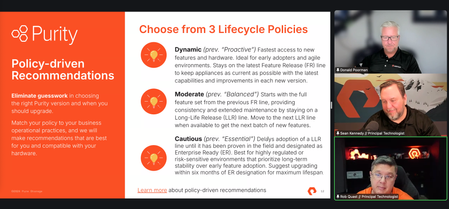
💬 We had an amazing Ask Us Everything, this past Friday, June 5th at 9 AM Pacific. It was all about Purity Upgrades. If you missed it or still have a burning question, don't fret! Feel free to ask it here and we'll get it answered for you by our experts! mbednar, greGPT plus kevinr were the moderators and experts who answered your questions during the conversation and will get to here on the community as well. If you want to catch the replay, check out the recording here!66Views3likes0CommentsAsk Us Everything Recap: Rethinking Storage with the Intelligent Control Plane
The latest Ask Us Everything session focused on a topic that’s quickly becoming central to Everpure’s strategy: the intelligent control plane. And based on the questions from the community, it’s clear that many teams are starting to think beyond individual arrays and toward managing storage as a unified platform. Here are the key takeaways—driven by the questions attendees asked and the answers from Everpure experts Don Poorman, Zane Allyn and Mike Nelson. “Do I need to rebuild my automation to use Everpure Fusion?” Most teams already have automation in place, whether it’s Terraform, Ansible, or years of scripts. The good news: you don’t have to start over. Everpure Fusion is API-driven, so existing workflows can stay intact. In practice, you’re simply shifting from targeting individual arrays to targeting the fleet as a whole. That often means adding a parameter, not rewriting everything. Everpure Fusion picks up where any existing automation gets bogged down, so tasks get simpler as you scale, not more complex. The takeaway: Everpure Fusion helps you scale your existing automation—it simplifies, standardizes and extends it across your data estate. “What does API-first really mean here?” At Everpure, API-first isn’t just a label. The APIs are built before the GUI, which means everything you can do in the GUI is already available programmatically. For practitioners, that translates to flexibility. Whether you’re scripting, using infrastructure-as-code, or experimenting with AI-driven workflows, you’re not waiting for features to be exposed—you already have access. It’s a subtle difference from legacy storage, where automation often lags behind the interface. “How do I approach automation without losing control?” Attendees raised a common concern: automation can feel risky. The advice was straightforward—start with outcomes, not everything at once. Automate a single workflow, apply guardrails, and expand gradually. Automation here isn’t about removing control. It’s about: Reducing repetitive work Minimizing human error Freeing up time for higher-value tasks For most admins juggling multiple systems, that shift is practical—not theoretical. “What does this look like in real workflows?” One of the most relatable examples discussed was a ServiceNow-style request flow. Instead of manually provisioning storage across multiple systems, a user submits a request describing what they need—performance, protection, and resiliency. From there, Everpure Fusion and Pure1 handle the process automatically. The result is faster, more consistent delivery with fewer manual steps. More importantly, it abstracts the complexity away from both the admin and the requester. That’s a major difference from legacy environments, where admins must manage each step across each array. “What do I actually need to install?” This answer surprised some people. Everpure Fusion isn’t a separate product. It’s built into Purity. Once you’re on the right version (Purity//FA 6.8.1 or later, Purity//FB 4.5.5 or later), getting started is simple: Create a fleet Add arrays That’s it. No additional infrastructure, no separate control plane to deploy. This lowers the barrier significantly and makes it easy to start small and build as your needs require. “How does this scale?” As expected, scale came up quickly. Instead of managing arrays individually, Everpure Fusion introduces fleet-level management. New capabilities like topology groups allow further organization within that fleet—by region, workload, or compliance requirements. This is where Everpure’s approach really diverges from legacy storage. You’re no longer limited to thinking in terms of hardware. You can organize storage in ways that reflect how your business actually operates. “What happens if something fails?” Everpure Fusion is distributed across the arrays in the fleet. There’s no single point of failure. If one system goes offline, the rest of the fleet continues operating normally. That design keeps management resilient while still enabling centralized control. Final thoughts The biggest shift highlighted in this session is simple: Stop managing arrays. Start managing outcomes. With the intelligent control plane—powered by Everpure Fusion and Pure1—Everpure enables: Policy-driven automation Fleet-scale visibility Simpler, faster operations For storage teams, that means less time on manual tasks and more time focused on how data supports the business. And based on the conversation, that’s exactly where our customers want to go. Find out more about the Everpure Intelligent Control Plane here. Check out this and all our other Ask Us Everything sessions. And, keep the conversation going by jumping into the Everpure Community.380Views1like0CommentsPure Fusion File Presets & Workloads on FB 4.6.7 and FA 6.10.4: Less Click‑Ops, More Policy
If you’ve ever built the “standard” NFS/SMB layout for an app for the fifth time in a week and thought “this should be a function, not a job”, this release is for you. With FlashBlade version 4.6.7 and FlashArray version 6.10.4, Pure Fusion finally gives file the same treatment block has had for a while: presets and workloads for file services across FlashBlade and FlashArray, a much sharper Presets & Workloads UI, plus smarter placement and resource naming controls tuned for real environments—not demos. This post is written for people who already know what NFS export policies and snapshot rules are and are mostly annoyed they still have to configure them by hand. Problem Statement: Your “Standard” File Config is a Lie Current pattern in most environments: Every app team needs “just a few file shares”. You (or your scripts) manually: Pick an array, hope it’s the right one. Create file systems and exports. Glue on snapshot/replication policies. Try to respect naming conventions and tagging. Six months later: Same logical workload looks different on every array. Audit and compliance people open tickets. Nobody remembers what “fs01-old2-bak” was supposed to be. Fusion File Presets & Workloads exist to eradicate that pattern: Presets = declarative templates describing how to provision a workload (block or file). Workloads = concrete instances of those presets deployed somewhere in a Fusion fleet (FA, FB, or both). In nerd-speak, think: Helm chart for storage (preset) vs Helm release (workload). Quick Mental Model: What Presets & Workloads Actually Are A File Preset can include, for example: Number of file systems (FlashBlade or FlashArray File). Directory layout and export policies (for NFS/SMB). Snapshot policies and async replication (through protection groups or pgroups). Per‑workload tags (helps in finding a needle in a haystack & more) Quota and Snapshot parameters A Workload is: A Fusion object that: References the preset in it’s entirety. Tracks where the underlying Purity objects live. Surfaces health, capacity, and placement at the fleet level. In code‑brain terms: preset: app-file-gold parameters: env: prod fs_count: 4 fs_size: 10TB qos_iops_max: 50000 placement: strategy: recommended # Pure1 or dark‑site heuristic depending on connectivity constraints: platform: flashblade Fusion resolves that into resources and objects on one or more arrays: purefs objects, exports, pgroups, QoS, tags, and consistently named resources. So, what’s new you ask? What’s New on FlashBlade in Purity//FB 4.6.7 1. Fusion File Presets & Workloads for FlashBlade Purity//FB 4.6.7 is the release where FlashBlade joins the Fusion presets/workloads party for file. Key points: You can now define Fusion file presets that describe: Number/size of file systems. Export policies (NFS/SMB). Snapshot/replication policies. Tags and other metadata. You then create Fusion file workloads from those presets: Deployed onto any compatible FlashBlade or FlashArray in the fleet, depending on your constraints and placement recommendations. That means you stop hand‑crafting per‑array configs and start stamping out idempotent policies. 2. New Presets & Workloads GUI on FlashBlade Putrity//FB version 4.6.7 brings proper Fusion GUI surfaces to FB: Storage → Presets Create/edit/delete Fusion presets (block + file). Upload/download preset JSON directly from the GUI. Storage → Workloads Instantiate workloads from presets. See placement, status, and underlying resources across the fleet. Why this is a real improvement, not just new tabs: Single mental model across FA and FB: Same abstractions: preset → workload → Purity objects. Same UX for block and file. Guard‑railed customization: GUI only exposes parameters marked as configurable in the preset (with limits), so you can safely delegate provisioning to less storage‑obsessed humans without getting random snapshot policies. 3. JSON Preset Upload/Download (CLI + GUI) This new release also adds full round‑trip JSON support for presets, including in the GUI: On the CLI side: # Export an existing preset definition as JSON purepreset workload download app-file-gold > app-file-gold.json # Edit JSON, save to file share, version control, commit to git, run through CI, etc… # Import the preset into another fleet or array purepreset workload upload --context fleet-prod app-file-gold < app-file-gold.json Effects: Presets become versionable artifacts (Git, code review, promotion). You can maintain a central preset catalog and promote from dev → QA → prod like any other infra‑as‑code. Sharing configs stops being “here’s a screenshot of my settings.”, 4. Fusion Dark Site File Workload Placement + Get Recommendations Many folks run fleets without outbound connectivity, for various reasons. Until now, that meant “no fancy AI placement recommendations” for those sites. Fusion Dark Site File Workload Placement changes that: When Pure1 isn’t reachable, Fusion can still compute placement recommendations for file workloads across the fleet using local telemetry: Capacity utilization. Performance headroom. QoS ceilings/commitments (where applicable). In the GUI, when you’re provisioning a file workload from a preset, you can hit “Get Recommendations”: Fusion evaluates candidate arrays within the fleet. Returns a ranked list of suitable targets, even in an air‑gapped environment. So, in dark sites you still get: Data‑driven “put it here, not there” hints. Consistency with what you’re used to on the block side when Pure1 is available, but without the cloud dependency. What’s New on FlashArray in Purity//FA 6.10.4 1. Fusion File Presets & Workloads for FlashArray File Version 6.10.4 extends Fusion presets and workloads to FlashArray File Services: You can now: Define file presets on FA that capture: File system count/size. NFS/SMB export behavior. QoS caps at workload/volume group level. Snapshot/async replication policies via pgroups. Tags and metadata. Provision file workloads on FlashArray using those presets: From any Fusion‑enabled FA in the fleet. With the same UX and API that you use for block workloads. This effectively normalizes block and file in Fusion: Fleet‑level view. Same provisioning primitives (preset→workload). Same policy and naming controls. 2. Fusion Pure1‑WLP Replication Placement (Block Workloads) Also introduced is Fusion Pure1 Workload Replication Placement for Block Workloads: When you define replication in a block preset: Fusion can ask Pure1 Workload Planner for a placement plan: Primary/replica arrays are chosen using capacity + performance projections. It avoids packing everything onto that one “lucky” array. Workload provisioning then uses this plan automatically: You can override, but the default is data‑backed rather than “whatever’s top of the list.” It’s the same idea as dark‑site file placement, just with more telemetry and projection thanks to Pure1. Resource Naming Controls: Have it your way If you care about naming standards, compliance, and audit (or just hate chaos and stress), this one matters. Fusion Presets Resource Naming Controls let you define deterministic naming patterns for all the objects a preset creates: Examples: Allowed variables might include: workload_name tenant / app / env platform (flasharray-x, flashblade-s, etc.) datacenter site code Sequenced IDs You can also define patterns like: fs_name_pattern: "{tenant}-{env}-{workload_name}-fs{seq}" export_name_pattern: "{tenant}_{env}_{app}_exp{seq}" pgroup_name_pattern: "pg-{app}-{env}-{region}" Result: Every file system, export, pgroup, and volume created by that preset: Follows the pattern. Satisfies internal CS/IT naming policies for compliance and audits. You can still parameterize inputs (e.g., tenant=finops, env=prod), but the structure is enforced. No more hunting down “test2-final-old” in front of auditors and pretending that was intentional. Not speaking from experience though :-) The Updated Presets & Workloads GUI: Simple is better Across Purity//FB v4.6.7 and Purity//FA v6.10.4, Fusion’s UI for presets and workloads is now a graphical wizard-type interface that is easier to follow, with more help along the way.. Single Pane, Shared Semantics Storage → Presets Block + file presets (FA + FB) in one place. JSON import/export. Storage → Workloads All workloads, all arrays. Filter by type, platform, tag, or preset. Benefits for technical users: Quick answer to: “What’s our standard for <workload X>?” “Where did we deploy it, and how many variants exist?” Easy diff between: “What the preset says” vs “what’s actually deployed.” Guard‑Rails Through Parameterization Preset authors (yes, we’re looking at you) decide: Which fields are fixed (prescriptive) vs configurable. The bounds on configurable fields (e.g., fs_size between 1–50 TB). In the GUI, that becomes: A minimal set of fields for provisioners to fill in. Validation baked into the wizard. Workloads that align with standards without needing a 10‑page runbook. Integrated Placement and Naming When you create a workload via the new GUI, you get: “Get Recommendations” for placement: Pure1‑backed in connected sites (block). Dark‑site logic for file workloads on FB when offline. Naming patterns from the resource naming controls baked in, not bolted on afterward. So you’re not manually choosing: Which array is “least bad” today. How to hack the name so it still passes your log‑parsing scripts. CLI / API: What This Looks Like in Practice If you prefer the CLI over the GUI, Fusion doesn’t punish you. Example: Defining and Using a File Preset Author a preset JSON (simplified example): { "name": "app-file-gold", "type": "file", "parameters": { "fs_count": { "min": 1, "max": 16, "default": 4 }, "fs_size_tib": { "min": 1, "max": 50, "default": 10 }, "tenant": { "required": true }, "env": { "allowed": ["dev","test","prod"], "default": "dev" } }, "naming": { "filesystem_pattern": "{tenant}-{env}-{workload_name}-fs{seq}" }, "protection": { "snapshot_policy": "hourly-24h-daily-30d", "replication_targets": ["dr-fb-01"] } } Upload preset into a fleet: purepreset workload upload --context fleet-core app-file-gold < app-file-gold.json Create a workload and let Fusion pick the array: pureworkload create \ --context fleet-core \ --preset app-file-gold \ --name payments-file-prod \ --parameter tenant=payments \ --parameter env=prod \ --parameter fs_count=8 \ --parameter fs_size_tib=20 Inspect placement and underlying resources: pureworkload list --context fleet-core --name payments-file-prod --verbose Behind the scenes: Fusion picks suitable arrays using Pure1 Workload Placement (for connected sites) or dark‑site logic purefs/exports/pgroups are created with names derived from the preset’s naming rules. Example: Binding Existing Commands to Workloads The new version also extends several CLI commands with workload awareness: purefs list --workload payments-file-prod purefs setattr --workload payments-file-prod ... purefs create --workload payments-file-prod --workload-configuration app-file-gold This is handy when you need to: Troubleshoot or resize all file systems in a given workload. Script around logical workloads instead of individual file systems. Why This Matters for You (Not Just for Slides) Net impact of FB 4.6.7 + FA 6.10.4 from an Admin’s perspective: File is now truly first‑class in Fusion, across both FlashArray and FlashBlade. You can encode “how we do storage here” as code: Presets (JSON + GUI). Parameterization and naming rules. Placement and protection choices. Dark sites get sane placement via “Get Recommendations” for file workloads, instead of best‑guess manual picks. Resource naming is finally policy‑driven, not left to whoever is provisioning at 2 AM. GUI, CLI, and API are aligned around the same abstractions, so you can: Prototype in the UI. Commit JSON to Git. Automate via CLI/API without re‑learning concepts. Next Steps If you want to kick the tires: Upgrade: FlashBlade to Purity//FB 4.6.7 FlashArray to Purity//FA 6.10.4 Pick one or two high‑value patterns (e.g., “DB file services”, “analytics scratch”, “home directories”). Implement them as Fusion presets with: Parameters. Placement hints. Naming rules. Wire into your existing tooling: Use the GUI for ad‑hoc. Wrap purepreset / pureworkload in your pipelines for everything else. You already know how to design good storage. These releases just make it a lot harder for your environment to drift away from that design the moment humans touch it.398Views3likes0Comments
Feature Request: Certificate Automation with ACME
Hi Pure people, How about reducing my workload a little by supporting the ACME protocol for certificate renewal? . Certficate lifespans are just getting shorter, and while I have a horrid expect script to renew certificates via ssh to flasharray, it would be much simpler if Purity ran an ACME client itself. PS We use the DNS Challenge method to avoid having to run webservices where they aren't needed.497Views1like2Comments
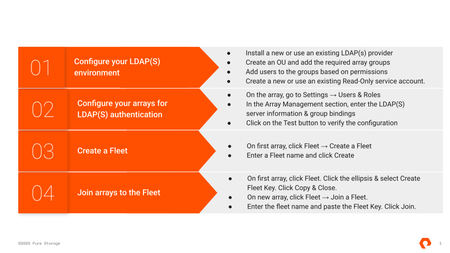
4 steps to enable Pure Fusion
Several teams like yours have recently switched on Pure Fusion and saved 39.5 hours of staff time per day by boosting application-response times. It’s been a game changer for enterprise data management. Read more on how Mississippi Department of Revenue deployed Pure Storage® platform for a faster, more versatile storage to boost application performance, protect data, and support hypervisor mobility. Pure Fusion unifies enterprise data and automates workflows with simplified storage management, workload automation and AI-driven workload placement. With the power of an Intelligent Control Plane, Fusion automates storage management across cloud, edge or core or any protocol file, object or block. Anchoring the Enterprise Data Cloud, it unifies data services and integrates with existing infrastructures, turning complex, manual tasks into streamlined, policy-driven operations. Fusion enables end-to-end automation—freeing you to accelerate innovation while reducing operational risk and overhead. Here are the 4 steps to enable Pure Fusion: Click here for the complete Pure Fusion Quick Start Guide. Using Secure LDAP (LDAPS) requires additional configuration with certificates. Please reference the Quick Start guide for more information. For compatibility reference, please see the Compatibility Matrix.751Views1like1CommentAnnouncing the General Availability of Purity//FA 6.10.1
We are happy to announce the general availability of 6.10.1, the second release in the 6.10 Feature Release line, continuing to deliver on our Evergreen promise, offering customers new integrations with third-party solutions and expanded platform capabilities, allowing them to extract even more value from their enterprise data cloud. Some of the Purity features contained in this release include: Rubrik Tag Visualization highlights compromised storage volumes and snapshots identified by Rubrik, directly in Fusion’s fleet-wide GUI, enabling customers to quickly gain actionable insights to protect data and minimize downtime—making cyber resilience simple and scalable. Unified Replication Support on X20R4/R5 aligns support for ActiveDR and Block Async replication use cases across the currently-available product line, expanding data protection capabilities for customers on entry-level platforms. Object Tagging Phase 4 adds REST and CLI support for adding metadata tags to remote pods, remote p-group snapshots and volume snapshots, giving users and processes more options for organizing and filtering storage objects. See the release notes for all the details about these, and the many other features, bug fixes, and security updates included in the 6.10 release line. UPGRADE RECOMMENDATIONS AND EOL SCHEDULE Customers who are looking for continued delivery of all the newest capabilities should upgrade to 6.10.1. Customers who are looking for long-term maintenance of the 6.8 feature set are recommended to upgrade to the 6.9 LLR. When possible, customers should make use of Self-Service Upgrades (SSU) to ease the process of planning and executing non-disruptive Purity upgrades for their fleet. Development on the 6.10 release line will continue through March 2026. After this time the full 6.10 feature set will roll into the 6.11 Long Life Release line for long-term maintenance, and the 6.10 line will be declared End-of-Life (EOL). HARDWARE SUPPORT This release is supported on the following FlashArray Platforms: Cloud Block Store for Azure and AWS, FA//X (R3, R4, R5), FA//C (R3, R4, R5), FA//XL (R1, R5), FA//E, and FA//RC20. Note, DFS software version 2.2.5 is recommended with this release. LINKS AND REFERENCES Purity//FA 6.10 Release Notes Self-Service Upgrades Purity//FA Release and End-of-Life Schedule FlashArray Hardware and End-of-Support DirectFlash Shelf Software Compatibility Matrix FlashArray Capacity and Feature Limits FlashArray Feature Interoperability Matrix1.1KViews0likes0CommentsAsk us everything about Purity Upgrades!
💬 Have more questions for our experts around Purity Upgrades after today's live "Ask Us Everything"? Feel free to drop them below and our experts will answer! dpoorman , skennedy , rquast , jhoughes tag your it! You can also check out these upgrade resources: Bulk self-service upgrades demo video Upgrade your own FlashArray with Pure1 blog Fleet-wide self-service upgrades brief761Views3likes3Comments