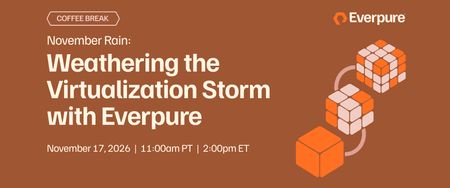
November Rain: Weathering the Virtualization Storm with Everpure
November 17 | Register Now While we may be past the eye of the virtualization storm, the landscape continues to evolve, and so does Everpure. Perhaps we can call the weather now more of a…November Rain. Following up on last November's episode, "Welcome to the (Virtualization) Jungle: How Pure Storage Can Help" with Cody Hosterman, host Andrew Miller invites Matt Webb (Consulting Field Solutions Architect, Virtualization, with two tours at VMware across vSAN, VCF, and Azure VMware Solution) to look at where virtualization is heading and why Everpure continues to provide value whichever hypervisor you land on. We'll explore:. Career lessons from the eye of the storm: Matt lived through VMware going from EMC to Dell and then becoming a standalone company—“we can do whatever we want”—before being acquired by Broadcom. We’ll discuss lessons in career planning in an ever-changing technology landscape, what you tie your professional identity to, and the lasting impact of communities like VMUG and vExpert Today’s virtualization landscape: We’ll explore the results from two recent analyst reports, how and why the average hypervisor count at customers is 2.9 (according to 451 Research), and unpack Matt’s perspective on the rationale behind why Nutanix, Microsoft, Red Hat, and VMware occupy the Gartner MQ for this space, plus the challengers (Proxmox!). Everpure's core value—nothing to tune and no trade-offs: The same core value that’s been tested over time but with new relevance in a world of shifting infrastructure layers. Even better, the core engineering work has new relevance with alternative technologies such asOpenStack Cinder. What's new for virtualization at Everpure: eEverything from major advances on the PX-CSI front (14 major releases with 20+ feature enhancements), increasing hypervisor support to follow where customers are going, and last but not least, continued deep work with VMWare, including Everpure FlashArray™ Management Pack for VMware Cloud Foundation (VCF) Operations as an example that brings array health and risk insight right into VCF Operations. Whether you're a VMware admin weighing your next move, an architect planning for more than one hypervisor, or a leader trying to keep the next renewal from becoming the next lock-in, grab your favorite beverage, come in out of the rain, and join the conversation. We'll stay on after the session to answer your questions live! Register Now6Views0likes0CommentsTrying something new out, join us?
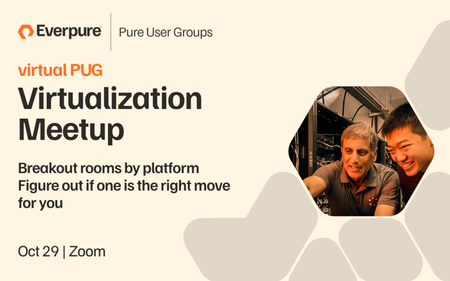
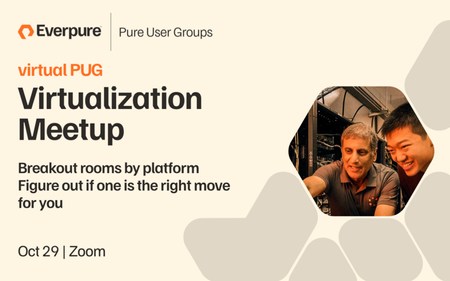
Hi all! Briana from the community team here. adhill and nfritsch came to me over the summer with the idea to host a virtual PUG meetup. So we put our heads together and came up with the idea of hosting a virtual PUG all about the landscape of virtualization options and figuring out how to make a choice or make the most of the choice you've already made. We'll meet on zoom & use breakout rooms to have small group discussions on 7 different virtualization topics. Info & registration link can be found by clicking on this image ⬇️ We're hosting it in 2 week and will be sending you a DoorDash gift card to cover your lunch during it. If you're part of a local chapter an SE in your area will be hosting a happy hour later in the day. (So far, Pittsburgh, Cleveland, and Columbus, OH have committed to this. Oh and you have to be at meetup to learn about the HH location & get swag.) We've brought in the Everpure experts on each of these options, and in some case they'll be interviewing customers who have already made the move. You'll have the chance to ask both of them your questions and get to know other Everpure customers that are making the same decision as you. What I'm asking is two things of you: 1) If you're interested, please register. This will help me know if it was a good idea to try out and will make it so I can get you that GC for lunch. Bonus points for commenting here & letting everyone know which room you're joining or thinking of joining. 2) If you think this is a terrible idea, tell us! Even better if you have an idea of what you'd like to see from the community team.Solved33Views0likes1CommentPOSTPONED: virtual PUG: Virtualization Meetup
This event has been postponed. A new event listing will be posted once a new date is confirmed. (Likely mid-January) You're invite you to our first virtual PUG, the Everpure User Group! It's built for anyone who has been weighing what's next for their virtualization platform. You'll join a small, off-the-record group with a peer who has already been through that decision, and an Everpure expert will be there too. When you register, you pick a breakout room that fits where you are: still deciding, staying on VMware, or moving to Nutanix, Kubernetes, Hyper-V, OpenStack, or the cloud. Lunch is on us, and afterward we'll share details for a happy hour with your local chapter. Date: October 29, 2026 Time: 1:00 PM - 2:30 PM EDT Location: Virtual More Info & Registration: RSVP here Breakout rooms, one for each path: We haven't picked a path yet — we're still evaluating - with Cody Hosterman We're staying on VMware and planning for VCF 9 - with David Stevens We're moving to, or already running, Nutanix AHV - with Alex Carver We're running VMs on Kubernetes — Portworx, OpenShift Virtualization - with Chris Crow We're standardizing on OpenStack - with Simon Dodsley We're moving to Hyper-V, or Azure Local - with Robert Quimbey We're shifting workloads to public cloud — Azure, AWS, AVS, EVS - with Joe Houghes52Views0likes0Comments
PHIF: Modular Hypervisor Integrations and a VMware Migration Path That Doesn't Depend on VDDK
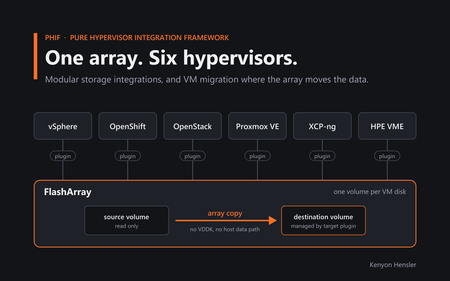
This post first ran on my personal blog, vSkeeBall. The code is on GitHub at PureStorage-OpenConnect/pure-hypervisor-integration-framework. For most of my career, virtualization meant VMware. Storage vendors built their integrations for vSphere, backup tools were built around VMware's APIs, and migration tools treated VMware as a source by reading its virtual disks and copying the blocks somewhere else. That's not the world most of the customers I talk to live in anymore. They're running vSphere next to OpenShift Virtualization, Proxmox VE, XCP-ng, HPE VM Essentials or OpenStack, and sometimes several of those at once. Some of the assumptions under the old tooling are changing too. In August 2026 Red Hat documented that VMware's Virtual Disk Development Kit (VDDK) images are no longer on the old public download, and you now have to request access from VMware/Broadcom. One workaround Red Hat called out was storage offload/XCOPY. Microsoft's Azure Migrate docs say the agentless VMware appliance needs VDDK too, and if you can't get it, you should use agent-based migration instead. I'd already been chewing on a question that this made a lot more relevant: what if moving a VM didn't depend on pulling its data out through the source hypervisor's disk SDK at all? That question ended up being one of the more interesting parts of PHIF, the Pure Hypervisor Integration Framework. PHIF started with a simpler goal. I wanted an easier way to hook a FlashArray up to a bunch of different virtualization platforms. Over time it turned into an experiment around three questions: Can the hypervisor storage integrations be modular and useful on their own, with no management framework at all? Can one capability-driven control plane automate those integrations without becoming something you're stuck with? Once the hypervisors share the same storage, can the array itself become the migration path? From what I've built so far, I think the answer to all three is yes. One thing up front: PHIF is a side project of mine, not a supported Everpure product. There's more on that at the end. Every hypervisor wants storage differently Going in, I figured this was mostly an API problem. The APIs turned out to be the easy part. The hard part is that every platform has its own idea of what storage looks like: VMware has VMFS, vVols, NFS and RDMs. OpenStack wants storage through Cinder. OpenShift and Kubernetes want CSI. Proxmox has its own storage plugin model. XCP-ng has Storage Repositories and SMAPI. HPE VM Essentials is built on Morpheus and KVM, with yet another plugin model. You could hide all of that behind one lowest-common-denominator layer, but you'd throw away most of what makes each platform worth running. So PHIF standardizes the orchestration and lets each platform keep its native integration model. PHIF can connect a FlashArray, deploy or configure the right integration for each platform, manage credentials, run day-2 operations and coordinate VM migrations, without pretending the platforms are the same underneath. Capabilities instead of if-statements Each hypervisor in PHIF is a connector, and the connector declares what that platform supports. The capability list right now looks like this: CONNECT, DEPLOY_PLUGIN, CONFIGURE, HOST_REGISTER, CONNECTIVITY, PROVISION_DATASTORE, PROVISION_VOLUME, SNAPSHOT, CLONE, RESIZE, QOS, REPLICATION, HEALTH, REMOVE, VM_INVENTORY, VM_LIFECYCLE, MIGRATE The front end doesn't carry a pile of "if it's vSphere, show these buttons" logic. It shows whatever each connector says it implements. Adding a hypervisor mostly means writing a new connector. The registry finds it on its own, and the shared services (FlashArray client, job engine, secrets and log streaming) are already there. This is one of my favorite screens in the app. All six platforms show up as peers, even though they look nothing alike under the hood. You don't need PHIF to use the plugins This is the part I care about most. PHIF can install the integrations, configure them, manage their lifecycle and use them in a migration, but several of them can be installed by hand and run without PHIF at all. I didn't want PHIF sitting between the hypervisor and the array. It sits above the integration instead: PHIF | deploy / configure / manage v Hypervisor | native plugin v FlashArray PHIF is an orchestration plane. It isn't in the VM's I/O path, and the storage integration keeps working if PHIF goes away. So if all you want is better FlashArray integration on Proxmox, XCP-ng or HPE VM Essentials, just grab that plugin. You don't have to run the web app or touch migration. Proxmox For Proxmox I wrote a custom purefa storage type as a real PVE::Storage::Plugin , so it runs inside Proxmox's own storage framework. The model is one FlashArray volume per VM disk. Instead of one big shared LUN with LVM on top and guest disks carved out of it, every guest disk gets its own volume: VM 101 |-- disk-0 -------- FlashArray volume A |-- disk-1 -------- FlashArray volume B VM 102 |-- disk-0 -------- FlashArray volume C Those volumes show up in the VM as raw multipathed block devices. Snapshots and clones happen on the array, and each disk keeps its own identity there. None of that needs PHIF. You can install the plugin, define the storage, set up multipathing and register the hosts yourself. PHIF just automates those steps. XCP-ng XCP-ng needed a completely different implementation, built on SMAPIv3: a volume plugin for the FlashArray-backed VDI lifecycle, a datapath that hands the raw multipathed device to the VM, and a host component for things like cleaning up multipath maps. Same idea as Proxmox, though: one VDI, one FlashArray volume, with snapshots and clones done on the array. I've validated it on a live two-host pool. PHIF can deploy it across a pool, or you can install it on the hosts yourself. HPE VM Essentials VME is Morpheus plus KVM, so this one is a native Morpheus/VME storage plugin. It registers FlashArray storage inside VME and lets VME drive the per-disk operations, with one volume per VM disk and snapshot, clone and resize offloaded to the array. I've validated it on a live VME appliance. PHIF can upload and configure it, or you can build and install it by hand. vSphere, OpenShift and OpenStack These three already had integrations: the FlashArray Cinder driver, Portworx CSI, and the vSphere plugin with VASA, VMFS and vVols. PHIF automates deploying and configuring them, and after that Cinder is still Cinder and CSI is still CSI. I don't want PHIF to fix one lock-in problem by adding a new mandatory dependency. How I think about the layers Layer 1 Native storage integration Layer 2 Deployment and configuration automation Layer 3 Lifecycle and day-2 operations Layer 4 Cross-hypervisor orchestration and migration Layer 1 is useful by itself, and you can stop there. Each layer above it is optional. Migration works because the storage model underneath is already there, but the plugins don't exist just to enable migration. Remove PHIF and they keep running. You lose the automation, not the storage integration. The management layer Nothing exotic here. It's a React SPA in front of a FastAPI backend, with an auto-discovered connector registry, a shared FlashArray REST client, an async job engine and encrypted credential storage. Operations run over HTTP APIs, SSH, Ansible or Kubernetes tooling. It runs under Docker Compose or Kubernetes/Helm. There's also a mock mode that stubs out the array and hypervisor I/O, so you can walk through every workflow without any real infrastructure. Day-2 operations PHIF exposes whatever each connector implements as day-2 operations: host registration, connectivity, provisioning, snapshots, clones, resize, QoS, replication, health checks and plugin lifecycle, depending on the platform. The UI is organized around six workflows: FlashArrays, API keys, hypervisors, operations, migrations, and jobs/log history. PHIF still stays out of the data path. The deployment wizard A lot of PHIF's value is just replacing a stack of per-platform install runbooks with one repeatable flow: discover the environment, find the nodes and interfaces, install the integration, set up storage networking, register the hosts, connect the FlashArray and validate. If you only run one environment, you probably don't need the wizard. That's the point of keeping the integrations modular. Then the storage layer became the migration layer I didn't set out to build migration. It came out of the storage design. Once several hypervisors keep each VM disk as its own FlashArray volume, a cross-hypervisor migration starts to look very different. The usual picture has the migration software acting as the data mover: Source hypervisor -> virtual disk -> migration software (read blocks, transfer blocks) -> destination storage -> destination hypervisor But if both platforms are attached to the same FlashArray, the source disk is already sitting on the hardware that's going to serve the destination. In a lot of cases there's no reason to copy it through a migration server. So PHIF captures the source VM's logical configuration, creates a matching VM and managed disks on the destination, and fills those destination volumes with a FlashArray copy-with-overwrite. The source volumes stay the source of the data, and the big block copy happens inside the array instead of going through the migration host. PHIF orchestration Source VM Destination VM | | v v Source FA volume --- array copy ---> Destination FA volume (inside FlashArray) PHIF coordinates. The array moves the data. Copy vs. move PHIF supports both. In copy mode, the source VM stays put while PHIF builds the destination and copies each source volume into a destination-managed volume. In move mode, the source is shut down first and only removed once the destination is created and running. If a migration fails, PHIF cleans up the half-built destination, and in copy mode the source is never touched. I've run boot-confirmed migrations in both directions across all the migration-capable platforms sharing one FlashArray. To be clear, this doesn't hand the same LUN from one hypervisor to another. The destination plugin creates its own volume and the array copies into it, so each platform keeps its own ownership and naming. Migration groups and scheduling Once single-VM migration worked, I added groups, with a shared source and destination, network mapping, scheduling and concurrency controls. That still sits above the plugins, and the plugins don't need it. Why VDDK matters here VDDK is how third-party tools have traditionally read VMware virtual disks. It works, but it puts VDDK squarely in your migration path: VMware VMDK -> VDDK -> migration software -> destination If your migration tool needs VDDK to read the source disk, its version compatibility, licensing and availability are all your problem. PHIF's VMware migration doesn't use VDDK. I didn't build it that way because of the August change. It's a side effect of leaning on the array and VMware's own host tooling instead. PHIF still uses the hypervisor APIs for the VM config, NICs and MACs, network mappings and creating the destination VM. It just doesn't pull the bulk data out through VDDK. RDMs are the easy case An RDM already has an identity as a storage device. PHIF resolves its device ID against the FlashArray, finds the volume, and that volume goes straight into the array-based workflow. VMFS takes more work A VMDK on VMFS is a file. The array holds the datastore, but there's no dedicated volume behind each individual VMDK, so PHIF has to change how the storage is represented. For a VMFS source, PHIF provisions a new FlashArray volume, presents it to ESXi as an RDM, and clones the VMDK onto it with vmkfstools . Where the VMware storage path supports it, that clone is VAAI/XCOPY offloaded to the array. Before: VM -> VMDK file -> VMFS -> FlashArray datastore volume Prep: VMDK file --(vmkfstools / VAAI-XCOPY)--> dedicated FA volume Migration: dedicated FA volume --(FlashArray copy)--> destination-managed FA volume -> destination VM No VDDK required. I also find it interesting that Red Hat independently pointed to storage offload/XCOPY as a way around its own VDDK dependency. vSphere as a destination vSphere can be the destination too. By default PHIF attaches the destination disks as virtual-mode RDMs backed by dedicated FlashArray volumes, which keeps the volume-per-disk model. If you'd rather end up with native VMFS VMDKs, there's an optional conversion. That step is different, because going from a raw device into a file on VMFS does need host-side data movement. PHIF runs it with VMware's storage operations and verifies the result before it frees the temporary volumes. That matters to me. An abstraction should make things simpler, but it shouldn't hide where the bytes are actually moving. Let the hardware do what it's good at Arrays already have snapshots, volume copies, clones, host mappings, replication and QoS. We think of those as storage features, but a lot of them work as mobility tools too. A volume copy can copy a VM disk, and a snapshot gives you a rollback point. So why push all the data through a migration appliance when the array that already owns it can do the copy? I think the VDDK situation points at a bigger issue. If leaving platform A requires a proprietary disk-access SDK from platform A, that SDK is part of your portability strategy whether you planned for it or not. PHIF splits the work. The hypervisor handles what it understands (inventory, CPU and memory, firmware, power state, networks and VM creation), and the array handles the volumes, copies, mappings and data. Who owns the VM? This project has also changed how I think about VM ownership. We usually draw the hypervisor on top, owning everything down to the array. I've started thinking of it as two halves: the compute platform owns the VM config and runs it, and the array owns the durable data that any of these hypervisors can consume. Real migrations still have plenty of complications (boot modes, drivers, disk formats, networking), but the data doesn't have to belong to one hypervisor. What PHIF is, and what it isn't PHIF is an independent, experimental project. It is not a supported Everpure product, and it isn't covered by a support agreement, warranty or SLA. That matters because it does real things to real infrastructure. It can create and destroy array volumes, change storage connectivity and multipathing, apply Kubernetes components, and create, power off or delete VMs. Try it in a lab, start in mock mode, and only point it at data you can afford to lose. The custom Proxmox, XCP-ng and HPE VM Essentials plugins are just as experimental. I put the code out so people can look at it, test it, change it and hopefully make it better. Where it stands today As of right now, PHIF has connectors for six environments: vSphere, OpenShift, OpenStack, Proxmox, XCP-ng and HPE VM Essentials. Each integration has been validated on hardware, and the migration engine has been tested on live hardware between the migration-capable platforms sharing the same FlashArray. That's enough to prove out the architecture. Next I'd like to add more hypervisors through the connector model and see whether array replication opens up cross-array mobility. And since it's modular, you can reuse the one piece you like without buying into the rest. Wrapping up For me, the interesting part of PHIF isn't the UI or the migration wizard. It's how the work is split underneath: the integrations are the foundation, PHIF handles orchestration, and the array is the data plane. When everything shares the same array, you can ask what the storage hardware can do for you. The VDDK changes made that more timely, but they aren't why I built it this way. They just show why those dependency boundaries matter. Sometimes a hypervisor migration really does mean moving a lot of data. But when the source and destination share capable storage, the migration server doesn't have to be the thing doing the moving. The source code, docs, deployment instructions, connector guides and the standalone plugins are all on GitHub: PureStorage-OpenConnect/pure-hypervisor-integration-framework. If you give it a try, I'd like to hear how it goes, so drop a comment here or open an issue on the repo. PHIF is an independent experimental project. It is not a supported Everpure product, is not covered by a support agreement, warranty or SLA, and can perform destructive infrastructure operations. Test it only in environments and against data you can afford to lose.24Views0likes0Comments
Proxmox VE
Hi all Hope you're all having a great day. We have several customers going down the Proxmox VE road. One of my colleagues was put onto https://github.com/kolesa-team/pve-purestorage-plugin as a possible solution (as using Pure behind Proxmox (using the native Proxmox release) is not a particularly Pure-like experience. Could someone from Pure comment on the plugin's validity/supportability?2.3KViews6likes10CommentsOur First Virtual Pure User Group Meeting
I hope you’re enjoying the fall weather. Baseball fans have already seen two roof balls this postseason, while Bengals fans know the drill. We tried to gather this summer, but the July 4th holiday and vacations made scheduling tough. We’re planning one last community get-together before 2027, and details are coming soon. In the meantime, join us for our first virtual Pure User Group, focused on modern virtualization. Subject matter experts and customers will share their experience and answer questions. We’re bringing together Pure User Group communities from across the Midwest, including Pittsburgh, but don’t let the Steelers fans scare you off even though they got the best of our Bengals a few weeks ago. Event Date/Time: Thursday, October 29, 2026, 1:00–2:20 p.m. Eastern Register: https://experience.everpuredata.com/virtualizationlunchlearn I’ve loved the community we’ve built in 2025 and 2026. We have a great foundation, and I’m looking forward to building on it in 2027.57Views1like1Comment09222026 - Demo Recap - From CSI to Snapshots—Seamless VM Management on Red Hat OpenShift
If you missed our latest Expert Led Demo, Matt Webb and I walked through how teams can manage virtual machines on Red Hat OpenShift while using Everpure FlashArray through CSI. The goal was not to turn every VMware administrator into a Kubernetes expert overnight. It was to connect the dots: many familiar VM operations still exist, but the platform uses different objects, policies, and automation to get the job done. What you missed 👇 🗺️ A familiar operating model with new terminology. Worker nodes, StorageClasses, PersistentVolumeClaims, live migration, and VirtualMachine objects map closely to concepts many VMware administrators already know. ⚙️ CSI automates the storage plumbing. A StorageClass defines the storage policy, while the CSI driver provisions volumes, maps them to the right node, and handles the day-to-day attachment work. 🔀 Choose the right storage-consumption model. Teams can use Portworx Enterprise volumes for flexible, software-defined storage services across mixed infrastructure, or FlashArray Direct Access when they want array-level data services and visibility in Purity. 🚀 Keep VM operations simple. In the demo, we showed a live compute migration, created a VM from a template, and used the OpenShift console to work through familiar virtualization tasks. 📸 Use array-based snapshots for fast recovery. With CSI configured, snapshots are FlashArray-based. The demo showed taking a snapshot, deleting data, restoring the VM, and bringing the data back quickly. 🧳 Plan migrations around your environment. Migration Toolkit for Virtualization can support cold migrations, while storage-offload migration can use SCSI XCOPY when source VMware storage and OpenShift storage share the same FlashArray. The practical takeaway: storage policies and automation remove much of the manual LUN, mapping, rescan, and multipathing work. That gives virtualization and platform teams more time to focus on the workload—not the plumbing behind it. 🎥Catch up on the demo HERE 🎥 💬 What is the biggest question your team has about running VMs on OpenShift: migration, storage policy, snapshots, or day-two operations? Share it in the comments.35Views1like0Comments
From CSI to Snapshots: Seamless VM Management on Red Hat OpenShift
September 22 | Register Now Red Hat OpenShift Virtualization is an increasingly popular option for organizations migrating workloads to a new hypervisor. Rather than being an afterthought, storage is actually a critical element of any OpenShift Virtualization deployment. Join this webinar for a set of short demos of Everpure FlashArray™ with Red Hat OpenShift. We'll go from the ground up: connecting the Container Storage Interface (CSI) to storage, spinning up a virtual machine (VM) from a template, and protecting the VM with instant, array-based snapshots. These demos will show how naturally FlashArray fits into an OpenShift environment. Get connected: See how to set up the CSI with the Portworx® operator and define both the StorageCluster and the StorageClass. Run and protect: We’ll demonstrate both VM provisioning in OpenShift Virtualization plus how to create instant, space-efficient snapshots. Register Now!406Views0likes0CommentsEverpure Cloud: Building an Efficient Storage Platform in Microsoft Azure
September 17 | Register Now More organizations are migrating VMs and containerized apps into Azure and hitting a wall: native cloud storage wasn't built to provide the enterprise data services they rely on. Teams are lifting workloads into the cloud only to discover unpredictable costs, the inability to manage their storage from a unified platform, and data protection gaps. Join us to learn how to easily scale demanding, storage-heavy workloads without sacrificing data requirements or budget. With the right storage platform as your foundation, your hybrid cloud environment can deliver flexibility, cost savings, and operational simplicity. Key takeaways: Versatile workload support: Seamlessly run and manage mixed enterprise workloads on Everpure Cloud without compromising performance or flexibility. Streamlined Azure integration: Rapidly provision and scale Everpure Cloud using familiar, standard Azure-native tools and workflows. Unified management and security: Simplify data management across cloud and on-premises environments with consistent controls, governance, and built-in data protection. Optimized storage TCO: Significantly reduce overall enterprise storage costs through efficient resource utilization. Register Now!382Views0likes0Comments