Get rid of stressful infrastructure headaches. Everpure Fusion handles your data, autonomously.
It happens! It's 11:45 PM on a Friday. An alert fires and storage latency has spiked across a production workload. The operator digs in and traces it back to an automated tiering policy that quietly moved a hot dataset to a slower tier because it looked idle based on a 24-hour access window, right before a scheduled batch job that runs every weekend. Nobody changed anything. The policy did exactly what it was configured to do. But nobody remembers configuring it that way, the documentation hasn't been touched in two years, and the monitoring dashboard shows storage as "healthy" because utilization is fine. It's just in the wrong place. The operator overrides the tier, performance recovers, and spends the next hour writing an incident report for a problem that shouldn't exist. A system that was supposed to make life easier made a decision with no context, no warning, and no visibility into why. That's the anger that doesn't go away quickly. It's not just frustration at the incident. It's the feeling that the tools are working against you instead of with you. The core problem in that story was a system making decisions with no context, no warning, and no visibility. Everpure Fusion attacks each of those problems: Unified visibility across the entire fleet: Everpure Fusion provides a global dataset as a single source of truth for discovery, management, and configuration of storage arrays so the operator isn't piecing together what happened across multiple dashboards, multiple arrays, multiple tickets after the fact. They see the full picture in one place, before things go wrong. Intelligent workload placement: Rather than static policies quietly acting on stale access patterns, Everpure Fusion uses AI-guided placement to boost performance and efficiency for every workload. It understands workload behavior, not just utilization snapshots, the kind of context that would have caught a batch job pattern before tiering the dataset down. Policy-driven governance with real control: Automated orchestration cuts manual tasks and speeds service delivery, while unified controls simplify audits, reduce risk, and prove compliance fast. Policies are visible, documented, and governable. Not buried configs nobody remembers setting. Built into the platform, not bolted on: Evepure Fusion is now simply a part of Purity, meaning it is not an add-on you have to install or buy, but rather a core piece of the Purity operating system. The operator doesn't have to manage another tool. The intelligence is already there. The operator in that story didn't need more alerts. They needed a system that understood context, made decisions transparently, and gave them control without requiring them to be online at midnight to maintain it. That's exactly the gap Everpure Fusion is designed to close - with One Fleet, Zero Complexity. Why policy-driven storage operations matter Everpure Fusion is built as the core of Everpure intelligent control plane that manages all arrays including FlashArray, FlashBlade, and cloud as a unified fleet, with one topology, one API, and one operational framework regardless of protocol or local - datacenter, cloud or edge. That uniformity is what makes policy enforcement reliable at scale. Everpure Fusion introduces workload-based provisioning through presets, which are predefined policy-driven templates for specific workload types, encoding protection policies, replication, and SafeMode retention from the moment a workload is provisioned, not patched in after an incident. Admins no longer need to pre-plan and tune deployments manually, which reduces the risk of non-compliance and improves resiliency by ensuring workloads are provisioned correctly from the beginning. The result is infrastructure that enforces your intent, not just your last manual action. Intelligent placement, rebalancing, and fleet-scale capacity control If you manage storage at scale, you've probably seen this scenario play out more than once. One array is buried, running hot, and screaming for relief. Three aisles over, another array is sitting at 40% utilization, doing almost nothing. And somewhere in between, your team is scrambling to provision capacity, kick off an emergency migration, and explain to stakeholders why an SLA was missed on a workload that, in hindsight, never should have been placed there in the first place. This is not a people problem. It is a tooling problem. And it is remarkably common. Everpure Fusion starts solving this problem at the moment of provisioning. When a new workload lands, most storage systems do a simple capacity check and place it wherever space is available. Everpure Fusion does something fundamentally different. The placement engine evaluates every array in the fleet simultaneously, looking at IOPS headroom, throughput capacity, and physical utilization before making a decision. The goal is not just to find somewhere to put the workload. It is to find the right home for it, one where it can live comfortably for the long term without creating a bottleneck down the road. Think of it as placing workloads with intention rather than convenience. Of course, environments do not stay static. Workloads grow, usage patterns shift, and an array that looked healthy six months ago can become a problem today. Everpure Fusion accounts for this with continuous rebalancing built directly into its operation. When an array starts trending toward overload, Everpure Fusion detects it and begins orchestrating data movement across the fleet automatically. No manual intervention required. No application downtime. Data migrates in the background while workloads keep running, and arrays that were sitting underutilized suddenly become productive members of your infrastructure. At fleet scale, now supporting up to 64 arrays, this turns capacity management from a constant firefight into something that largely runs itself. What makes this possible without disruption is how Everpure Fusion executes the move under the hood. It leverages ActiveCluster to stretch the volume across both the source and target arrays simultaneously, creating a synchronous mirror in place. Once the stretch is established, volumes are connected on the target array and hosts auto-discover the new target paths through standard multipathing. The target then validates that path usage is healthy and confirmed before any cutover begins. Only after that validation is complete are the volumes disconnected from the source, ensuring there is zero gap in access at any point in the sequence. Everpure Fusion then unstretches from the source array to complete the rebalance and release its capacity. The result is a seamless, non-disruptive migration that the application never sees. What truly sets Everpure Fusion apart from a standard load balancer is what happens under the hood. Powered by Pure1 AI and up to 30 days of historical workload data, Everpure Fusion does not just look at what is happening right now. It looks at what is about to happen. Say you have a workload that runs a heavy batch job every Saturday night. Everpure Fusion knows that. It has seen the pattern. So when the placement engine is evaluating tier assignments, it will never recommend moving that workload to a lower-performance tier just because it looks quiet on a Tuesday afternoon. It understands what Tuesday quiet actually means in context. And if that workload somehow ends up on the wrong tier, perhaps through a manual change or a migration gone sideways, Everpure Fusion will proactively raise a violation before the weekend arrives. Not after the SLA is missed. Before. The cumulative effect is that customers can operate their fleets closer to full utilization without the anxiety that normally comes with it. Underused hardware gets activated, incremental purchases get deferred, and the reactive, always-behind-the-curve model of capacity management starts to look like a problem from a previous era. And Everpure Fusion does not stop at the infrastructure layer. Through its integration with Pure1 Application Intelligence, Everpure Fusion gains deeper visibility into the nature of the workloads themselves, not just how they behave, but what they actually are. That additional context means smarter decisions at every level, from initial placement to long-term tier management, grounded in a more complete picture of what your environment is really doing. Workload rebalance and mobility will be available towards the end of 2026. Compliance as part of the control plane Most storage compliance workflows follow the same pattern: an audit is announced, someone pulls reports from three different tools, cross-references configuration against a spreadsheet of expected settings, and spends two weeks proving that workloads are protected the way they're supposed to be. Then the audit ends and nothing changes until the next one. That model breaks at fleet scale. When you're managing dozens of arrays across multiple sites and protocols, manual audits don't just slow you down — they leave gaps that only get discovered at the worst possible time. Everpure Fusion Compliance is built into the control plane, not bolted on after provisioning. Because Everpure Fusion presets encode protection policies, replication requirements, SafeMode retention, and QoS settings at deployment time, Everpure Fusion always knows what every workload's intended configuration is. Drift detection is continuous — not periodic. When a workload deviates from its preset, Everpure Fusion instantly surfaces the violation — visible in the UI, queryable via API or CLI, and accessible to AI agents through an MCP server. Remediation can be triggered directly through the same interfaces, without pulling in a separate tool or writing a custom script. Fleet-wide compliance dashboards give storage admins a live view of posture across every array, with exportable audit-ready reports that don't require manual assembly. The shift is meaningful: compliance becomes a property of how the fleet operates, not a project that interrupts how the team works. Everpure Fusion Compliance will be available towards the end of 2026. From dashboards and scripts to natural-language fleet operations You know the drill. A latency spike hits production. You open three dashboards, run a handful of CLI queries, dig through alert logs, and piece together enough context to understand what happened — and by then, you've already spent 45 minutes on a problem that should have taken five. The issue isn't the tools. It's that the context your fleet holds is trapped across systems that don't talk to each other. Everpure Fusion MCP Server changes that. Built on the open Model Context Protocol standard, it connects any MCP-compatible AI assistant — Claude, ChatGPT, Copilot, or internal agents — directly to live Everpure Fusion fleet state. Arrays, workloads, capacity, performance metrics, alert history, configuration, and placement data are normalized into clean, structured JSON and made available to AI in real time, pulled directly from Everpure Fusion and Purity REST APIs. The result: instead of navigating dashboards and stitching together CLI output, you ask a question. "Which arrays are approaching capacity?" "What's driving latency on this workload?" "Which workloads are drifting from their preset?" Everpure Fusion MCP Server answers from live fleet context, not stale snapshots. This is the on-ramp to agentic storage operations. Everpure Fusion already enforces policy and placement across the fleet. Pure1 adds AI-driven analytics and recommendations on top. Together, they give infrastructure operators the foundation to move from reactive troubleshooting to intent-driven, increasingly autonomous fleet management. Using topology groups to encode real infrastructure boundaries If your Everpure Fusion fleet's topology model lives in a color-coded spreadsheet, three wikis, and the institutional memory of one senior admin who never takes vacation — this is for you. Everpure Fusion, built into Purity for FlashArray and FlashBlade, introduces Topology Groups: fleet-scoped objects that let you describe your arrays in the same language your architecture diagrams already use — regions, availability zones, datacenters, rows, racks. No more provisioning a Everpure Fusion workload and hoping it lands in the right building. A Everpure Fusion Topology Group is a hierarchical, tree-structured object. Groups nest up to 10 levels deep (global → us-east → az-us-east-1a → dc01 → row3 → rack12), each array belongs to exactly one parent, and cycles are rejected at write time. Critically, they encode placement semantics — not access control. RBAC stays in Pure1 Resource Groups; topology stays in Everpure Fusion topology. Once modeled, Everpure Fusion presets reference groups using <group>.arrays notation. Everpure Fusion intersects the preset's allowed arrays with the group's membership at placement time. If there's no overlap, Everpure Fusion provisioning fails fast with a clear error — not silently in the wrong zone. The Everpure Fusion CLI shorthand makes automation clean: purevol list --context az-us-east-1a.arrays Everpure Fusion membership changes propagate automatically across the fleet. You stop maintaining a second source of truth outside the control plane. Stop treating topology as tribal knowledge. With Everpure Fusion, make it a first-class part of the intelligent control plane. Extending the model to Kubernetes and virtualization Most infrastructure operators are managing two parallel storage worlds right now: traditional VMs and databases on one side, Kubernetes-based containerized workloads on the other. Separate toolchains. Separate provisioning workflows. Separate everything. Everpure Fusion changes that. Through the Portworx Fusion Controller, Everpure Fusion extends its policy and placement control plane directly into Kubernetes — without forcing developers to change their existing workflows. Everpure Fusion auto-discovers your FlashArray and FlashBlade fleet, then exposes Everpure Fusion presets as native Kubernetes StorageClasses. That means when a developer requests a persistent volume, Everpure Fusion's placement engine resolves it against your existing policy constraints — storage class, protection policy, topology group, replication requirements — the same way it does for any other Everpure Fusion workload. No separate control plane for modern environments. No array-by-array configuration for each cluster. New arrays added to the fleet are automatically discovered and configured, so the operational model stays consistent as infrastructure grows. For VMware environments, Everpure Fusion extends the same operational model through the Everpure Fusion vSphere plugin, connecting storage management directly into virtualization workflows instead of running it as a separate administrative domain. The result: one control plane, one set of policies, one placement engine — spanning VMs, containers, and databases across the fleet. That is fewer parallel stacks to operate, less configuration drift between environments, and a more scalable path to consistent storage operations across the full infrastructure stack. Everpure Fusion as the storage admin foundation for autonomous operations The through-line across everything covered in this blog is simple: Everpure Fusion gives infrastructure operators a unified, policy-driven control plane that enforces intent consistently — across provisioning, placement, compliance, topology, and now Kubernetes and virtualization. That foundation matters because autonomous storage operations do not start with AI. They start with structure. Topology groups encode where workloads belong. Presets encode how they should be configured. Everpure Fusion presets exposed as StorageClasses ensure Kubernetes environments follow the same rules as everything else. When that structure is in place, AI can recommend, optimize, and eventually act — because the context is already clean, trusted, and machine-readable. For storage admins, the shift is real: less time resolving incidents caused by placement decisions nobody remembers making, more time defining the intent that governs the fleet. Everpure Fusion is that foundation — built into Purity, not bolted on. Want to learn more about Everpure Fusion? Check out the following links to dive deeper: Join the Everpure Fusion Mastery Program to build expertise, complete hands-on activities and earn rewards. Sign up for a Fusion test drive to try it out on your own time. Check out more about Fusion product details. Watch our cool new Fusion demo videos. Read Everpure Fusion Datasheet117Views0likes0Comments
What We Learned About ActiveCluster for File from the Latest “Ask Us Everything”
The newly-announced ActiveCluster for file extends Everpure’s synchronous replication to unstructured workloads–so it was no surprise that the latest Ask Us Everything session drew a lot of attention. Attendees came ready with practical questions about how it works, where it fits, and what it could mean for real production environments. And host Don Poorman, Product Manager Quinn Summers, and Principal Technologist Russell Pope brought the Everpure answers. The conversation showed just how this new approach can help modernize resiliency, mobility, and day-to-day operations. Let’s break down the biggest takeaways. “Is This Just HA… or Something More?” One of the most interesting threads came early: is ActiveCluster for file just another high availability solution? Short answer: no. Attendees pushed on this, and the response from Everpure’s team was clear—this is about data mobility and policy-driven management, not just surviving a failure. Instead of treating HA as a one-off configuration, ActiveCluster is designed to align storage behavior with business intent. That shift matters. In traditional environments, HA is often bolted on and managed manually. Here, policies define things like performance, protection, and placement—and the system enforces them automatically across the fleet. For many in the session, that was a “wait, this is different” moment. The Big Comparison: Legacy Replication vs. ActiveCluster A standout question came from someone evaluating ActiveCluster as a replacement for legacy approaches like NetApp SVMDR. The discussion highlighted a key difference: granularity and consistency. Legacy solutions often replicate at a coarser level (think entire systems or large aggregates), which doesn’t always align with how applications are structured. ActiveCluster instead works at the realm level, where both data and configuration are synchronously mirrored. That means: No mismatched failover scope No rebuilding configs on the other side No “did we forget something?” during a failover It’s a cleaner, more application-aligned model—and that resonated with the audience. “What Actually Happens During a Failover?” Attendees asked the right questions: Is failover automatic? What about DNS changes? How fast does it happen? The answers were refreshingly direct. In a stretched Layer 2 setup, failover is fully automatic and transparent—clients don’t even notice. In more complex network designs, there may be some redirection (like DNS updates), but the data is already in sync. And timing? The expectation is on the order of seconds (often under 10). This is a variable currently unmatched by any legacy storage competitor to Everpure. There was also a lot of interest in how Everpure avoids split-brain scenarios. The mediator service—hosted by Everpure or deployed locally if needed—acts as a lightweight “tie breaker” during network partitions. No extra infrastructure to manage in most cases, and no guesswork about which side should stay active. Simplicity Came Up… A Lot If there was one theme that kept coming back, it was simplicity. One attendee asked about setup, and the answer was basically: it’s wizard-driven. That sparked a broader discussion about how legacy storage often assumes admins have time to relearn complex workflows. In reality, most teams are juggling multiple systems. The ability to stand up synchronous replication with a few guided steps—not scripts, not custom tooling—landed well. Even testing reflects that philosophy. Instead of complex test procedures, the guidance was simple: pull cables, simulate real failures, and observe behavior. No artificial “test modes”—just real-world validation. Data Mobility Is the Real Story Another strong theme was mobility. ActiveCluster doesn’t just protect data—it enables you to move it. The “stretch and unstretch” workflow means datasets can be mirrored, shifted, and re-homed without disruption. That’s a big departure from traditional models, where moving data often means downtime, migration projects, or both. For teams thinking about workload placement, lifecycle management, or hybrid environments, this opens up new options. Real-World Use Cases The audience also pushed beyond file shares into real workloads: Financial trading and payment systems Healthcare imaging and research data VMware/NFS environments The takeaway: if it’s mission-critical and file-based, it’s a candidate. Final Thought: Even More on the Horizon Even with some initial constraints (like starting with new file systems), the field feedback shared during the session was telling: customers are ready to adopt this early. Why? Because the core value—resiliency, mobility, and simplicity—is already there. And if the session proved anything, it’s that Everpure is building this in close collaboration with the community. The questions weren’t just answered—they’re shaping what comes next. If you’re evaluating how to modernize file services, Everpure’s approach is definitely one to consider. Check out this and all our other Ask Us Everything sessions. And, keep the conversation going by jumping into the Everpure Community.152Views0likes0Comments
Ask Us Everything: Pure Storage + Nutanix — What the Community Really Wanted to Know
The January Ask Us Everything (AUE) session tackled one of the hottest topics in infrastructure right now: what Pure Storage and Nutanix are doing together—and what that means for our customers. Judging by the volume and depth of questions, it’s clear that many of you are actively evaluating next-generation virtualization options and want real answers, not marketing slides. With Cody Hosterman (Sr Director Product Management, Pure Storage), Thomas Brown (Field CTO, Nutanix), myself - Joe Houghes (Field Solutions Architect, Pure Storage), and our host Don Poorman (Technical Evangelist, Pure Storage), the conversation went deep into architecture, migration realities, and the practical problems this joint solution is designed to solve. Here are the biggest takeaways from what attendees asked—and what they learned. This is joint engineering, not just “interoperability” One of the most important clarifications came early: this isn’t a case of “here’s a LUN, good luck.” Nutanix has natively integrated Pure Storage FlashArray APIs directly into the Nutanix stack. That means: No plugins to install No bolt-on frameworks to manage No separate operational silos In Prism, the Nutanix management plane, Pure Storage behaves like a first-class storage backend. Snapshots, protection, provisioning, and automation are driven from Nutanix, while Pure Storage delivers its strengths—performance, data reduction, SafeMode, and simplicity—under the covers. NVMe/TCP support is a deliberate, forward-looking choice Several attendees asked why Fibre Channel or legacy protocols weren’t the focus. The answer: this solution is built for where infrastructure is going, not where it’s been. By standardizing on NVMe/TCP over Ethernet, Pure and Nutanix: Avoid decades of SCSI and FC tech debt Enable massive bandwidth scalability (100G, 400G, and beyond) Lay the groundwork for modern security features like TLS and in-band authentication This is a design meant to still make sense 10 years from now. Object-style vDisks eliminate old datastore limits A recurring “aha” moment came when attendees learned how vDisks are implemented. Instead of traditional filesystem-based datastores (with all their historical limits), each virtual disk maps directly to a Pure Storage volume. What that unlocks: Petabyte-scale virtual disks (no more 64TB ceilings) No datastore gymnastics to scale performance No artificial limits inherited from legacy file systems This felt especially relevant for customers running large databases, analytics platforms, or fast-growing enterprise apps. HCI isn’t going away—this complements it A key question from the audience: Does this replace Nutanix HCI? The answer was a clear no. Nutanix HCI still makes perfect sense for many workloads. But when customers: Need to scale storage independently of compute Have performance-heavy or capacity-dense workloads Want an “apples-to-apples” replacement for traditional VMware + external storage …Pure Storage + Nutanix provides a clean alternative without forcing architectural compromises. Migration is real, and the hard parts were addressed honestly Migration questions dominated the session—and the tone was refreshingly pragmatic. Attendees learned: Nutanix Move is fully supported and preserves Purity’s data reduction–which makes this a zero-cost migration in terms of storage capacity VMware NSX rules can be translated into Nutanix Flow during migration Backup tools (Veeam, Rubrik, Commvault, Cohesity, etc.) continue to work without re-engineering or changes in backup operations Most migration risk doesn’t lie in the hypervisor—it’s overlooked third-party dependencies The guidance was consistent: plan carefully, take stock of any dependencies, and don’t rush a wholesale cutover just to meet an artificial deadline. No user ever wants to be forced to do that. Operational simplicity is a major design goal A subtle but powerful theme emerged: you don’t need to tune this solution. VMware users often ask about “nerd knobs” and the need to tweak things to get them working right. In this solution, they’re mostly gone—and intentionally so. Best practices for queue depths, multipathing, performance tuning and more are already baked into the platform by the joint engineering teams. Improvements are managed through upgrades, eliminating the need for manual scripting or implementing performance tweaks for a "snowflake" deployment. The result of this best-of-breed, jointly-engineered solution is consistency, predictability, and easier support—especially during migrations–so that you can focus on the work that makes your business run. The roadmap is active—and community feedback matters This solution was not positioned as “done and dusted.” The GA release is the foundation, not the finish line. Capabilities like Kubernetes support, deeper snapshot orchestration, VDI validation, and migration optimizations are all on the roadmap. And importantly: your use cases drive priorities. And the Pure Storage Community is a great place to drop your feedback for the teams! Keep the conversation going This partnership sparked a lot of interest for a reason: it’s not just about changing hypervisors—it’s about modernizing how infrastructure works. If you missed the live session—or want to dive deeper—join the ongoing discussion in the Pure Storage Community: 👉 https://purecommunity.purestorage.com/discussions/virtualization/ask-us-everything-about-pure-storage--nutanix/3634 You’ll find Pure Storage and Nutanix experts answering follow-ups, clarifying edge cases, and sharing lessons learned from real deployments. While you’re there, be sure to check out past Ask Us Everything events—they’re packed with practical, practitioner-level insights.369Views1like0CommentsOptimizing VMware ESXi iSCSI Performance with iSCSI Buffers
Optimizing VMware ESXi iSCSI performance involves a multi-faceted approach, touching on network configuration, ESXi settings, and even your storage array's capabilities. One of the common ways to improve iSCSI performance is network configuration (crucial for iSCSI) and ESXi host configuration. In this blog post, I’ll focus on improving iSCSI performance via ESXi host advanced configuration settings. To improve ESXi iSCSI performance via advanced settings, you're primarily looking at parameters that control how the ESXi host interacts with the iSCSI storage at a deeper level. These settings should always be modified with caution, preferably after consulting VMware (Broadcom) documentation or your storage vendor's recommendations, as incorrect changes can lead to instability or worse performance. Recommended steps for adjusting ESXi advanced settings: Understand your workload: Identify if your workload is sequential or random, small block or large block, read-heavy or write-heavy. This influences which settings might be most beneficial. Identify bottlenecks: Use esxtop, vCenter performance charts, and your storage array's monitoring tools to pinpoint where the bottleneck lies (host CPU, network, storage array controllers, disks). Consult documentation: Always refer to VMware's (Broadcom) official KBs and your storage vendor's best practices guides. Change one setting at a time: Make only one change, then thoroughly test and monitor the impact. This allows you to isolate the effect of each change. Make incremental adjustments: Don't make drastic changes. Increase/decrease values incrementally. Test in a lab: If possible, test performance changes in a lab environment before implementing them in production. Be prepared to revert: Make a note of default values before making changes so you can easily revert if issues arise. There are several ESXi advanced settings (VMkernel parameters) that can influence iSCSI performance, for example, iSCSI session cloning, DSNRO, iSCSI adapter device queue depth, MaxIoSize, and others. I’ll focus on the relatively new configuration setting available from vSphere 7.0 U3d onwards, which allows adjusting iSCSI socket buffer sizes. iSCSI Socket Buffer Sizes There are two advanced parameters for adjusting iSCSI socket buffer sizes: SocketSndBufLenKB and SocketRcvBufLenKB. Both those parameters control the size of the TCP send and receive buffers for iSCSI connections and are configurable via ESXi host advanced settings (go to Host > Configure > System > Advanced Settings > Search for ISCSI.SocketSndBufLenKB and ISCSI.SocketRcvBufLenKB). The receive buffer size affects read performance, while the send buffer size affects write performance. For high-bandwidth (10Gbps+) or high-latency networks, increasing these buffers can significantly improve TCP throughput by allowing more data to be "in flight" over the network. This is related to the bandwidth delay product (BDP); see details below. What Value Should I Use? These settings are tunable from vSphere 7.0 U3d onwards; the default values are set to 600KB for SocketSndBufLenKB and 256KB for SocketRcvBufLenKB and can be adjusted up to 6MB for both parameters. My recommendation is to calculate the BDP in your environment, adjust the iSCSI socket buffer sizes, test them, and monitor the results with esxtop (see a how-to below). Note that larger buffers consume more memory on the ESXi host. While generally not a major concern unless extremely large values are used, it's something to be aware of. Bandwidth Delay Product (BDP) Now, let’s take a closer look at the bandwidth delay product (BDP). BDP is a fundamental concept in networking that represents the maximum amount of data that can be in transit (on the "wire") at any given time over a network path. It's essentially the "volume" of the network pipe between two points. Why Is BDP Important for TCP/iSCSI? Transmission Control Protocol (TCP), which iSCSI relies on, uses a "windowing" mechanism to control the flow of data. The TCP send and receive buffers (also known as TCP windows) dictate how much data can be sent before an acknowledgment (ACK) is received. If your TCP buffers are smaller than the BDP, the TCP window will close before the network pipe is full. This means the sender has to stop and wait for ACKs, even if the network link has more capacity. This leads to underutilization of bandwidth and reduced throughput. If your TCP buffers are equal to or larger than the BDP, the sender can keep sending data continuously, filling the network pipe. This ensures maximum throughput and efficiency. When Is BDP Configuration Most Relevant? BDP configuration is important for: High-bandwidth networks: 10/25/40/50/100Gbps iSCSI networks High-latency networks: Stretched clusters, long-distance iSCSI, cloud environments, or environments with multiple network hops between ESXi and storage For typical 1Gbps iSCSI networks with low latency, the default buffer sizes are usually sufficient, as the BDP will likely be smaller than the defaults. However, as network speeds increase, accurately sizing your TCP buffers becomes more critical for maximizing performance. How to Calculate BDP BDP = Bandwidth (BW) × Round Trip Time (RTT) Where: Bandwidth (BW): The data rate of the network link, typically measured in bits per second (bps) or bytes per second (Bps). In ESXi contexts, this refers to the speed of your iSCSI NICs (e.g., 1Gbps, 10Gbps). Round Trip Time (RTT): The time it takes for a packet to travel from the sender to the receiver and back again, measured in seconds (or milliseconds, which then needs conversion to seconds for the formula). This accounts for network latency. Monitoring with esxtop Modifying ESXi advanced settings can yield significant performance benefits, but it requires a deep understanding of your environment and careful, methodical execution and monitoring. I highly recommend watching esxtop metrics for storage performance to monitor the results and see the outcomes of the above changes. How to Use esxtop The most common way is to SSH into your ESXi host, but you can also access the ESXi command line directly from the ESXi host console. Once you are there, type esxtop and press Enter. You'll see the CPU view by default. To get to the disk-related views, press one of the following keys: d (Disk Adapter View/HBA View): Shows performance metrics for your storage adapters (HBAs, software iSCSI adapters, etc.). This is useful for identifying bottlenecks at the host bus adapter level. u (Disk Device View/LUN View): Displays metrics for individual storage devices (LUNs or datastores). This is often the most useful view for identifying shared storage issues. v (Disk VM View/Virtual Machine Disk View): Shows disk performance metrics per virtual machine. This helps you identify which VMs are consuming the most I/O or experiencing high latency. Once you're in a disk view (d, u, or v), you can monitor these key storage metrics: Latency metrics (the most important): DAVG/cmd (device average latency): This tells you how long the storage array itself is taking to process commands. High DAVG often indicates a bottleneck on the storage array (e.g., slow disks, busy controllers, insufficient IOPS). KAVG/cmd (kernel average latency): This represents the time commands spend within the ESXi VMkernel's storage stack. High KAVG often points to queuing issues on the ESXi host. Look at QUED along with KAVG. If KAVG is high and QUED is consistently high, it suggests the ESXi host is queuing too many commands because the path to the storage (or the storage itself) can't keep up. This could be due to a low configured queue depth (Disk.SchedNumReqOutstanding, iscsivmk_LunQDepth) or a saturated network path. GAVG/cmd (guest average latency): This is the end-to-end latency seen by the virtual machine's guest operating system. It's the sum of DAVG + KAVG. This is what the VM and its applications are experiencing. If GAVG is high, you then use DAVG and KAVG to pinpoint where the problem lies. Thresholds: While specific thresholds vary by workload and expectation (e.g., database VMs need lower latency than file servers), general guidelines are: ~10-20ms sustained: Starting to see performance impact. >20-30ms sustained: Significant performance issues are likely. >50ms sustained: Severe performance degradation. I/O metrics: CMDS/s (commands per second): The total number of SCSI commands (reads, writes, and others like reservations). This is often used interchangeably with IOPS. READS/s/WRITES/s: The number of read/write I/O operations per second. MBREAD/s/MBWRTN/s: The throughput in megabytes per second. This tells you how much data is being transferred. Queuing metrics: QUED (queued commands): The number of commands waiting in the queue on the ESXi host. A persistently high QUED value indicates a bottleneck further down the storage path (either the network, the iSCSI adapter, or the storage array itself). This is a strong indicator that your queue depth settings might be too low, or your storage can't handle the incoming load. ACTV (active commands): The number of commands currently being processed by the storage device. QLEN (queue length): The configured queue depth for the device/adapter. Conclusion Modifying iSCSI socket buffer sizes is another method to tune the ESXi iSCSI connection for better performance. Together with other ESXi tunables, it can bring better performance to your storage backend. If the iSCSI connection is already tuned for maximum performance, another option is to implement a more modern protocol such as NVMe over TCP, which Pure Storage fully supports with our arrays.2.1KViews2likes5CommentsHyper-V: The Municipal Fleet Pickup: Familiar, Capable, and Still Worth Considering
Hyper-V remains a practical, cost-efficient option for Windows-centric environments, offering strong features and seamless Azure integration. This blog explores where it shines, where it struggles, and how Pure ensures enterprise-grade data protection no matter which virtualization road you take.180Views1like0CommentsWho’s Driving Virtualization? Kicking Off the Road Trip
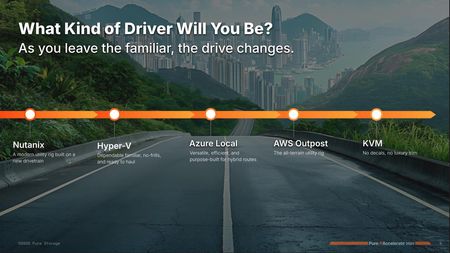
Over the years, VMware vSphere has been the gold-standard — the reliable luxury sedan of the datacenter. It’s delivered a smooth ride with powerful features, a robust ecosystem, and enough polish to keep your operations humming. Many of us have built entire practices, architectures, and skill sets around that platform. But with the Broadcom acquisition, the road has changed. New licensing structures, evolving product bundles, and operational shifts have created uncertainty — the equivalent of finding out that your well-loved sedan suddenly takes only premium-priced fuel and requires a new maintenance shop. So what are your options? Stick with VMware? That’s still a perfectly valid choice, especially if you double down on modernizing how you run it. Enhancing vSphere with Pure’s FlashArray, FlashBlade, and Fusion gives you ways to simplify, automate, and reduce costs, while maintaining that familiar driving experience. Look for an alternative? That’s where things get interesting. Because changing hypervisors isn’t like changing lanes on the highway — it’s more like switching to a whole different vehicle, with a new dashboard, new handling, new maintenance, and a different driving style. Framing the Conversation: The Virtualization Vehicle Metaphor In our session, we used a driving metaphor to illustrate these choices: 🚛 Hyper-V — The Municipal Fleet Pickup Reliable, widely available, low-cost. If you know Windows, you know Hyper-V, and the licenses may already be in your toolbox. 🚙 Nutanix AHV — The Retro-Modern Concept Car Streamlined, integrated, designed for simplicity. An HCI approach that reimagines what virtualization can look like. 🚐 Azure Local — The Electric Sprinter Van Hybrid-ready, with a familiar dashboard if you live in the Microsoft ecosystem. Built for flexible, modern routes. 🚗 AWS Outposts — The Off-Road Luxury SUV The same AWS powertrain, but adapted to handle rugged hybrid terrain on-premises. 🏎️ KVM — The EV Sports Car That’s Actually a Customized Japanese Compact (or maybe a well-used Ranger) Flexible, open-source, highly modifiable — but definitely for drivers who are ready to get their hands dirty and do their own tuning. Each of these “vehicles” comes with a different mix of: ✅ migration effort ✅ operational changes ✅ skill requirements ✅ and data protection needs Key Takeaways from Accelerate Here’s what stood out during our live session and the conversations that followed: ✅ There is no drop-in replacement for VMware. Each platform brings its own challenges and benefits. ✅ Migration is not just technical — it’s cultural, operational, and often requires reskilling your team. ✅ Modernizing with vSphere is still a strong path — with storage, automation, and security improvements, you can get more from what you already own. ✅ Pure is built to be your co-pilot — no matter which hypervisor you choose, we’re there to help you protect, manage, and move data seamlessly. One theme that resonated was that the driver matters as much as the car. Your organization’s skills, processes, and risk tolerance all shape which road makes sense. You can’t pick a new hypervisor in a vacuum — you have to look at what you can maintain, what you can train for, and what you can support. Where We’re Going with This Series We had a ton of material packed into Accelerate — far more than fits in a single session recap. So here on Pure Community, I’ll be breaking down each of these hypervisors in detail, one at a time. Here’s what you can expect: 🚛 Hyper-V We’ll dig into its Windows ecosystem strengths, where it works well, and what trade-offs come with a move from VMware. 🚙 Nutanix AHV Here we will take a look at how a platform that once was a integrated HCI. Can offer simplicity when it meets enterprise-grade capabilities on Pure Storage — and where it may leave gaps. 🚐 Azure Local Let's explore the strength is a hybrid-ready strategy. The native integrations, and what to watch out for when moving workloads from traditional hypervisors. 🚗 AWS Outposts Together we’ll break down why Outposts is not just a “VMware replacement,” but really an AWS extension, with its own Day 2 and migration realities. 🏎️ KVM We’ll explore the open-source options, why so many see it as a cost-saver, and the skills you’ll need to manage it at scale. So, Who’s Driving? My biggest takeaway from Accelerate is this: Your hypervisor journey is less about the technology, and more about the people and processes behind it. Every route — modernize VMware, switch to a new platform, or blend hybrid options — has trade-offs. But with the right planning, the right skills, and the right partners, you can make the journey smoother. Pure is committed to being your co-pilot, whichever path you choose. Whether you’re rolling out Fusion, looking to modernize with FlashArray, or exploring migration options, our ecosystem and integrations are designed to keep your data resilient, performant, and simple to manage. Join the Discussion I’d love to hear from you: 🚗 Are you staying on VMware? 🚗 Modernizing your vSphere environment? 🚗 Kicking the tires on an alternative hypervisor? What worries you? What excites you? Drop a comment below — to keep the conversation going. Let’s keep mapping this road trip — together.167Views3likes0Comments