Recent Content
Why You Should Make Adopting Current Long-Life Releases a Habit
Hey everyone — At Pure Storage, we see many customers who still think about storage upgrades like old-school firmware: “set it and forget it” until it’s forced to change. But FlashArray isn’t firmware it’s modern, continually improved, and designed for an agile, secure, predictable data platform. That means it’s time to make adopting recent Long-Life Releases (LLRs) a regular habit not just something you reluctantly do, "when you have to". LLRs should be your standard practice: ✅ Fresh Features, Mature Code Each LLR is built on code that’s been running in production for at least 8 months before it branches. That means you get the innovations from recent Feature Releases — tested, stabilized, and production-proven. You avoid missing out on valuable improvements while still benefiting from enterprise-grade predictability. ✅ Consistent Security and Compliance Aging too far behind, even on an LLR, can expose you to security vulnerabilities and unsupported configurations. By habitually adopting recent LLRs, you ensure you’re in the supported window for critical patches and compliance audits and avoiding fire drills later. ✅ Reduce Technical Debt Getting stuck on very old LLRs can build up technical debt. Skipping multiple versions makes your next upgrade harder, riskier, and more time-consuming. Keeping up with recent LLRs means smoother transitions, less operational friction, and easier adoption of the next improvements. ✅ Keep Innovation Flowing The idea that an LLR is “old code” is a myth. Recent LLRs contain carefully chosen, well-hardened feature improvements. If you wait too long, you lock yourself out of meaningful performance, efficiency, and capability gains that your peers are already using. ✅ Break the Firmware Mentality FlashArray is software-driven, and has a rapid but reliable development model. Treating it like outdated firmware, and you miss the true value. The LLR program is designed precisely to let you safely adopt modern features and maintain enterprise-grade stability and maintain a predictable cadence. Bottom line? Adopting recent Long-Life Releases, habitually, is the best way to get modern features, maintain security, reduce upgrade risk, and keep your environment aligned with Pure’s best practices. You deserve innovation and peace of mind. Don’t settle for less by sticking with outdated code. If you want help reviewing which LLR is right for you, or understanding the timelines, just reach out — we’re here to help you stay current, secure, and ahead of the game.1.2KViews8likes2CommentsWant a Sneak Peek at What's Next for Pure1? We Need Your Feedback!
Hey Everpure Community — We're Sarah and Pranav, a user researcher and designer on the Everpure team working to make Pure1 and Evergreen//One subscriptions work better for the people who rely on them every day. We'd love to hear directly from you, so if this sounds like your world, we hope you'll join us. 👉Fill out this short form to sign up👈 What we're doing We're redesigning how subscriptions work in Pure1, and we want your hands on it before it ships. Our team is working on updates to Service Mode that make Evergreen//One subscriptions easier to navigate and understand. What we're asking We're looking for storage and infrastructure admins who are Pure1 users with active Evergreen subscriptions to join a 1-hour 1:1 interview over Zoom. No prep needed. No right or wrong answers. Just your perspective as someone who lives in these tools day-to-day. Timeline We're looking to conduct the feedback sessions in mid-June. What's in it for you Early access to upcoming designs before anyone else sees them A direct line to the product team shaping the tools you use Your feedback, built into the product — this is how features get better Interested? 👉Fill out this short form to sign up👈 Just drop your name, email, company, and job title. We'll reach out shortly to schedule a session that works for you!645Views7likes0CommentsFusion MCP Server Is Now Released & Open Source
There’s a narrow band between “AI demo” and “actually useful in production,” and most tools miss it by a country mile. Fusion MCP Server doesn’t. Now that it’s open source, MCP-compatible AI assistants get a controlled bridge into Everpure FlashArray and FlashBlade environments, one built to answer real operational questions about fleet inventory, capacity, performance, alerts, volumes, file systems, workloads, and presets, without turning your storage estate into a science fair project. The AI Agent doesn’t get to vibe its way through your infrastructure. It works through a clean tool surface backed by real Everpure APIs, and writes stay hidden until you flip them on yourself. What it actually solves If you’ve ever wanted to ask a storage question in plain English and get something better than a dashboard scavenger hunt, this is that. Fusion MCP Server sits between your AI agent and your arrays: the assistant talks to the server, the server authenticates with configured array API tokens, calls supported Everpure APIs, and returns structured results. Your assistant never touches the arrays directly. Practically, that means engineers can ask things like: Show me the fleet overview Which arrays have capacity concerns Show array performance for the last 24 hours List workload presets available in this fleet Show active alerts with remediation links The data was never the problem. Storage teams already have it. What eats the day is bouncing between menus, tabs, and API docs just to answer something like “which arrays are closest to full?” Think of it like swapping a pile of ad hoc curl commands and tribal knowledge for a typed interface your AI assistant can reason over. Calling it “screen scraping with confidence” undersells it. It behaves more like a junior SRE who actually reads the schema. Why engineers should care The release leads with reads, which is exactly the right default for infrastructure tooling. Out of the box, Fusion MCP Server covers fleet overview, capacity and performance, storage objects, configuration audit, and optional supervised actions for placement recommendations, preset creation and updates, and workload deployment. A few details stand out: It works with FlashArray and FlashBlade environments in a Fusion fleet, including mixed environments, as long as you provide at least one token for each platform type for Remote Execution. If the API version you have on your arrays does not yet have the endpoints with Remote Execution capability enabled, you must supply an API token for every array in the fleet. More on that in the next section. Fleet discovery covers the supported read workflows broadly, though some, especially performance, still need a direct token for each array you want to query. Built-in prompts handle fleet, performance, and config workflows, and it also works through plain natural-language questions if your agent doesn’t expose MCP prompts directly. Read-only endpoint documentation plus a whitelisted authenticated GET fetch tool cover supported API surface beyond the dedicated tools. Let’s talk Tokens first Back in Purity REST API version 2.38, Everpure started to include a capability for API endpoints called Remote Execution. This is the mechanism that lets a client invoke a Purity REST API request on a different fleet member, and that request executes as though it were initiated locally on that remote member. The catch is that both arrays must have the same API version available on them as well as the endpoint being executed against must have Remote Execution capability. As of today, not all endpoints have this capability, so there must be an API token specified for each array in the fleet until they have all been enabled. We are diligently working to get all endpoints enabled to make this easier for everyone. Stay tuned! Installation (that does not require a PhD) The setup flow is refreshingly direct: Download the latest binary from GitHub Releases or build from source. Generate API tokens for the arrays you want to query. Run generate-config with your FlashArray and/or FlashBlade targets. Drop the generated config into your MCP-capable agent using the standard start --auth-config pattern over STDIO. generate-config does more than write boilerplate. It validates tokens, detects each array’s API version, resolves array names, and writes the auth config with restrictive permissions: the config directory gets 0700 and the file gets 0600. Want an even easier way? How you just tell your AI Agent to “Read this repository at https://github.com/PureStorage-OpenConnect/fusion-mcp-server and the included USER_GUIDE.md file and add the Fusion MCP server to this agent.” Easy-peasy as it’ll step you thought the process and create the config file for you. A few caveats are worth flagging before you point this at anything that matters: The published binaries aren’t signed, so macOS and Windows may throw a warning on first run. Build from source if that’s a dealbreaker. It’s all there, have at it! Keep the generated auth-config.json local, don’t share it, and rotate tokens if one ever leaks. None of that is friction. It’s the fine print you’d want before trusting a tool with API tokens. Supervised write actions: powerful, optional, and very much not on by default Now for the part everyone asks about first, and the part some people should absolutely not enable first: write actions. Fusion MCP Server hides write tools by default. You turn them on explicitly, either during config generation with --enable-write-tools or later with update-config --enable-write-tools. Enabled, the supervised actions cover these processes with more to come as the product evolves: Placement recommendations Workload preset creation Workload preset updates Workload deployment The approval step is the clever bit. Write operations sit behind an explicit confirmation. If the agent supports MCP Elicitation, the server pops up an interactive dialog for every write tool, so you can review the proposed action and approve or decline before anything changes. If the agent doesn’t support Elicitation, it falls back to telling the agent, in plain instructions, to ask you for approval before resubmitting the call. One practical wrinkle: the write tools inherit whatever permissions live on the API tokens you configure, so the workflow only works if those tokens can perform the write. So when should you flip the switch? Enable write tools if you want supervised acceleration on repeatable workflows: placing a workload from a known preset, updating a policy-backed preset, or turning a natural-language request into a deployment action that still needs a human to sign off. Skip it if you’re still validating token scope, using the server mainly for observability, or introducing MCP to a team that hasn’t built trust in the read-only workflows yet. Start with read-only. Make it boring. Then decide whether supervised writes are the next move. Write tools toggle on and off with a simple update-config command, so this isn’t a one-way door: turn them off again anytime with update-config --enable-write-tools=false. Use cases that actually matter This release isn’t for people who like screenshots of AI chats. It’s for engineers and operators who want faster answers and safer workflows. A few obvious wins: Fleet triage Ask for a fleet overview with alerts, array inventory, Purity version, and fleet connections, the kind of first-response context you want before guessing which dashboard to open. Capacity and performance review Ask which configured arrays have the highest used capacity, which have high latency, or pull performance for the last 24 hours. For teams juggling multiple arrays, this turns routine health checks into a single conversation. Storage object lookup Query volumes by naming pattern, list file systems on FlashBlade, or inspect workloads on a specific array. Useful for anyone who inherited naming conventions from a previous geological era. Configuration audit Use the built-in documentation and read-only fetch coverage to compare settings across arrays and check for policy consistency. Handy if you’re trying to catch drift without hand-rolling an audit script every quarter. Workload lifecycle acceleration Enable supervised writes and the assistant can recommend placement, create or update presets, and deploy workloads from those presets. At that point the server stops acting like a reporting tool and starts acting like an interface layer for intent-driven operations. On My Soapbox: Why the Open Source release matters Being open source here changes the trust model, not just the distribution channel. You can inspect how the bridge works, check the security assumptions yourself, and contribute fixes instead of filing a ticket into the void. When reality disagrees with the documentation, which happens to every project sooner or later, you can open an issue instead of just living with it. The repository is public under Apache 2.0, with contribution guidance, architecture notes, a developer guide, and a dedicated issue tracker for support, issues, and feature requests. That means the people who’ll stress-test this in real environments can also be the ones fixing it. For a tool sitting between AI agents and production-adjacent storage workflows, that’s where the engineering conversation belongs. Final thought Fusion MCP Server is short on hype and long on mechanical sympathy. Read workflows stay front and center, write workflows require your explicit sign-off, and installation doesn’t eat your afternoon. If you’re running Fusion-managed fleets (which y’all should be!), it’s worth a look. Grab the latest release, point it at your MCP-capable agent, start read-only, and see how fast “show me my fleet overview” becomes second nature. It’s open source. Once you’ve kicked the tires, contribute code if you build something useful, and open an issue when you hit an edge case. That’s the whole deal.FREE BEER FOR ALL!!! Now That I Have Your Attention, Let's Talk About Purity Updates.
WAIT WAIT WAIT - don't leave yet because of my free beer tomfoolery....hear me out. Listen, we get it. Storage OS updates are historically the LAST thing you ever want to consider for your already impossibly thin maintenance windows. And, we all know NOBODY ever grew up saying, "When I get older, I want to manage enterprise storage for its rock and roll lifestyle." 😀 But - hear me out. Any past pain, suffering, or heavy drinking you may have taken on during previous OS updates with other legacy vendors has been minimized or even flat out eliminated by how we handle updating Purity for FlashArray and FlashBlade. We offer two tracks you can leverage for making them happen by either working directly with support for a white glove update experience where they do all the work remotely, or you can complete them via the Self Support Update (SSU) feature built into Pure1. We encourage regular Purity updates for two reasons: Performance. stability and security improvements...obviously New feature adoption. Want Fusion 2.0? Want the ability to deliver NFS/SMB shares on your FlashArray? These are bundled into your Purity updates and require no additional licensing costs to adopt if you want them. Think of them as over the air feature updates that are all the rage for EVs... For now, take a quick look at the Purity version you are running. If you haven't updated it in a year or two (which many of you probably haven't), you're missing out on being able to squeeze extra value out of your storage. I will be posting some supporting demos and other materials to help you visualize the process in the coming month or so. I would LOVE any feedback from the community, good or bad, on current or past experiences with our updating experience...through it all we can get more boats to rise with the tide! Stay tuned! DP465Views6likes1CommentGetting Started with Pure Storage Fusion: A Quick Guide to Unified Fleet Management
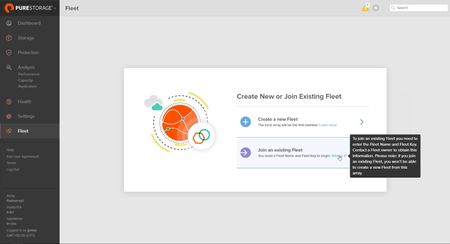
One of the most powerful updates in the Pure Storage ecosystem is the ability to federate arrays into a unified fleet with Fusion. Whether you're scaling out infrastructure or simplifying operations across data centers, Fusion makes multi-array management seamless—and the setup process is refreshingly simple. Here’s a quick walkthrough to get your fleet up and running: 🔹 Step 1: Create or Join a Fleet From the Fleet Management tab in the Purity UI, you can either create a new fleet or join an existing one. Creating a fleet? Just assign a memorable name and generate a one-time fleet key. This key acts like a secure handshake, ensuring that only authorized arrays can join. 🔹 Step 2: Add Arrays to the Fleet On each array you want to bring into the fold: Select Join Fleet, enter the fleet name, and paste in the fleet key. Once verified, the array becomes part of your managed fleet. 🔹 Step 3: Manage as One With federation complete, you now have a single, unified control plane. Any array in the fleet can serve as your management entry point—configure, monitor, and operate across the entire environment from one location. This capability is a big leap forward for simplifying scale and operations—especially for hybrid cloud or multi-site environments. If you're testing it out, I’d love to hear how it's working for you or what use cases you're solving.1.5KViews6likes2CommentsHello All, I am a Sr. Architect with the Pure Professional Services team
Hello All, I am a Sr. Architect with the Pure Professional Services team. In our PS Delivery team, we spend a large amount of my time automating against FlashArray for various tasks, such as database refreshes, automated volume provisioning, DR/BC, zero touch provisioning, etc Recently, we have had a thought that it would be mutually beneficial for us to share our successes with the customer base, as well as create an open forum for you all to share with each other where you have had success. I have made a slack channel topic-automation-user-group where you can join if interested. If we can spark enough interest, we will attempt to meet quarterly. We will have an agenda for demos, guest speakers (including from your peers), open Q&A etc.200Views6likes0CommentsPurity Fusion Recipes
I have been loading up our fleet with a bunch of these predefined recipes and management have really enjoyed the information. I will say that most of these are very straight forward to setup but the Rubrik one was giving me troubles. I stumbled upon this link and it walked me everything perfectly. Almost all the recipes are listed here step by step and make this so easy. https://support.purestorage.com/bundle/m_pure1_manage_workflows/page/Pure1/Pure1_Manage/pure1_manage_workflows/topics/reference/recipe_template/protection/r_rubrik_cyber_resilience_visibility_template.html63Views4likes0CommentsFusion preset: VMFS datastore volumes for VMware ESXi clusters (with two-tier snapshots and QoS)
Hi all, I put together a Fusion preset for one of the most common block use cases in our environment: provisioning VMFS datastore volumes for a VMware ESXi cluster. What it does: - 4x 4 TiB datastore volumes on a FlashArray//X storage class (adjust count/size to your cluster design) - Two-tier snapshot retention: hourly snapshots kept for 1 day (fast rollback) plus daily snapshots kept for 30 days - Per-volume QoS limit (50k IOPS / 1 GiB/s) so a single datastore cannot starve the array - An "environment" parameter (prod/test/dev) that is requested at deployment time and written into the workload tags for filtering and chargeback The JSON follows the conventions of the official PureStorage-OpenConnect/fusion-presets repository, including the _comment documentation style. One honest note is included in the preset itself: array-side snapshots of VMFS datastores are crash-consistent, not VM-consistent, so treat them as an extra safety net next to your backup solution. GitHub link: https://github.com/knabespecht/pure_workflows/blob/main/presets/vmware-esxi-datastores.json Feedback welcome, especially on the QoS defaults and retention values you use for similar setups.350Views4likes1CommentActiveCluster for File
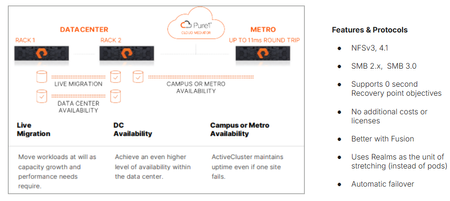
We’re proud to announce the availability of ActiveCluster for file, Everpure’s premier business continuity solution and a fundamental enabler of our Enterprise Data Cloud vision, where Service Level Agreements define what storage, network and compute resources are assigned dynamically to application data sets rather than an hardware-to-app architectures. With ActiveCluster for file, Everpure is extending the benefits of data mobility, continuous access and policy-driven management to file workloads. What is ActiveCluster? Everpure launched ActiveCluster in 2017, and rapidly took the mission critical, enterprise block storage world by storm. ActiveCluster rapidly enabled enterprise customers with the most demanding block workloads to deploy synchronous, always available, always up-to-date, LUNs or volumes to hosts stretched across geographic distances. What set ActiveCluster apart from the existing solutions at the time, and even now, is how simple to set up Everpure RTO-0 and RPO-0 file solutions are, and how flexible and adaptable to the ever changing business needs hosting these data sets become after being deployed on a Everpure Fusion fleets. Today, we’re adding file protocol support like NFSv3, NFSv4.1, SMB 2.0, and SMB 3.0 w/ continuously available shares to our ActiveCluster solution. Realms as a new container ActiveCluster for file utilizes a new, high-level container called a Realm, to synchronously mirror both user data and storage configuration information necessary to provide data access to authorized users on either side of the stretched file system(s). Realms are handy to put applications with similar Recovery Point Objectives and similar Recovery Time Objectives together. Realm Synchronous Replication The act of synchronously mirroring both the user data and storage configuration information across two different FlashArrays is called ‘stretching’. Similar to how a pod is stretched across two FlashArrays, a Realm can be stretched between any FlashArray system that has no more than 11ms Round Trip Time average latencies on their array replication links. Either Fibrechannel or Ethernet array replication links can be used to replicate file data synchronously. Figure 1. ActiveCluster for file can be deployed in different modalities Realms as namespaces for policies Realms contain unique snapshot, audit logging, replication and export policies. These policies are only viewable and attachable to storage objects within the Realm, creating a building block for hosting multiple different end customers or tenants on Fusion fleets. These policies are automatically replicated over to the other array if the Realm is stretched, reducing operator burden in failover scenarios. To prevent split brain scenarios (where a network partition in the array links or replication links stop communication between the pair of FlashArrays) Everpure’s fully managed Cloud Mediator service will determine which remaining FlashArray controller pair can process writes, and which array will not. Unlike other business continuity solutions, ActiveCluster customers don’t have to worry about patching or maintaining the security of separate VMs to act as a mediator service to prevent split brain scenarios. Multiple servers supported per Realm, different IDPs allowed. Each Realm can have one or more servers configured in it, which act as protocol end points for clients and hosts to connect to. Each server in a Realm can have a different IP address, or utilize a different Identity Provider Service. When a failover condition occurs (like a site disaster on one side), automatic failover and the clients in either data center are on the same Ethernet segment or broadcast domain, a failover condition will emit a gratuitous Reverse Address Resolution Protocol request (RARP), mapping the new MAC address of the ethernet interface on one side to a same IP address being used. Applications may see a small pause in reads or writes being serviced, but will not have to re-issue I/O or remount / remap shares or exports. Managed directory quotas can also be used for any filesystem or managed directory attached to the servers in the Realm being stretched. These quota policies automatically get replicated with user data, so the same customer experience in terms of usable space exists both before and after an automatic failover. New Guided Setup available for ActiveCluster for file Deploying new ActiveCluster for file solutions can occur in less than five minutes on already racked and powered arrays. A Guided Setup wizard is available to quickly capture the necessary information to stretch a Realm. This wizard can be started from multiple locations within the Purity GUI. ActiveCluster for file fully takes advantage of Fusion fleets and the ability to manage storage infrastructure as code, programmatically and via policy. Realms are not tied to hardware, and can ‘float’ Realms with ActiveCluster for file support not only provide a 0-RTO and 0-Recovery Point Object at the storage layer for mission critical applications, but they also provide a mechanism to transparently move the data and configuration in the Realm non-disruptively somewhere else within your fleet, whether it’s follow the Sun type round-robin hops, where the Realm’s location changes depending on the time of day, or is moved as a part of a data-center migration. Coupled with Fusion, Everpure’s intelligent control plane, ActiveCluster for file enables workloads and application data and their configuration information to dynamically and seamlessly move to the right location, at the right time, at the right granularity. Seamless movement across greater geographic distances can be accomplished by stretching and unstretching the same Realm between different arrays, as long as the RTT latency between them is <11ms. Service Level Agreements are the lingua franca of the Enterprise Data Cloud Service Level Agreements are the natural language of business owners, and are integral for companies who want to move away from managing storage arrays to managing their business data. They capture answers to questions like “How fast do you need access to this data? Does it need to be backed up or otherwise protected against site-wide failure? SLAs are what forms our vision behind the App-to-data operational model. This App-to-data model takes abstract, high level business requirements as input, and then automatically configures and deploys the required storage services to meet the service level agreement just defined. A Fusion fleet manager’s perspective is one of many different application tiles, and their health, not just a series of HA pairs spread out across different data centers. Data management operations, like instant backups, cloning, movement is applied as “verbs” to the application data set’s name or workload ID, and not to a mismatched storage container whose hardware boundaries impose limits on your app team. An Intelligent, unified control plane manages and enforces SLA’s across the fleet autonomously, like a modern cloud operating model but that can be deployed in any modality, whether on-prem, in the cloud or a hybrid. This scalable model, with Fusion’s intelligent control plane, supports ALL workloads, from modern AI workloads, containers and High Performance Workloads to extremely large image or rich media archives. An Enterprise Data Cloud, made up of discrete nodes tied loosely together, where Service Level Definitions define autonomous system behavior. Stop managing your storage arrays, and start managing your data. Learn more about ActiveCluster for file Read the support documentation for Purity 6.12.0 Test and deploy Fusion fleets and file presets Ask your account executive or system engineer for a demo!
Tags
Featured Content
Hey Everpure Community — We're Sarah and Pranav, a user researcher and designer on the Everpure team working to make Pure1 and Evergreen//One subscriptions work better for the people who rely on ...
2 months ago