FlashCrew London & Glasgow May/June 2025 !!!! Register NOW...
I'd like to invite you to our upcoming FlashCrew Customer User Group in London on May 15th, from midday. Throughout May, we'll be taking our FlashCrew User Group on the road to share ideas, best practices and network on all things Pure over some drinks and food. Plus, as a thank you for your continued support and attendance we will of course have the latest FlashCrew branded gifts for you to take with you! If you can make it, please register at this link below. London 10-11 Carlton House Terrace Thursday 15th May: REGISTER HERE for FLASHCREW LONDON Glasgow Radisson Blu Hotel Thursday 5th June: REGISTER HERE for FLASHCREW GLASGOW These are user group meetings, targeted at a technical audience across Pure's existing customers. Not only will you hear the latest news on the Pure Enterprise Data Cloud, but will also get to network with other like-minded users and exchange ideas and experiences. Agenda: 12:00 - 12:50 Arrival, Lunch and Welcome 13:00 - 14:00 Pure Platform: Features and Roadmap: with demo 14:00 - 14:15 Break 14:15 - 14:45 SQL Databases and Pure 14:45 - 15:15 Voice of the Customer 15:15 - 15:30 Break 15:30 - 16:15 Portworx and the Enterprise Data Cloud 16:15 - 16:45 Modern Virtualisation 16:45 - 17:00 Open Floor Q&A, Raffle, Wrap Up 17:00 - 19:00 Drinks and Networking302Views5likes0CommentsAzure Red Hat OpenShift with Everpure Cloud
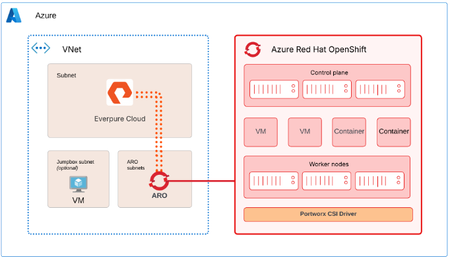
Azure Red Hat OpenShift (ARO) can use Everpure Cloud for persistent block storage, for VMs and containers. Both Everpure Cloud options - Everpure Cloud Azure Native and Everpure Cloud Dedicated are certified with ARO, and the cluster-side setup is nearly identical for both. This post covers the architecture, configuration sequence, and the checks that catch most problems early. Two storage options, one ARO procedure Everpure Cloud Dedicated is an array you deploy into your Azure subscription. Everpure Cloud Azure Native is delivered through the Azure portal, where you deploy a Storage Pool into a delegated subnet in your own Azure Virtual Network. With Azure Native you manage the array through the Platform Console, which gives you the Purity GUI, REST API, and CLI. It's disabled by default and you enable it per Storage Pool. With Dedicated you use the Purity interface directly. Architecture ARO provides the compute platform for VMs and containers. The Storage Pool (or Dedicated array) provides persistent block storage, and PX-CSI connects the ARO worker nodes to it to provision and manage volumes. The solution uses two paths. Management path. PX-CSI talks to the Purity management endpoint to create and manage volumes. With Azure Native, the Platform Console is how you get that endpoint. Data path. iSCSI traffic flows between the ARO worker nodes and the storage over the Azure virtual network. Deploy the ARO cluster and the storage in the same Azure region and virtual network. Put ARO in its dedicated subnets and the Azure Native Storage Pool in a separate subnet delegated to the Everpure Cloud service. A jump host VM is optional, and it's handy for reaching both the cluster and the Platform Console. For the data path, keep it short and boring. Everpure's field guidance is no virtual network peering and no user-defined routes or virtual appliances between the workers and the storage. Walkthrough Enable the Platform Console (Azure Native only) In the Azure portal, open the Storage Pool, go to Settings, then Platform console, and set it to Enabled. Pick the access methods you need (GUI and REST API, and optionally SSH) and select Configure. Copy the management IP address and the cloudadmin user name from Connection details, then generate a one-time password. It's shown once, so copy it before you close the dialog. Browse to https://<management-IP-address>, sign in as cloudadmin, and create a local administrator account right away. cloudadmin is only for first access. Make sure your Network Security Group allows TCP 80 and 443 for the GUI and REST API, and TCP 22 if you enabled SSH, and limit those rules to your management addresses. Prepare the OpenShift cluster Log in to the cluster from your Azure VM, create the Portworx namespace, and turn on user workload monitoring so OpenShift can scrape Portworx metrics. RESOURCE_GROUP="<ARO cluster resource group name>" CLUSTER_NAME="<ARO cluster name>" ADMIN_PW=$(az aro list-credentials --name $CLUSTER_NAME \ --resource-group $RESOURCE_GROUP --query "kubeadminPassword" -o tsv) API_URL=$(az aro show --name $CLUSTER_NAME \ --resource-group $RESOURCE_GROUP --query "apiserverProfile.url" -o tsv) oc login $API_URL -u kubeadmin -p $ADMIN_PW oc create namespace portworx apiVersion: v1 kind: ConfigMap metadata: name: cluster-monitoring-config namespace: openshift-monitoring data: config.yaml: | enableUserWorkload: true Apply that with oc apply -f. Then, in the ARO web console, go to Ecosystem -> Software Catalog, search for Portworx Enterprise, and install it into the portworx namespace. Don't create a StorageCluster yet. It comes after the worker nodes and the credentials are ready. Configure worker nodes PX-CSI attaches volumes over iSCSI, so the workers need multipath and udev settings that match Everpure's Linux recommendations. Create a multipath.conf with "user_friendly_names no" and "find_multipaths no" (each controller has a single path), and a udev.rules file with the recommended queue depth and tuning. The same two files go on every worker. Base64-encode both with base64 -w0, and wrap them in a MachineConfig. apiVersion: machineconfiguration.openshift.io/v1 kind: MachineConfig metadata: name: 98-worker-pure-multipath labels: machineconfiguration.openshift.io/role: worker spec: config: ignition: version: 3.2.0 storage: files: - path: /etc/multipath.conf mode: 0644 contents: source: data:text/plain;charset=utf-8;base64,<base64-multipath-conf> - path: /etc/udev/rules.d/99-pure-storage.rules mode: 0644 contents: source: data:text/plain;charset=utf-8;base64,<base64-udev-rules> systemd: units: - name: iscsid.service enabled: true - name: multipathd.service enabled: true oc apply -f 98-worker-pure-multipath.yaml oc get mcp worker -w The Machine Config Operator merges this into the worker pool and rolls it out one node at a time, cordoning, draining, applying, and rebooting each. Wait until the worker pool shows Updated as True. Give PX-CSI access to the array Create a user with the Storage Admin role (or an equivalent tenant-scoped role if you use secure multi-tenancy) and generate an API token for it. On Dedicated, that looks like this: pureadmin create --access-policy storage_admin px-pure-user ssh px-pure-user@<array-management-IP> pureadmin create --api-token On Azure Native, do the same from the Platform Console. Next, describe the array in a pure.json file and load it into a secret in the portworx namespace. { "FlashArrays": [ { "MgmtEndPoint": "<management-endpoint-IP>", "APIToken": "<api-token>" } ] } oc create secret generic px-pure-secret \ --namespace portworx \ --from-file=pure.json=/path/to/pure.json The secret name has to be px-pure-secret, because PX-CSI looks for that name by default. Generate and apply the PX-CSI StorageCluster Open Portworx Central, go to Spec List, Create New Spec, and choose PX-CSI. Pick a supported release (26.1.x in the documented setup), set the namespace to portworx, choose Azure Red Hat OpenShift (or generic OpenShift, since the YAML is valid for both), set the access type to Block Storage and the SAN type to iSCSI, and leave the rest at defaults. Download the manifest and apply it. oc project portworx oc apply -f px-csi-storagecluster.yaml Watch the StorageCluster in the console until it reads Running. During creation PX-CSI reads px-pure-secret, parses pure.json, and uses those endpoints and the token to manage volumes. Verify and use oc get pods -n portworx | grep -E 'px|pure-csi' oc get storagecluster -n portworx All PX-CSI pods should be Running and the StorageCluster should report Online or Running. oc get sc PX-CSI creates several default px-pure-csi-* StorageClasses, pick your PX-CSI StorageClass with backend: pure_block or create your own. Create a PVC or VM against the class, bind it to a pod, and you'll see the volume appear in the Platform Console or Purity UI. When something doesn't work Start at the bottom of the stack and work up. Connectivity. From a worker, run iscsiadm discovery against the array endpoint, and check that initiator names are unique. Node configuration. Confirm multipath.conf and the udev rules landed on every worker, and that iscsid and multipathd are running. PX-CSI. Check that the pods are Running, the StorageCluster is Online, and px-pure-secret exists in the same namespace as the operator. Connect to workers oc get nodes oc debug node/<worker> -T -- chroot /host Check services (ensure iscsid and multipathd services are enabled and running on workers) and check config files are updated. cat /etc/multipath.conf cat /etc/udev/rules.d/99-pure-storage.rules Resources Everpure Cloud Dedicated with Azure Red Hat OpenShift and PX-CSI Deployment Guide30Views3likes0Comments
Stop Prompting, Start Context Engineering
This blog post argues that Context Engineering is the critical new discipline for building autonomous, goal-driven AI agents. Since Large Language Models (LLMs) are stateless and forget information outside their immediate context window, Context Engineering focuses on assembling and managing the necessary information—such as session history, long-term memory (embeddings, RAG indexes), and tool outputs—for the agent every single turn. The post asserts that storage, not the LLM or the prompt, is the primary performance bottleneck for AI at scale. The speed of the underlying storage architecture dictates the agent's responsiveness because it must quickly retrieve and persist context data repeatedly.265Views3likes0CommentsUse CBS as persistent storage on AKS via Portworx CSI driver
Hi all, with the recent version of Portworx CSI driver (v25.4.0) you can mount a persistent block volume on CBS into your containers on Kubernetes and utilize all features and benefits of CBS. Sharing my recent blog post, how to set it up on Azure Kubernetes Service (AKS): https://blog.vjirovsky.cz/portworx-csi-with-aks-with-cbs/138Views2likes0CommentsOur First Virtual Pure User Group Meeting
I hope you’re enjoying the fall weather. Baseball fans have already seen two roof balls this postseason, while Bengals fans know the drill. We tried to gather this summer, but the July 4th holiday and vacations made scheduling tough. We’re planning one last community get-together before 2027, and details are coming soon. In the meantime, join us for our first virtual Pure User Group, focused on modern virtualization. Subject matter experts and customers will share their experience and answer questions. We’re bringing together Pure User Group communities from across the Midwest, including Pittsburgh, but don’t let the Steelers fans scare you off even though they got the best of our Bengals a few weeks ago. Event Date/Time: Thursday, October 29, 2026, 1:00–2:20 p.m. Eastern Register: https://experience.everpuredata.com/virtualizationlunchlearn I’ve loved the community we’ve built in 2025 and 2026. We have a great foundation, and I’m looking forward to building on it in 2027.57Views1like1Comment
Interested in deploying Kubernetes in FlashArray with Portworx? Join our live labs 7/14 and 7/15.
Curious how FlashArray fits into Kubernetes? Join the live upcoming Hands-on labs for a practical, storage-admin-first look at how Portworx Enterprise extends your existing FlashArray investment into modern application environments. We’ll cover how to provision persistent storage for stateful workloads, build flexible storage pools with Cloud Drives and StorageV2, apply storage policies and QoS across teams, and automate volume growth with Portworx Autopilot. If you’re just starting with Kubernetes or already supporting multiple clusters, this session is a great way to connect your storage expertise to what’s next. Save Your Spot for the Live Labs: Americas July 14th at 9:00 AM PT – LINK EMEA July 15th at 10:00 AM CET – LINK95Views1like0CommentsSpring is Calling, and so is Reds Baseball
I don't know about you, but I am more than ready for Spring; though I could definitely skip the rain. Wiping muddy dog paws after every walk is getting old! On the bright side, who else is ready for some Reds baseball? I have a few exciting updates and resources to share with the community: 🚀 PUG Meeting Update charles_sheppar and I are currently hard at work on the next PUG meeting. Details to come. 🛡️ Strengthening Your Cyber Resilience Given the current geopolitical climate and the rise in cyber threats, now is the perfect time to audit your data protection. Features like SafeMode and Pure1 Security Assessments act as a resilient last line of defense. If you want to see these tools in action, we recently hosted an expert-led demo on building a foundation for cyber resilience. Watch the recording here: https://www.purestorage.com/video/webinars/the-foundations-of-cyber-resilience/6389889927112.html Questions? Reach out to your Everpure SE or partner for a deeper dive. 📅 Upcoming Events March 12: Nutanix Webinar Exploring virtualization alternatives? Nutanix is hosting a session tomorrow focused on simplifying IT operations and highlighting the Everpure partnership. https://event.nutanix.com/simplifyitandonprem March 19: Or perhaps you're interested in running virtual machines alongside containerized workloads within K8s clusters. If that's the case, join Greg McNutt and Sagar Srinivasa for Virtualization Reimagined: Inside the Everpure Journey. https://www.purestorage.com/events/webinars/virtualization-reimagined.html March 19: Ask Us Everything About Storage for Databases. Join experts Anthony Nocentino, Ryan Arsenault, and Don Poorman for a live Q&A session. https://www.purestorage.com/events/webinars/ask-us-everything-about-storage-for-databases.html March 24: Presets & Workloads for Consistent DB Environments. We’re extending the database conversation to discuss how Everpure helps you transition from "managing storage" to "managing data" through automated presets. https://www.purestorage.com/events/webinars/presets-and-workload-setups-for-consistent-database-environments.html139Views1like0CommentsVirtualization Reimagined: Inside the Everpure Journey
March 19 | Register Now! Rising virtualization costs triggered a mandate for Everpure to find an alternative—fast. What began as an exploration of Kubernetes with Portworx® evolved into a virtualization strategy built on KubeVirt to simplify and accelerate VM migration. Today, more than 5,000 virtual machines run on KubeVirt alongside containerized workloads within Kubernetes clusters. This TechTalks webinar highlights key milestones in our journey and technical solutions to help customers accelerate similar migrations. Key takeaways: How to migrate large-scale VM workloads using KubeVirt Running virtual machines and containers side by side on a single platform The role of Portworx in automating storage and data management at scale Practical lessons from operating KubeVirt in production Register Now!140Views1like0Comments
Flashcrew Manchester
🤝 Flashcrew Pure Usergroup | Manchester | For our amazing customers! Connect with fellow Pure users and dive deep into the //Accelerate announcements. Learn how to extract even more value from the Pure ecosystem and get your technical questions answered by the experts. Register here: https://info.purestorage.com/2025-Q2EMEA-UKREPLHCOFY26Q3-FlashCrew-Manchester-LP_01---Registration-Page.html We also open these up to non-customers interested in Pure, helping you learn from those already benefitting from the Pure Enterprise Data Platform. Please DM me if you would like an invite.131Views1like0CommentsVirtualization Anonymous - Pittsburgh PUG
Welcome to Our 2nd Pure User Group (PUG) Discussion on Server Virtualization! We’re excited to bring our community together again for our second PUG session focused on server virtualization — a topic that's constantly evolving and critical to modern infrastructure. This is part of our ongoing effort to host these discussions every six months, continuing as long as there's interest from our user community. Whether you joined us for the first session or you're new to the group, we’re glad to have you here. Let’s learn, share, and grow together — and as always, your feedback helps shape future PUG topics! Event Details This will be a customer driven and customer focused discussion to hear from people like you related to the experiences and journey you have been on as we all seek the recovery we need to build a virtualization strategy for the future. Pure Storage and Expedient will provide experts and guidance to take that first step with you. After our presentation, we invite you to join us for happy hour and appetizers at the Federal Galley located here. Prizes will be provided to help encourage open collaboration. Space is extremely limited for this event. Sign up now to grab your spot to this exciting event. Registration https://info.purestorage.com/2025-Q3AMS-COMREDTFSPUGPittsburghLP_01---Registration-Page.html Parking Enter the Parking garage on level 2 off of S Commons, Take the east or west stairs to the Plaza Level, Exit the plaza level by the information desk to the outdoor plaza, walk towards the Federal Galley, The conference center entrance is located to the left of the Federal Galley. (follow Pure Storage Signage) Agenda 2:00PM Check In 2:30PM - 4:30PM Presentation 4:30PM - Giveaway Raffle (Pirate Tickets, Pure Swag, Autographed Pirate Baseballs) 5:00PM - 6:30PM Happy Hour with Pure197Views1like0Comments