Containers, Kubernetes, and Modern VMs: Your Storage Questions Answered
From persistent storage and disaster recovery to modern alternatives for traditional VMs, Everpure experts answered your questions about making the move to Kubernetes. Containers and Kubernetes are changing how IT teams deploy and manage applications. But what happens to your data when applications become more portable, infrastructure becomes more dynamic, and traditional VMs start sharing the stage with containers? That was the focus of our latest Ask Us Everything session, featuring Everpure experts Jon Owings and Nathan Wood. As always, attendees drove the conversation, bringing questions about persistent storage, migration, disaster recovery, Portworx by Everpure, and what Kubernetes means for their existing infrastructure. Why should storage be a priority when adopting Kubernetes? Jon kicked things off with an important reminder: Organizations spend considerable time choosing their Kubernetes platform, but don't always give storage the same attention. Unlike traditional VM environments, Kubernetes introduces new requirements for managing persistent data across containers, clusters, and locations. Nathan compared storage to the foundation of a house. You wouldn't build a house without considering the foundation; if storage is the foundation of modern apps, why approach Kubernetes differently? The takeaway: Don't assume that provisioning volumes is enough. Think about performance, data protection, portability, and automation from the beginning. Can I migrate production databases to Kubernetes without downtime? One attendee asked how to move an existing production database from on-premises infrastructure into Kubernetes without disrupting operations. Jon explained that migration options range from open-source tools requiring downtime to commercial solutions supporting live cutovers. Nathan emphasized that migration planning must account for the application, database, and storage layers. Their advice? Start with your data requirements, understand your downtime tolerance, and involve the right experts. There's no one-size-fits-all migration strategy. How does Portworx simplify persistent storage and disaster recovery? Another attendee wanted to understand disaster recovery when using FlashArray Direct Access or FlashBlade Direct Access, particularly when recovering to another site with different arrays. Jon explained that direct-attached storage approaches can require additional workflows and automation to coordinate recovery. That's where Portworx Enterprise offers a different approach. Rather than building and maintaining custom scripts for every recovery scenario, Portworx provides Kubernetes-native storage management capabilities designed to simplify data mobility and recovery across environments. It's a significant departure from traditional, infrastructure-specific storage management. What should we measure beyond uptime? Jon and Nathan were asked which metrics matter most when reporting storage performance. The answer: Latency, latency, latency. Availability matters, but application performance depends on more than whether infrastructure is running. The experts discussed measuring latency, response times, and performance at the application, node, and cluster levels. Portworx provides consistent metrics across different storage vendors and cloud environments, with Prometheus and Grafana offering visualization options. Can Kubernetes become an alternative to traditional VMs? For organizations with substantial VMware investments, Kubernetes can support both containerized applications and modern VM workloads. Jon explained that organizations should evaluate their application requirements rather than simply recreate their existing virtualization environment. Kubernetes offers opportunities for greater flexibility across on-premises, hybrid-cloud, and multicloud environments, while Portworx helps address the persistent storage requirements that accompany those choices. How do we get started—and convince our leadership this is the right path? A longtime VMware customer asked how to make the business case up the management chain for the move to Kubernetes. Jon and Nathan agreed: Lead with risk reduction, not technology. Explain how flexibility, portability, and infrastructure choices can help the business adapt. Nathan also recommended hands-on learning environments where teams can experiment, demonstrate value, and build confidence. Keep the conversation going! Whether you're exploring Kubernetes, evaluating modern VM options, or already managing production containers, this session reinforced one important lesson: Modern applications need a modern approach to storage. Check out the full Ask Us Everything replay for more practical advice from Jon and Nathan (and find all our other Ask Us Everything sessions here), and keep the conversation going by jumping into the Everpure Community!4Views0likes0CommentsAzure Red Hat OpenShift with Everpure Cloud
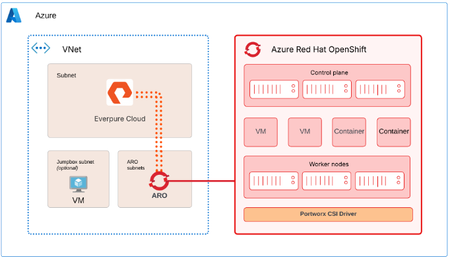
Azure Red Hat OpenShift (ARO) can use Everpure Cloud for persistent block storage, for VMs and containers. Both Everpure Cloud options - Everpure Cloud Azure Native and Everpure Cloud Dedicated are certified with ARO, and the cluster-side setup is nearly identical for both. This post covers the architecture, configuration sequence, and the checks that catch most problems early. Two storage options, one ARO procedure Everpure Cloud Dedicated is an array you deploy into your Azure subscription. Everpure Cloud Azure Native is delivered through the Azure portal, where you deploy a Storage Pool into a delegated subnet in your own Azure Virtual Network. With Azure Native you manage the array through the Platform Console, which gives you the Purity GUI, REST API, and CLI. It's disabled by default and you enable it per Storage Pool. With Dedicated you use the Purity interface directly. Architecture ARO provides the compute platform for VMs and containers. The Storage Pool (or Dedicated array) provides persistent block storage, and PX-CSI connects the ARO worker nodes to it to provision and manage volumes. The solution uses two paths. Management path. PX-CSI talks to the Purity management endpoint to create and manage volumes. With Azure Native, the Platform Console is how you get that endpoint. Data path. iSCSI traffic flows between the ARO worker nodes and the storage over the Azure virtual network. Deploy the ARO cluster and the storage in the same Azure region and virtual network. Put ARO in its dedicated subnets and the Azure Native Storage Pool in a separate subnet delegated to the Everpure Cloud service. A jump host VM is optional, and it's handy for reaching both the cluster and the Platform Console. For the data path, keep it short and boring. Everpure's field guidance is no virtual network peering and no user-defined routes or virtual appliances between the workers and the storage. Walkthrough Enable the Platform Console (Azure Native only) In the Azure portal, open the Storage Pool, go to Settings, then Platform console, and set it to Enabled. Pick the access methods you need (GUI and REST API, and optionally SSH) and select Configure. Copy the management IP address and the cloudadmin user name from Connection details, then generate a one-time password. It's shown once, so copy it before you close the dialog. Browse to https://<management-IP-address>, sign in as cloudadmin, and create a local administrator account right away. cloudadmin is only for first access. Make sure your Network Security Group allows TCP 80 and 443 for the GUI and REST API, and TCP 22 if you enabled SSH, and limit those rules to your management addresses. Prepare the OpenShift cluster Log in to the cluster from your Azure VM, create the Portworx namespace, and turn on user workload monitoring so OpenShift can scrape Portworx metrics. RESOURCE_GROUP="<ARO cluster resource group name>" CLUSTER_NAME="<ARO cluster name>" ADMIN_PW=$(az aro list-credentials --name $CLUSTER_NAME \ --resource-group $RESOURCE_GROUP --query "kubeadminPassword" -o tsv) API_URL=$(az aro show --name $CLUSTER_NAME \ --resource-group $RESOURCE_GROUP --query "apiserverProfile.url" -o tsv) oc login $API_URL -u kubeadmin -p $ADMIN_PW oc create namespace portworx apiVersion: v1 kind: ConfigMap metadata: name: cluster-monitoring-config namespace: openshift-monitoring data: config.yaml: | enableUserWorkload: true Apply that with oc apply -f. Then, in the ARO web console, go to Ecosystem -> Software Catalog, search for Portworx Enterprise, and install it into the portworx namespace. Don't create a StorageCluster yet. It comes after the worker nodes and the credentials are ready. Configure worker nodes PX-CSI attaches volumes over iSCSI, so the workers need multipath and udev settings that match Everpure's Linux recommendations. Create a multipath.conf with "user_friendly_names no" and "find_multipaths no" (each controller has a single path), and a udev.rules file with the recommended queue depth and tuning. The same two files go on every worker. Base64-encode both with base64 -w0, and wrap them in a MachineConfig. apiVersion: machineconfiguration.openshift.io/v1 kind: MachineConfig metadata: name: 98-worker-pure-multipath labels: machineconfiguration.openshift.io/role: worker spec: config: ignition: version: 3.2.0 storage: files: - path: /etc/multipath.conf mode: 0644 contents: source: data:text/plain;charset=utf-8;base64,<base64-multipath-conf> - path: /etc/udev/rules.d/99-pure-storage.rules mode: 0644 contents: source: data:text/plain;charset=utf-8;base64,<base64-udev-rules> systemd: units: - name: iscsid.service enabled: true - name: multipathd.service enabled: true oc apply -f 98-worker-pure-multipath.yaml oc get mcp worker -w The Machine Config Operator merges this into the worker pool and rolls it out one node at a time, cordoning, draining, applying, and rebooting each. Wait until the worker pool shows Updated as True. Give PX-CSI access to the array Create a user with the Storage Admin role (or an equivalent tenant-scoped role if you use secure multi-tenancy) and generate an API token for it. On Dedicated, that looks like this: pureadmin create --access-policy storage_admin px-pure-user ssh px-pure-user@<array-management-IP> pureadmin create --api-token On Azure Native, do the same from the Platform Console. Next, describe the array in a pure.json file and load it into a secret in the portworx namespace. { "FlashArrays": [ { "MgmtEndPoint": "<management-endpoint-IP>", "APIToken": "<api-token>" } ] } oc create secret generic px-pure-secret \ --namespace portworx \ --from-file=pure.json=/path/to/pure.json The secret name has to be px-pure-secret, because PX-CSI looks for that name by default. Generate and apply the PX-CSI StorageCluster Open Portworx Central, go to Spec List, Create New Spec, and choose PX-CSI. Pick a supported release (26.1.x in the documented setup), set the namespace to portworx, choose Azure Red Hat OpenShift (or generic OpenShift, since the YAML is valid for both), set the access type to Block Storage and the SAN type to iSCSI, and leave the rest at defaults. Download the manifest and apply it. oc project portworx oc apply -f px-csi-storagecluster.yaml Watch the StorageCluster in the console until it reads Running. During creation PX-CSI reads px-pure-secret, parses pure.json, and uses those endpoints and the token to manage volumes. Verify and use oc get pods -n portworx | grep -E 'px|pure-csi' oc get storagecluster -n portworx All PX-CSI pods should be Running and the StorageCluster should report Online or Running. oc get sc PX-CSI creates several default px-pure-csi-* StorageClasses, pick your PX-CSI StorageClass with backend: pure_block or create your own. Create a PVC or VM against the class, bind it to a pod, and you'll see the volume appear in the Platform Console or Purity UI. When something doesn't work Start at the bottom of the stack and work up. Connectivity. From a worker, run iscsiadm discovery against the array endpoint, and check that initiator names are unique. Node configuration. Confirm multipath.conf and the udev rules landed on every worker, and that iscsid and multipathd are running. PX-CSI. Check that the pods are Running, the StorageCluster is Online, and px-pure-secret exists in the same namespace as the operator. Connect to workers oc get nodes oc debug node/<worker> -T -- chroot /host Check services (ensure iscsid and multipathd services are enabled and running on workers) and check config files are updated. cat /etc/multipath.conf cat /etc/udev/rules.d/99-pure-storage.rules Resources Everpure Cloud Dedicated with Azure Red Hat OpenShift and PX-CSI Deployment Guide30Views3likes0CommentsTrying something new out, join us?
Hi all! Briana from the community team here. adhill and nfritsch came to me over the summer with the idea to host a virtual PUG meetup. So we put our heads together and came up with the idea of hosting a virtual PUG all about the landscape of virtualization options and figuring out how to make a choice or make the most of the choice you've already made. We'll meet on zoom & use breakout rooms to have small group discussions on 7 different virtualization topics. Info & registration link can be found by clicking on this image ⬇️ We're hosting it in 2 week and will be sending you a DoorDash gift card to cover your lunch during it. If you're part of a local chapter an SE in your area will be hosting a happy hour later in the day. (So far, Pittsburgh, Cleveland, and Columbus, OH have committed to this. Oh and you have to be at meetup to learn about the HH location & get swag.) We've brought in the Everpure experts on each of these options, and in some case they'll be interviewing customers who have already made the move. You'll have the chance to ask both of them your questions and get to know other Everpure customers that are making the same decision as you. What I'm asking is two things of you: 1) If you're interested, please register. This will help me know if it was a good idea to try out and will make it so I can get you that GC for lunch. Bonus points for commenting here & letting everyone know which room you're joining or thinking of joining. 2) If you think this is a terrible idea, tell us! Even better if you have an idea of what you'd like to see from the community team.Solved49Views0likes1CommentOur First Virtual Pure User Group Meeting
I hope you’re enjoying the fall weather. Baseball fans have already seen two roof balls this postseason, while Bengals fans know the drill. We tried to gather this summer, but the July 4th holiday and vacations made scheduling tough. We’re planning one last community get-together before 2027, and details are coming soon. In the meantime, join us for our first virtual Pure User Group, focused on modern virtualization. Subject matter experts and customers will share their experience and answer questions. We’re bringing together Pure User Group communities from across the Midwest, including Pittsburgh, but don’t let the Steelers fans scare you off even though they got the best of our Bengals a few weeks ago. Event Date/Time: Thursday, October 29, 2026, 1:00–2:20 p.m. Eastern Register: https://experience.everpuredata.com/virtualizationlunchlearn I’ve loved the community we’ve built in 2025 and 2026. We have a great foundation, and I’m looking forward to building on it in 2027.57Views1like1Comment
Your Last Line of Defense: Everpure + CrowdStrike: Active Defender in Action
October 20 | Register Now AI attacks breach in 29 minutes, driving ransomware toward $74B, while 90% of logs sit invisible in cold tiers*. See how Everpure and CrowdStrike Falcon® bring together visibility, intelligence, investigation, and automated response to turn storage into an active defender. Key takeaways: Extensive CrowdStrike and Everpure integrations: How Falcon NG-SIEM (visibility), Threat Graph (intelligence), Falcon LogScale (investigation), and Fusion SOAR (response) cover the full detect-to-remediate lifecycle. Closed-loop architecture: How telemetry, normalization, triage, and SOAR action combine so storage events become one continuous detection-to-response loop. Speed to containment: How Fusion SOAR turns a FlashArray™ or FlashBlade® detection into containment action within seconds, not hours. *(Source: 2026 CrowdStrike Global Threat Report) Register Now!159Views0likes0CommentsAsk Us Everything About Containers & Kubernetes
October 2 | Register Now Got questions about managing data on Kubernetes? Get answers. This month we're diving into containers and Kubernetes–key technologies for IT priorities like Cloud-native applications, AI data pipelines, and modern VMs. But as more databases and other critical workloads move onto Kubernetes, how do you deliver availability, performance, and data protection, without becoming Kubernetes experts overnight? See how Portworx® by Everpure helps you bring enterprise-grade data services to Kubernetes. You'll get an overview of how Portworx enables you to: Deliver Kubernetes-native persistent storage across on-premises, cloud, hybrid, and edge environments Meet availability and recovery requirements with container-granular backup, disaster recovery, and high availability Improve storage efficiency with automated provisioning, capacity management, and dynamic scaling Give application teams self-service data services while maintaining control, security, and visibility Bring your questions for our experts, who are ready to discuss Kubernetes storage architecture, stateful workload migration, data protection strategies, and how to support container platforms with confidence. Register Now!55Views0likes0CommentsFrom CSI to Snapshots: Seamless VM Management on Red Hat OpenShift
September 22 | Register Now Red Hat OpenShift Virtualization is an increasingly popular option for organizations migrating workloads to a new hypervisor. Rather than being an afterthought, storage is actually a critical element of any OpenShift Virtualization deployment. Join this webinar for a set of short demos of Everpure FlashArray™ with Red Hat OpenShift. We'll go from the ground up: connecting the Container Storage Interface (CSI) to storage, spinning up a virtual machine (VM) from a template, and protecting the VM with instant, array-based snapshots. These demos will show how naturally FlashArray fits into an OpenShift environment. Get connected: See how to set up the CSI with the Portworx® operator and define both the StorageCluster and the StorageClass. Run and protect: We’ll demonstrate both VM provisioning in OpenShift Virtualization plus how to create instant, space-efficient snapshots. Register Now!410Views0likes0Comments
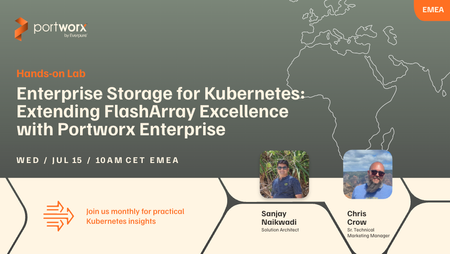
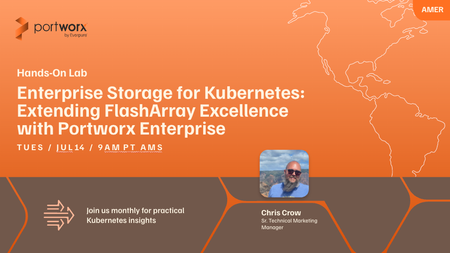
Interested in deploying Kubernetes in FlashArray with Portworx? Join our live labs 7/14 and 7/15.
Curious how FlashArray fits into Kubernetes? Join the live upcoming Hands-on labs for a practical, storage-admin-first look at how Portworx Enterprise extends your existing FlashArray investment into modern application environments. We’ll cover how to provision persistent storage for stateful workloads, build flexible storage pools with Cloud Drives and StorageV2, apply storage policies and QoS across teams, and automate volume growth with Portworx Autopilot. If you’re just starting with Kubernetes or already supporting multiple clusters, this session is a great way to connect your storage expertise to what’s next. Save Your Spot for the Live Labs: Americas July 14th at 9:00 AM PT – LINK EMEA July 15th at 10:00 AM CET – LINK95Views1like0CommentsEnterprise Storage for Kubernetes: Extending FlashArray Excellence with Portworx Enterprise
Register Now - July 15! Your FlashArray is already delivering the performance, reliability, and data services your organization depends on. Now Kubernetes is coming to your environment and your applications are following. The question isn’t whether to support stateful Kubernetes workloads. It’s how to do it without sacrificing the storage control, visibility, and SLAs you’ve spent years building. In this live Hands-on Lab, we’ll show storage administrators how Portworx Enterprise (PXE) extends your FlashArray investment directly into Kubernetes. You’ll walk away knowing how to: Provision and manage persistent storage for stateful Kubernetes workloads backed by FlashArray performance Leverage Cloud Drives and StorageV2 to build flexible, scalable storage pools that fit your existing architecture Enforce storage policies and QoS across application teams with Application IO Control and multi-tenancy guardrails Automate capacity management with Portworx Autopilot — so volumes grow on demand without manual intervention or after-hours firefighting Whether you’re being asked to support your first Kubernetes namespace or managing a fleet of clusters, this session gives you a practical, storage-admin-first view of how to extend your FlashArray expertise into the Kubernetes era. Register Now - July 15!104Views0likes0CommentsEnterprise Storage for Kubernetes: Extending FlashArray Excellence with Portworx Enterprise
Register Now - July 14th! Your FlashArray is already delivering the performance, reliability, and data services your organization depends on. Now Kubernetes is coming to your environment and your applications are following. The question isn’t whether to support stateful Kubernetes workloads. It’s how to do it without sacrificing the storage control, visibility, and SLAs you’ve spent years building. In this live Hands-on Lab, we’ll show storage administrators how Portworx Enterprise (PXE) extends your FlashArray investment directly into Kubernetes. You’ll walk away knowing how to: Provision and manage persistent storage for stateful Kubernetes workloads backed by FlashArray performance Leverage Cloud Drives and StorageV2 to build flexible, scalable storage pools that fit your existing architecture Enforce storage policies and QoS across application teams with Application IO Control and multi-tenancy guardrails Automate capacity management with Portworx Autopilot — so volumes grow on demand without manual intervention or after-hours firefighting Whether you’re being asked to support your first Kubernetes namespace or managing a fleet of clusters, this session gives you a practical, storage-admin-first view of how to extend your FlashArray expertise into the Kubernetes era. Register Now!92Views0likes0Comments